1. Pengenalan
Thank you for choosing the WELCARE Maxpro Pace Pro PTM605M Manual Incline Treadmill. This manual provides essential information for the safe and effective use, assembly, operation, and maintenance of your new fitness equipment. Please read this manual thoroughly before operating the treadmill and retain it for future reference.
2. Maklumat Keselamatan
Untuk memastikan keselamatan anda dan memanjangkan hayat treadmill anda, sila patuhi langkah berjaga-jaga berikut:
- Sentiasa berunding dengan doktor sebelum memulakan sebarang program senaman baharu.
- Jauhkan kanak-kanak dan haiwan peliharaan dari treadmill semasa operasi.
- Letakkan treadmill di atas permukaan yang rata dan stabil dengan ruang yang mencukupi di sekelilingnya.
- Pakai kasut dan pakaian sukan yang sesuai.
- Gunakan kunci keselamatan sepanjang masa. Pasangkan klip pada pakaian anda sebelum memulakan senaman anda.
- Jangan kendalikan treadmill jika ia rosak atau tidak berfungsi.
- Jangan melebihi berat pengguna maksimum 110 kg.
- Pastikan kord kuasa tidak tersepit atau rosak.
- Cabut palam treadmill apabila tidak digunakan atau sebelum pembersihan/penyelenggaraan.
3. Apa yang ada di dalam Kotak
Selepas membongkar, sila sahkan bahawa semua komponen ada:
- 1 x Treadmill Unit
- 1 x Manual Pengguna
- 1 x Kit Pemasangan
- Kunci Keselamatan
4. Persediaan dan Pemasangan
The Maxpro Pace Pro PTM605M treadmill is designed for easy setup, arriving 90% pre-installed. Follow these steps for final assembly:
- Carefully remove all packaging materials and place the treadmill on a clear, level surface.
- Lift the console mast into the upright position and secure it according to the instructions in the assembly kit.
- Connect any pre-labeled cables as indicated in the assembly guide.
- Attach any remaining accessories such as the water bottle holders or tablet stand.
- Ensure all bolts and screws are tightened securely before use.
For detailed visual guidance, refer to the installation video or contact customer support for video call assistance.
Video: This video demonstrates the folding and unfolding process of the treadmill, highlighting its space-saving design and ease of movement with transportation wheels. (Relevant sections: 0:05 - 0:15, 1:48 - 1:52)

Image: A person demonstrating the easy folding and movement of the treadmill using its built-in wheels, showcasing its compact storage capability.
5. Arahan Operasi
5.1 Panel Kawalan Selesaiview
The treadmill features an intuitive control panel with an LCD display to track your workout metrics. It includes buttons for speed adjustment, program selection, and a central knob for easy control.

Imej: Jarak dekat view of the treadmill's multi-functional control panel, showing the LCD display, speed buttons, program selection, and the central on/off knob with speed control.
5.2 Memulakan Senaman
- Ensure the safety key is properly attached to your clothing and the treadmill console.
- Melangkah ke tali pinggang treadmill.
- Press the 'Start' button or rotate the central knob to begin.
- Adjust the speed using the speed buttons or the central knob (1-14 KMH).
- To stop, press the 'Stop' button or pull the safety key.
Video: This video demonstrates the operation of the control panel, including selecting programs (P1-P12) and adjusting speed using the knob. (Relevant sections: 0:17 - 0:21, 0:40 - 0:43)
5.3 Manual Incline Adjustment
The Pace Pro PTM605M features a 6-level manual incline system. To adjust the incline:
- Stop the treadmill and step off the running belt.
- Locate the incline adjustment mechanism at the rear of the treadmill deck.
- Lift the deck slightly and adjust the support bar to the desired incline level (1-6).
- Ensure the support bar is securely locked into place before resuming your workout.

Image: A visual representation of the treadmill's incline and decline capabilities, showing the adjustable mechanism at the rear of the running deck.
Video: This video illustrates how to manually adjust the treadmill's incline to 6 different levels, demonstrating the physical adjustment process. (Relevant sections: 0:52 - 1:03)
5.4 FitShow App Connectivity
Enhance your workout experience by connecting your treadmill to the FitShow App via Bluetooth. The app allows you to track your progress, access various workout programs, and enjoy multi-scene motion modes.
- Download the FitShow App from your device's app store.
- Dayakan Bluetooth pada peranti mudah alih anda.
- Open the FitShow App and follow the on-screen instructions to pair with your treadmill.
- Once connected, you can control the treadmill and monitor your workout data through the app.

Image: A visual showing the FitShow App interface on a smartphone, connected to the treadmill, indicating data synchronization and control capabilities.
Video: This video demonstrates the FitShow App's Bluetooth connectivity, showing how to pair a smartphone and use the app to control the treadmill and view workout data. (Relevant sections: 1:04 - 1:16)
5.5 Multi-functional Features
The Maxpro Pace Pro PTM605M offers additional features for a comprehensive workout and recovery:
Massager Function
Utilize the built-in massager for post-workout relaxation or to target specific muscle groups.
- Attach the massager belt to the designated point on the treadmill.
- Wrap the belt around the desired body area (e.g., hips, thighs, glutes).
- Turn on the massager function via the control panel.
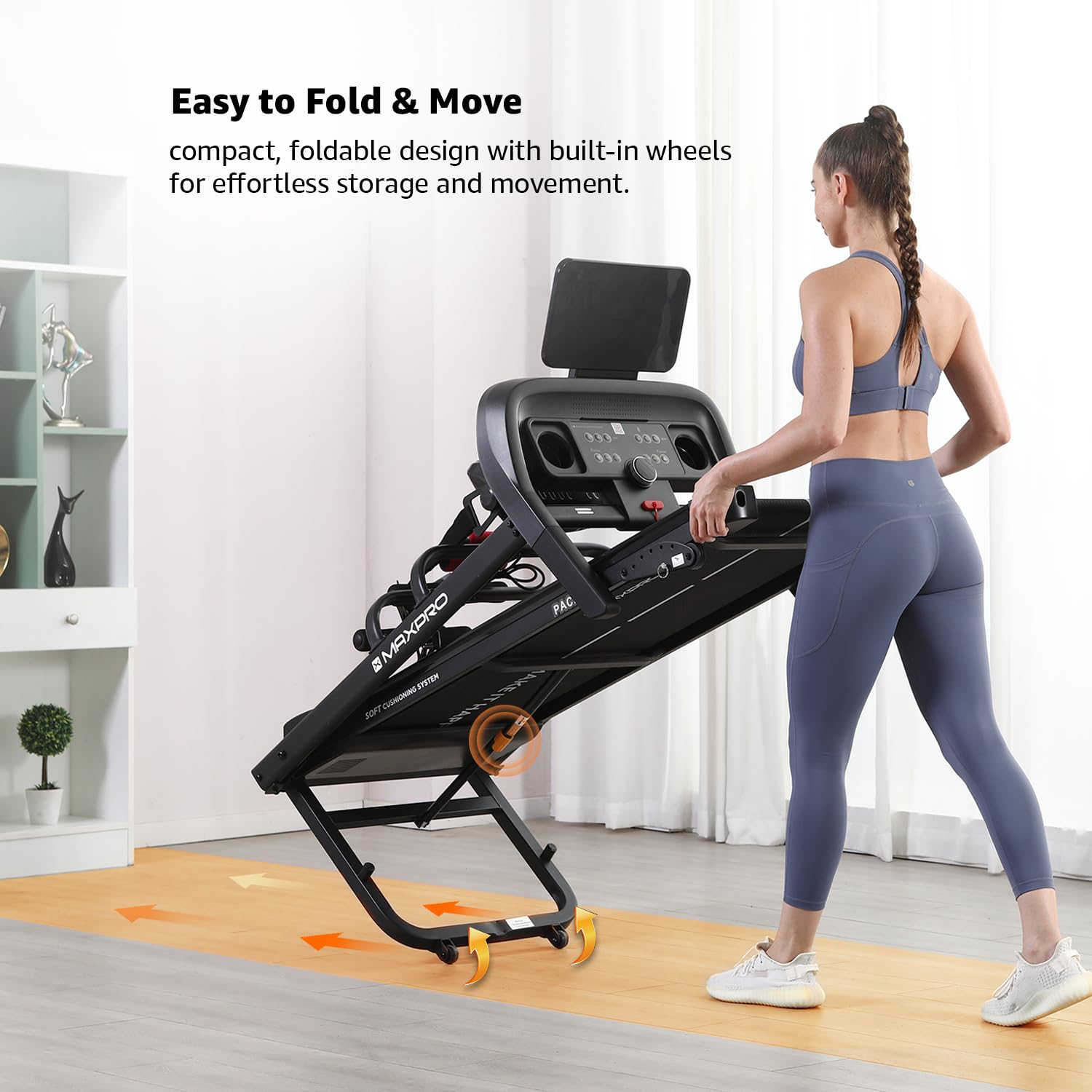
Image: A person using the multi-functional massager belt attached to the treadmill, demonstrating its application for hip and glute massage.
Video: This video shows the massager function in use, demonstrating how to attach the belt and apply it to different body areas for relaxation. (Relevant sections: 1:17 - 1:29)
Sit-up Function
The treadmill includes a sit-up function for core strengthening exercises.
- Position yourself on the floor in front of the treadmill, hooking your feet under the designated sit-up bar.
- Perform sit-ups as desired, ensuring proper form.
Video: This video demonstrates the sit-up function, showing a user performing sit-ups with their feet secured under the treadmill's sit-up bar. (Relevant sections: 1:30 - 1:37)
Dumbbells
The treadmill comes with 1 Kg x2 dumbbells for additional strength training.
- Remove the dumbbells from their storage area on the treadmill.
- Perform various exercises to complement your cardio workout.
Video: This video shows a user utilizing the included dumbbells for arm exercises, demonstrating their integration into a workout routine. (Relevant sections: 1:38 - 1:42)
6. Penyelenggaraan
Penyelenggaraan yang kerap memastikan prestasi optimum dan jangka hayat treadmill anda.
6.1 Pelinciran
The treadmill features an automatic lubrication system. Regular lubrication of the running belt is crucial.
- Locate the lubrication hole near the treadmill belt.
- Pour 10-15ml of silicone oil into the hole.
- Run the treadmill at a low speed for a few minutes to distribute the oil evenly.

Imej: Dari dekat view of hands applying silicone oil into the lubrication hole near the treadmill belt, illustrating the maintenance process.
Video: This video demonstrates the process of lubricating the treadmill belt by pouring silicone oil into the designated hole. (Relevant sections: 1:43 - 1:47)
6.2 Pembersihan
Lap permukaan treadmill dengan iklanamp kain selepas setiap penggunaan. Elakkan menggunakan pembersih atau pelarut yang kasar.
7. Penyelesaian masalah
Jika anda menghadapi masalah dengan treadmill anda, rujuk penyelesaian biasa berikut:
- Treadmill tidak bermula: Ensure the power cord is securely plugged in and the safety key is correctly placed on the console. Check the circuit breaker.
- Tali pinggang tergelincir atau tidak sekata: The running belt may need adjustment or lubrication. Refer to the maintenance section.
- Bunyi luar biasa: Inspect for loose parts or foreign objects under the belt. If the noise persists, contact customer support.
- Paparan tidak berfungsi: Check all cable connections to the console. If the issue continues, contact support.
For persistent problems, please contact WELCARE customer support.
8. Spesifikasi
| Ciri | Perincian |
|---|---|
| Jenama | SELAMAT BERJAYA |
| Nama Model | PACE PRO (PTM605M) |
| Motor | Motor DC Puncak 5 HP |
| Julat Kelajuan | 1 - 14 Kilometers per Hour |
| condong | Condong Manual 6 Aras |
| Berat Pengguna Maksimum | 110 Kilogram |
| Dimensi Tali Pinggang Larian | 1200 x 420 mm |
| Dimensi Produk (Dipasang) | 148D x 70W x 138H Sentimeter |
| Saiz Dilipat | 720 x 700 x 1380 mm |
| Berat Barang | 49.2 Kilogram |
| bahan | Keluli Aloi |
| Jenis Paparan | LED |
| Ketersambungan | Bluetooth (FitShow App) |
| Ciri Khas | Foldable, Heart Rate Monitor, Manual Incline, Water Bottle Holder, Massager, Sit-up Function, Dumbbells |
| Sumber Kuasa | Elektrik Bertali |
| Komponen yang Disertakan | 1 x Assembly Kit, 1 x Treadmill, 1 x User Manual, Safety Key |
9. Waranti dan Sokongan
9.1 Butiran Waranti
- 1 Year Motor Warranty
- 1 Year Part Warranty
- Waranti Rangka Seumur Hidup
Product service charges are extra. It is suggested to use a 4Kva stabilizer for the safety of the motor, as a stabilizer protects the motor from power fluctuations and ensures its long life.
9.2 Sokongan Pemasangan
For installation support, please call or WhatsApp to register with your Order ID. The treadmill is 90% pre-installed. WELCARE provides installation guidance through video call assistance from their experts. Standard installation charges are applicable for doorstep installation support.
Maklumat Hubungan 9.3
For any queries or support, please contact:
- Manufacturer/Packer/Importer: S and T Welcare Equipments Pvt Ltd, India
- Hubungi: 8220209111