
LAICOMEIN B110
LAICOMEIN Premium Pro Bluetooth 5.4 Transmitter Receiver User Manual
Model: B110
pengenalan
The LAICOMEIN Premium Pro Bluetooth 5.4 Transmitter Receiver is a versatile 2-in-1 audio adapter designed to enhance your audio experience. It functions as both a Bluetooth transmitter (TX mode) to stream audio from non-Bluetooth devices to your wireless headphones or speakers, and a Bluetooth receiver (RX mode) to enable Bluetooth streaming on your traditional wired audio systems. This device is ideal for use with TVs, gaming consoles, in-flight entertainment systems, car stereos, home audio systems, and more, offering seamless wireless audio connectivity.
This manual provides detailed instructions on setting up, operating, and maintaining your device to ensure optimal performance and longevity.
Kandungan Pakej
Sila sahkan bahawa semua item terdapat dalam pakej anda:
- LAICOMEIN Premium Pro Bluetooth 5.4 Transmitter Receiver (Main Unit)
- Kabel Pengecasan USB Jenis-C
- 3.5mm Audio Female Plug
- Kabel Audio RCA
- Dual 3.5mm Male to Female Adapter (for airplane use)
- Manual Pengguna (dokumen ini)

Figure 1: Package Contents and Device Components
Produk Selesaiview
Familiarize yourself with the device's buttons, ports, and indicators:
- Butang pelbagai fungsi: Power On/Off (press and hold), Clear Pairing Records (hold for 8 seconds).
- Mode Switch (RX / TX): Toggle between Receiver (RX) and Transmitter (TX) modes.
- Butang Berpasangan: Activates pairing mode for quick connections.
- Device 1 Status Light: Indicates connection status for the first paired device.
- Device 2 Status Light: Indicates connection status for the second paired device (supports dual pairing).
- Lampu Penunjuk Status Pengecasan: Shows charging progress and battery status.
- Port Pengecasan: Port USB Jenis-C untuk pengecasan.
- Bicu Audio 3.5mm: Universal audio input/output port.
Rajah 2: Terperinci View of Device Components
Persediaan
1. Mengecas Peranti
Before first use, fully charge the device. Connect the included USB Type-C charging cable to the device's charging port and the other end to a USB power source (e.g., computer USB port, wall adapter). The Charging Status Indicator Light will show charging progress. A full charge takes approximately 1.5 hours and provides over 15 hours of playtime.
2. Menghidupkan/Mematikan
- Untuk Menghidupkan: Press and hold the Multifunction Button for a few seconds until the indicator lights illuminate.
- Untuk Mematikan: Press and hold the Multifunction Button for a few seconds until the indicator lights turn off.
Mod Pengendalian
The LAICOMEIN Bluetooth adapter supports two primary operating modes: Transmitter (TX) and Receiver (RX). Use the Mode Switch (RX / TX) on the side of the device to select the desired mode.
TX Mode (Transmitter)
In TX mode, the device transmits audio from a non-Bluetooth source (e.g., TV, MP3 player, gaming console, airplane entertainment system) to your Bluetooth headphones or speakers.
- Set the Mode Switch to TX.
- Connect the device to your non-Bluetooth audio source using the 3.5mm audio cable. For TVs or other devices with RCA outputs, use the provided RCA audio cable. For airplane entertainment systems, use the dual 3.5mm male to female adapter if needed.
- Ensure your Bluetooth headphones or speakers are in pairing mode.
- Tekan ke Butang Berpasangan on the LAICOMEIN adapter to initiate pairing. The Device 1 Status Light will flash, indicating it's searching for devices.
- Once paired, the Device 1 Status Light will turn solid. You can now enjoy wireless audio.
- Dual Pairing (TX Mode): To connect a second pair of Bluetooth headphones/speakers, ensure the first device is connected, then put the second device into pairing mode and press the Pairing Button again. The Device 2 Status Light will illuminate when the second device is connected.
Nota: For best performance in TX mode, turn off nearby Bluetooth devices (e.g., phones/iPads) when pairing to avoid interference.
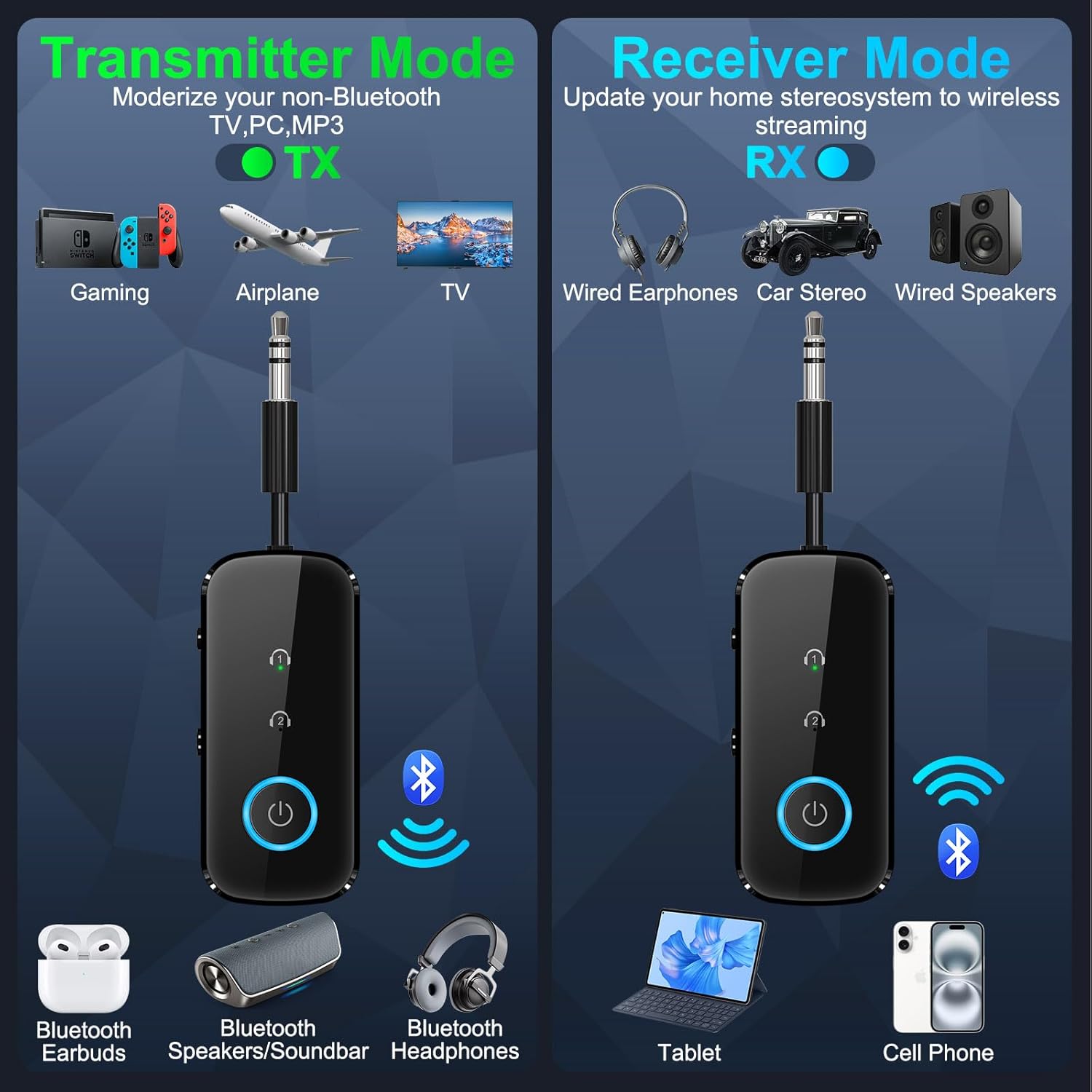
Figure 3: TX Mode and RX Mode Overview

Figure 4: Dual Pairing in TX Mode for TV Audio

Figure 5: Using TX Mode for In-Flight Entertainment

Figure 6: Using TX Mode at the Gym
RX Mode (Receiver)
In RX mode, the device receives Bluetooth audio from your smartphone, tablet, or other Bluetooth-enabled device and outputs it to a non-Bluetooth audio system (e.g., car stereo, home stereo, wired headphones).
- Set the Mode Switch to RX.
- Connect the device to your non-Bluetooth audio system (e.g., car stereo AUX input, home stereo AUX input) using the 3.5mm audio cable.
- Enable Bluetooth on your smartphone, tablet, or other audio source and search for "LAICOMEIN B110" (or similar device name) in the list of available Bluetooth devices.
- Select the device to pair. Once paired, the Device 1 Status Light will turn solid.
- You can now stream audio wirelessly from your Bluetooth device to your traditional audio system.
- Dual Pairing (RX Mode): The device can also pair with two smartphones/computers simultaneously, allowing for easy switching between audio sources.

Figure 7: Using RX Mode in a Car

Figure 8: Using RX Mode on a Boat
Penyelenggaraan
To ensure the longevity and optimal performance of your LAICOMEIN Bluetooth adapter, follow these maintenance guidelines:
- Pembersihan: Gunakan kain lembut dan kering untuk membersihkan peranti. Jangan gunakan pembersih cecair atau aerosol.
- Storan: Simpan peranti di tempat yang sejuk dan kering jauh dari cahaya matahari langsung dan suhu yang melampau.
- Pengendalian: Elakkan daripada menjatuhkan peranti atau terkena impak yang kuat.
- Pendedahan Air: Peranti ini tidak kalis air. Elakkan pendedahan kepada air atau kelembapan yang tinggi.
Menyelesaikan masalah
Jika anda menghadapi masalah dengan peranti anda, rujuk masalah dan penyelesaian biasa berikut:
| Masalah | Kemungkinan Punca / Penyelesaian |
|---|---|
| Peranti tidak dihidupkan. | Battery may be depleted. Charge the device fully using the provided Type-C cable. |
| Cannot pair with Bluetooth headphones/speakers (TX Mode). |
|
| Cannot connect to car stereo/home stereo (RX Mode). |
|
| Kualiti audio kurang baik atau terputus-putus. |
|
| LED indicators are not behaving as expected. | Refer to the "Product Overview" section for expected indicator behavior. If issues persist, try resetting the device by holding the Multifunction Button for 8 seconds while powered off. |
Spesifikasi
Key technical specifications for the LAICOMEIN Premium Pro Bluetooth 5.4 Transmitter Receiver:
| Ciri | Perincian |
|---|---|
| Jenama | LAICOMEIN |
| Model | B110 |
| Versi Bluetooth | 5.4 |
| Antara Muka Perkakasan | 3.5mm Audio, Bluetooth 5 |
| Peranti Serasi | Laptop, Television, Car Stereo System, Tablet, Headphone, Smartphone |
| Keserasian Input Audio | 3.5mm AUX, RCA |
| Jenis Bateri | Litium-Ion (termasuk) |
| Masa Mengecas | Approximately 1.5 - 2 Hours |
| Masa bermain | 15+ hours on a single charge |
| Jenis Wayarles | Bluetooth |
| Jenis Penyambung | RCA, Stereo Audio (3.5mm) |
| Dimensi (Pakej) | 13.69 x 11.51 x 1.9 cm |
| Berat badan | 59 g |

Figure 9: Internal Configuration Highlighting Bluetooth 5.4
Keselamatan dan Pensijilan
This device is certified by FCC, CE, RoHS, and BQB, meeting global safety standards. It includes built-in protections against overcurrent, short circuits, and overheating to ensure safe operation.
Waranti dan Sokongan
For warranty information or technical support, please refer to the contact details provided on the product packaging or the official LAICOMEIN website. If you have questions or require assistance with setup, operation, or troubleshooting, do not hesitate to contact customer service.
You may also scan the QR code on the product packaging for an IUG (Instructional User Guide) if available.