
1. Pengenalan
This manual provides detailed instructions for the installation, operation, and maintenance of your Loddery 7-inch Android 13.0 Car Stereo. This unit is designed for specific vehicle models, ensuring a seamless integration and enhanced in-car entertainment experience.
Model Kenderaan Berkenaan:
- Chevrolet Silverado SSR Tahoe: 2003-2006
- GMC Sierra Yukon: 2003-2006
- Hummer H2: 2003-2007

Image 1.1: Applicable Car Models and Dashboard Compatibility

Image 1.2: Dashboard Fitment Guide (Before/Fit/Not Fit)
2. Maklumat Keselamatan
Please read all safety instructions carefully before installation and operation. Failure to follow these guidelines may result in injury or damage to the unit or vehicle.
- Pemasangan Profesional Disyorkan: Disebabkan kerumitan sistem elektrik kereta, pemasangan profesional sangat disyorkan.
- Sumber Kuasa: Connect the unit only to a 12V DC power supply with a negative ground.
- Pendawaian: Ensure all wiring is correctly connected according to the wiring diagram. Incorrect wiring can cause damage or fire.
- Keselamatan Memandu: Jangan kendalikan unit dengan cara yang mengalihkan perhatian anda daripada memandu. Sentiasa mengutamakan keselamatan jalan raya.
- Suhu: Elakkan daripada mendedahkan unit kepada suhu yang melampau atau cahaya matahari langsung untuk tempoh yang lama.
3. Kandungan Pakej
Sahkan bahawa semua item terdapat dalam pakej:
- Loddery 7-inch Android 13.0 Car Stereo Unit
- Kuasa Kuasa
- Antena GPS
- Kabel USB (x2)
- RCA Cables (Audio/Video Output)
- belakang View Kabel Input Kamera
- Mikrofon Luaran
- Pendakap dan Skru Pemasangan
- Manual Pengguna (dokumen ini)
- Car Compass (as listed in product details)
4. Produk Lebihview
The Loddery 7-inch Android 13.0 Car Stereo features a capacitive touchscreen display and various connectivity options. Familiarize yourself with the unit's components before installation.
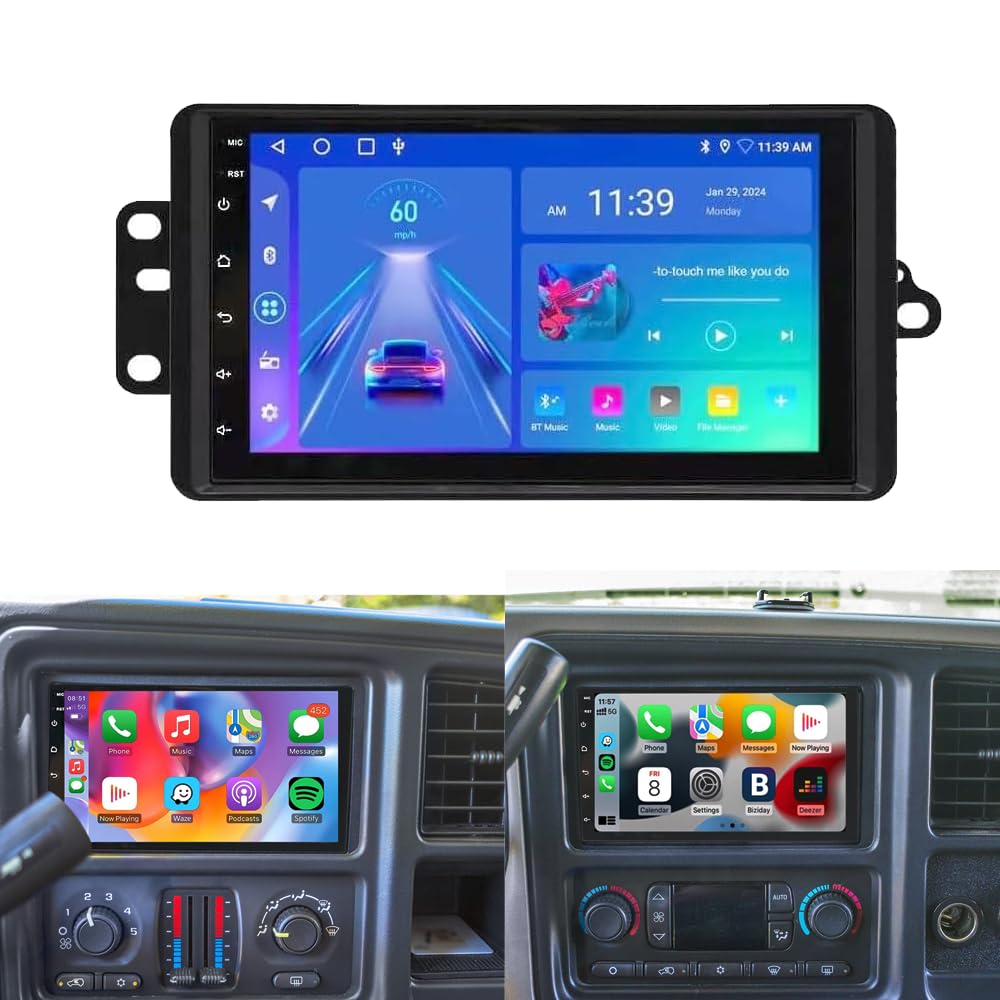
Imej 4.1: Depan View of the Car Stereo Unit
The unit typically includes:
- Skrin Sentuh Kapasitif 7-inci: For interactive control and display.
- Physical Buttons/Knobs: (If present, usually for volume, home, back, etc. - refer to specific unit design).
- Port USB: For media playback, wired CarPlay/Android Auto, and charging.
- Input Mikrofon: Untuk panggilan bebas tangan.
- Pelabuhan Antena GPS: Untuk fungsi navigasi.
- Port Antena Radio: For FM/AM reception.
- Input Kamera Belakang: For connecting a backup camera.
- Output RCA: Untuk luaran amppengangkat atau pemantau.
5. Persediaan & Pemasangan
Follow these general steps for installing your car stereo. Specific vehicle requirements may vary.
5.1 Senarai Semak Pra-Pemasangan
- Ensure the vehicle's ignition is off and the negative terminal of the car battery is disconnected.
- Gather necessary tools (screwdrivers, wire strippers, electrical tape, etc.).
- Confirm compatibility with your vehicle's dashboard and wiring harness.
5.2 Sambungan Pendawaian
Connect the included wiring harness to the stereo unit and then to your vehicle's wiring. Refer to the wiring diagram provided with your specific harness. Common connections include:
- Yellow (B+ / Constant Power): Sambungkan kepada sumber kuasa 12V yang berterusan.
- Red (ACC / Switched Power): Connect to a 12V accessory power source that turns on/off with the ignition.
- Hitam (Ground): Connect to a metal part of the car chassis or the vehicle's ground wire.
- Orange (Illumination / Dimmer): Connect to the vehicle's illumination wire (optional).
- Blue (Antenna / Amp Remote): Sambungkan ke antena kuasa atau amplifier remote turn-on wire.
- Wayar Pembesar suara: Sambungkan ke wayar pembesar suara kenderaan yang sepadan (cth, Putih/Putih-Hitam untuk Kiri Depan, Kelabu/Kelabu-Hitam untuk Depan Kanan, Hijau/Hijau-Hitam untuk Kiri Belakang, Ungu/Ungu-Hitam untuk Belakang Kanan).
- Reverse (Backup Camera Trigger): Connect to the vehicle's reverse light wire to automatically display the rear camera feed.
- Steering Wheel Control (SWC) Wires: Connect to the vehicle's SWC wires (Key1, Key2, Ground).
5.3 Pemasangan Komponen
- Antena GPS: Mount the GPS antenna on the dashboard or another location with a clear view dari langit.
- Mikrofon Luaran: Position the microphone in a suitable location for clear voice pickup (e.g., near the rearview cermin atau pada tiang A).
- Kabel USB: Route USB cables to an accessible location, such as the glove compartment or center console.
- belakang View Kamera (Pilihan): Pasang bahagian belakang view camera according to its separate instructions and connect its video output to the stereo's 'CAM IN' port.
5.4 Memasang Unit
Secure the stereo unit into the dashboard opening using the provided mounting brackets and screws. Ensure it is firmly in place and does not obstruct any vehicle controls.

Image 5.1: Stereo Unit Installed in Dashboard
5.5 Selepas Pemasangan
Reconnect the negative terminal of the car battery. Turn on the ignition and test all functions of the stereo unit.
6. Arahan Operasi
This section details the primary functions and features of your Loddery car stereo.
6.1 Wireless & Wired CarPlay / Android Auto
Sambungkan telefon pintar anda untuk penyepaduan lancar navigasi, muzik, panggilan dan mesej.
- Sambungan Wayarles: Enable Bluetooth and Wi-Fi on your iPhone (for CarPlay) or Android phone (for Android Auto). Pair your phone with the stereo via Bluetooth. Follow on-screen prompts to activate wireless CarPlay/Android Auto.
- Sambungan Berwayar: Connect your smartphone to the stereo's USB port using a high-quality USB cable. The system will automatically launch CarPlay or Android Auto.

Image 6.1: CarPlay & Android Auto Interface

Image 6.2: Wireless Apple CarPlay

Image 6.3: Wireless Android Auto
6.2 Navigasi GPS
The unit features built-in GPS for navigation. Connect to Wi-Fi to download and update maps or use online navigation services.
- Peta Dalam Talian: Use pre-installed navigation apps or download your preferred apps from the Google Play Store (requires Wi-Fi connection).
- Peta Luar Talian: Download map data for offline use in areas without network coverage.

Image 6.4: GPS Navigation Icon
6.3 Kefungsian Bluetooth
Connect your phone via Bluetooth 5.0 for hands-free calling and audio streaming.
- Berpasangan: Go to the Bluetooth settings on the stereo and your phone. Cari untuk available devices and select the stereo's name to pair.
- Panggilan Bebas Tangan: Make and receive calls directly from the stereo screen. Access your phonebook and call history.
- Penstriman Audio: Play music from your phone through the car speakers.

Image 6.5: Bluetooth Functionality

Image 6.6: Built-in Bluetooth Interface
6.4 FM/RDS Radio
Access local radio stations with clear reception and RDS (Radio Data System) features.
- tuning: Use the touchscreen to scan for stations or manually tune to a specific frequency.
- RDS: Displays station information, song titles, and traffic updates where available.

Image 6.7: FM/RDS Radio Interface
6.5 DSP (Digital Sound Processor) & HIFI Audio
Customize your audio experience with the built-in DSP and HIFI audio features.
- Penyamaan (EQ): Adjust frequency bands to fine-tune the sound output to your preference.
- Pratetap Bunyi: Select from various pre-defined sound modes (e.g., Pop, Rock, Jazz).

Image 6.8: HIFI Audio & EQ Settings
6.6 Belakang View Kamera
Apabila bahagian belakang yang serasi view camera is connected, the display automatically switches to the camera feed when the vehicle is put into reverse.
- Garis Panduan Tempat Letak Kereta: Dynamic or static guidelines assist with parking maneuvers.
- HD Image: Menyediakan yang jelas view kawasan di belakang kenderaan anda.

Imej 6.9: Belakang View Paparan Kamera

Imej 6.10: Belakang View Ciri Kamera
6.7 Kawalan Roda Stereng (SWC)
Configure the stereo to work with your vehicle's existing steering wheel controls for convenient operation.
- Fungsi Pembelajaran: Access the 'Steering Learn' menu in the stereo settings. Follow the on-screen instructions to assign functions to your steering wheel buttons.

Image 6.11: Steering Wheel Control Setup
6.8 Fungsi Skrin Pisah
The Android 13.0 system supports split-screen mode, allowing you to run two applications simultaneously (e.g., navigation and music player).
- Pengaktifan: Typically, long-press the recent apps button or drag an app to one side of the screen to activate split-screen.
7. Penyelenggaraan
Penyelenggaraan yang betul memastikan jangka hayat dan prestasi optimum stereo kereta anda.
- Membersihkan Skrin: Gunakan kain lembut dan tidak berbulu untuk mengelap skrin sentuh dengan lembut. Elakkan pembersih yang kasar atau bahan kimia yang keras.
- Kemas Kini Perisian: Periodically check for system updates via the 'Settings' menu. Connect to Wi-Fi to download and install updates to ensure the latest features and security patches.
- Elakkan Cecair: Jauhkan cecair daripada unit untuk mengelakkan kerosakan.
- Kawalan Suhu: Do not leave the unit in extreme hot or cold conditions for extended periods.
8. Penyelesaian masalah
Rujuk bahagian ini untuk isu biasa dan penyelesaiannya.
| Masalah | Kemungkinan Punca | Penyelesaian |
|---|---|---|
| Tiada Kuasa | Incorrect wiring (B+, ACC, Ground), blown fuse. | Check power and ground connections. Verify vehicle fuses and stereo fuse. |
| Tiada Bunyi | Speaker wires disconnected, volume too low, mute activated, incorrect audio source. | Check speaker connections. Increase volume. Deactivate mute. Select correct audio source. |
| GPS Tidak Berfungsi | GPS antenna not connected or poorly positioned, no map data. | Pastikan antena GPS disambungkan dengan selamat dan mempunyai jernih view dari langit. Muat turun atau kemas kini data peta. |
| Isu Sambungan Bluetooth | Phone not in pairing mode, incorrect pairing process, interference. | Ensure Bluetooth is enabled on both devices. Re-attempt pairing. Clear previous pairings. |
| Steering Wheel Controls Not Responding | SWC wires incorrectly connected, learning process not completed. | Verify SWC wiring. Perform the 'Steering Learn' function in settings. |
| Skrin sentuh Tidak Responsif | Pembekuan sistem, gangguan perisian sementara. | Restart the unit (if possible, by holding the power button) or perform a soft reset (refer to specific unit instructions). |
9. Spesifikasi
Key technical specifications of the Loddery 7-inch Android 13.0 Car Stereo:
- Jenama: Loddery
- Nama Model: For Chevy Chevrolet Silverado SSR Tahoe 2003-2006
- Sistem pengendalian: Android 13.0
- Saiz Skrin: 7 Inci
- Jenis Paparan: LCD, Capacitive Touchscreen
- Kapasiti Storan Memori: 32 GB
- Teknologi Ketersambungan: Wi-Fi, Bluetooth 5.0
- Supported Satellite Navigation System: GPS
- Kaedah Kawalan: Sentuh, Suara
- Jenis Perkhidmatan Kenderaan: Car, SUV, Truck
- Jenis Pemasangan: Pemasangan Papan Pemuka, Pemasangan Panel
- Komponen yang Disertakan: Car compass (as per product details)
10. Waranti & Sokongan
For any questions or concerns regarding your Loddery car stereo, please contact customer support.
- Waranti: Please contact the seller directly for warranty information and claims.
- Sokongan Pelanggan: Refer to your purchase documentation or the seller's contact information for support.