
ALONEFIRE SV123
ALONEFIRE SV123 EDC Flashlight User Manual
Model: SV123 | Brand: ALONEFIRE
1. Pengenalan
The ALONEFIRE SV123 EDC Flashlight is a versatile and compact illumination tool designed for a wide range of applications. It features a unique three-in-one light source, offering white light, yellow light, and 365nm UV light, making it suitable for various tasks from general illumination to specialized inspections. Its durable aluminum alloy construction and USB-C rechargeable built-in battery ensure reliability and convenience for everyday carry.
2. Maklumat Keselamatan
- Jangan melihat terus ke sumber cahaya. The intense light can cause temporary vision impairment or eye damage.
- Jauhkan daripada kanak-kanak.
- Do not disassemble the flashlight. This may void the warranty and cause damage.
- Elakkan daripada mendedahkan lampu suluh kepada suhu yang melampau atau cahaya matahari langsung untuk tempoh yang lama.
- Produk ini adalah tidak kalis air. Avoid contact with water or high humidity.
- Gunakan hanya kabel pengecas USB-C yang disediakan atau kabel yang diperakui.
3. Kandungan Pakej
Sila semak pakej untuk item berikut:
- ALONEFIRE SV123 EDC Flashlight
- USB Charging Cord (USB-A to USB-C)

Image: The ALONEFIRE SV123 EDC Flashlight shown alongside its included USB-C charging cable.
4. Produk Lebihview
The ALONEFIRE SV123 features a compact design with multiple light sources and a removable focusing tip.

Imej: A terperinci view of the ALONEFIRE SV123 flashlight, highlighting its overall design and the three distinct LED light sources (white, yellow, and UV) at the head.
4.1 Komponen Utama
- Kepala Ringan: Contains the white, yellow, and 365nm UV LEDs.
- Butang Kuasa: Located on the side for turning the flashlight on/off and cycling through modes.
- Port Pengecasan USB-C: Located near the tail cap for convenient recharging.
- Penunjuk Pengecasan: LED light near the charging port (Red for charging, Off for fully charged).
- Removable Focusing Tip: A small, conical accessory that can be attached to the light head for a more focused beam.

Image: A diagram illustrating the process of attaching and removing the small focusing tip from the flashlight's head, allowing for adjustment of the light beam.
5. Persediaan
5.1 Caj Permulaan
Before first use, it is recommended to fully charge the flashlight. The device comes with a built-in rechargeable battery.
- Cari port pengecasan USB-C di sisi lampu suluh.
- Connect the provided USB-C charging cable to the flashlight's port.
- Connect the other end of the USB cable (USB-A) to a compatible USB power source (e.g., wall adapter, computer USB port, power bank).
- The charging indicator light will illuminate merah semasa mengecas.
- Setelah dicas sepenuhnya, lampu penunjuk akan menyala dimatikan.
- Charging typically takes 3-4 hours.

Image: The flashlight connected via USB-C, showing the charging indicator light (red for charging, off for fully charged) and estimated charging time (3-4 hours) and battery life (2-3 hours).
6. Arahan Operasi
6.1 Hidupkan/Mati Kuasa dan Tukar Mod
The flashlight features a single button for all operations.
- Untuk Menghidupkan: Press the power button once. The flashlight will turn on in the last used mode.
- Untuk Menukar Mod: While the flashlight is on, press the power button repeatedly to cycle through the light modes: White Light → Yellow Light → 365nm UV Light.
- Untuk Mematikan: Tekan dan tahan butang kuasa selama lebih kurang 1 saat.

Image: A visual representation of the three distinct light sources available on the flashlight: White Light, Yellow Light, and 365nm UV Light, with an inset showing the LED arrangement.
6.2 Using the Focusing Tip
The included focusing tip allows you to concentrate the light beam for more precise illumination.
- To attach, gently push the focusing tip onto the light head until it is securely in place.
- To remove, gently pull the focusing tip off the light head.
7. Aplikasi dan Kegunaan
The ALONEFIRE SV123 flashlight is designed for a variety of specialized uses:
7.1 White Light Applications
- General illumination for everyday tasks.
- Observing the clarity and internal characteristics of crystals and gemstones.
- Assessing the authenticity and quality of jade and other translucent materials.

Image: A side-by-side comparison showing an emerald under normal ambient light versus the same emerald illuminated by the flashlight's white light, revealing internal clarity and color variations.
7.2 Yellow Light Applications
- Ideal for inspecting the surface and texture of various rocks and minerals.
- Can highlight subtle details and imperfections that might be less visible under white light.

Image: A comparison showing different rock samples under normal light and then illuminated by the flashlight's yellow light, demonstrating how the yellow light can reveal specific textures and details.
7.3 365nm UV Light Applications
- Detecting pet urine stains on carpets, furniture, and other surfaces.
- Verifying the authenticity of banknotes, passports, and other official documents.
- Identifying mineral and gemstone fluorescence.
- Inspecting for scorpions or other fluorescent organisms.
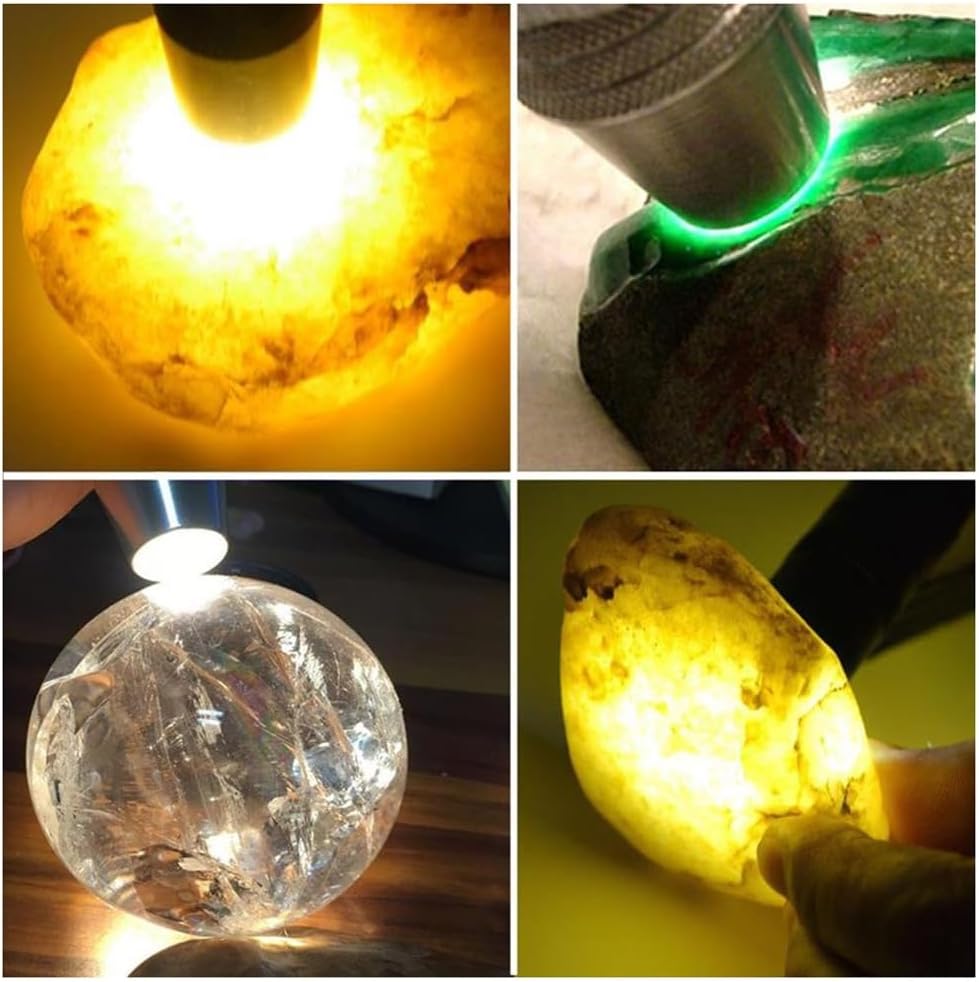
Image: The ALONEFIRE SV123 flashlight emitting a distinct purple 365nm UV light beam onto a surface.

Image: A collage demonstrating the use of 365nm UV light for detecting pet urine on a toilet and observing fluorescence on plants, highlighting its utility in various detection scenarios.
8. Penyelenggaraan
- Pembersihan: Lap badan lampu suluh dengan lembut, damp kain. Jangan gunakan pembersih atau pelarut yang melelas.
- Storan: Store the flashlight in a cool, dry place away from direct sunlight and extreme temperatures. If storing for extended periods, charge the battery every 3-6 months to maintain battery health.
- Penjagaan Bateri: Avoid fully depleting the battery frequently. Recharge when the light output noticeably dims.
9. Penyelesaian masalah
| Masalah | Kemungkinan Punca | Penyelesaian |
|---|---|---|
| Lampu suluh tidak menyala. | Bateri habis. | Cas lampu suluh menggunakan kabel USB-C. |
| Keluaran cahaya adalah malap. | Bateri lemah. | Isi semula lampu suluh. |
| Lampu suluh tidak dicas. | Masalah kabel pengecas atau sumber kuasa. | Ensure the USB-C cable is properly connected. Try a different USB port or power adapter. |
| Cannot switch light modes. | Button malfunction or software glitch. | Ensure the flashlight is on. Try turning it off and on again. If the issue persists, contact customer support. |
10. Spesifikasi
| Ciri | Perincian |
|---|---|
| Model | SV123 |
| Jenis Sumber Cahaya | LED (White, Yellow, 365nm UV) |
| Sumber Kuasa | Battery Powered (Built-in Lithium Ion) |
| Port Pengecasan | USB-C |
| Masa Mengecas | lebih kurang 3-4 jam |
| Hayat Bateri | Approx. 2-3 hours (depending on mode) |
| bahan | Aloi Aluminium |
| warna | Golden and Silver |
| Berat Barang | 5.6 auns (0.16 Kilogram) |
| Dimensi | 6.26 x 2.32 x 1.69 inci |
| Tahap Ketahanan Air | Bukan Tahan Air |
| Ciri Khas | Adjustable Focus (with tip), Adjustable Light Modes, Non-Slip Grip, Portable, Rechargeable |
11. Waranti dan Sokongan
For warranty information or technical support, please refer to the product packaging or contact ALONEFIRE customer service through the retailer's platform where the product was purchased. Keep your purchase receipt as proof of purchase.
For more information, visit the official ALONEFIRE store: ALONEFIRE Store on Amazon.
Ask a question about this manual
Ask about setup, troubleshooting, compatibility, parts, safety, or missing instructions. Manuals+ will review the question and use this page’s manual context to help answer it.