
pengenalan
Thank you for choosing the Belkin Portable 20,000 mAh Power Bank. This device is designed to provide reliable and fast charging for your mobile devices, featuring an integrated USB-C cable and 30W Power Delivery. Its compact and lightweight design makes it ideal for travel, ensuring your devices stay powered wherever you go. This manual provides essential information on how to set up, operate, maintain, and troubleshoot your power bank.

Image: The Belkin Portable 20,000 mAh Power Bank in blue, showcasing reka bentuknya yang anggun.
Ciri-ciri Utama
- Kabel USB-C Bersepadu: For convenient charging on the go.
- Penghantaran Kuasa 30W: Enables fast charging for smartphones, tablets, and even some laptops like the MacBook Air.
- Kapasiti 20,000 mAh: Provides up to 87 hours of additional battery life for an iPhone 16 Pro, charging 0-50% in approximately 25 minutes.
- Pengecasan serentak: Charge up to three devices concurrently using the integrated USB-C cable, USB-C port, and USB-A port, with a shared output of 30W.
- Penunjuk LED: Displays the power bank's charging status.
- Pengecasan Laluan: Charge your devices while the power bank itself is being recharged.
- Lightweight and Travel-Friendly: Weighing less than 395 grams, it meets aviation safety standards for carry-on luggage.
- Reka Bentuk Mampan: Made from 72% post-consumer recycled materials with 100% plastic-free packaging.
Persediaan
Pengecasan Awal Bank Kuasa
Before first use, fully charge your Belkin Power Bank. Connect the power bank to a wall charger using a compatible USB-C cable (not included for recharging the power bank itself, only the integrated cable is for output). The LED indicators will show the charging progress. A full charge typically takes up to 12 hours.

Image: The power bank connected to a wall outlet for recharging, simultaneously charging a smartphone via its integrated cable. This illustrates pass-through charging.
Arahan Operasi
Mengecas Peranti Anda
- Menggunakan Kabel USB-C Bersepadu: Extend the integrated USB-C cable from the power bank and connect it directly to your USB-C compatible device.
- Menggunakan Port USB-C: Connect your device's USB-C charging cable to the power bank's USB-C output port.
- Menggunakan Port USB-A: Connect your device's USB-A charging cable to the power bank's USB-A output port.

Image: The Belkin power bank connected to an iPhone via its integrated USB-C cable, demonstrating seamless high-speed charging.
Mengecas Berbilang Peranti
The power bank supports charging up to three devices simultaneously with a combined output of 30W. You can use the integrated USB-C cable, the USB-C port, and the USB-A port at the same time.
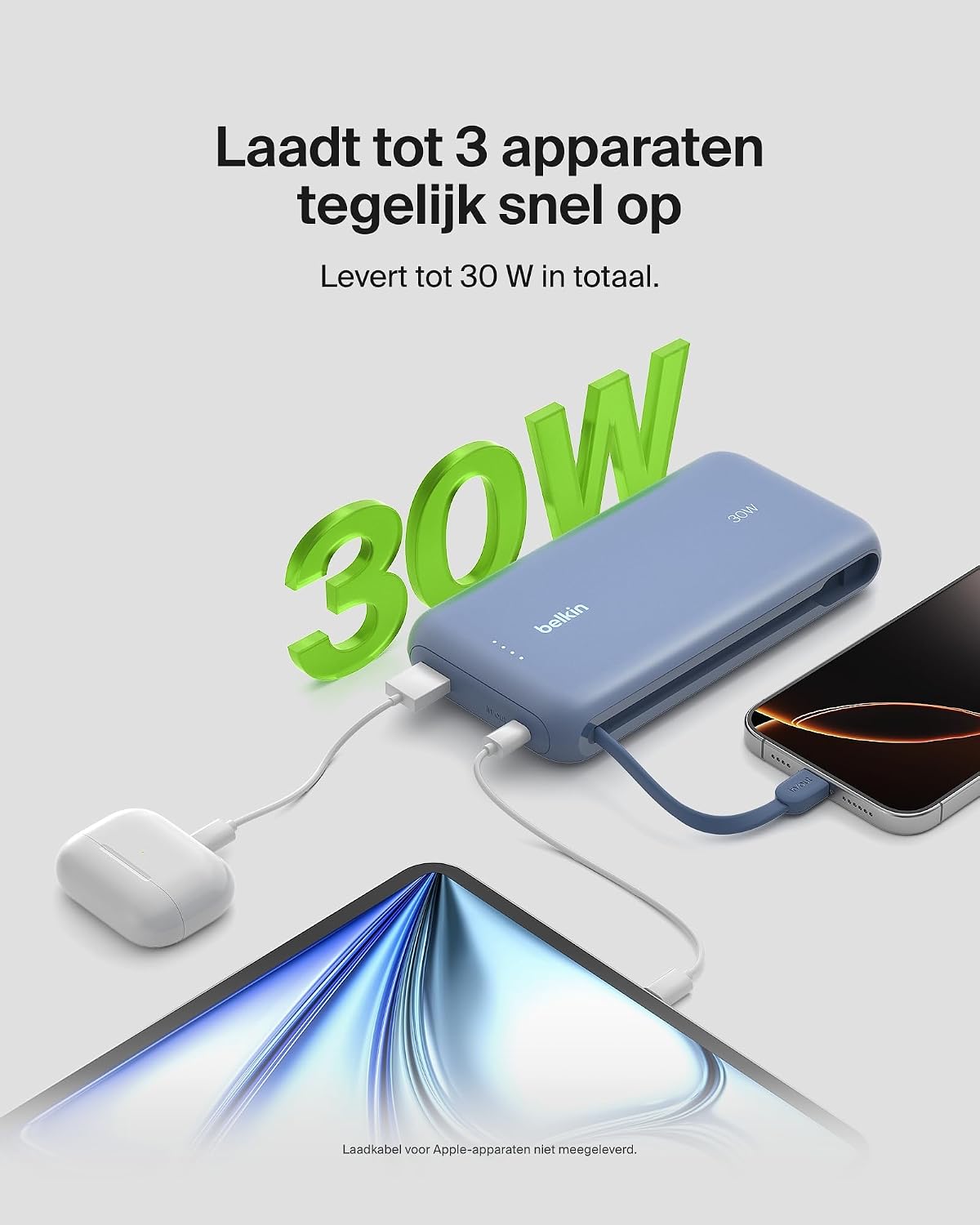
Image: The power bank simultaneously charging a smartphone, a tablet, and wireless earbuds, illustrating its capability to charge up to three devices with a total output of 30W.
Penunjuk Status Bateri LED
The power bank features LED lights that indicate the remaining battery level and charging status. Refer to the table below for interpretation:
| Status LED | Maknanya |
|---|---|
| Semua LED pepejal | Dicas sepenuhnya |
| LEDs blinking sequentially | Pengecasan sedang dijalankan |
| Fewer LEDs solid | Baki kapasiti bateri |
Penyelenggaraan
- Pembersihan: Gunakan kain lembut dan kering untuk membersihkan power bank. Elakkan menggunakan bahan kimia yang keras atau bahan yang melelas.
- Storan: Simpan bank kuasa di tempat yang sejuk dan kering jauh dari cahaya matahari langsung dan suhu yang melampau.
- Penjagaan Bateri: To prolong battery life, avoid fully discharging the power bank regularly. Recharge it when the battery level is low.
- Integrated Cable Care: When not in use, ensure the integrated USB-C cable is properly stowed to prevent damage.
Menyelesaikan masalah
Isu dan Penyelesaian Biasa
- Peranti tidak dicas:
- Ensure the power bank is charged. Check the LED indicators.
- Sahkan bahawa kabel pengecasan disambungkan dengan selamat ke bank kuasa dan peranti anda.
- Cuba kabel atau port pengecasan lain pada bank kuasa.
- Sahkan peranti anda serasi dengan spesifikasi pengecasan bank kuasa.
- Pengecasan perlahan:
- Ensure your device supports fast charging (Power Delivery) to utilize the 30W output.
- If charging multiple devices, the total 30W output is shared, which may result in slower charging for individual devices.
- Check if the cable used supports fast charging.
- Bank kuasa tidak mengecas:
- Ensure the wall adapter and cable used for recharging the power bank are functional and properly connected.
- Try a different wall adapter or cable.
Belkin SmartProtect Safety Features
The Belkin Power Bank is equipped with SmartProtect technology, which includes multiple safety features to protect your devices and the power bank itself:
- Perlindungan Caj Terlebih
- Perlindungan Arus Lebih
- Overpower Protection
- Perlindungan litar pintas
- Output Overvoltage Perlindungan
- Output High/Low Temperature Protection
- Input High/Low Temperature Protection
- Signal Interference Protection
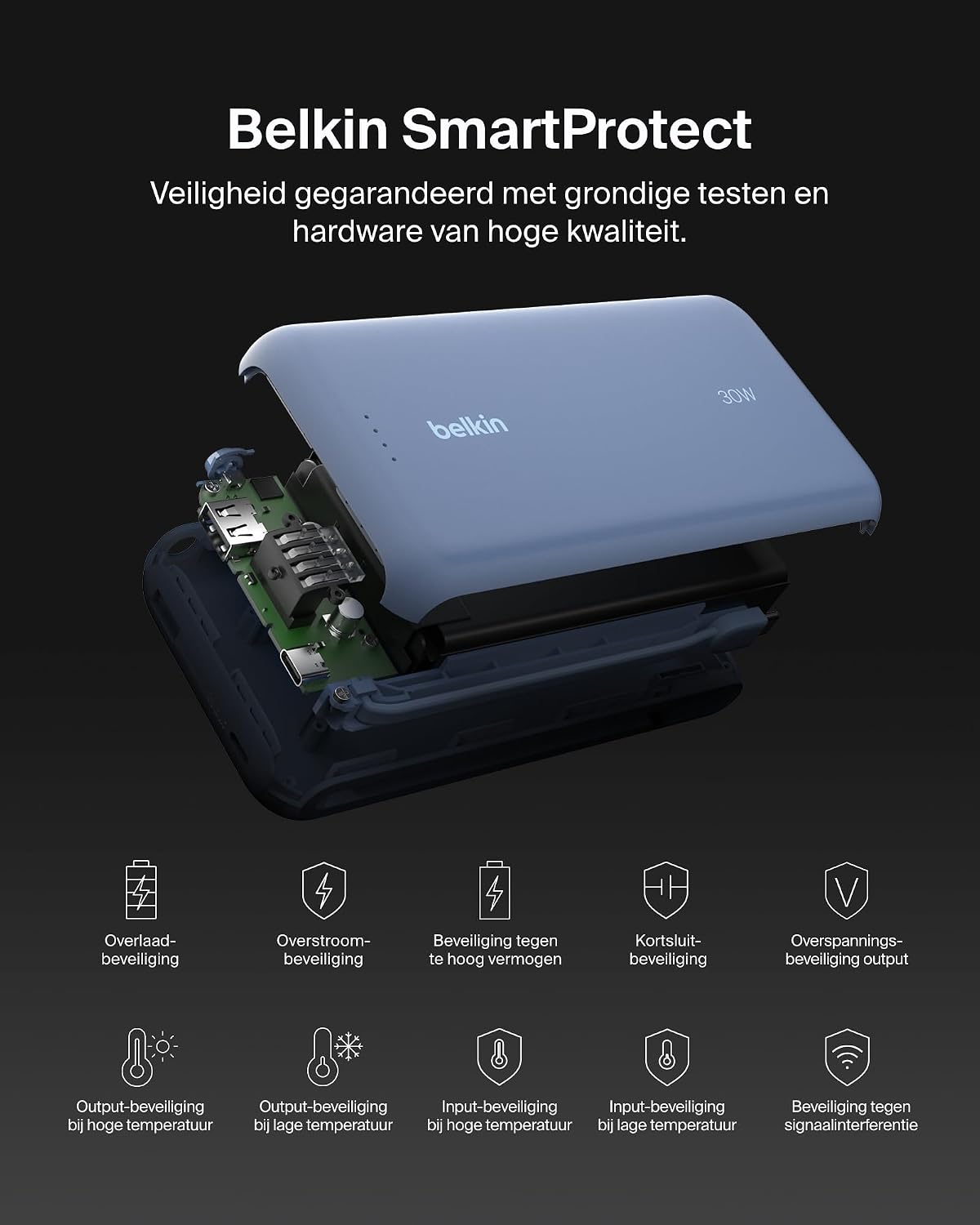
Imej: Meletup view of the Belkin Power Bank, highlighting its internal components and the comprehensive Belkin SmartProtect safety features, including protection against overcharge, overcurrent, and short-circuits.
Spesifikasi
| Ciri | Perincian |
|---|---|
| Nombor Model | BPB024hqBL |
| Kapasiti Bateri | 20,000 mAh |
| Kuasa Keluaran | Up to 30W Power Delivery (shared) |
| Jenis Penyambung | Integrated USB-C cable, 1x USB-C port, 1x USB-A port |
| Voltage | 5 Volt |
| Amppemadam | 3 Ampsebelum |
| Masa Pengecasan (Power Bank) | lebih kurang 12 jam |
| Dimensi Produk | 15.4 x 7.62 x 2.51 cm |
| Berat Barang | 395 gram |
| Komposisi Sel Bateri | Litium-ion |
| Peranti Serasi | Apple iPhone 16 series, iPhone 15 series, iPhone 14 series, iPhone 13 series, Samsung Galaxy S22/S23/S24/S25 series, iPad Pro, iPad Air, iPad, iPad Mini, and other USB-C/USB-A compatible devices. |
Waranti dan Sokongan
Maklumat Waranti
This Belkin Portable Power Bank comes with a Waranti pengilang selama 2 tahun. Additionally, it includes a Connected Equipment Warranty, providing peace of mind for your connected devices. Please retain your proof of purchase for warranty claims.
Sokongan Pelanggan
Untuk bantuan lanjut, sokongan teknikal atau pertanyaan jaminan, sila lawati sokongan rasmi Belkin webtapak atau hubungi perkhidmatan pelanggan mereka. Anda boleh mendapatkan maklumat lanjut di www.belkin.com/support.