
1. Pengenalan
This manual provides detailed instructions for the installation, setup, and operation of your ASD 20-Inch Smart RGBW Flush Mount Ceiling Light. This LED lighting fixture combines a modern design with advanced smart features, offering a versatile lighting solution for various indoor spaces. It features RGBW color-changing capabilities, dimming, and control via a remote or a smartphone app, with compatibility for Alexa and Google Assistant.
2. Maklumat Keselamatan
Sila baca semua arahan dengan teliti sebelum pemasangan dan penggunaan. Simpan manual ini untuk rujukan pada masa hadapan.
- Keselamatan Elektrik: Always turn off power at the circuit breaker before installing, servicing, or cleaning the fixture. Consult a qualified electrician if you are unsure about electrical wiring.
- Pemasangan: Ensure the mounting surface can support the weight of the fixture. Follow all local electrical codes and ordinances.
- Pengendalian: Do not handle the fixture with wet hands. Avoid direct eye exposure to the light source when illuminated.
- Persekitaran: Perlawanan ini dinilai untuk damp locations but is intended for indoor use only. Do not expose to direct water spray or submersion.
- Pembersihan: Gunakan kain lembut dan kering untuk membersihkan. Jangan gunakan bahan kimia yang keras atau pembersih yang kasar.
3. Kandungan Pakej
Sahkan bahawa semua komponen hadir sebelum memulakan pemasangan:
- ASD 20-Inch Smart RGBW Flush Mount Ceiling Light Fixture (2 units)
- Alat Kawalan Jauh (1 unit)
- Perkakasan Pemasangan (skru, nat dawai)
- Manual Arahan
4. Spesifikasi Produk
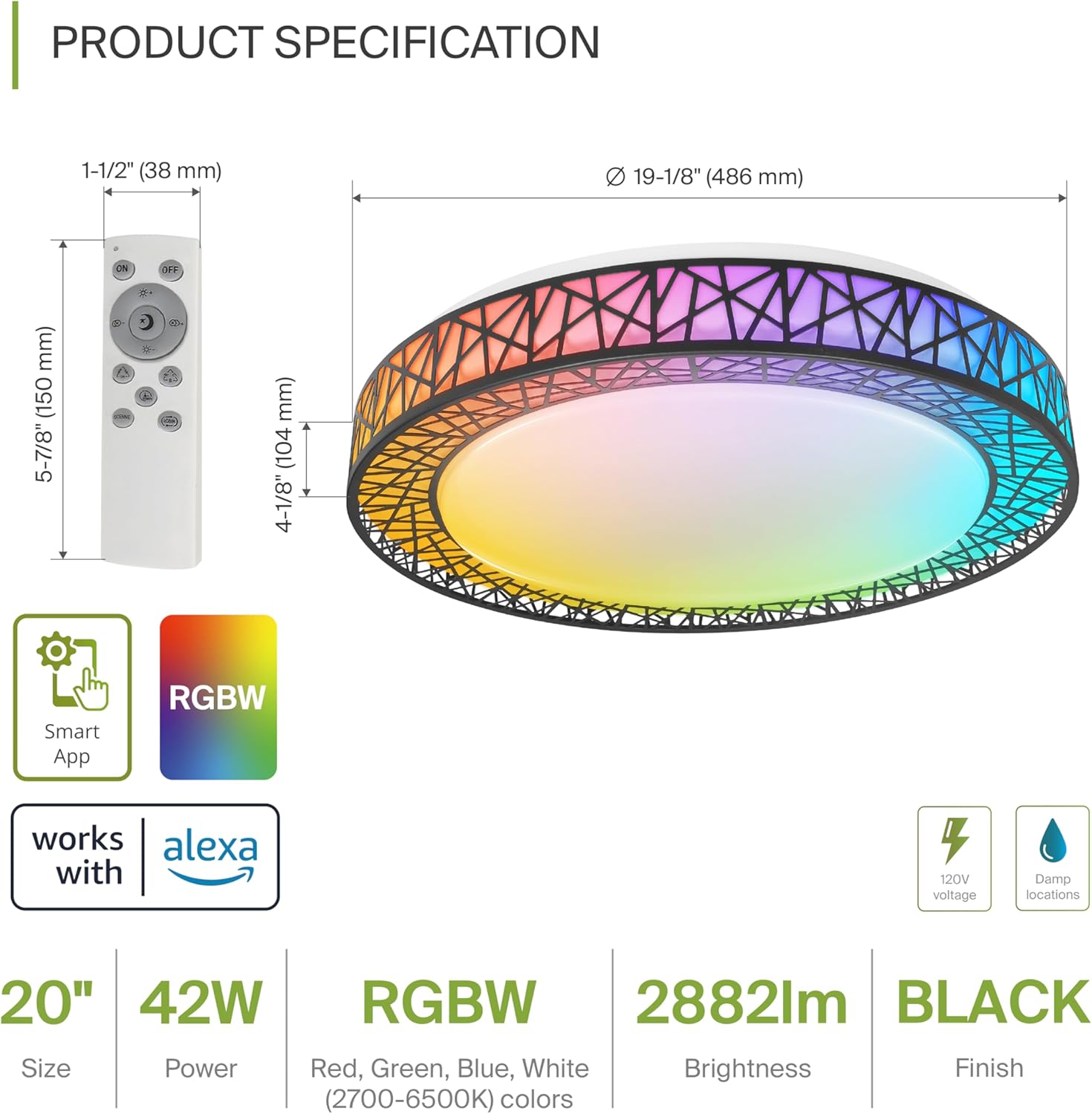
Product Specification Diagram: Dimensions, remote control, and key features.
| Ciri | Perincian |
|---|---|
| Jenama | ASD |
| Nama Model | LOFT |
| Nombor Model | A-LFM20D42SRGBW-B-2p |
| warna | 20" | Black | RGBW |
| bahan | Acrylic, Alloy Steel |
| Dimensi Produk | 19.1"L x 19.1"W x 4.1"H |
| Sumber Kuasa | Berwayar keras |
| Wattage | 42 watt |
| Voltage | 120 Volt |
| Kecerahan | 2579 lumen (max) |
| Suhu Warna | 2700-6500K (Boleh Laras CCT) |
| Ciri Khas | RGBW, Remote Control, Smart App, Dimmable |
| Kaedah Kawalan | Alat Kawalan Jauh, Suara (Alexa, Pembantu Google) |
| Penggunaan Dalaman/Luar | Dalaman |
| Tahap Ketahanan Air | Kalis Air (Damp Locations Rated) |
| Kehidupan Purata | 50,000 Jam |
| Pensijilan | Tersenarai ETL |
5. Arahan Pemasangan
Before starting, ensure the power is turned off at the circuit breaker.

Installation Diagram: Visual guide for mounting the light fixture.
- Sediakan Perlawanan: Remove the lens from the light fixture by rotating it clockwise.
- Lekapkan Pendakap: Attach the two screws to the outlet box on your ceiling.
- Sambungan Wayar: Connect the wires: Black to Black, White to White, and Ground to Ground. Secure these connections with wire nuts.
- Selamatkan Lekapan: Carefully tuck all wires back into the outlet box. Attach the light fixture to the mounting bracket.
- Reattach the Lens: Rotate the lens counter-clockwise to secure it to the fixture.
Once installed, restore power at the circuit breaker.
6. Smart Feature Setup
6.1. ASD SMART App Control
The ASD Smart RGBW Flush Mount Ceiling Light can be controlled via the ASD SMART App on your smartphone (Wi-Fi internet connection required).
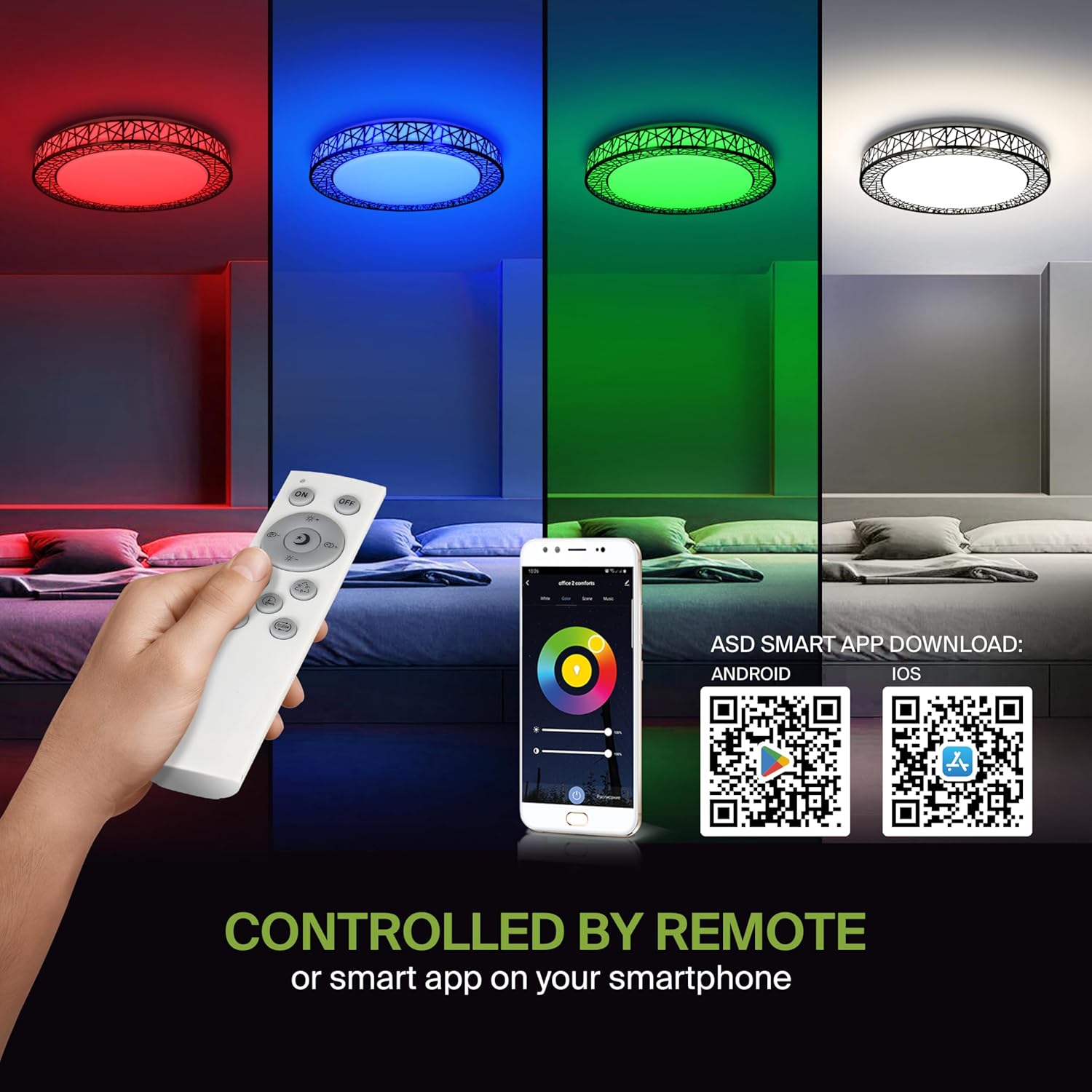
Remote control and ASD SMART App interface with QR codes for download.
- Muat turun Apl: Scan the QR code provided in the product images or search for "ASD SMART" in the Apple App Store (untuk iOS) atau Gedung Google Play (untuk Android).
- Daftar/Log Masuk: Ikut arahan dalam aplikasi untuk membuat akaun atau log masuk.
- Tambah Peranti: In the app, select the option to add a new device. Follow the pairing instructions to connect your ceiling light to the app via Wi-Fi.
6.2. Kawalan Suara (Alexa & Google Assistant)
The fixture is compatible with Amazon Alexa and Google Assistant for convenient voice control.

Voice control compatibility with Alexa and Google Assistant.
- Pautkan Akaun: Open your Alexa or Google Home app. Navigate to the 'Skills' or 'Works with Google' section.
- Cari untuk ASD SMART: Cari untuk the "ASD SMART" skill/service and enable it.
- Sambung: Link your ASD SMART account with your Alexa or Google Home account.
- Cari Peranti: Ask Alexa or Google Assistant to discover new devices, or manually initiate device discovery in their respective apps.
7. Arahan Operasi
7.1. Operasi Alat Kawalan Jauh
Use the included remote control to manage your light fixture's functions.
Remote control for easy access to light functions.
- Hidupkan/Mati Kuasa: Tekan butang kuasa untuk menghidupkan atau mematikan lampu.
- Pelarasan Kecerahan: Use the brightness buttons to increase or decrease the light intensity (smoothly dimmable).
- Color Selection (RGBW): Press the dedicated color buttons (Red, Green, Blue, White) or use the color wheel/mode buttons to cycle through 16.7 million colors.
- Suhu Warna (CCT): Adjust the white light color temperature between 2700K (warm white) and 6500K (cool white).
- Mod Pemandangan: Select pre-programmed lighting patterns or scenes.
7.2. Operasi Kawalan Aplikasi
The ASD SMART App offers comprehensive control over your light fixture.
- Spektrum Warna Penuh: Access the full 16.7 million RGBW color palette.
- Precise Dimming: Adjust brightness levels with fine control.
- Penjadualan: Set schedules for the light to turn on/off or change modes at specific times.
- Pengelompokan: Group multiple ASD smart lights to control them simultaneously.
- Adegan Tersuai: Create and save your own custom lighting scenes.
7.3. Voice Command Examples
After linking your device to Alexa or Google Assistant, use commands such as:
- "Alexa, turn on the [Light Name]."
- "Hei Google, tetapkan [Nama Cahaya] kepada biru."
- "Alexa, dim the [Light Name] to 50%."
- "Hey Google, make the [Light Name] warmer."
8. Penyelenggaraan
To ensure the longevity and optimal performance of your ASD Smart RGBW Flush Mount Ceiling Light, follow these maintenance guidelines:
- Pembersihan: Before cleaning, ensure the power to the fixture is turned off. Use a soft, dry, or slightly damp kain untuk mengelap permukaan. Elakkan menggunakan pembersih yang kasar, pelarut atau bahan kimia yang keras, kerana ini boleh merosakkan kemasan atau komponen elektrik.
- Pemeriksaan: Periodically check the fixture for any signs of damage, loose connections, or wear. If any issues are found, turn off the power and consult a qualified electrician.
- Penggantian mentol: This fixture uses integrated LED technology and does not require bulb replacement. The LEDs are designed for a long lifespan.
9. Penyelesaian masalah
If you encounter issues with your ASD Smart RGBW Flush Mount Ceiling Light, refer to the following common solutions:
| Masalah | Kemungkinan Punca | Penyelesaian |
|---|---|---|
| Lampu tidak menyala | Tiada bekalan elektrik, pendawaian longgar, suis rosak | Periksa pemutus litar. Pastikan semua sambungan wayar kukuh. Uji suis dinding. |
| Alat kawalan jauh tidak berfungsi | Dead batteries, remote out of range, pairing issue | Replace remote batteries. Ensure remote is within operating range. Re-pair the remote with the light (refer to app instructions for pairing). |
| Kawalan apl tidak berfungsi | No Wi-Fi connection, incorrect app pairing, outdated app | Verify Wi-Fi connectivity. Ensure the light is correctly paired in the ASD SMART App. Update the app to the latest version. |
| Kawalan suara tidak bertindak balas | Account not linked, device not discovered, incorrect commands | Ensure ASD SMART account is linked to Alexa/Google Assistant. Redo device discovery. Use correct voice commands. |
| Cahaya berkelip atau malap tanpa diduga | Unstable power supply, loose wiring, incompatible dimmer (if applicable) | Check power supply stability. Verify wiring. This light is dimmable via remote/app; external dimmers may cause issues. |
10. Maklumat Waranti
ASD menyediakan a Waranti terhad 5 tahun for this product. This warranty covers defects in materials and workmanship under normal use. Please retain your proof of purchase for warranty claims. For detailed warranty terms and conditions, please refer to the official ASD webtapak atau hubungi sokongan pelanggan.
11. Sokongan Pelanggan
If you have any questions, require technical assistance, or need to make a warranty claim, please contact ASD customer support through the following channels:
- Webtapak: Visit the official ASD Lighting webtapak untuk Soalan Lazim dan sumber sokongan.
- e-mel: Refer to your product packaging or the ASD weblaman web untuk alamat e-mel khidmat pelanggan.
- telefon: Refer to your product packaging or the ASD weblaman web untuk nombor telefon khidmat pelanggan.
Please have your model number (A-LFM20D42SRGBW-B-2p) and purchase date ready when contacting support.