
1. Pengenalan
The LEOBOG AULA F75 is a versatile 75% layout mechanical keyboard designed for various computing environments. It features tri-mode connectivity, hot-swappable switches, dynamic RGB backlighting, and durable PBT keycaps. This manual provides detailed instructions for setup, operation, and maintenance to ensure optimal performance.
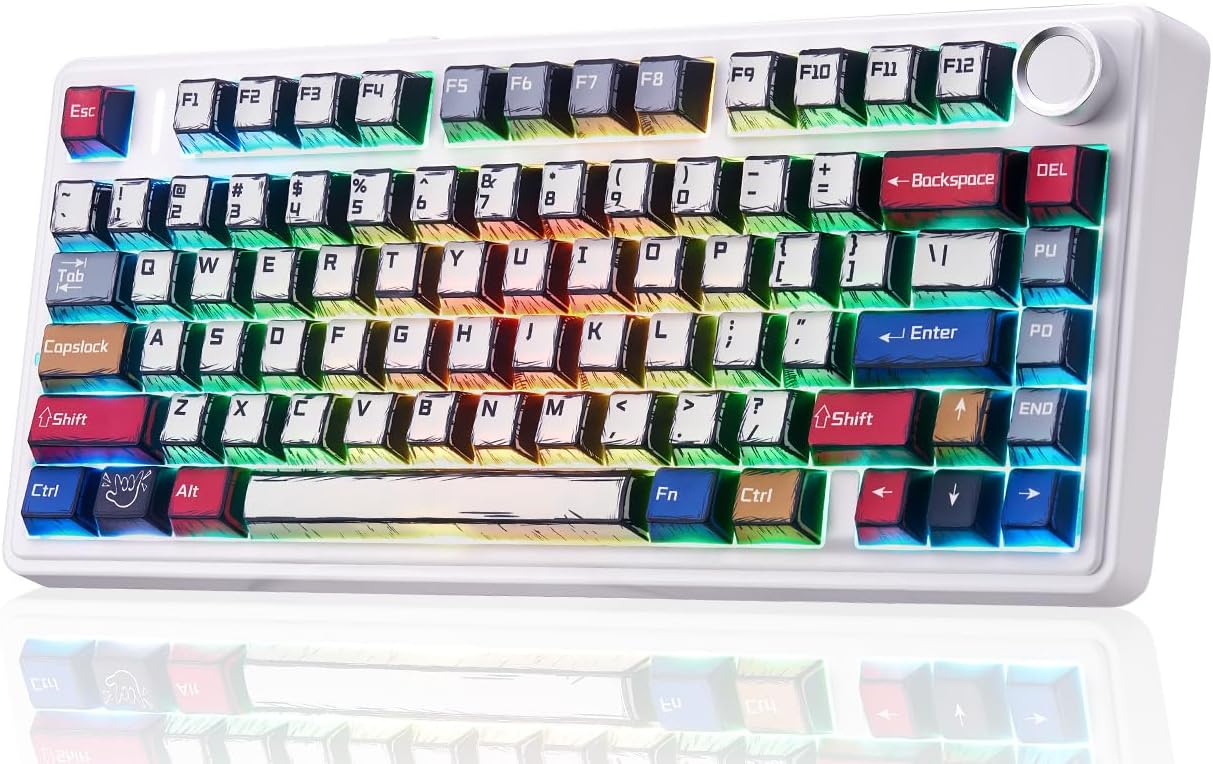
Figure 1: LEOBOG AULA F75 Wireless Mechanical Keyboard
2. Apa yang ada di dalam Kotak
- AULA F75 Gaming Keyboard x1
- LEOBOG Reaper Switches x4 (extra)
- Kabel USB x1
- Penarik Keycap x1
- Manual Pengguna x1
- Penutup Habuk x1
3. Persediaan
3.1. Tri-Mode Connection
The AULA F75 keyboard supports three connection modes: Bluetooth 5.0, 2.4GHz wireless, and USB wired. You can connect up to 5 devices simultaneously.

Figure 2: Tri-Mode Connection Options
3.1.1. Sambungan Wayarles 2.4GHz
- Locate the 2.4GHz USB receiver stored in the keyboard's dedicated slot.
- Palamkan penerima ke dalam port USB yang tersedia pada peranti anda.
- Switch the keyboard's mode selector to 2.4G. The keyboard will automatically connect.
3.1.2. Sambungan Bluetooth 5.0
- Switch the keyboard's mode selector to BT.
- Pada peranti anda, dayakan Bluetooth dan cari peranti yang tersedia.
- Select "AULA F75" from the list to pair.
- The keyboard can store up to 3 Bluetooth connections (BT1, BT2, BT3). Use FN + 1/2/3 to switch between paired devices.
3.1.3. Sambungan Berwayar USB
- Sambungkan kabel USB-C yang disediakan ke port USB-C papan kekunci.
- Sambungkan hujung kabel yang satu lagi ke port USB yang tersedia pada peranti anda.
- Papan kekunci secara automatik akan bertukar kepada mod berwayar dan mula mengecas.
3.2. Maklumat Bateri
The AULA F75 is equipped with a large 4000mAh battery. Battery life varies based on usage and RGB backlight settings:
- With backlight ON: Approximately 17.5 hours
- With backlight OFF: Approximately 266.5 hours

Figure 3: High-Capacity 4000mAh Battery
4. Arahan Operasi
4.1. Multi-functional Knob
The knob located on the top right of the keyboard provides quick control over various functions:
- Turn Right: Increase Brightness / Volume Up
- Turn Left: Decrease Brightness / Volume Down
- Press: Switch RGB Mode / Mute ON/OFF

Figure 4: Multi-functional Control Knob
4.2. Dynamic RGB Backlight
The F75 features 16.8 million RGB lighting colors and 16 lighting effects. You can adjust the lighting using the knob or FN key combinations:
- FN + /: Switch Lighting Color
- FN + ↑: Increase Lighting Brightness
- FN + ↓: Decrease Lighting Brightness
- FN + →: Increase Lighting Speed
- FN + ←: Decrease Lighting Speed
4.3. Full-Key Macro Programmable
Customize single keys or key combinations using the F75 driver software to enhance work efficiency or gaming performance. The keyboard also supports WIN key lock to prevent accidental presses during gameplay.

Figure 5: Driver Macro Customization Interface
4.4. Hot-Swap Customization
The F75 keyboard is equipped with a hot-swappable base that supports both 3-pin and 5-pin switches, allowing for easy customization without soldering. It comes with pre-lubricated LEOBOG Reaper switches for a smooth and creamy typing experience.

Figure 6: Hot-Swappable Switches and LEOBOG Reaper Switches
4.5. Double-Shot PBT Manga Keycaps
The F75 features Cherry-profile double-shot PBT manga keycaps, offering durability and a unique aesthetic. These keycaps are resistant to wear and maintain their appearance over time.
4.6. Gasket Structure
The keyboard incorporates a gasket structure with 5 sound and shock-absorbing layers. This design effectively reduces cavity noise and provides a softer, more comfortable typing feel.
4.7. 75% Layout
This 81-key compact layout integrates all essential keys in a smaller footprint, optimizing desk space without compromising functionality.
5. Penyelenggaraan
To ensure the longevity and optimal performance of your AULA F75 keyboard, follow these maintenance guidelines:
- Membersihkan Kap Kunci: Gunakan penarik penutup kekunci yang disediakan untuk menanggalkan penutup kekunci dengan berhati-hati. Bersihkannya dengan kain lembutamp kain dan sabun lembut jika perlu. Pastikan ia kering sepenuhnya sebelum dipasang semula.
- Cleaning the Keyboard Base: Use a can of compressed air to remove dust and debris from between the switches. Wipe the surface with a microfiber cloth.
- Penyelenggaraan Suis: If switches feel inconsistent, they can be hot-swapped with new ones using the switch puller.
- Penjagaan Kabel: Elakkan selekoh tajam atau tarikan berlebihan pada kabel USB-C untuk mengelakkan kerosakan.
6. Penyelesaian masalah
If you encounter issues with your AULA F75 keyboard, refer to the following common solutions:
- Papan Kekunci Tidak Membalas: Ensure the keyboard is charged. Check the connection mode (2.4G, BT, or Wired) matches your device. For wired mode, try a different USB port or cable. For wireless modes, try re-pairing.
- Isu Sambungan Bluetooth: Ensure the keyboard is in BT mode and discoverable. Remove previous pairings on your device and try pairing again. Ensure no other devices are interfering with the Bluetooth signal.
- 2.4GHz Wireless Issues: Ensure the USB receiver is securely plugged in. Try a different USB port. Ensure the keyboard is in 2.4G mode.
- RGB Backlight Not Working: Check brightness settings using FN key combinations or the multi-functional knob. Ensure the keyboard is not in a low power state.
- Kunci Tidak Mendaftar: If specific keys are not working, try hot-swapping the switch with one of the spare switches provided.
7. Spesifikasi
| Ciri | Perincian |
|---|---|
| Dimensi Produk | 12.67 x 5.62 x 1.69 inci |
| Berat Barang | 2.25 paun |
| Pengeluar | LEOBOG |
| Nombor Model Item | F75 |
| Bateri | 1 bateri AA diperlukan (termasuk) |
| Teknologi Ketersambungan | 2.4GHz Wireless, Bluetooth, USB-C |
| Penerangan Papan Kekunci | mekanikal |
| Ciri Khas | Backlit, Hot-Swappable, Integrated Stand, Programmable Keys, Volume Roller |
| Backlighting papan kekunci | RGB |
| Peranti Serasi | Konsol Permainan, Komputer Riba, PC, Telefon Pintar, Tablet |
8. Video Produk Rasmi
AULA F75 Keyboard Manga Style
This video showcases the unique manga-style keycaps and RGB lighting effects of the AULA F75 keyboard, highlighting its aesthetic appeal and dynamic visual features.
AULA F75, Pro & Max Hands-On Review - Worth the Hype?
A detailed hands-on review comparing the AULA F75, F75 Pro, and F75 Max models, discussing their features, typing experience, and overall value.
Watch First! LEOBOG x Aula F75 Mechanical Keyboard Review!
Semula yang mendalamview of the LEOBOG x Aula F75 mechanical keyboard, covering its design, features, and performance aspects.
These Gaming Keyboards Couldn't Be More Different, Which Wins?
A comparative video reviewing various gaming keyboards, including the AULA F75, highlighting their unique features and differences.
9. Waranti dan Sokongan
For warranty information and technical support, please refer to the official LEOBOG webtapak atau hubungi perkhidmatan pelanggan mereka. Simpan resit pembelian anda untuk tuntutan waranti.