
PROVISION ISR DI-340IPS-MVF-G
Manual Pengguna Kamera IP PoE ISR 4MP PERUNTUKAN
Model: DI-340IPS-MVF-G
1. Pengenalan
Thank you for choosing the PROVISION ISR 4MP IP PoE Camera. This manual provides essential information for the proper installation, operation, and maintenance of your security camera. Please read this manual thoroughly before using the product to ensure optimal performance and safety. This camera is designed for both indoor and outdoor surveillance, offering high-definition video, advanced night vision, and robust weather protection.
2. Maklumat Keselamatan
- Ensure the power supply meets the camera's specifications (PoE or 12V DC).
- Jangan dedahkan kamera kepada suhu melampau di luar julat pengendaliannya (-30°C hingga 60°C).
- Avoid direct exposure to strong light sources, which may affect image quality.
- Jangan cuba membuka atau mengubah suai kamera. Rujuk semua servis kepada kakitangan yang berkelayakan.
- Bersihkan lensa kamera dengan kain lembut dan kering. Elakkan bahan kimia yang keras.
3. Kandungan Pakej
Sahkan bahawa semua item terdapat dalam pakej:
- PROVISION ISR 4MP IP PoE Camera Body
- Manual Arahan
4. Persediaan
4.1. Pemasangan
The PROVISION ISR 4MP IP PoE Camera is designed for ceiling mount installation. Ensure the mounting surface is strong enough to support the camera's weight.
- Choose a suitable location for optimal surveillance coverage.
- Use the provided mounting template (if applicable) to mark drill holes on the ceiling.
- Tebuk lubang pandu dan masukkan penambat dinding jika perlu.
- Lekatkan tapak kamera pada permukaan pelekap menggunakan skru.
- Laraskan kamera viewsudut mengikut keperluan.

Image: Simple Installation. This image shows a person installing the camera on a ceiling, demonstrating the ease of physical setup.
4.2. Ketersambungan
This camera supports Power over Ethernet (PoE) for simplified installation, allowing both power and data transmission over a single Ethernet cable. Alternatively, it can be powered via a 12V DC power adapter (not included).
- Sambungan PoE: Connect an Ethernet cable from a PoE-enabled NVR or PoE switch to the camera's Ethernet port.
- Sambungan Standard: Connect an Ethernet cable to the camera's Ethernet port and a 12V DC power adapter to the camera's power input.

Image: Easy Integration with PoE. This diagram illustrates how the camera integrates with an NVR system using PoE, highlighting its plug-and-play capability.
4.3. Konfigurasi Awal
After physical installation and connection, configure the camera via its web interface or an NVR system.
- Mengakses Web Antara muka: Use a network scanner tool to find the camera's IP address. Enter the IP address into a web browser to access the camera's login page.
- NVR Integration: Refer to your NVR's manual for instructions on adding IP cameras. The camera supports ONVIF for broad compatibility.
5. Beroperasi
5.1. Ciri-ciri Utama
- Resolusi Tinggi 4MP: Provides clear and detailed video at 2560x1440 resolution.
- IR 40m Night Vision: Ensures clear imaging up to 40 meters in complete darkness.
- Mikrofon terbina dalam: Captures audio alongside video for comprehensive surveillance.
- Pengesanan Gerakan AI: Utilizes advanced algorithms to accurately detect human movement and reduce false alarms.
- Mampatan H.265+: Efficiently compresses video to save storage space without compromising quality.
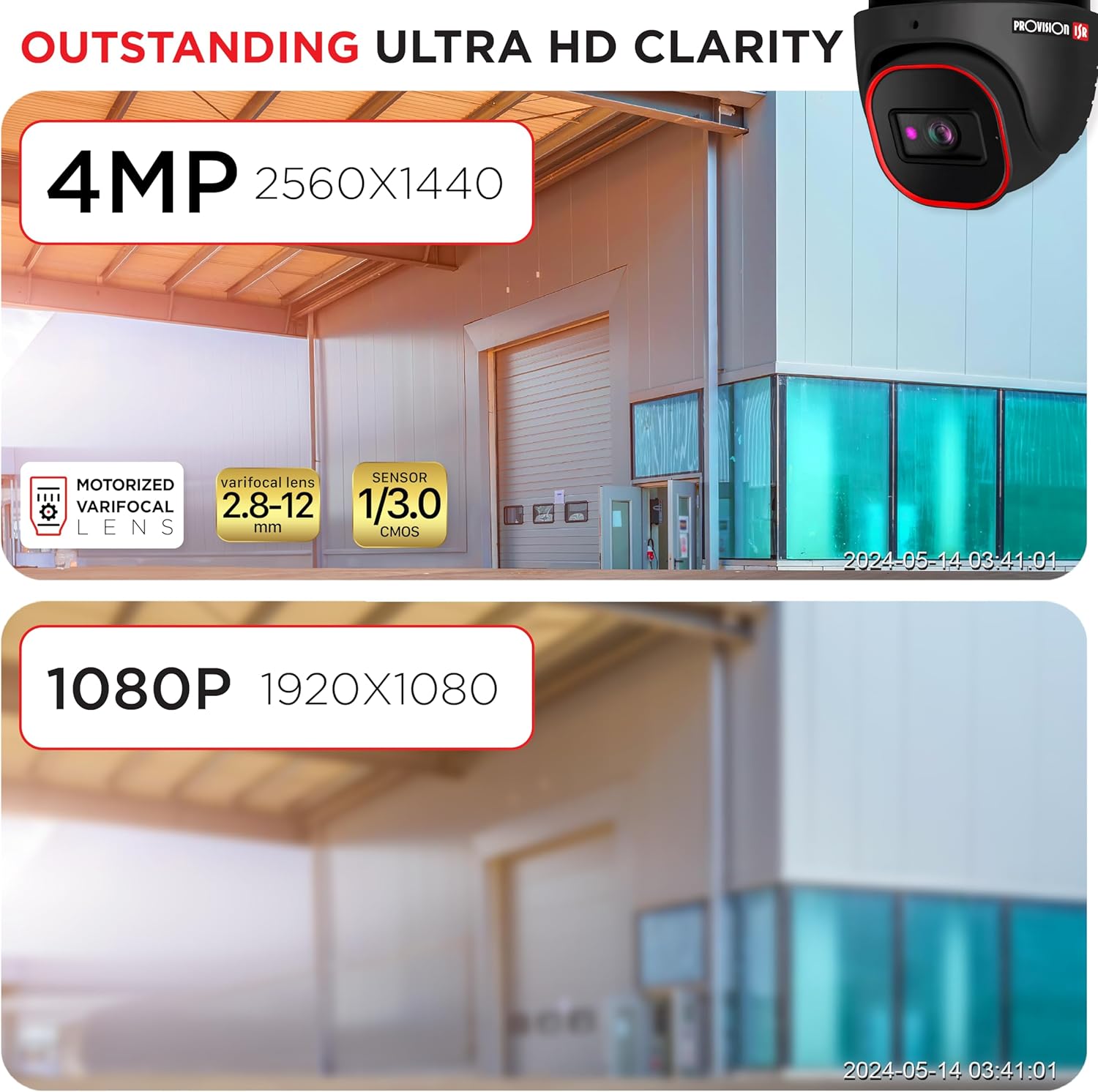
Image: Outstanding Ultra HD Clarity. This image visually compares the superior clarity of 4MP resolution (2560x1440) against 1080P (1920x1080).

Image: Built-in Microphone & Audio. This image highlights the camera's integrated microphone and audio input feature, enabling sound recording.
5.2. Akses Jauh
Akses foo secara langsungtage and recordings remotely via mobile devices or PCs.
- Aplikasi Mudah Alih: Download the official PROVISION ISR mobile app from your device's app store. Follow the in-app instructions to add and view kamera anda.
- Akses PC: Use the IP camera web interface or dedicated VMS (Video Management Software) for comprehensive monitoring and management.

Image: Remote Access with AI-Powered Detection. This image shows a smartphone displaying multiple live camera feeds, demonstrating remote monitoring capabilities and AI detection.
5.3. Mod Rakaman
The camera supports various recording modes to suit your surveillance needs:
- Rakaman Manual: Start and stop recording manually through the web interface or NVR.
- Rakaman Berjadual: Set specific times or days for continuous recording.
- Line-Crossing Recording: Trigger recording when an object crosses a predefined virtual line.
- Rakaman Pengesanan Gerak: Record only when motion is detected, saving storage space.
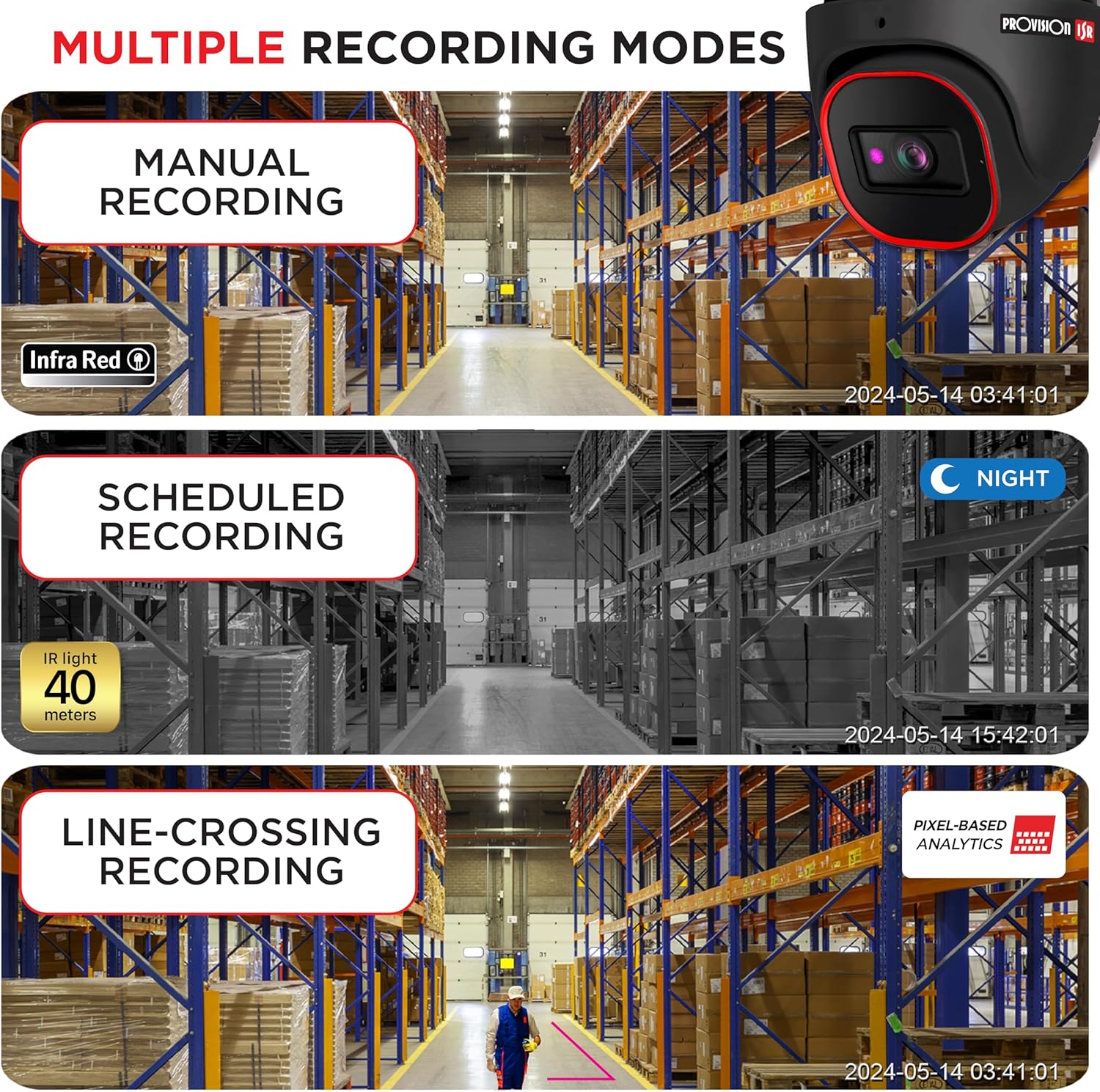
Image: Multiple Recording Modes. This image illustrates different recording options: manual, scheduled (night vision), and line-crossing triggered recording.

Image: Pixel Based Analytics. This diagram demonstrates the camera's ability to detect line crossing and sterile area intrusions using pixel-based analytics, providing real-time alerts.
6. Penyelenggaraan
Regular maintenance ensures the longevity and optimal performance of your camera.
- Pembersihan: Bersihkan kanta dan perumah kamera secara berkala dengan lembut, damp kain. Jangan gunakan pembersih yang kasar.
- Kemas kini Firmware: Check the PROVISION ISR website for the latest firmware updates. Keeping your firmware updated ensures access to new features and security enhancements.
- Perlindungan Alam Sekitar: The camera has an IP67 waterproof rating, protecting it from dust and water ingress. Ensure all cable connections are properly sealed to maintain this rating.

Image: Durable Design & Waterproof. This image highlights the camera's IP67 rating, indicating its durability and resistance to water and dust, along with its operational temperature range.
7. Penyelesaian masalah
Jika anda menghadapi masalah dengan kamera anda, rujuk masalah dan penyelesaian biasa berikut:
| Masalah | Kemungkinan Punca | Penyelesaian |
|---|---|---|
| Tiada output imej/video | No power; Network cable issue; Incorrect IP address | Check power connection; Verify Ethernet cable integrity; Ensure correct IP configuration |
| Kualiti imej yang lemah | Dirty lens; Insufficient lighting; Incorrect resolution settings | Clean the lens; Ensure adequate lighting or enable IR; Adjust resolution settings in web antara muka |
| Tidak dapat mengakses kamera dari jauh | Network configuration; Firewall settings; Incorrect port forwarding | Verify network settings (router, port forwarding); Check firewall rules; Ensure stable internet connection |
| Pengesanan gerakan tidak berfungsi | Sensitivity too low; Detection area not configured; Firmware outdated | Adjust motion detection sensitivity; Configure detection zones; Update camera firmware |
8. Spesifikasi
Detailed technical specifications for the PROVISION ISR 4MP IP PoE Camera:
| Ciri | Spesifikasi |
|---|---|
| Nama Model | Kamera Keselamatan |
| Penggunaan Dalaman/Luar | Luaran, Dalaman |
| Resolusi Tangkapan Video | 4MP (2560x1440) |
| Julat Penglihatan Malam | 40 Meter |
| Teknologi Ketersambungan | Berwayar (Ethernet) |
| Sumber Kuasa | Corded Electric (PoE supported) |
| Penarafan IP | IP67 Kalis Air |
| Faktor Bentuk | Kubah |
| Jenis Pemasangan | Pemasangan Siling |
| Viewsudut | 94 Darjah |
| Dimensi (L x W x H) | 6.25 x 5.5 x 5.5 inci |
| warna | Hitam |
| Peranti Serasi | Desktop, NVR, Smartphone |
| Jenis Pengawal | NVR, Android |
| UPC | 619317412736 |
| Nombor Model Item | DI-340IPS-MVF-G |
9. Waranti dan Sokongan
For warranty information and technical support, please contact PROVISION ISR directly or refer to their official webtapak. Pelan perlindungan mungkin tersedia untuk perlindungan lanjutan.
Manufacturer: Provision ISR
Ask a question about this manual
Ask about setup, troubleshooting, compatibility, parts, safety, or missing instructions. Manuals+ will review the question and use this page’s manual context to help answer it.