
TABWEE TABWEE T20 Tablet
TABWEE T20 Android Tablet User Manual
Model: TABWEE T20 Tablet | Brand: TABWEE
1. Pengenalan
This user manual provides comprehensive instructions for the TABWEE T20 Android Tablet. It covers setup, operation, maintenance, and troubleshooting to help you maximize your device's performance and ensure a smooth user experience. Please read this manual thoroughly before using your tablet.
2. Kandungan Pakej
Sahkan bahawa semua item yang disenaraikan di bawah terdapat dalam pakej anda:
- TABWEE T20 Android Tablet
- Papan Kekunci boleh tanggal
- Pen Stylus
- tetikus
- Kes Pelindung
- Stand Tablet
- Pelindung Skrin (dipasang terlebih dahulu atau berasingan)
- Kabel Pengecasan USB Jenis-C
- Penyesuai Kuasa (5V/2A)
- Manual Pengguna (dokumen ini)
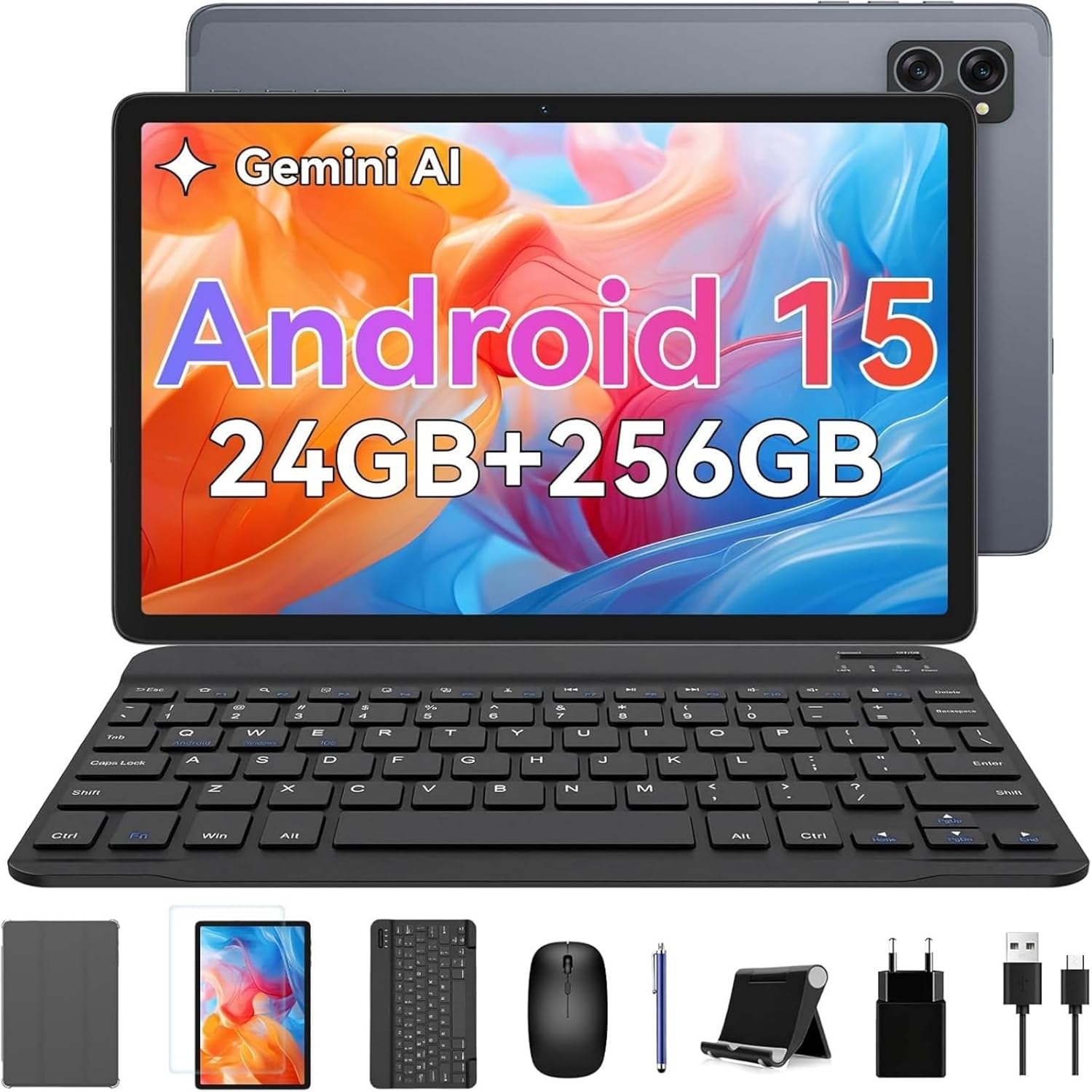
Image: The TABWEE T20 tablet displayed with its full set of accessories, including the detachable keyboard, mouse, stylus, protective case, tablet stand, charging cable, and power adapter.
3. Produk Lebihview
3.1 Ciri-ciri Utama
- Sistem pengendalian: Android 15 with Gemini AI 2.0
- Pemproses: Octa-Core Unisoc T606, 1.6 GHz
- Memori (RAM): 24 GB (8GB built-in + up to 16GB expansion)
- Storan (ROM): 256 GB internal, expandable up to 2 TB via TF card
- paparan: 10.1-inch HD+ IPS (1280 x 800 pixels), Widevine L1 support, 350 nits brightness
- Kamera: 5 MP Front Camera, 8 MP Rear Camera
- Bateri: 5000 mAh, providing extended usage times
- Ketersambungan: Dual-band 2.4G/5G Wi-Fi (802.11ac/b/g/n), Bluetooth 5, GPS
- Audio: Dual smart speakers for stereo sound, 3.5mm headphone jack
- Keselamatan: ID Wajah
- Dimensi: 24.64 x 15.49 x 0.76 cm (L x W x T)
- Berat: Lebih kurang 412 gram
3.2 Tablet Layout
Familiarize yourself with the physical components of your TABWEE T20 Tablet.


Image: Left: Rear view of the TABWEE T20 tablet, highlighting its camera array and slim profile. Right: Front view of the tablet in use, demonstrating the vibrant display.
- Kamera Depan: Located at the top center when held vertically, used for video calls and selfies.
- Kamera Belakang: Located on the back, used for taking photos and videos.
- Butang Kuasa: Typically on the side, used to turn the tablet on/off or wake/sleep the screen.
- Butang Kelantangan: Adjacent to the power button, used to adjust audio volume.
- Port USB Jenis-C: Untuk pengecasan dan pemindahan data.
- Bicu Fon Kepala 3.5mm: Untuk menyambungkan fon kepala berwayar.
- Gril Pembesar Suara: Dual speakers for enhanced audio output.
- Slot Kad MicroSD: For expanding storage with a TF card.
4. Persediaan
4.1 Pengecasan Awal
Before first use, fully charge your tablet. Connect the USB Type-C cable to the tablet's charging port and the other end to the power adapter. Plug the adapter into a wall outlet. The charging indicator will show the charging status. A full charge typically takes a few hours.
4.2 Hidupkan/Mati Kuasa
- Untuk Menghidupkan: Press and hold the Power button until the TABWEE logo appears on the screen.
- Untuk Mematikan: Press and hold the Power button until a power menu appears. Select "Power off" and confirm.
- Untuk Tidur/Bangun: Briefly press the Power button to turn the screen off/on without powering down the tablet.
4.3 Wizard Persediaan Awal
Upon first power-on, the tablet will guide you through an initial setup process:
- Pilih pilihan anda Bahasa.
- Sambung ke a Rangkaian Wi-Fi to enable internet access.
- Log masuk dengan anda Akaun Google or create a new one. This is essential for downloading apps from the Google Play Store and syncing data.
- Sediakan ID Wajah for convenient and secure unlocking.
- Review dan terima terma dan syarat.
- Complete the setup to access the Android home screen.
4.4 Memasukkan Kad TF (MicroSD).
To expand the tablet's storage up to 2TB:
- Cari slot kad TF di sisi tablet.
- Masukkan kad TF dengan lembut ke dalam slot dengan sentuhan emas menghadap ke bawah sehingga ia klik pada tempatnya.
- The tablet will detect the new storage. You may be prompted to format it for internal or portable storage.
4.5 Connecting Accessories (Keyboard, Mouse, Stylus)
The included keyboard and mouse connect via Bluetooth. The stylus may connect via Bluetooth or be passive, depending on its type.
Bluetooth Keyboard and Mouse:
- Ensure the keyboard/mouse are charged and powered on.
- On your tablet, go to tetapan > Peranti yang disambungkan > Bluetooth.
- Turn on Bluetooth. The tablet will scan for available devices.
- Select the keyboard or mouse from the list of available devices (e.g., "Bluetooth Keyboard", "Bluetooth Mouse").
- Ikut sebarang gesaan pada skrin untuk melengkapkan gandingan.
Pen Stylus:
If your stylus is Bluetooth-enabled, follow the same Bluetooth pairing steps as for the keyboard/mouse. If it's a passive stylus, no pairing is required; simply use it directly on the screen.
5. Mengendalikan Tablet Anda
5.1 Navigasi Asas
- Ketik: Pilih item atau buka apl.
- Sentuh dan Tahan: Akses menu kontekstual atau alihkan ikon.
- Leret: Scroll through pages, home screens, or menus.
- Cubit-untuk-Zum: Zoom in or out on photos, maps, or web muka surat.
5.2 Ciri-ciri Android 15
Your TABWEE T20 runs on Android 15, offering enhanced performance and features:
- Gemini AI 2.0: Utilize the integrated AI for smart suggestions, personalized settings, and intelligent automation.
- Mod Skrin Pisah: Run two apps simultaneously side-by-side for improved multitasking. To activate, open an app, swipe up from the bottom to view recent apps, tap the app icon at the top of its card, and select "Split screen".
- Multi-User Modes: Create separate user profiles for different family members or work/personal use, ensuring data privacy and customized experiences. Access via tetapan > Sistem > Berbilang pengguna.
- Enhanced Privacy & Security: Benefit from advanced encryption, granular permission management, and private notification modes.
5.3 Sambungan Wi-Fi
Untuk menyambung ke rangkaian Wi-Fi:
- Pergi ke tetapan > Rangkaian & internet > Internet.
- Ensure Wi-Fi is turned on.
- Pilih rangkaian yang anda inginkan daripada senarai.
- Masukkan kata laluan jika digesa dan ketik Sambung.
5.4 Penggunaan Kamera
The tablet features a 5MP front camera and an 8MP rear camera.
- Buka Kamera apl.
- Ketik ikon suis kamera untuk menogol antara kamera hadapan dan belakang.
- Ketik butang pengatup untuk mengambil foto atau memulakan/menghentikan rakaman video.
- Access settings within the camera app to adjust modes, resolution, and other parameters.
5.5 Main Semula Media dan Widevine L1
The TABWEE T20 supports Widevine L1, allowing you to stream high-definition content from popular streaming services like Netflix, Amazon Prime Video, and Disney+ in full HD resolution.
- Download your preferred streaming apps from the Google Play Store.
- Ensure a stable internet connection for optimal streaming quality.
- Utilize the dual smart speakers for an immersive audio experience, or connect headphones via the 3.5mm jack or Bluetooth.
6. Penyelenggaraan
6.1 Membersihkan Tablet Anda
- Use a soft, lint-free cloth (e.g., microfiber) to clean the screen and body.
- Untuk calitan degil, sedikit dampen kain dengan air atau pembersih skrin yang direka untuk elektronik.
- Elakkan menggunakan bahan kimia yang keras, bahan yang melelas atau kelembapan berlebihan.
6.2 Kemas Kini Perisian
Semak dan pasang kemas kini perisian secara berkala untuk memastikan prestasi, keselamatan dan akses kepada ciri baharu yang optimum.
- Pergi ke tetapan > Sistem > Kemas kini sistem.
- Ketik Semak kemas kini.
- If an update is available, follow the on-screen instructions to download and install it. Ensure your tablet has sufficient battery life or is connected to power during updates.
6.3 Pengurusan Storan
To maintain smooth operation, periodically manage your tablet's storage:
- Pergi ke tetapan > Penyimpanan kepada view penggunaan storan.
- Nyahpasang apl yang tidak digunakan.
- Kosongkan data cache untuk aplikasi.
- Bergerak besar files (photos, videos) to the TF card or cloud storage.
6.4 Penjagaan Bateri
- Elakkan suhu yang melampau, kerana ia boleh merendahkan hayat bateri.
- Jangan biarkan bateri habis sepenuhnya dengan kerap.
- Gunakan pengecas dan kabel asal yang disediakan.
7. Penyelesaian masalah
| Masalah | Penyelesaian yang Mungkin |
|---|---|
| Tablet tidak dihidupkan. | Ensure the tablet is charged. Connect to the charger and wait a few minutes before attempting to power on again. If unresponsive, press and hold the Power button for 10-15 seconds to force a restart. |
| Isu sambungan Wi-Fi. | Restart the tablet and your Wi-Fi router. Forget the network in Wi-Fi settings and reconnect. Ensure you are within range of the Wi-Fi signal. |
| Prestasi perlahan atau aplikasi ranap. | Close unused apps running in the background. Clear app cache (Settings > Apps > [App Name] > Storage & cache > Clear cache). Ensure sufficient free storage space. Restart the tablet. |
| Skrin sentuh tidak bertindak balas. | Restart the tablet. If the issue persists, ensure the screen is clean and free of debris. |
| Bateri cepat habis. | Reduce screen brightness. Close background apps. Disable Wi-Fi/Bluetooth/GPS when not in use. Check battery usage in Settings to identify power-hungry apps. |
| Cannot connect Bluetooth accessories. | Ensure the accessory is in pairing mode and charged. Turn Bluetooth off and on again on the tablet. Restart both devices. |
| Tablet freezes or crashes frequently. | Perform a factory reset as a last resort. Amaran: Ini akan memadamkan semua data pada tablet anda. Sandarkan data penting sebelum meneruskan. Pergi ke tetapan > Sistem > Tetapkan semula pilihan > Padam semua data (set semula kilang). |
8. Spesifikasi
| Ciri | Perincian |
|---|---|
| Jenama | TABWEE |
| Nama Model | Tabwee Tablet T20 2025 |
| Nombor Model | TABWEE T20 Tablette |
| Sistem Operasi | Android 15 & Gemini AI 2.0 |
| Pemproses | Unisoc Octa-Core, 1.6 GHz |
| RAM | 24 GB (8GB built-in + 16GB virtual) |
| Storan Dalaman | 256 GB |
| Storan Boleh Dikembangkan | Up to 2 TB via Micro SD (TF) card |
| Saiz Skrin | 10.1 Inci |
| Resolusi Paparan | 1280 x 800 Pixels (HD+ IPS) |
| Chipset Grafik | Unisoc T606 (Integrated) |
| Kamera Depan | 5 MP |
| Kamera Belakang | 8 MP |
| Kapasiti Bateri | 5000 mAh (Lithium-Polymer) |
| Ketersambungan | Wi-Fi (802.11a/b/g/n/ac, 2.4G/5G), Bluetooth 5, GPS |
| Pelabuhan | USB Type-C, 3.5mm Audio Jack, Micro SD Slot |
| Dimensi (L x W x H) | 24.64 x 15.49 x 0.76 cm |
| Berat badan | 412 Gram |
| Ciri Khas | Stereo Speakers, Expandable Storage, USB OTG Support, Detachable Keyboard Support, Stylus Support |
9. Waranti dan Sokongan
9.1 Waranti Produk
The TABWEE T20 Tablet comes with a Waranti 24 bulan dari tarikh pembelian. Waranti ini meliputi kecacatan pembuatan dan kerosakan dalam penggunaan biasa. Sila simpan bukti pembelian anda untuk tuntutan waranti.
Waranti tidak melindungi kerosakan yang disebabkan oleh:
- Kemalangan, penyalahgunaan atau penyalahgunaan.
- Pembaikan atau pengubahsuaian yang tidak dibenarkan.
- Operating the device outside the specified environmental conditions.
- Haus dan lusuh biasa.
9.2 Sokongan Pelanggan
For technical assistance, troubleshooting, or warranty inquiries, please contact TABWEE customer support:
- e-mel: Refer to the contact information provided on the official TABWEE website or your purchase platform (e.g., Amazon seller contact).
- Sokongan dalam talian: Visit the official TABWEE webtapak untuk Soalan Lazim, artikel sokongan dan borang hubungan.
TABWEE is committed to providing professional technical support and excellent customer service to resolve any issues you may encounter.
Ask a question about this manual
Ask about setup, troubleshooting, compatibility, parts, safety, or missing instructions. Manuals+ will review the question and use this page’s manual context to help answer it.