
1. Pengenalan
The LAUNCH X-431 i-TPMS is a professional handheld tool designed for comprehensive Tire Pressure Monitoring System (TPMS) services. It supports activation, programming, relearn, and diagnosis of TPMS sensors, specifically compatible with LAUNCH 315/433MHz sensors. This manual provides detailed instructions for the proper use and maintenance of your i-TPMS device.
2. Produk Lebihview
The X-431 i-TPMS is a portable and user-friendly device. It can operate in two primary modes: bound with a LAUNCH X-431 diagnostic scanner or standalone via the i-TPMS mobile application. Its core functions include reading sensor ID, tire pressure, tire temperature, and battery status, as well as performing sensor activation, programming, and relearn procedures.

Figure 2.1: LAUNCH X-431 i-TPMS device in operation.
2.1 Komponen Peranti

Figure 2.2: Labeled components of the X-431 i-TPMS device.
- Sensor Slot: Area for interacting with TPMS sensors.
- LED pengecasan: Menunjukkan status pengecasan.
- Skrin Paparan: Shows operational information and menus.
- Butang KE ATAS: Navigates menus upwards or increases values.
- Butang kuasa: Menghidupkan/mematikan peranti.
- Butang TURUN: Navigates menus downwards or decreases values.
- OK (Confirm) Button: Mengesahkan pilihan atau tindakan.
- Port Pengecasan: Port mikro USB untuk mengecas peranti.
3. Persediaan
3.1 Pengecasan Awal
Before first use, ensure the i-TPMS device is fully charged. Connect the device to a power source using the provided USB cable via the Charging Port. The Charging LED will indicate the charging status.
3.2 Menghidupkan/Mematikan
- Untuk menghidupkan: Tekan dan tahan butang Butang KUASA sehingga skrin menyala.
- Untuk mematikan kuasa: Tekan dan tahan butang Butang KUASA sehingga peranti dimatikan.
4. Arahan Operasi
The LAUNCH X-431 i-TPMS offers two modes of operation: binding with a compatible LAUNCH X-431 scanner or operating standalone with the i-TPMS mobile application.
4.1 Operation with LAUNCH X-431 Scanner
When bound with a LAUNCH X-431 scanner (8-inch screen or above), the i-TPMS can perform a full range of TPMS services including activation, programming, relearn, and diagnosis for sensors.

Gambar 4.1: Lebihview of TPMS functions available with an X-431 scanner.
- Pengaktifan: Read sensor ID, tire pressure, tire temperature, sensor battery, sensor position, and frequency.
- Pengaturcaraan: Create new sensor IDs for LAUNCH sensors. Supports auto-creation for 1-16 sensors or manual input.
- Belajar semula: Perform Stationary Relearn, Automatic Relearn, or OBD Relearning procedures to link new sensor IDs to the vehicle's ECU.
- Diagnosis: Read and clear TPMS fault codes.
4.2 Standalone Operation with i-TPMS Mobile App
The i-TPMS can also function independently when paired with the i-TPMS mobile application on an Android phone. This mode supports sensor activation and programming.
- Replace Tire Pressure Sensor: Guide through the process of replacing a sensor.
- Aktifkan Sensor: Initiate communication with the sensor to read its data.
- Program Sensor ID: Create new sensor IDs.
- Query Sensor OE Part Number: Retrieve original equipment part numbers for sensors.
- Generate Tire Pressure Detection Reports: Create reports based on sensor data.
4.3 Pengaturcaraan Sensor TPMS
The i-TPMS allows for programming LAUNCH LTR RF sensors to replace original equipment (OE) sensors. This process can be done automatically or manually.

Figure 4.2: Sensor ID programming options.
- Auto Create Sensor ID: If the original sensor ID is unknown, the i-TPMS can automatically generate a new ID.
- Manual Create Sensor ID: Allows the user to manually input a specific sensor ID.
4.4 Prosedur Pembelajaran Semula TPMS
After replacing or programming a sensor, a relearn procedure is necessary to ensure the vehicle's ECU recognizes the new sensor IDs.

Figure 4.3: TPMS Relearn options.
- Belajar Semula OBD: Connects to the vehicle's OBD-II port to transfer sensor IDs.
- Belajar Semula Automatik: Sensors are automatically learned by driving the vehicle.
- Belajar Semula Pegun: Requires specific steps to be performed while the vehicle is stationary.
4.5 Membaca dan Mengosongkan Kod Kerosakan
The i-TPMS can diagnose issues within the TPMS by reading and clearing diagnostic trouble codes (DTCs).
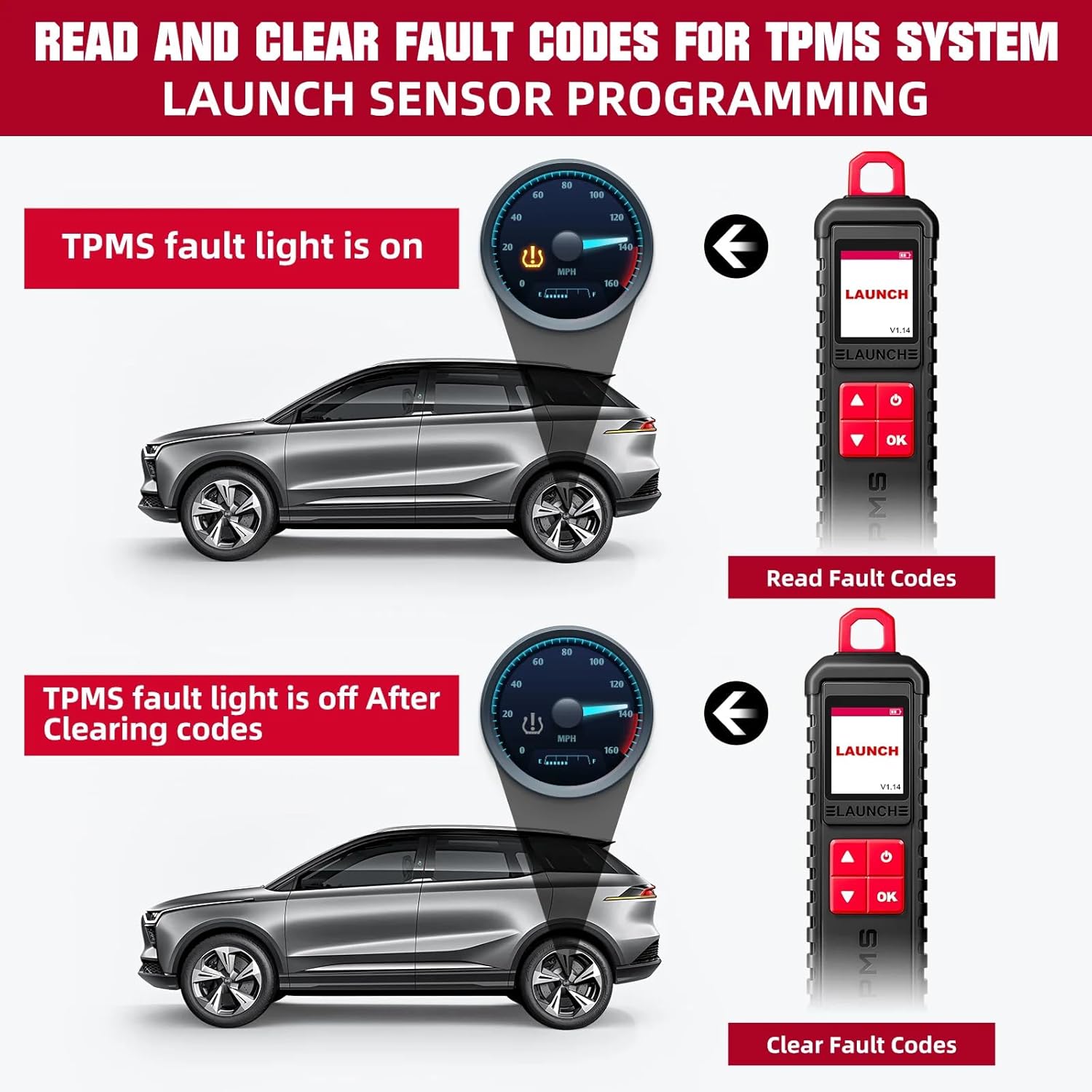
Figure 4.4: Process of reading and clearing TPMS fault codes.
- Baca Kod Kesalahan: Access and display current and stored TPMS-related DTCs.
- Kosongkan Kod Kesalahan: Erase DTCs from the vehicle's ECU after repairs or sensor replacements.
5. Keserasian
5.1 Compatible LAUNCH X-431 Devices
The LAUNCH X-431 i-TPMS is designed to work with various LAUNCH X-431 intelligent diagnostic tools that feature an 8-inch or larger screen.

Figure 5.1: Compatible LAUNCH X-431 scanner models.
- LAUNCH X-431 PRO
- LAUNCH X-431 V/PRO V5.0
- LAUNCH X-431 PRO TT/DYNO
- LAUNCH X-431 PRO 3
- LAUNCH X-431 PRO3S+/PRO3S+ V5.0
- LAUNCH X-431 V+
- LAUNCH X-431 PRO3 ACE/APEX
- LAUNCH X-431 PAD III
- LAUNCH X-431 PAD V
- LAUNCH X-431 PAD VII
Nota: The i-TPMS requires a compatible LAUNCH diagnostic tablet (8-inch or above) for full functionality. It cannot be used for advanced functions if purchased separately without a compatible scanner.
5.2 Supported Vehicle Brands and Protocols
The i-TPMS supports over 98% of mainstream vehicles equipped with a TPMS system. For OBDII diagnostics, it is compatible with most cars built in 1996 or later, supporting various protocols:
- ISO 14230-4 (KWP2000)
- ISO 15765-4 (BOLEH)
- ISO 9141-2 (ISO)
- ISO 14229 (UDS)
- SAE J1850 (VPW & PWM)
- Protokol asal pelbagai pengeluar
For advanced functions like active tests, all system diagnostics, and maintenance services, it covers approximately 95% of car models, including:
- Asia: Daewoo, Honda, JP Isuzu, Kia, Mazda, Mitsubishi, Nissan, SGM, Subaru, Suzuki, Toyota, Hyundai, Ssangyong.
- Eropah: Aston Martin, Audi, Benz, BMW, Citroen, Ferrari, Fiat, Land Rover, Maserati, Opel, Porsche, Renault, Rover, Saab, Tempat duduk, Skoda, Smart, Sprinter, Volvo, VW, Peugeot.
- Amerika: Chrysler, Amerika Syarikat-Ford, GM.
6. Penyelenggaraan
- Pembersihan: Gunakan yang lembut, damp kain untuk membersihkan peranti. Elakkan pembersih atau pelarut yang melelas.
- Storan: Simpan peranti di tempat yang sejuk dan kering jauh dari cahaya matahari langsung dan suhu yang melampau.
- Penjagaan Bateri: Untuk memanjangkan hayat bateri, elakkan daripada kerap mencas sepenuhnya peranti. Caskannya secara berkala.
- Kemas Kini Perisian: Regularly check for and install software updates for both the i-TPMS device and any paired X-431 scanner or mobile application to ensure optimal performance and compatibility.
7. Penyelesaian masalah
This section addresses common issues you might encounter with the LAUNCH X-431 i-TPMS.
| Masalah | Kemungkinan Punca | Penyelesaian |
|---|---|---|
| Peranti tidak dihidupkan. | Bateri lemah; kerosakan peranti. | Charge the device fully. If issue persists, contact customer service. |
| Tidak boleh mengaktifkan sensor. | Sensor out of range; sensor faulty; incorrect frequency. | Ensure device is close to the sensor. Verify sensor type and frequency (315/433MHz). Check sensor battery. |
| Programming fails. | Sensor not a LAUNCH LTR RF sensor; device not properly connected to scanner/app. | Ensure you are using LAUNCH LTR RF sensors. Verify connection to X-431 scanner or i-TPMS app. |
| Relearn procedure unsuccessful. | Incorrect relearn procedure for vehicle; vehicle not in relearn mode. | Consult vehicle's service manual for correct relearn procedure. Ensure vehicle is in TPMS relearn mode. |
8. Spesifikasi
| Ciri | Perincian |
|---|---|
| Jenama | PELANCARAN |
| Nombor Model | X-431 i-TPMS (SDC447) |
| Berat Barang | 2.2 paun |
| Supported Sensor Frequencies | 315/433MHz (LAUNCH sensors only) |
| Operating System (for paired scanner) | Windows 10 (as per product data, likely refers to scanner OS) |
| UPC | 810139309857 |
| Pengeluar | ITCARDIAG-Official |
9. Apa yang ada di dalam Kotak
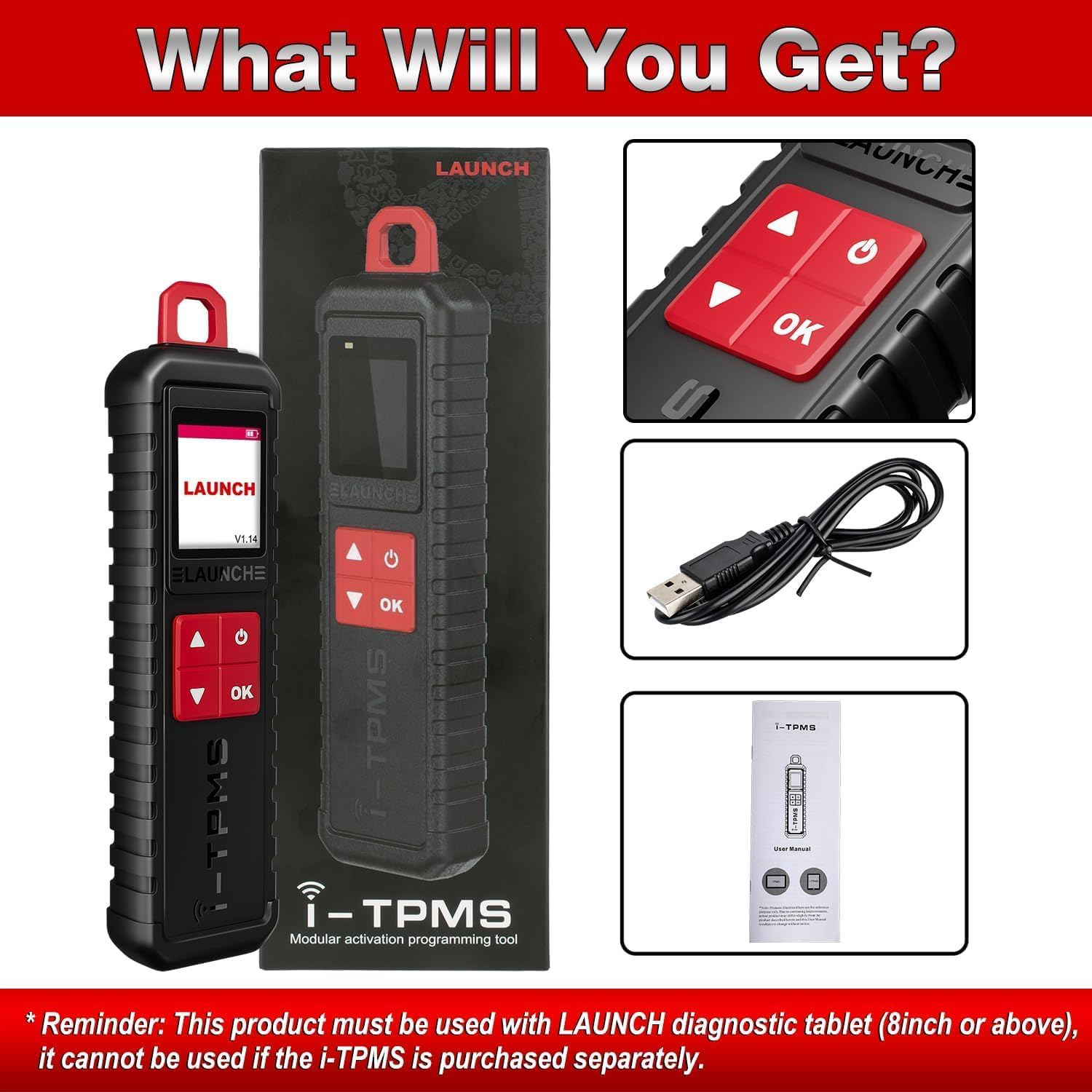
Rajah 9.1: Kandungan pakej.
- 1 x LAUNCH X-431 i-TPMS Device
- 1 x Kabel Pengecas USB
- 1 x Manual Pengguna (dokumen ini)
10. Waranti dan Sokongan
The manufacturer offers a free replacement or return service within 30 days of purchase. For any issues encountered during installation or use, please contact customer service for assistance.
For further inquiries or support, please refer to the contact information provided with your purchase or visit the official LAUNCH webtapak.
Online repair resources, including operating skills, DTC help, tech handbook, repair cases, and a tire pressure maintenance database, are available to assist with diagnosis and repair.