
1. Pengenalan
The RADIOMASTER Boxer Crush Radio Controller Transmitter is a high-performance remote control system designed for RC enthusiasts. It features the EdgeTX Operating System and an ExpressLRS RF System, providing reliable and precise control for various remote-controlled vehicles. This manual provides essential information for setting up, operating, and maintaining your Boxer Crush transmitter.
2. Ciri-ciri Produk
- Available in seven vibrant colors: Iron Grey, Frost White, Mint Mist, Hot Pink, Cherry Red, Iceberg Blue, and Lemon Twist Yellow.
- Equipped with CNC Aluminum AG01 Hall-effect Gimbals for precise control.
- Features a powerful STM32F407VGT6 microcontroller with 1MB Flash and 192KB RAM.
- Built-in ExpressLRS Backpack for enhanced connectivity.
- Redesigned SD card slot with a new and improved 512MB pre-loaded SD card included.

Image: The RADIOMASTER Boxer Crush Radio Controller in Iron Grey, highlighting its sleek design.

Image: A display of the RADIOMASTER Boxer Crush Radio Controller available in multiple vibrant colors.
3. Kandungan Pakej
Upon unboxing your RADIOMASTER Boxer Crush, ensure all the following items are present:
- 1 x Boxer Crush Radio Transmitter
- 1 x Signature Carry Case
- 1 x T Antenna
- 1 x Kabel USB-C
- 1 x Pelindung Gimbal

Image: The complete package contents of the RADIOMASTER Boxer Crush, including the transmitter, carry case, antenna, USB-C cable, and gimbal protector.
4. Persediaan
4.1. Pemasangan Bateri
The Boxer Crush requires a 2S 6200mAh Li-Po battery (not included) or AA batteries using the provided battery pack. To install:
- Cari petak bateri di bahagian belakang pemancar.
- Slide the battery cover latch to open the compartment.
- Connect the Li-Po battery to the internal connector, ensuring correct polarity. If using AA batteries, insert them into the battery pack and connect the pack.
- Carefully place the battery into the compartment and close the cover, ensuring it latches securely.
Video: Demonstrates battery installation and basic handling of the RADIOMASTER Boxer transmitter.
4.2. Pemasangan Antena
Attach the T Antenna to the designated port on the top of the transmitter. Ensure it is securely fastened but do not overtighten.
4.3. Penyingkiran Pelindung Gimbal
Remove the gimbal protector before operating the transmitter to allow full range of motion for the gimbals.
5. Arahan Operasi
5.1. Menghidupkan/Mematikan
To power on the transmitter, press and hold the power button located centrally above the screen until the EdgeTX logo appears. To power off, press and hold the power button until the power-down sequence completes.
5.2. Kawalan Asas
The Boxer Crush features two main gimbals for control inputs, along with various switches and buttons for auxiliary functions. Familiarize yourself with the layout:
- Gimbal: Control primary flight surfaces (throttle, aileron, elevator, rudder).
- Suis: Used for flight modes, arming, and other programmable functions.
- Buttons (RTN, PAGE, TELE, SYS): Navigate through the EdgeTX menu system.
- Roda Tatal: Used for menu navigation and parameter adjustment.
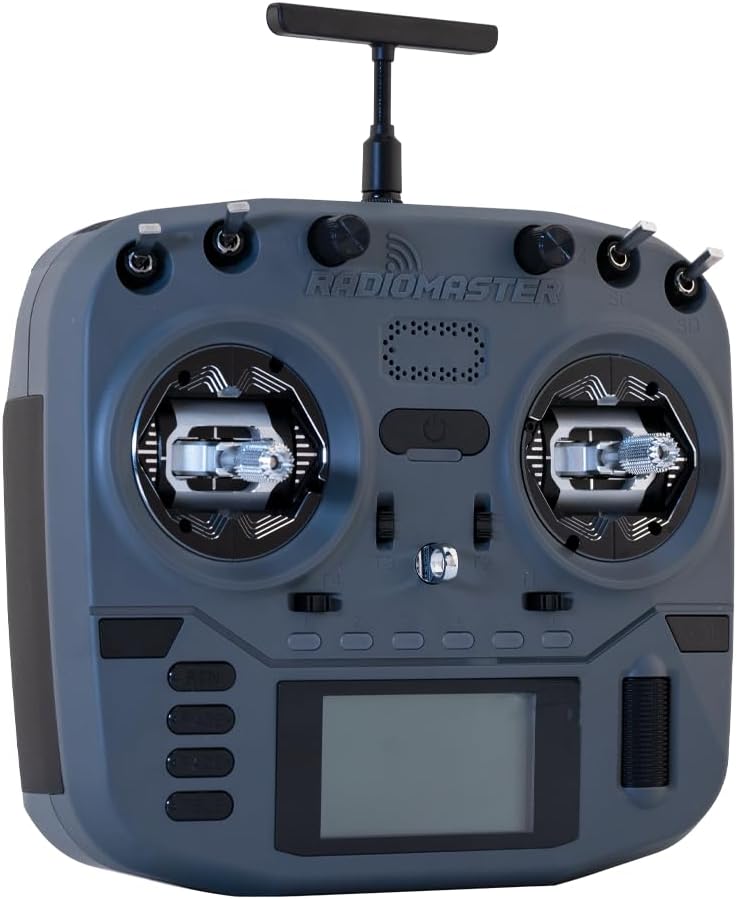
Imej: Depan view of the RADIOMASTER Boxer Crush, showing gimbals, screen, and control buttons.
5.3. Menu Navigation (EdgeTX)
The EdgeTX operating system provides extensive customization. Use the SYS button to enter the system menu, the PAGE buttons to navigate between pages, and the scroll wheel to select options and adjust values. The RTN button returns to the previous screen.
Video: Selesaiview of the RADIOMASTER Boxer Crush RC Transmitter, highlighting the EdgeTX Operating System and various features.
5.4. Penentukuran Joystick
Regular joystick calibration ensures optimal performance. Refer to the transmitter's internal menu for the calibration procedure. Generally, this involves moving both gimbals through their full range of motion.
Video: Demonstrates the joystick calibration process for a Radiomaster Pocket remote control. The steps are generally similar for the Boxer Crush.
5.5. Binding/Pairing
To bind your Boxer Crush transmitter to a receiver, follow the specific binding procedure outlined in your receiver's manual. Typically, this involves putting the receiver into bind mode and then initiating the binding process from the transmitter's EdgeTX menu.
6. Penyelenggaraan
- Pastikan pemancar bersih dan bebas daripada habuk dan serpihan. Gunakan kain lembut dan kering untuk pembersihan.
- Store the transmitter in its carry case when not in use to protect it from damage.
- Ensure batteries are charged using appropriate chargers and follow battery safety guidelines.
- Periodically check all switches and gimbals for smooth operation.
7. Penyelesaian masalah
- Pemancar tidak dihidupkan: Check battery charge and ensure it is correctly installed.
- No control response: Verify the transmitter is bound to the receiver and that the model is correctly selected in EdgeTX. Check antenna connection.
- Erratic control: Perform joystick calibration. Check for any physical obstructions to the gimbals.
- SD card errors: Ensure the SD card is properly seated. If issues persist, try reformatting the card (backing up data first) or using a different SD card.
8. Spesifikasi
| Ciri | Spesifikasi |
|---|---|
| Dimensi Produk | 7 x 6 x 4 inci |
| Umur Disyorkan Pengilang | 18 tahun dan ke atas |
| Pengeluar | Greathobby RC |
| Gimbal | CNC Aluminum AG01 Hall-effect Gimbals |
| Sistem Operasi | EdgeTX |
| Sistem RF | ExpressLRS |

Image: Diagram illustrating the dimensions of the RADIOMASTER Boxer Crush Radio Controller.
9. Waranti dan Sokongan
Untuk maklumat jaminan dan sokongan teknikal, sila rujuk RADIOMASTER rasmi webtapak atau hubungi pengedar sah anda. Simpan bukti pembelian anda untuk tuntutan waranti.
Official RADIOMASTER Webtapak: www.radiomasterrc.com


