
1. Pengenalan
This manual provides detailed instructions for the proper use and maintenance of your Oakcastle HIFI500 Remote Control. This remote is designed as a replacement or spare for the Oakcastle HIFI500 audio system, ensuring seamless control over its functions. Please read this manual thoroughly before use to ensure optimal performance and longevity of your remote control.
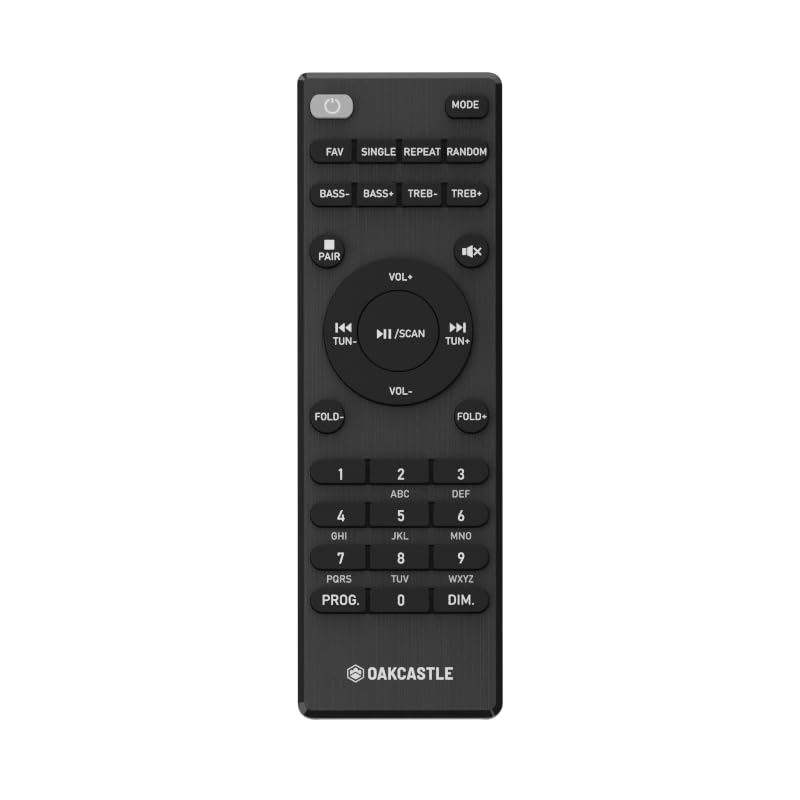
Rajah 1.1: Depan view of the Oakcastle HIFI500 Remote Control. This image displays the compact design and button layout, including power, volume, source selection, and playback controls, typical for operating the HIFI500 audio system.
2. Persediaan
2.1. Pemasangan Bateri
The Oakcastle HIFI500 Remote Control requires two AAA batteries (not included) for operation. Follow these steps to install the batteries:
- Cari petak bateri di belakang alat kawalan jauh.
- Tekan ke bawah pada tab dan luncurkan penutup bateri ke bawah untuk membukanya.
- Masukkan dua bateri AAA, pastikan terminal positif (+) dan negatif (-) sejajar dengan tanda di dalam petak.
- Luncurkan penutup bateri ke tempat semula sehingga ia berbunyi dengan selamat.
Nota: Always use new batteries and dispose of old batteries responsibly. Do not mix old and new batteries, or different types of batteries.
2.2. Penggunaan Awal
Once batteries are installed, the remote control is ready for use with your Oakcastle HIFI500 audio system. Point the remote directly at the infrared (IR) receiver on your HIFI500 system. No additional pairing is typically required for this replacement remote.
3. Mengendalikan Alat Kawalan Jauh
The Oakcastle HIFI500 Remote Control provides full functionality for your HIFI500 audio system. Below is a general guide to common button functions:
- Butang kuasa (⏻): Turns the HIFI500 system on or off.
- Kelantangan Naik/Turun (Vol+ / Vol-): Melaraskan tahap output audio.
- Bisu (🔇): Menyenyapkan output audio buat sementara waktu.
- Source/Input (Sumber): Cycles through available audio inputs (e.g., CD, FM, Bluetooth, AUX).
- Kawalan Main Semula (▶ / ⏸ / ⏹ / ⏪ / ⏩): Controls media playback (Play, Pause, Stop, Rewind, Fast Forward) for compatible sources like CD or USB.
- Butang Navigasi (▲ / ▼ / ◀ / ▶): Used to navigate menus and selections on the HIFI500 system display.
- Butang OK/Masuk: Mengesahkan pilihan.
- Pad Kekunci Berangka (0-9): For direct input of radio frequencies, track numbers, or other numerical data.
Refer to your Oakcastle HIFI500 audio system's main user manual for specific functions and advanced operations.
4. Penyelenggaraan
4.1. Pembersihan
To clean your remote control, gently wipe the surface with a soft, dry cloth. For stubborn dirt, slightly dampen kain dengan air atau pembersih yang lembut dan tidak melelas. Elakkan daripada menggunakan bahan kimia, pelarut atau bahan yang kasar, kerana ini boleh merosakkan kemasan alat kawalan jauh atau komponen dalaman.
4.2. Penggantian Bateri
Replace batteries when the remote's response becomes sluggish or stops working. Follow the battery installation steps outlined in Section 2.1. Always replace both batteries simultaneously with new ones.
4.3. Penyimpanan
When not in use for extended periods, it is recommended to remove the batteries from the remote control to prevent leakage, which can cause damage. Store the remote in a cool, dry place away from direct sunlight and extreme temperatures.
5. Penyelesaian masalah
If you encounter issues with your Oakcastle HIFI500 Remote Control, please refer to the following common problems and solutions:
- Jauh tidak bertindak balas:
- Check if the batteries are correctly installed with the correct polarity.
- Gantikan bateri dengan yang baru.
- Ensure there are no obstructions between the remote control and the HIFI500 system's IR receiver.
- Make sure you are within the effective range and pointing the remote directly at the HIFI500 system.
- Intermittent function:
- Ini selalunya menunjukkan kuasa bateri rendah. Gantikan bateri.
- Ensure the remote's IR emitter is clean and free from dirt or smudges.
If the problem persists after trying these solutions, please contact Oakcastle customer support.
6. Spesifikasi
| Ciri | Spesifikasi |
|---|---|
| Model | HIFI500 Remote Control |
| Jenama | Oakcastle |
| Teknologi Ketersambungan | Inframerah (IR) |
| Sumber Kuasa | 2 x Bateri AAA (tidak termasuk) |
| Bilangan Maks Peranti yang Disokong | 1 (Oakcastle HIFI500 Audio System) |
| Ciri Khas | Ringan |
| Berat Barang | 2.82 auns (lebih kurang 80 gram) |
| Dimensi Pakej | 8 x 3.2 x 2.5 inci (lebih kurang 20.3 x 8.1 x 6.3 cm) |
| Pengeluar | MAJORITI |
7. Waranti dan Sokongan
7.1. Maklumat Waranti
This Oakcastle HIFI500 Remote Control is covered by a manufacturer's warranty. Please refer to the warranty card included with your original Oakcastle HIFI500 audio system or visit the official Oakcastle webtapak untuk terma dan syarat jaminan terperinci. Simpan bukti pembelian anda untuk tuntutan waranti.
7.2. Sokongan Pelanggan
For technical assistance, troubleshooting beyond this manual, or warranty inquiries, please contact Oakcastle customer support. You can typically find contact information, including phone numbers, email addresses, and support portals, on the official Oakcastle webtapak.
Please have your product model (HIFI500 Remote Control) and purchase details ready when contacting support.