
1. Pengenalan
This manual provides essential instructions for the assembly, operation, and maintenance of your MCombo Power Zero Wall Hugger Recliner Chair, model ST257. Please read this manual thoroughly before use to ensure proper function and longevity of your product. Keep this manual for future reference.

Image 1.1: MCombo Power Zero Wall Hugger Recliner Chair (Beige)
2. Maklumat Keselamatan
Awas: Assemble the chair carefully due to its unique structure and wiring design. Regularly inspect and maintain all electrical parts and upholstery material to ensure safety and prevent potential hazards.
- Ensure all connections are secure before operating the recliner.
- Jauhkan kanak-kanak dan haiwan peliharaan daripada bahagian kerusi malas yang bergerak.
- Do not place hands or feet near the reclining mechanism during operation.
- Elakkan daripada menumpahkan cecair pada panel kawalan atau komponen elektrik.
- Unplug the chair from the power outlet before cleaning or performing maintenance.
3. Kandungan Pakej
Sahkan bahawa semua komponen ada sebelum memulakan pemasangan. Pakej ini biasanya merangkumi:
- Backrest
- Tempat Letak Tangan (Kiri dan Kanan)
- Base (Seat and Footrest Assembly)
- Penyesuai Kuasa dan Kabel
- Accessories Box (containing small parts and hardware)
- Manual Arahan (dokumen ini)

Image 3.1: Packaging for the MCombo Recliner Chair
4. Arahan Pemasangan (Persediaan)
Assembly is designed to be straightforward and typically requires no additional tools. It can be completed by a novice in approximately 20 minutes.
- Buka Pembungkusan Komponen: Carefully remove all parts from the two boxes. Place them on a soft, clean surface to prevent damage.
- Pasang Sandaran Belakang: Align the metal brackets on the backrest with the receivers on the seat base. Slide the backrest down firmly until it clicks into place. Ensure it is securely fastened.
- Sambungkan Wayar Elektrik: Locate the electrical wires extending from the backrest and the seat base. Connect them according to the color-coded or labeled connectors. Ensure a snug fit.
- Pasang tempat letak tangan: Slide the armrests onto the designated slots on the sides of the seat base. Press down until they lock into position.
- Sambungkan Kuasa: Plug the power adapter into the chair's power input, then plug the adapter into a standard wall outlet.
For visual guidance, refer to the diagrams below illustrating key components:

Image 4.1: Backrest

Image 4.2: Armrest

Image 4.3: Base

Image 4.4: Accessories Box
5. Arahan Operasi
Your MCombo recliner features a power reclining mechanism and an adjustable headrest for personalized comfort.
5.1 Power Reclining Mechanism
To recline the chair, locate the control panel on the side of the armrest. Press and hold the appropriate button to smoothly extend the footrest and recline the backrest to your desired position (maximum reclining angle: 145°).

Image 5.1: Recliner in a partially reclined position
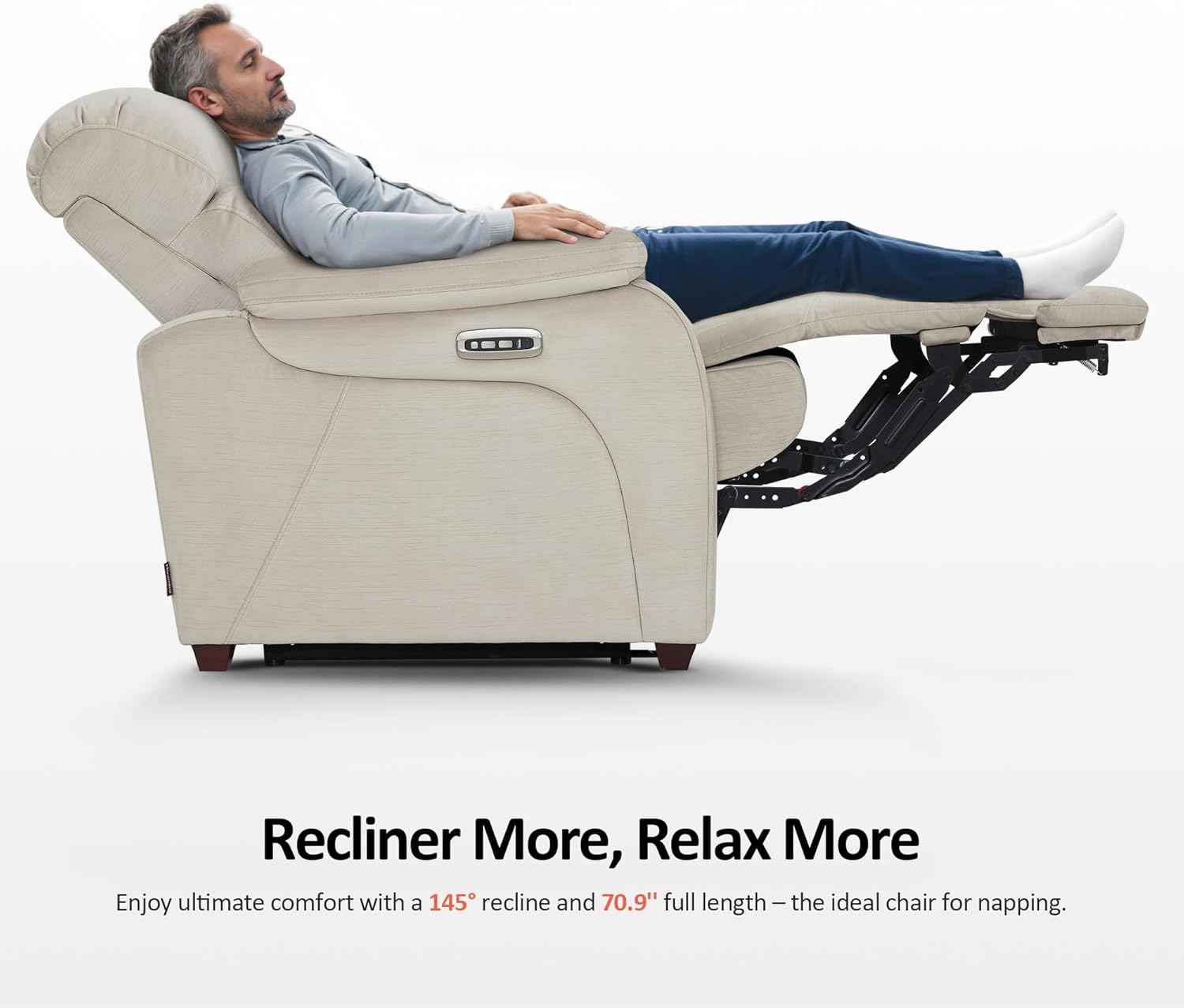
Image 5.2: Full recline position for relaxation
5.2 Adjustable Power Headrest
The headrest can be adjusted independently to provide optimal neck and head support. Use the dedicated button on the control panel to tilt the headrest from 0° to 35°, enhancing comfort for activities like watching TV or reading.

Image 5.3: Adjustable headrest mechanism
5.3 User-Friendly Controller and Charging Ports
The control panel includes a home button that, when pressed, returns the chair smoothly to its original upright position in approximately 8 seconds. Dual USB and USB-C charging ports are integrated into the armrest, allowing convenient charging for phones, tablets, and other compatible devices.

Image 5.4: Control panel with USB and USB-C charging ports
5.4 Zero Wall Hugger Feature
The forward-gliding mechanism of this recliner allows it to be placed close to a wall while still fully reclining, optimizing space in smaller rooms or RVs. The chair moves forward as it reclines, requiring minimal clearance behind it.

Image 5.5: Zero Wall Hugger design for space-saving
6. Penyelenggaraan dan Penjagaan
Penjagaan yang betul akan memanjangkan hayat dan penampilan kerusi malas anda.
- Penjagaan Fabrik: For general cleaning, vacuum the fabric regularly using a soft brush attachment to remove dust and loose particles. For spills, blot immediately with a clean, dry cloth. Avoid rubbing, which can spread the stain. For stubborn stains, consult a professional upholstery cleaner or use a mild fabric cleaner according to its instructions. Test any cleaning product on an inconspicuous area first.
- Komponen Elektrik: Keep the power cord and adapter free from damage. Do not expose electrical parts to moisture. If any electrical component appears damaged or malfunctions, discontinue use and contact customer support.
- Penjagaan Mekanisme: The reclining mechanism is designed for durability. Avoid forcing the mechanism. Periodically check that all bolts and connections are tight. Do not apply lubricants unless specifically instructed by the manufacturer.
- Penjagaan Bingkai: The chair features solid wood feet. Clean them with a soft, damp kain dan keringkan segera. Elakkan bahan kimia yang keras.

Image 6.1: Fabric detail with OEKO-TEX certification

Image 6.2: Certifications for materials (CertiPUR-US, OEKO-TEX, FSC)
7. Penyelesaian masalah
Jika anda menghadapi masalah dengan kerusi malas anda, rujuk langkah penyelesaian masalah biasa berikut:
- Kerusi Tidak Boleh Bersandar:
- Ensure the power cord is securely plugged into both the chair and a working wall outlet.
- Periksa sama ada alur keluar dinding berfungsi dengan memasang peranti lain.
- Verify that all internal electrical connections within the chair are properly connected (refer to assembly instructions).
- Headrest Does Not Adjust:
- Confirm the chair is receiving power.
- Check the headrest's electrical connection.
- USB/USB-C Ports Not Charging:
- Ensure the chair is powered on and fully connected.
- Test with a different charging cable or device to rule out external issues.
- Bunyi Luar Biasa Semasa Operasi:
- Inspect the reclining mechanism for any obstructions.
- Pastikan semua bolt pemasangan diketatkan.
Jika masalah berterusan selepas mencuba langkah ini, sila hubungi sokongan pelanggan.
8. Spesifikasi
| Ciri | Perincian |
|---|---|
| Jenama | MCombo |
| Nama Model | Zero Wall-Hugger Power Recliner Chair |
| Nombor Model Item | 6160-ST257 |
| warna | Beige |
| Dimensi Produk (D x W x H) | 38.2"D x 36"W x 41.4"H |
| Sudut Berbaring Maks | 145° |
| Adjustable Headrest Tilt | 0° hingga 35° |
| Ketinggian Tempat duduk | 19.3 Inci |
| Kedalaman Tempat duduk | 22.4 inci |
| Ketinggian Bahagian Belakang Tempat Duduk | 27.2 Inci |
| Ketinggian Lengan | 25.2 Inci |
| Lebar Sandaran Kerusi | 27.6 Inci |
| Berat Barang | 130 paun |
| bahan | Fabric (Upholstery), Foam (Fill), Wood (Frame/Legs) |
| Ciri Khas | Zero Wall Hugger, Power Reclining, Adjustable Headrest, USB & USB-C Charging Ports |

Image 8.1: Detailed dimensions of the recliner chair
9. Maklumat Waranti
Your MCombo Power Zero Wall Hugger Recliner Chair is covered by a Waranti Terhad 2 Tahun from the date of purchase. This warranty covers:
- Mekanisme Berbaring
- Bahagian Elektrik
- Bahan Upholsteri
- Kusyen
- Bingkai Kayu dan Logam
This warranty is valid for manufacturing defects and does not cover damage resulting from misuse, accidents, unauthorized repairs, or normal wear and tear. Please retain your proof of purchase for warranty claims.
10. Sokongan Pelanggan
For any questions, assistance, or warranty claims, please contact MCombo customer support. Have your model number (6160-ST257) and proof of purchase ready when contacting support.
You can visit the official MCombo store for more information and support resources: MCombo Store on Amazon