
pengenalan
Thank you for choosing the CHUWI Wireless Mouse S1. This 2.4GHz USB computer mouse is designed for comfort and efficiency, featuring a 1600 DPI optical sensor with 3-level adjustable DPI settings, long battery life, and broad compatibility with various devices. This manual provides essential information for setting up, operating, maintaining, and troubleshooting your new wireless mouse.
Kandungan Pakej
Sila sahkan bahawa semua item terdapat dalam pakej anda:
- CHUWI Wireless Mouse
- Penerima USB
- Dokumentasi Pengguna
- 1 Bateri AA (dipasang atau disertakan secara berasingan)
Panduan Persediaan
Follow these steps to set up your CHUWI Wireless Mouse S1:
- Cari Penerima USB: Gently remove the bottom cover of the mouse by sliding it downward. The USB receiver and the battery compartment are located inside.
- Pasang Bateri: Insert the provided AA battery into the battery compartment, ensuring correct polarity.
- Dapatkan Penerima USB: Take out the small USB receiver from its storage slot.
- Sambung ke Peranti Anda: Pasangkan penerima USB ke port USB yang tersedia pada komputer, komputer riba atau tablet anda.
- Tutup Penutup: Replace the bottom cover of the mouse.
- Hidupkan kuasa: Slide the power switch at the bottom of the mouse to the "on" position. The mouse should now be ready for use.

Figure 1: Locating the USB receiver and installing the AA battery.
Arahan Operasi
Menyambungkan Tetikus
The CHUWI Wireless Mouse S1 uses 2.4G wireless technology for a stable connection up to 33 feet (10 meters). Once the USB receiver is plugged into your device and the mouse is powered on, it will automatically establish a connection. No complex pairing is required.

Figure 2: Establishing a 2.4G wireless connection.
Pelarasan DPI
The mouse features three adjustable DPI (Dots Per Inch) settings: 800, 1200, and 1600. To switch between DPI levels, simply press the DPI button located below the scroll wheel. Each press cycles through the available settings, allowing you to adjust cursor sensitivity for different tasks such as general browsing, office work, graphic design, or gaming.

Figure 3: Adjusting DPI settings with the dedicated button.
Butang Navigasi
The mouse is equipped with convenient forward and back buttons on the side. These buttons allow for quick navigation through web pages, documents, and folders, enhancing your workflow efficiency.
Ciri Klik Senyap
The CHUWI Wireless Mouse S1 is designed with silent click buttons, making it suitable for quiet environments such as libraries, offices, or late-night use. This feature minimizes click noise without compromising tactile feedback.

Figure 4: The silent click feature for quiet operation.
Reka Bentuk Ergonomik
The mouse features an ergonomic design that conforms to the natural curve of your hand, providing a comfortable grip for extended use. Its compact and lightweight build, along with rubber-coated side grips, helps reduce hand fatigue. The design is ambidextrous, accommodating both left-handed and right-handed users.

Rajah 5: Reka bentuk ergonomik untuk kegunaan yang selesa.
Maklumat Bateri
The CHUWI Wireless Mouse S1 is powered by a single AA battery, offering an approximate battery life of 12-15 months. The mouse is designed for convenience with no on/off switch; simply pick it up and start using it. This design eliminates the need for frequent charging, providing hassle-free use for mobile work and daily tasks.
Penyelenggaraan
To ensure optimal performance and longevity of your CHUWI Wireless Mouse S1:
- Pembersihan: Gunakan kain lembut dan kering untuk mengelap permukaan tetikus. Untuk kotoran degil, sedikit dampLap kain dengan air atau larutan pembersih yang lembut. Elakkan menggunakan bahan kimia yang keras atau bahan yang melelas.
- Penyelenggaraan Sensor: Periodically clean the optical sensor area at the bottom of the mouse with a cotton swab to prevent dust buildup, which can affect tracking performance.
- Storan: When not in use for extended periods, consider removing the AA battery to prevent potential leakage. Store the USB receiver in its designated slot within the mouse to prevent loss.
- Perlindungan Alam Sekitar: The mouse features a splash-proof and dust-proof design, contributing to its durability. However, avoid exposing it to excessive moisture or dust.
Menyelesaikan masalah
If you encounter issues with your CHUWI Wireless Mouse S1, refer to the following common solutions:
- Tetikus Tidak Menjawab:
- Ensure the AA battery is correctly installed and has sufficient charge. Replace the battery if necessary.
- Sahkan bahawa penerima USB dipasang dengan selamat ke port USB yang berfungsi pada komputer anda. Cuba port USB yang lain.
- Make sure the mouse's power switch (if present, though this model is designed to be always on when battery is inserted) is in the 'on' position.
- Mulakan semula komputer anda.
- Pergerakan Kursor Tidak Menentu:
- Bersihkan sensor optik di bahagian bawah tetikus.
- Pastikan anda menggunakan tetikus pada permukaan yang sesuai. Permukaan yang sangat reflektif atau lutsinar boleh menjejaskan penjejakan. Pad tetikus disyorkan.
- Check for interference from other wireless devices. Move the mouse closer to the USB receiver.
- Isu Sambungan:
- If the connection is unstable, try plugging the USB receiver into a different USB port, preferably one closer to the mouse.
- Pastikan tiada objek logam besar antara tetikus dan penerima yang boleh menghalang isyarat.
- Butang Tidak Berfungsi:
- Check if the mouse is properly connected and powered on.
- Uji tetikus pada komputer lain untuk menentukan sama ada masalahnya adalah pada tetikus atau tetapan komputer.
Spesifikasi
Detailed specifications for the CHUWI Wireless Mouse S1:
| Dimensi Produk | 3.89 x 2.36 x 0.04 inci |
| Berat Barang | 1.76 auns |
| Nombor Model Item | CHUWI Wireless Mouse S1 |
| Bateri | 1 bateri AA (termasuk) |
| Teknologi Ketersambungan | Wayarles 2.4G (Penerima USB) |
| Teknologi Pengesanan Pergerakan | Optik |
| Tetapan DPI | 800, 1200, 1600 (Boleh Laras) |
| Butang | 4 (Left, Right, Scroll Wheel/Middle, DPI, Forward, Back) |
| warna | Hitam |
| Keserasian | PC, Mac, Laptop, Windows Tablets (Universal USB interface) |
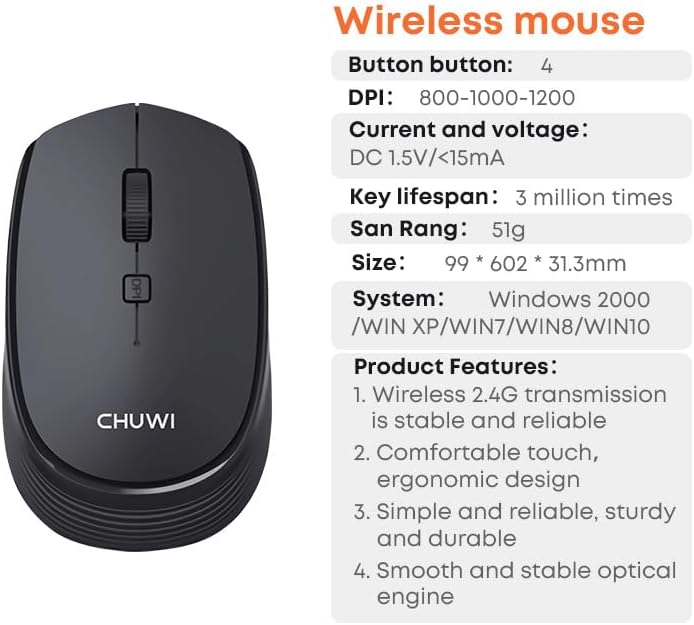
Figure 6: CHUWI Wireless Mouse S1 and its key specifications.
Waranti dan Sokongan
CHUWI is committed to providing high-quality products and excellent customer service. While specific warranty details for this mouse are not provided, CHUWI generally offers professional support for its products.
- Sokongan Profesional: CHUWI offers lifetime factory professional support.
- Sokongan dalam talian: 24 hours of online support is available to assist with any issues or questions you may have.
For further assistance, please visit the official CHUWI webtapak atau hubungi perkhidmatan pelanggan mereka secara langsung.