
L600 Pro Max
Professional Drone L600 Pro MAX User Manual
Model: L600 Pro Max | Brand: Generic
pengenalan
This user manual provides comprehensive instructions for the safe operation, setup, and maintenance of your L600 Pro MAX Professional Drone. Please read this manual thoroughly before operating the drone to ensure proper use and to prevent damage or injury. Keep this manual for future reference.
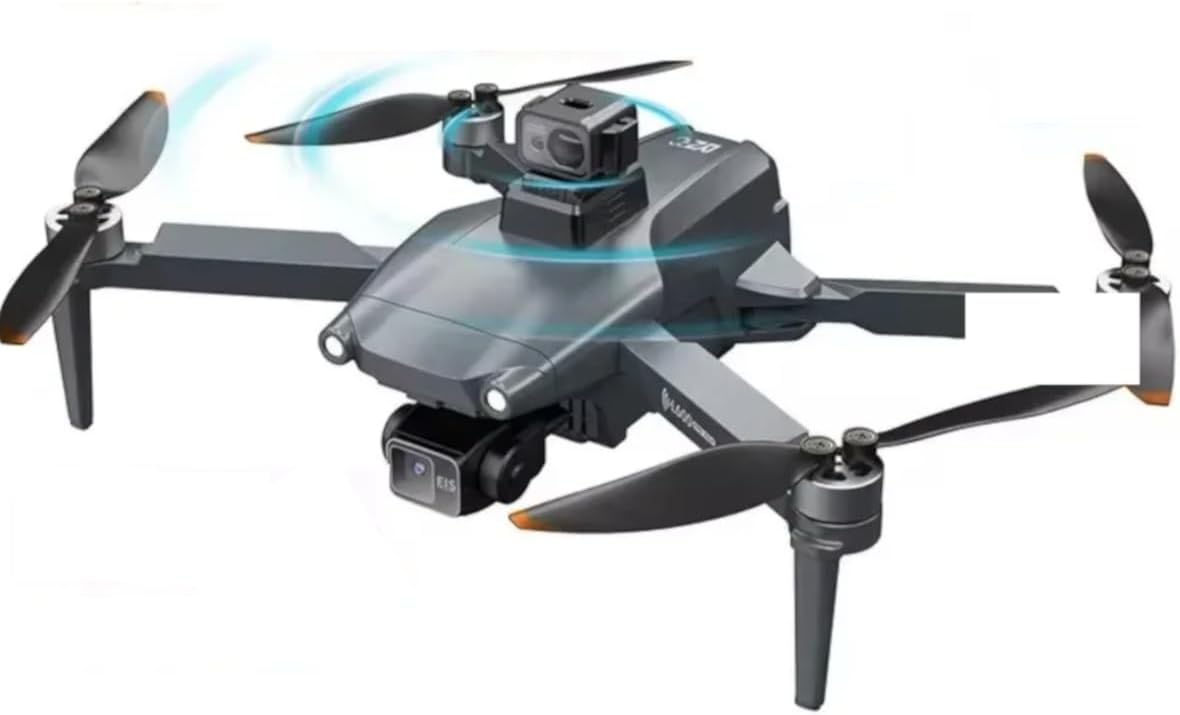
Image: The L600 Pro MAX Professional Drone, showcasing its sleek design and propellers in motion, indicating flight readiness.
Garis Panduan Keselamatan
Adhering to these safety guidelines is crucial for safe and responsible drone operation:
- Sentiasa kendalikan dron di kawasan terbuka, jauh daripada orang ramai, bangunan dan halangan.
- Maintain a clear line of sight with the drone at all times.
- Jangan terbang dalam angin kencang, hujan, salji, atau keadaan cuaca buruk yang lain.
- Pastikan bateri dicas sepenuhnya dan dipasang dengan betul sebelum setiap penerbangan.
- Familiarize yourself with local regulations and restrictions regarding drone operation.
- Jauhkan jari dan pakaian longgar daripada kipas yang berputar.
- Do not operate the drone under the influence of alcohol or drugs.
- Perform pre-flight checks as outlined in this manual before every flight.
Kandungan Pakej
Sahkan bahawa semua item yang disenaraikan di bawah disertakan dalam pakej anda:
- L600 Pro MAX Drone
- Alat Kawalan Jauh
- 7.4V 4500mAh Battery (1 included, additional may be purchased separately)
- Propellers (Spare set included)
- Manual Pengguna (Dokumen ini)
- Kabel Pengecasan
- Storage Bag/Backpack

Image: A visual representation of the L600 Pro MAX drone and its accompanying accessories, including the remote controller, battery, propellers, and user manual.
Produk Selesaiview
The L600 Pro MAX is an advanced professional drone designed for superior aerial photography and stable flight. It integrates cutting-edge technology for an enhanced user experience.
4K HD Camera System
Equipped with a 4K HD camera, the L600 Pro MAX captures stunning photos at 4096x3072P and videos at 2048x1080P. The camera features an anti-shake lens for crystal-clear imagery.

Imej: A terperinci view of the drone's primary camera, emphasizing its "Master Lens" designation for high-quality image capture.

Image: A side-by-side comparison demonstrating the effectiveness of the anti-shake gimbal, showing a clear image on the left and a blurred image on the right without stabilization.
360° Laser Obstacle Avoidance
The drone is equipped with an innovative 360-degree laser obstacle avoidance system, providing intelligent detection and navigation around obstacles in all directions, enhancing flight safety.

Image: A front perspective of the drone, illustrating the location of its obstacle avoidance sensors with a wavy blue line indicating detection.
Three-Axis Mechanical Self-Stabilizing Gimbal
The three-axis mechanical gimbal ensures smooth and stable footage by compensating for drone movements, allowing for precise camera control and professional-grade video capture.

Image: A graphic demonstrating the range of motion for the drone's three-axis gimbal, showing horizontal 40°, lateral 65°, and vertical 120° adjustments.

Image: Three distinct views of the gimbal, each highlighting its rotational capacity along one axis: horizontal, lateral, and vertical, with red arrows indicating movement.
Persediaan
1. Pemasangan Bateri
- Ensure the drone and remote controller are powered off.
- Locate the battery compartment on the rear of the drone.
- Insert the 7.4V 4500mAh battery firmly into the compartment until it clicks into place.
- Tutup penutup petak bateri dengan selamat.
- For the remote controller, open the battery cover and insert the required 9V batteries (included) according to polarity markings.
2. Pemasangan Baling-baling
The propellers are marked with 'A' or 'B'. Match them to the corresponding motor arms. Ensure they are securely fastened.
- Identify the 'A' and 'B' markings on the propellers and motor arms.
- Align the propeller with the motor shaft and press down firmly, then twist to lock (refer to visual indicators on the drone).
- Ensure all propellers are installed correctly and are not loose.
3. Persediaan Alat Kawalan Jauh
Power on the remote controller after battery installation. It will automatically attempt to pair with the drone once the drone is powered on.

Image: The drone's remote controller with a smartphone attached, showing the live 5G real-time high-definition image transmission from the drone's camera.
4. Pemasangan dan Sambungan Apl
Download the official L600 Pro MAX app from your smartphone's app store. Connect your smartphone to the drone's Wi-Fi network (usually named "L600_XXXXXX") to enable live video transmission and advanced control features.
- Scan the QR code in the quick start guide or search for "L600 Pro MAX" in your app store.
- Pasang aplikasi.
- Hidupkan dron.
- Go to your phone's Wi-Fi settings and connect to the drone's Wi-Fi network.
- Open the L600 Pro MAX app; it should automatically connect to the drone.
Arahan Operasi
1. Senarai Semak Pra-Penerbangan
- Ensure drone and remote controller batteries are fully charged.
- Periksa bahawa kipas dipasang dengan selamat dan tidak rosak.
- Verify that the camera gimbal is free from obstructions.
- Confirm GPS signal acquisition (indicated by solid green lights on the drone).
- Check for clear flight path and suitable weather conditions.
2. Berlepas dan Mendarat
After powering on the drone and remote controller, and establishing connection:
- Pelepasan Automatik: Press the one-key takeoff button on the remote controller or in the app. The drone will ascend to a safe height and hover.
- Berlepas Manual: Push both joysticks down and outwards to arm the motors. Slowly push the left joystick up to ascend.
- Pendaratan Automatik: Press the one-key landing button. The drone will descend and land automatically.
- Pendaratan Manual: Slowly pull the left joystick down to descend. Once landed, push both joysticks down and inwards to disarm the motors.
3. Kawalan Penerbangan
Standard Mode 2 controls:
- Kayu Joy Kiri (Pendikit/Kuap): Atas/Bawah untuk ketinggian, Kiri/Kanan untuk putaran (yaw).
- Kayu Bedik Kanan (Pitch/Roll): Up/Down for forward/backward movement (pitch), Left/Right for sideways movement (roll).
4. Operasi Kamera
Control the camera directly from the remote controller or via the app interface.
- Tangkapan Foto: Press the dedicated photo button on the remote controller or tap the camera icon in the app.
- Rakaman Video: Press the dedicated video button to start/stop recording. Ensure a 30G SD card is inserted for storage.
- Kawalan Gimbal: Use the gimbal dial on the remote controller to adjust the camera's vertical angle.

Imej: Cthamples of high-quality aerial footage and photography captured by the drone, demonstrating its "Intelligent Film" features and natural color reproduction.
5. Mod Penerbangan Pintar
The L600 Pro MAX offers several intelligent flight modes for enhanced functionality:
- Kedudukan GPS: Provides precise hovering and stable flight. Ensure sufficient GPS satellites are acquired before flight.
- Mod Ikut Saya: The drone will automatically follow the remote controller or connected smartphone.
- Corridor Navigation: Utilizes obstacle avoidance to navigate through narrow spaces.
- Night Flying Capability: Designed for stable operation in low-light conditions.
Penyelenggaraan
Penyelenggaraan tetap memastikan jangka hayat dan prestasi optimum dron anda.
- Pembersihan: Use a soft, dry cloth to clean the drone body and camera lens. Avoid using liquid cleaners.
- Penjual: Inspect propellers for cracks, bends, or damage before each flight. Replace damaged propellers immediately.
- Penjagaan Bateri:
- Charge batteries using only the provided charger.
- Do not overcharge or completely discharge batteries.
- Simpan bateri di tempat yang sejuk dan kering, jauh dari cahaya matahari langsung dan suhu yang melampau.
- Jika menyimpan untuk tempoh yang lama, cas bateri kepada kapasiti kira-kira 50%.
- Storan: Store the drone and its components in the provided storage bag or a protective case when not in use.
Menyelesaikan masalah
Rujuk jadual di bawah untuk isu biasa dan penyelesaiannya.
| Masalah | Kemungkinan Punca | Penyelesaian |
|---|---|---|
| Drone tidak dihidupkan. | Bateri tidak dipasang dengan betul atau dinyahcas. | Pastikan bateri dicas sepenuhnya dan dimasukkan dengan betul. |
| No connection with remote controller. | Remote controller not powered on, out of range, or not paired. | Power on remote controller, ensure it's within 3000M range, re-pair if necessary (refer to pairing instructions). |
| Kualiti imej/video yang lemah. | Camera lens dirty, gimbal not calibrated, or insufficient lighting. | Clean lens, calibrate gimbal, fly in well-lit conditions or utilize night flying mode. |
| Drone hanyut semasa penerbangan. | Insufficient GPS signal, compass interference, or uncalibrated sensors. | Fly in open areas with strong GPS signal, perform compass calibration, or IMU calibration. |
| Penghindaran halangan tidak berfungsi. | Sensors obstructed or system malfunction. | Ensure sensors are clean and unobstructed. If issue persists, contact support. |
Spesifikasi
Detailed technical specifications for the L600 Pro MAX drone:
| Ciri | Perincian |
|---|---|
| Jenama | Generik |
| Nama Model | L600 Pro Max |
| Ciri Khas | 360-degree Laser Obstacle Avoidance, Three-axis Mechanical Self-stabilizing Gimbal, 29 Minutes Flight Time, 4K HD Camera, GPS Navigation |
| Resolusi Tangkapan Video | 2048x1080p, 4K |
| Resolusi Pegun Berkesan | 4096 MP (4096x3072P) |
| Teknologi Ketersambungan | Wi-Fi, GPS |
| Komponen yang Disertakan | User Manual, Propellers, Battery, Drone, Remote Controller |
| Tahap Kemahiran | Pertengahan |
| Berat Barang | 11.6 Auns (lebih kurang 330g) |
| Format Tangkapan Video | MP4 |
| Teknologi Kawalan Jauh | Kawalan Radio |
| bahan | Plastik, Logam |
| Komunikasi Tanpa Wayar | Wi-Fi, RF (5G real-time image transmission) |
| Jenis Bateri | Lithium Ion (7.4V 4500mAh) |
| Masa Penerbangan | Sehingga 29 minit |
| Jarak Kawalan Jauh | Sehingga 3000M |
| Jarak Penghantaran Imej | Sehingga 800M |
| Ketinggian Penerbangan Maks | 300M |
| Sokongan Kad SD | Sehingga 30G |
| Dimensi Produk | 11.4"L x 11"W x 4"H |
Waranti dan Sokongan
This product comes with a standard manufacturer's warranty. For specific warranty terms and conditions, please refer to the warranty card included in your package or contact the retailer where the product was purchased.
For technical support, troubleshooting assistance, or inquiries about spare parts, please contact our customer service team. Contact information can typically be found on the product packaging or the official brand webtapak.
Please note: Damage caused by improper operation, unauthorized modification, or failure to follow instructions in this manual is not covered under warranty.
Ask a question about this manual
Ask about setup, troubleshooting, compatibility, parts, safety, or missing instructions. Manuals+ will review the question and use this page’s manual context to help answer it.