
RadioShack 2607149
RadioShack Transparent Wired RGB Gaming Mouse (Model 2607149) Instruction Manual
Model: 2607149
Produk Selesaiview
The RadioShack Transparent Wired RGB Gaming Mouse is designed for enhanced control and precision in gaming and multitasking. Featuring a durable braided cable, advanced 7D buttons, and customizable RGB lighting, this mouse offers responsive performance and extended durability.

Image: The transparent design of the RadioShack Wired RGB Gaming Mouse showcasing its internal components and vibrant RGB lighting.
Ciri-ciri Utama:
- Durable Braided Cable: Equipped with a resistant white braided USB cable of 1.5 meters for long-lasting use.
- Advanced 7D Buttons: Features 7 programmable buttons for enhanced control and precision.
- Pencahayaan RGB yang boleh disesuaikan: Offers 14 modes of RGB light to personalize your gaming setup.
- Prestasi Tinggi: Built with an Instant 725F chipset and a polling rate of 125Hz for smooth and responsive performance.
- Jangka Hayat Dilanjutkan: Designed with a keystroke life of up to 5 million clicks for reliable and enduring use.
Arahan Persediaan
To begin using your RadioShack Transparent Wired RGB Gaming Mouse, follow these simple steps:
- Sambungkan Kabel USB: Plug the 1.5-meter braided USB cable directly into an available USB port on your personal computer.
- Pemasangan Pemandu: Your operating system (Windows) should automatically detect and install the necessary drivers. Allow a few moments for this process to complete.
- Sahkan Sambungan: Once drivers are installed, the mouse's RGB lighting should illuminate, indicating a successful connection.
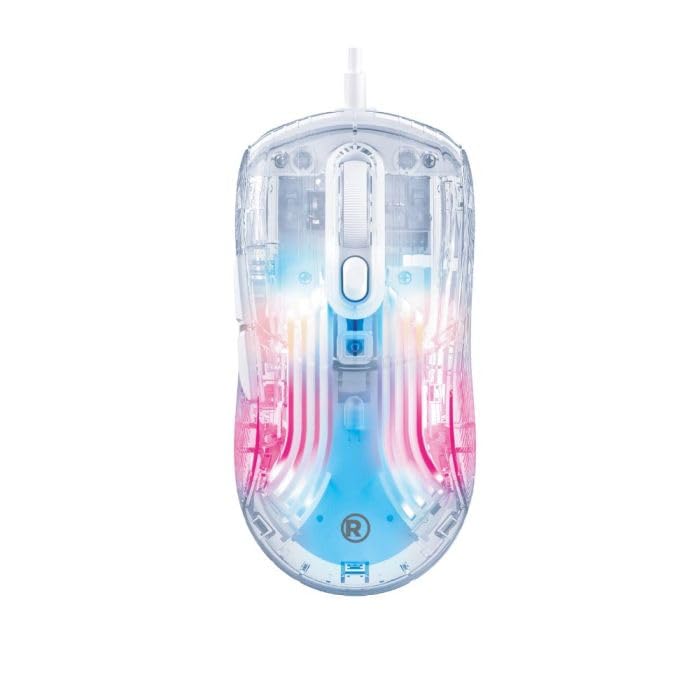
Image: The transparent gaming mouse with its braided USB cable, ready for connection to a computer.
Arahan Operasi
The RadioShack Transparent Wired RGB Gaming Mouse features 7 programmable buttons and customizable RGB lighting to enhance your user experience.
Fungsi Butang:
- Butang Klik Kiri: Standard primary function.
- Butang Klik Kanan: Standard secondary function.
- Roda Tatal: Tatal ke atas/bawah dan boleh diklik untuk fungsi klik tengah.
- DPI Adjustment Buttons: Typically located near the scroll wheel, these buttons allow you to cycle through different DPI (dots per inch) settings to adjust cursor sensitivity.
- Butang Ke Hadapan/Ke Belakang: Located on the side, these buttons are commonly used for navigation in web pelayar atau file penjelajah.
- Butang Mod RGB: A dedicated button (often on the bottom or top) to cycle through 14 different RGB lighting modes.
Customizing RGB Lighting:
Press the dedicated RGB mode button to switch between the 14 available lighting effects. Some models may also feature a button to select specific colors.
Video: A demonstration of the transparent gaming mouse showcasing its various RGB lighting effects and sleek design.
Penyelenggaraan
To ensure the longevity and optimal performance of your gaming mouse, regular maintenance is recommended:
- Pembersihan: Use a soft, dry cloth to wipe down the mouse surface. For stubborn dirt, a slightly damp kain boleh digunakan, memastikan tiada kelembapan memasuki komponen dalaman.
- Penjagaan Kabel: Elakkan selekoh tajam atau tarikan berlebihan pada kabel USB jalinan untuk mengelakkan kerosakan.
- Storan: Simpan tetikus di persekitaran yang bersih dan kering, jauh daripada suhu ekstrem dan cahaya matahari langsung apabila tidak digunakan.
Menyelesaikan masalah
If you encounter any issues with your RadioShack Transparent Wired RGB Gaming Mouse, please refer to the following common solutions:
- Tetikus Tidak Menjawab: Ensure the USB cable is securely plugged into a functional USB port. Try a different USB port or restart your computer.
- Lampu RGB Tidak Berfungsi: Check if the RGB mode button has been pressed to activate lighting effects. Ensure the mouse is properly connected.
- Isu Pergerakan Kursor: Clean the optical sensor on the bottom of the mouse. Ensure you are using the mouse on a suitable surface (e.g., a mouse pad). Adjust DPI settings using the dedicated buttons.
Spesifikasi
| Ciri | Perincian |
|---|---|
| Jenama | RadioShack |
| Nombor Model | 2607149 |
| warna | Telus |
| Teknologi Ketersambungan | USB (Berwayar) |
| Ciri Khas | RGB Lights (14 modes) |
| Teknologi Pengesanan Pergerakan | Optical (Instant 725F chipset) |
| Kadar Mengundi | 125Hz |
| Kuantiti Butang | Butang 7D |
| Orientasi Tangan | Betul |
| Peranti Serasi | Komputer Peribadi |
| Sistem Operasi | Windows |
| Panjang Kabel | 1.5 meter |
| Jangka Hayat Ketukan Kekunci | Sehingga 5 juta klik |
| Berat Barang | 1.5 paun |
| Bahan Kepungan | plastik |
Waranti dan Sokongan
This product does not include a specific warranty description as per available information. For technical support or further assistance, please refer to the official RadioShack customer service channels or visit their webtapak.
Ask a question about this manual
Ask about setup, troubleshooting, compatibility, parts, safety, or missing instructions. Manuals+ will review the question and use this page’s manual context to help answer it.