
pengenalan
This manual provides detailed instructions for the proper use and maintenance of your 82Ms-A Scientific Calculator. Designed for students and professionals, this calculator features a 2-line display, multi-function keys, and supports up to 240 functions, including trigonometric calculations. Please read this manual thoroughly to ensure optimal performance and longevity of your device.
Apa yang ada dalam Kotak

Image: The 82Ms-A Scientific Calculator as packaged, indicating one unit is included.
- 82Ms-A Scientific Calculator (1 unit)
- Manual Pengguna (dokumen ini)
Persediaan
Pemasangan Bateri

Imej: A terperinci view showing the open battery compartment of the calculator, revealing two AAA batteries.
The 82Ms-A Scientific Calculator is powered by a long-lasting battery. To install or replace batteries:
- Pastikan kalkulator diputar DIMATIKAN.
- Cari penutup petak bateri di bahagian belakang kalkulator.
- Luncurkan penutup mengikut arah yang ditunjukkan oleh anak panah (jika ada).
- Insert new batteries, ensuring correct polarity (+/-) as marked inside the compartment.
- Gantikan penutup petak bateri sehingga ia terkunci pada tempatnya.
Arahan Operasi
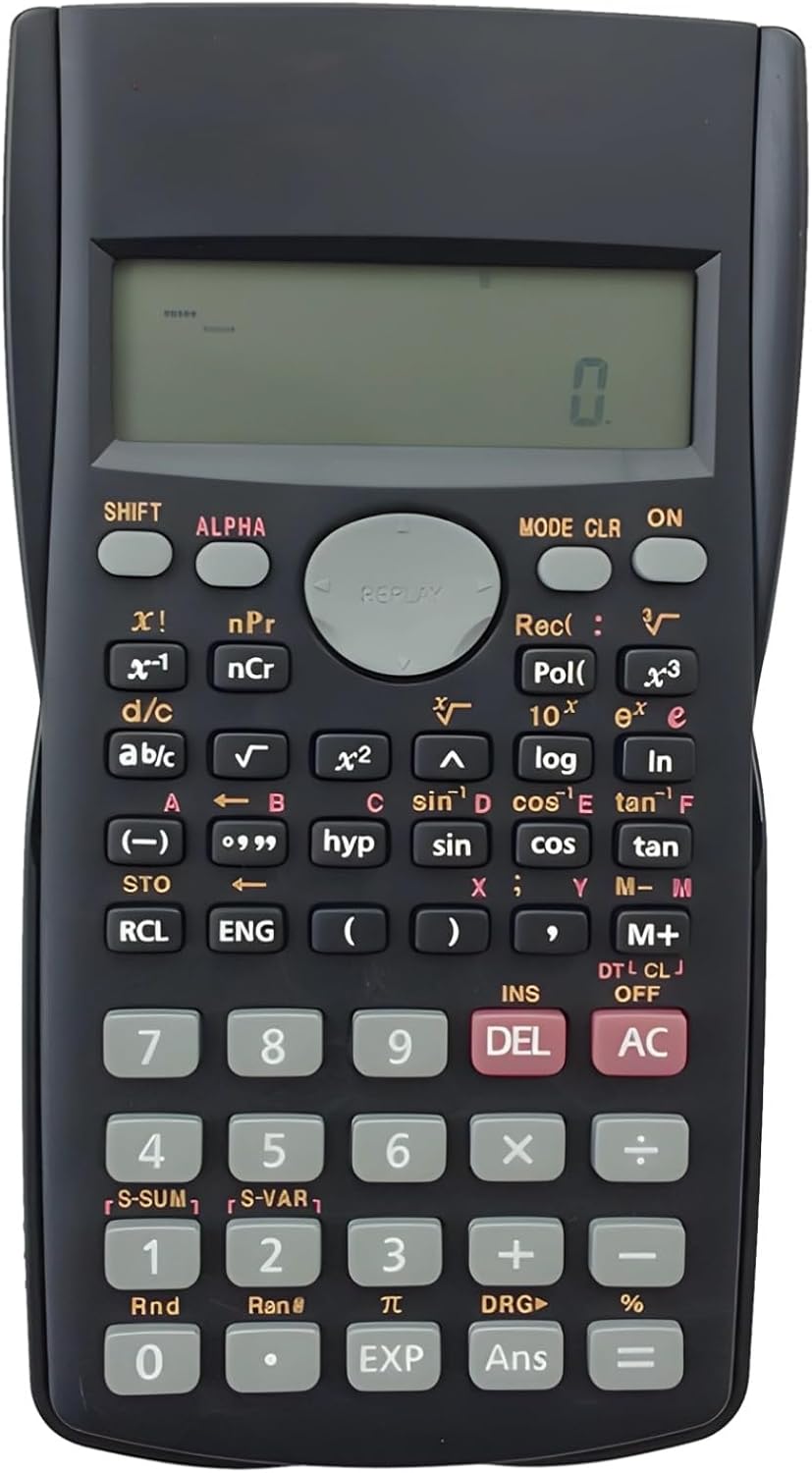
Image: The full layout of the 82Ms-A Scientific Calculator, highlighting its 2-line display and various function keys.
Hidupkan/Mati Kuasa
- Untuk menghidupkan: Tekan butang ON kunci.
- Untuk mematikan: Tekan SHIFT kemudian AC (MATI).
Pengiraan Asas
Masukkan nombor menggunakan papan kekunci berangka. Gunakan +, -, ×, dan ÷ keys for standard arithmetic operations. Press = untuk memaparkan hasilnya.
Multi-Function Keys and 2-Line Display
The calculator features a 2-line display, showing both the input expression and the result simultaneously. Many keys have multiple functions, indicated by colored labels above or below them. These functions are accessed using the SHIFT dan ALPHA kunci.
- SHIFT: Activates the yellow-labeled functions. Press SHIFT, then the desired key.
- ALPHA: Activates the red-labeled functions (variables, constants). Press ALPHA, then the desired key.
- MODE: Changes the calculator's mode (e.g., COMP, STAT, EQN). Press MODE repeatedly to cycle through options.
- CLR: Clears specific data or settings. Press SHIFT kemudian CLR to access clear options.
- DEL: Deletes the character at the cursor position.
- AC: Clears all input and returns to the initial state.
Fungsi Lanjutan
The 82Ms-A supports 240 functions, including trigonometric (sin, cos, tan), logarithmic (log, ln), power (x², x³), roots (√, ³√), fractions (a b/c), and statistical calculations. Refer to the specific key labels and their SHIFT/ALPHA functions for detailed usage.
- Fungsi Trigonometri: Gunakan dosa, cos, sawo matang keys. For inverse functions (sin⁻¹, cos⁻¹, tan⁻¹), use SHIFT with these keys.
- Fungsi Logaritma: Gunakan log (asas 10) dan ln (natural logarithm) keys.
- Fungsi Kuasa dan Akar: Gunakan x² for squaring, SHIFT kemudian x² for square root (√). For other powers and roots, use x³ or SHIFT kemudian x³ (³√).
- Pecahan: Gunakan ab/c key to input and convert fractions.
Penyelenggaraan
Pembersihan
To clean the calculator, use a soft, dry cloth. For stubborn dirt, slightly dampen the cloth with water or a mild, non-abrasive cleaner. Do not use strong solvents, alcohol, or abrasive cleaners, as these can damage the casing dan paparan.
Penyimpanan
Store the calculator in a cool, dry place away from direct sunlight and extreme temperatures. If storing for an extended period, it is recommended to remove the batteries to prevent leakage.
Menyelesaikan masalah
| Masalah | Kemungkinan Punca | Penyelesaian |
|---|---|---|
| Kalkulator tidak boleh dihidupkan. | Bateri mati atau tidak dipasang dengan betul. | Gantikan bateri dengan yang baharu, memastikan kekutuban yang betul. |
| Paparan malap atau kosong. | Kuasa bateri rendah. | Gantikan bateri. |
| Keputusan pengiraan yang salah. | Incorrect mode setting or previous calculation error. | Tekan AC to clear. Check the current mode using the MODE key and adjust if necessary. |
| Kekunci tidak responsif. | Dust or debris under keys; internal malfunction. | Gently clean around the keys. If problem persists, contact support. |
Spesifikasi

Image: The 82Ms-A Scientific Calculator with its length, width, and thickness measurements indicated.
| Ciri | Perincian |
|---|---|
| Nombor Model | 71T71524TQPRRJC1J26SKQF |
| Jenis Paparan | Paparan 2 Baris |
| Bilangan Fungsi | Sehingga 240 fungsi |
| Sumber Kuasa | Dikuasakan Bateri |
| Dimensi (L x W x H) | 6.1 x 3.27 x 0.39 inci |
| Berat Barang | 5.3 auns |
| warna | Hitam |
| bahan | plastik |
Waranti dan Sokongan
Specific warranty information for this product is not provided within this manual. For warranty details, technical support, or service inquiries, please refer to the product packaging or contact the retailer from whom the product was purchased. Keep your purchase receipt as proof of purchase.