
CENMING FAN-HD6UDL
CENMING Replacement Remote Control Instruction Manual
Model: FAN-HD6UDL for HampKipas Siling Teluk Tan
1. Pengenalan
This manual provides comprehensive instructions for the installation, operation, and maintenance of your CENMING Replacement Remote Control, Model FAN-HD6UDL. This remote is specifically designed for Hampton Bay ceiling fans featuring up and down light control and a 3-speed fan function. It is important to note that this product is the remote control unit only and does not include a receiver or a 9V battery.

Image 1.1: The CENMING FAN-HD6UDL replacement remote control, showing its buttons for fan speed and light control.
2. Compatibility Notes
This remote control is not universal. It is a direct replacement for specific Hampton Bay Hunter remote models that operate at a frequency of 303.9MHz. To ensure compatibility, verify the FCC ID/Model number on the back of your original remote control. Compatible models include:
- UC7078T / CHQ7078T
- UC7083T / CHQ7083T
- L3H2010FANHD / Fan-HD6UDL (with UP DOWN LIGHT Key)
If your original remote's FCC ID/Model number is not listed above, or if it features a reverse button (this remote does not), this replacement remote may not be compatible with your ceiling fan receiver. In such cases, a complete kit including a receiver may be required.

Image 2.1: Illustration of checking the FCC ID/Model number on the back of an original remote control to confirm compatibility.
3. Kandungan Pakej
Semasa membuka bungkusan, sila pastikan semua item berikut ada:
- 1 x CENMING Replacement Remote Control (Transmitter)
- 1 x Remote Holder (Wall Mount)
- 2 x Skru Pemasangan
A 9V battery is required for operation but is not included in the package.

Image 3.1: Visual representation of the package contents, including the remote, wall mount, and screws.
4. Persediaan dan Pemasangan
To ensure proper communication between the remote control and your ceiling fan receiver, you must match the DIP switch codes.
- Locate DIP Switches: Open the battery cover on your original remote control. The DIP switches are typically located behind the battery compartment. If you do not have the original remote, you will need to access the DIP switches on the ceiling fan receiver unit itself.
- Match DIP Codes: Carefully slide the switches on your new CENMING remote control to match the exact pattern (ON/OFF positions) of the DIP switches found on your original remote or receiver.
- Pasang Bateri: Insert a new 9V battery (not included) into the battery compartment of the new remote control, observing the correct polarity.
- Kefungsian Ujian: Replace the battery cover. The remote should now be ready for operation. Test all functions (fan speeds, light control) to confirm successful setup.
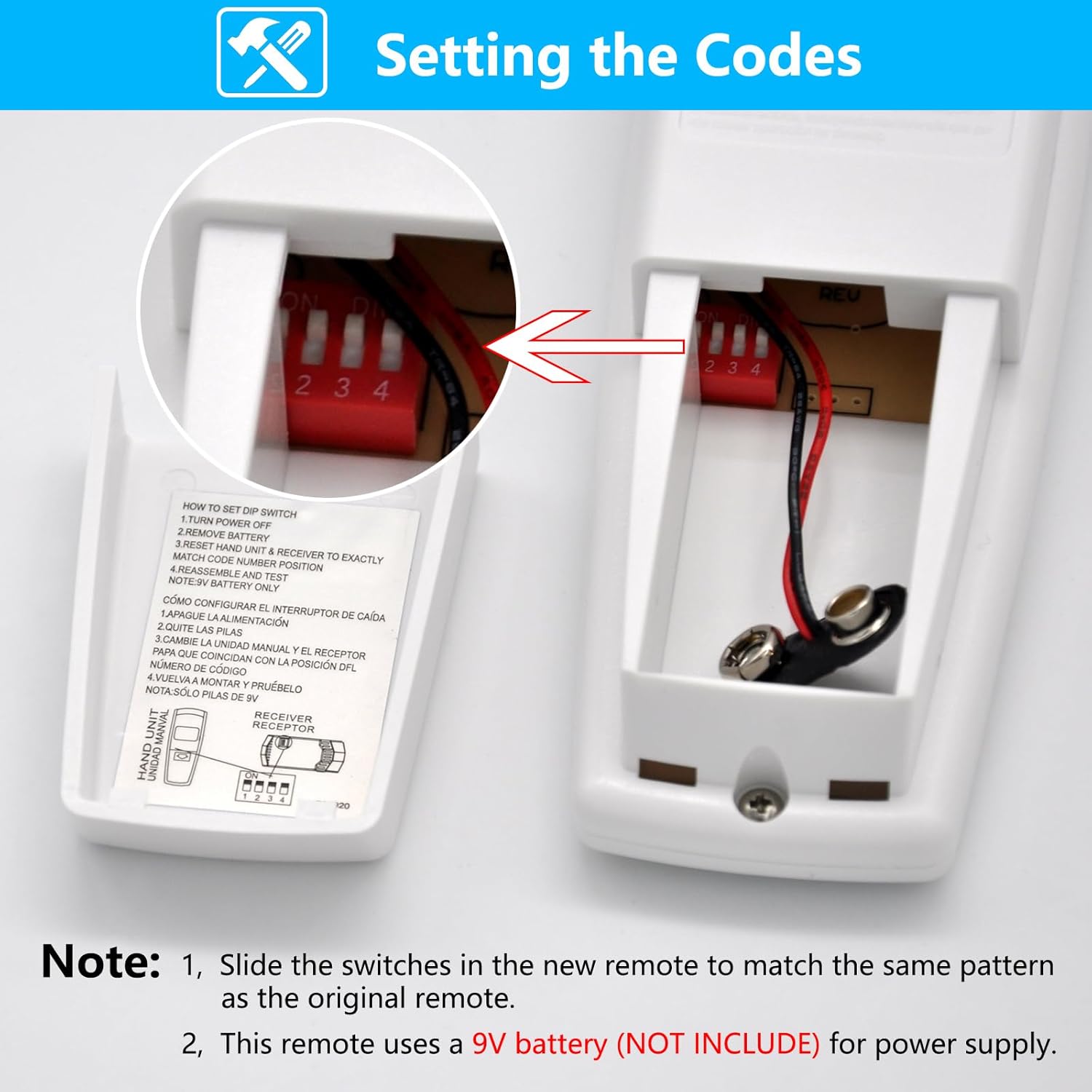
Imej 4.1: Terperinci view of the DIP switch compartment inside the remote control, illustrating how to match the code settings.
5. Arahan Operasi
The CENMING FAN-HD6UDL remote control provides intuitive control over your ceiling fan's functions:
- Kawalan Kelajuan Kipas:
- HI: Sets the fan to high speed.
- MED: Sets the fan to medium speed.
- LO: Sets the fan to low speed.
- KIPAS DIMATIKAN: Turns the ceiling fan off.
- Light Control (Up and Down Lights):
- LAMPU ATAS: Controls the up-lighting feature of your fan. Press briefly to turn the up light ON or OFF. Press and hold for more than 0.7 seconds to activate the dimmer function; the light intensity will cycle through its range over 0.8 seconds.
- DOWN LIGHT: Controls the down-lighting feature of your fan. Press briefly to turn the down light ON or OFF. Press and hold for more than 0.7 seconds to activate the dimmer function; the light intensity will cycle through its range over 0.8 seconds.
This remote control does not include a reverse function for the fan blades.

Image 5.1: The remote control shown in a room setting, highlighting its 3-speed fan control and independent up/down light control with dimming capabilities.
6. Spesifikasi
| Ciri | Perincian |
|---|---|
| Nombor Model | FAN-HD6UDL |
| Peranti Serasi | 110V 3-Speed AC Ceiling Fan with Up and Down Lights |
| Teknologi Ketersambungan | Radio Frequency (RF) 303.9 MHz |
| Sumber Kuasa | 1 x 9V Battery (Not Included) |
| Dimensi Produk | 2.2 x 1.4 x 5.8 inci (anggaran) |
| Berat Barang | 3.2 auns (anggaran) |
| Ciri Khas | 3-Speed Fan Control, Up Down Light Control, Light Dimmer |
| warna | putih |

Image 6.1: Diagram illustrating the physical dimensions of the remote control in inches and millimeters.

Image 6.2: The remote control displayed alongside a summary of its compatible devices, connectivity, range, and battery requirements.
7. Penyelesaian masalah
If you encounter issues with your remote control, please refer to the following common solutions:
- Jauh Tidak Menjawab:
- Periksa Bateri: Ensure a fresh 9V battery is correctly installed in the remote control.
- Verify DIP Switches: Re-check that the DIP switch settings on the remote exactly match those on your ceiling fan receiver. Incorrect settings are a common cause of non-responsiveness.
- Fan or Lights Not Working:
- Bekalan Kuasa: Confirm that the ceiling fan unit is receiving power from the main electrical supply.
- Receiver Functionality: If the remote is correctly set up and has a fresh battery, but the fan/lights still do not respond, there might be an issue with the ceiling fan's receiver unit itself.
- Fungsi Peredupan Tidak Berfungsi:
- Tekan dan Tahan: Remember to press and hold the UP LIGHT or DOWN LIGHT button for more than 0.7 seconds to activate the dimming feature. A brief press will only toggle ON/OFF.
- Keserasian Mentol: Ensure that the light bulbs installed in your ceiling fan are dimmable. Non-dimmable bulbs will not respond to the dimming function.
- Remote Does Not Match Original:
- FCC ID/Model Check: Refer to the "Compatibility Notes" section (Section 2) and re-verify that your original remote's FCC ID/Model number is listed as compatible. If not, this remote is likely not the correct replacement for your specific fan.
8. Waranti dan Sokongan
For specific warranty information regarding your CENMING Replacement Remote Control, please refer to the product packaging or contact the seller directly. If you require further assistance or have questions not covered in this manual, please reach out to CENMING customer support through the retailer's platform where the product was purchased. Providing your product model number (FAN-HD6UDL) and a detailed description of the issue will help expedite support.