
1. Pengenalan
Terima kasih kerana membeliasing the Tornado TCM-9008A-GS Automatic Espresso Machine. This appliance is designed to provide high-quality espresso, cappuccino, and hot water with convenience and ease. Featuring an integrated grinder, it processes fresh coffee beans for optimal flavor. Please read this manual thoroughly before operating the machine to ensure safe and efficient use.
2. Arahan Keselamatan
Sila patuhi langkah berjaga-jaga keselamatan berikut untuk mengelakkan kecederaan atau kerosakan pada perkakas:
- Perkakas ini adalah untuk kegunaan isi rumah dalam rumah sahaja.
- Jangan rendam mesin, kord kuasa atau palam dalam air atau cecair lain.
- Keep the appliance away from direct heat sources, open flames, and hot surfaces.
- Pastikan bekalan kuasa voltage matches the rating label on the machine.
- Cabut palam mesin daripada soket kuasa sebelum membersihkan, menyelenggara atau jika ia tidak akan digunakan untuk tempoh yang lama.
- Do not operate the machine with a damaged cord or plug, or if the appliance malfunctions or has been damaged in any way.
- Jauhkan kanak-kanak dan orang yang tidak dibenarkan daripada perkakas semasa operasi.
- Gunakan hanya aksesori asli dan alat ganti.
3. Komponen Produk
Familiarize yourself with the main parts of your espresso machine.
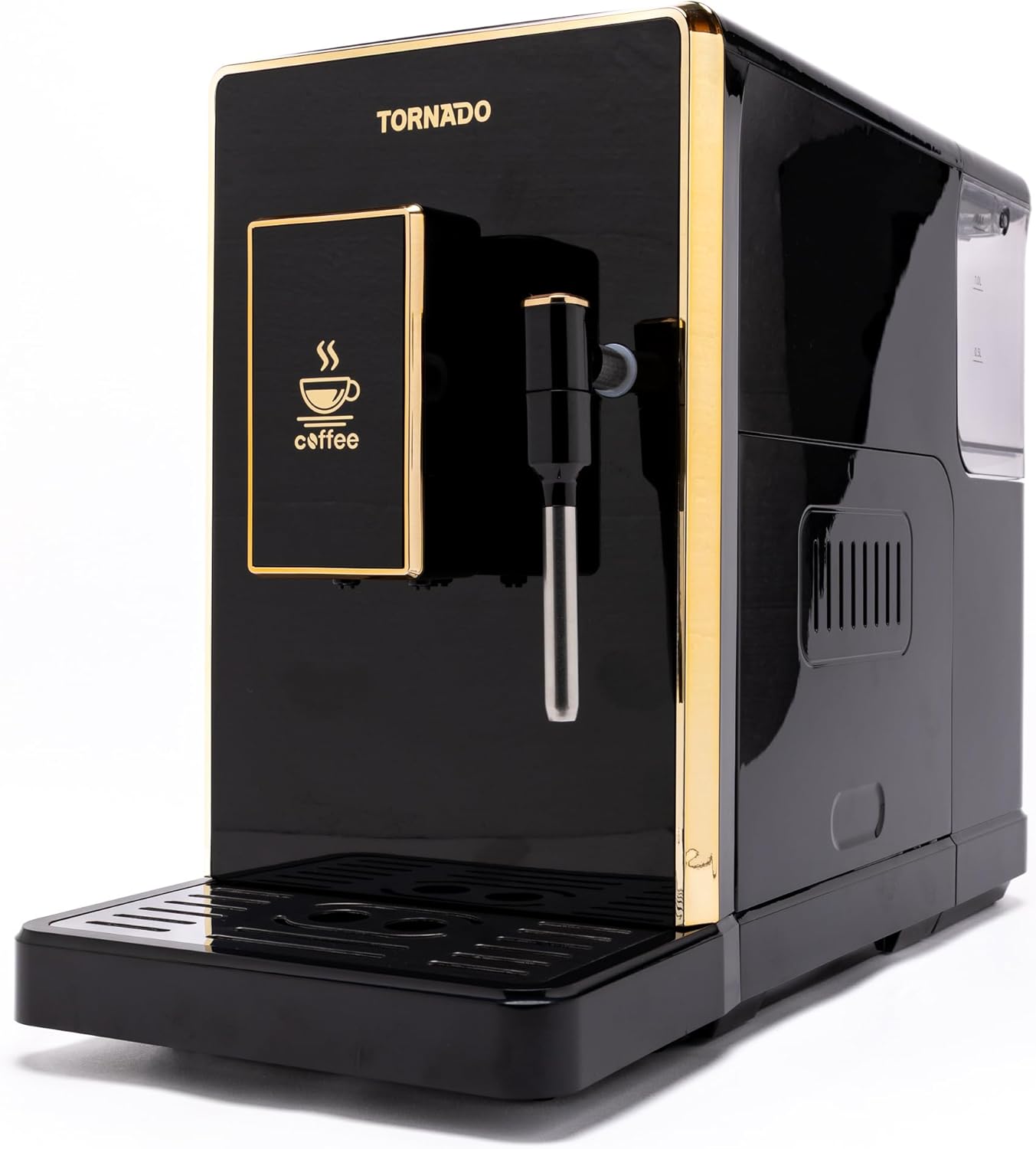
Rajah 3.1: Depan view of the Tornado TCM-9008A-GS Automatic Espresso Machine, showcasing its sleek black design with gold accents, control panel, and coffee dispenser.

Rajah 3.2: sebelah view of the espresso machine, highlighting the removable water tank on the right and an access panel for internal components.

Rajah 3.3: Atas view of the machine, displaying the coffee bean hopper with its lid and the integrated grinder adjustment dial.

Rajah 3.4: belakang view of the espresso machine, showing the main power switch (on/off) and the power cord inlet.

Rajah 3.5: Included accessories: the detachable power cord and a cleaning brush for maintenance.
4. Persediaan
- Membongkar: Keluarkan mesin dan semua aksesori dengan berhati-hati dari pembungkusan. Simpan pembungkusan untuk pengangkutan atau penyimpanan masa hadapan.
- penempatan: Place the machine on a stable, level, and heat-resistant surface, away from water sources and direct sunlight. Ensure adequate ventilation around the appliance.
- Tangki Air: Remove the water tank (refer to Figure 3.2), rinse it with fresh water, and fill it with clean, cold drinking water up to the MAX level. Reinsert the tank securely.
- Bean Hopper: Open the lid of the coffee bean hopper (refer to Figure 3.3) and fill it with fresh, whole coffee beans. Do not overfill.
- Sambungan Kuasa: Connect the power cord to the machine's inlet (refer to Figure 3.4) and then plug it into a grounded electrical outlet.
- Kitaran Bilas Permulaan: Before first use, perform an initial rinse cycle as described in the 'Operating Instructions' section to clean internal components.
5. Arahan Operasi
5.1 Menghidupkan dan Memulakan
- Press the main power switch on the back of the machine (Figure 3.4) to the 'ON' position.
- The machine will perform a self-test and heating cycle. The integrated display will show progress.
- Once ready, the display will indicate that the machine is prepared for use.
5.2 Adjusting Grinder Settings
The integrated grinder allows you to adjust the fineness of the coffee grounds. Turn the adjustment dial inside the bean hopper (Figure 3.3) to your desired setting. Finer settings are suitable for espresso, while coarser settings are better for larger coffee volumes. Adjust only when the grinder is operating or empty.
5.3 Membuat Espresso
- Letakkan cawan di bawah dispenser kopi.
- Select your desired espresso strength and volume using the controls on the integrated display.
- Press the 'Espresso' button. The machine will grind the beans, brew, and dispense the coffee.
5.4 Preparing Cappuccino (Milk Frothing)
- Isikan jag susu dengan susu sejuk.
- Letakkan tongkat stim ke dalam susu.
- Select the 'Cappuccino' or 'Steam' function on the display. The machine will heat up to steam temperature.
- Once ready, activate the steam function to froth the milk.
- After frothing, clean the steam wand immediately.
5.5 Pemberian Air Panas
- Place a cup under the hot water dispenser.
- Select the 'Hot Water' function on the display.
- Tekan butang untuk mengeluarkan air panas.
6. Penyelenggaraan dan Pembersihan
Pembersihan dan penyelenggaraan yang kerap memastikan prestasi optimum dan jangka hayat mesin espresso anda.
6.1 Pembersihan Harian
- Dulang Drip: Kosongkan dan bilas dulang titisan setiap hari.
- Bekas Kopi: Empty the coffee grounds container when prompted by the machine or daily. Rinse and dry.
- Tangki Air: Bilas tangki air dengan air bersih setiap hari.
- Tongkat Stim: Selepas setiap penggunaan, lap tongkat stim denganamp cloth to remove milk residue. Perform a short steam burst to clear any internal blockages.
- Luaran: Lap bahagian luar mesin dengan lembut, damp kain. Jangan gunakan pembersih yang kasar.
6.2 Weekly Cleaning (Brew Unit)
The brew unit should be removed and rinsed weekly:
- Matikan dan cabut plag mesin.
- Open the side access panel (Figure 3.2).
- Follow the instructions in the machine to remove the brew unit.
- Rinse the brew unit thoroughly under lukewarm running water until all coffee residue is removed. Do not use detergents.
- Biarkan unit pembuat bir kering sepenuhnya sebelum dipasang semula.
6.3 Penyahkelasan
The machine will prompt you when descaling is required. Use a suitable descaling solution specifically designed for espresso machines and follow the instructions provided with the descaler and on the machine's display.
7. Penyelesaian masalah
Jika anda menghadapi masalah dengan mesin anda, rujuk jadual di bawah untuk masalah dan penyelesaian biasa.
| Masalah | Kemungkinan Punca | Penyelesaian |
|---|---|---|
| Mesin tidak dihidupkan | No power supply; Main switch off | Check power cord connection; Ensure main switch (Figure 3.4) is ON. |
| Tiada kopi dispens | Water tank empty; Brew unit clogged; No coffee beans | Fill water tank; Clean brew unit; Fill bean hopper. |
| Kopi terlalu lemah/kuat | Grinder setting incorrect; Coffee strength setting incorrect | Adjust grinder fineness (Figure 3.3); Adjust coffee strength on display. |
| Susu tidak berbuih dengan betul | Steam wand clogged; Insufficient steam pressure; Milk type/temperature | Clean steam wand thoroughly; Ensure machine is at steam temperature; Use cold, fresh milk. |
| Machine displays error message | Specific internal issue | Refer to the machine's display for specific error codes and consult the full manual or contact customer support. |
If the problem persists after attempting these solutions, please contact Tornado customer support.
8. Spesifikasi
| Nombor Model | TCM-9008A-GS |
| Dimensi (L x W x H) | 46 x 19 x 31 cm |
| Berat badan | 7.74 kg |
| bahan | Akrilik |
| Kapasiti Biji Kopi | 200 Gram |
| Fungsi Khas | Integrated coffee grinder, Integrated display, Cappuccino preparation, Hot water system, Fully automatic operation |
| Keserasian Jenis Kopi | Coffee beans, Espresso coffee, Cappuccino |
| warna | Hitam |
9. Video Produk
The following videos provide additional visual guidance on using and maintaining your Tornado TCM-9008A-GS espresso machine.
Video 9.1: Produk habisview or demonstration (Duration: 0:23).
Video 9.2: Detailed feature explanation or usage guide (Duration: 1:51).
Video 9.3: Operational steps or maintenance tips (Duration: 1:17).
Video 9.4: Quick guide or specific function demonstration (Duration: 0:45).
Video 9.5: Usage scenario or advanced tips (Duration: 1:25).
Video 9.6: Feature highlight or troubleshooting demonstration (Duration: 0:59).
Video 9.7: In-depth guide or comparison (Duration: 1:31).
Video 9.8: User experience or tips and tricks (Duration: 1:05).
Video 9.9: Comprehensive product demonstration (Duration: 2:01).
Video 9.10: Short instructional clip (Duration: 0:36).
10. Waranti dan Sokongan
For warranty information and customer support, please refer to the documentation included with your purchase or visit the official Tornado webtapak. Simpan bukti pembelian anda untuk tuntutan waranti.