1. Pengenalan
This instruction manual provides detailed guidance for the proper use and maintenance of your Generic AWSBH22 remote control. This remote is designed as a replacement for various soundbar systems, including Aiwa AWSBH22, VMA X-bar, and Geepa GMS11152 models. Please read this manual thoroughly before operating the device to ensure optimal performance and longevity.
2. Maklumat Keselamatan
- Do not expose the remote control to direct sunlight, heat sources, or extreme temperatures.
- Elakkan daripada menjatuhkan alat kawalan jauh atau mendedahkannya kepada hentaman yang kuat.
- Do not immerse the remote control in water or any other liquids.
- Jauhkan bateri daripada kanak-kanak. Jika tertelan, dapatkan rawatan perubatan segera.
- Buang bateri terpakai mengikut peraturan tempatan. Jangan campurkan bateri lama dan baharu, atau jenis bateri yang berbeza.
- Jika alat kawalan jauh tidak digunakan untuk tempoh yang lama, tanggalkan bateri untuk mengelakkan kebocoran.
3. Kandungan Pakej
Sila pastikan pakej anda mengandungi item berikut:
- 1 x Generic AWSBH22 Remote Control
- (Batteries are not included and must be purchased separately.)
4. Produk Lebihview
The Generic AWSBH22 remote control is designed for intuitive operation of your compatible soundbar system. Below is an illustration of the remote with its key functions.
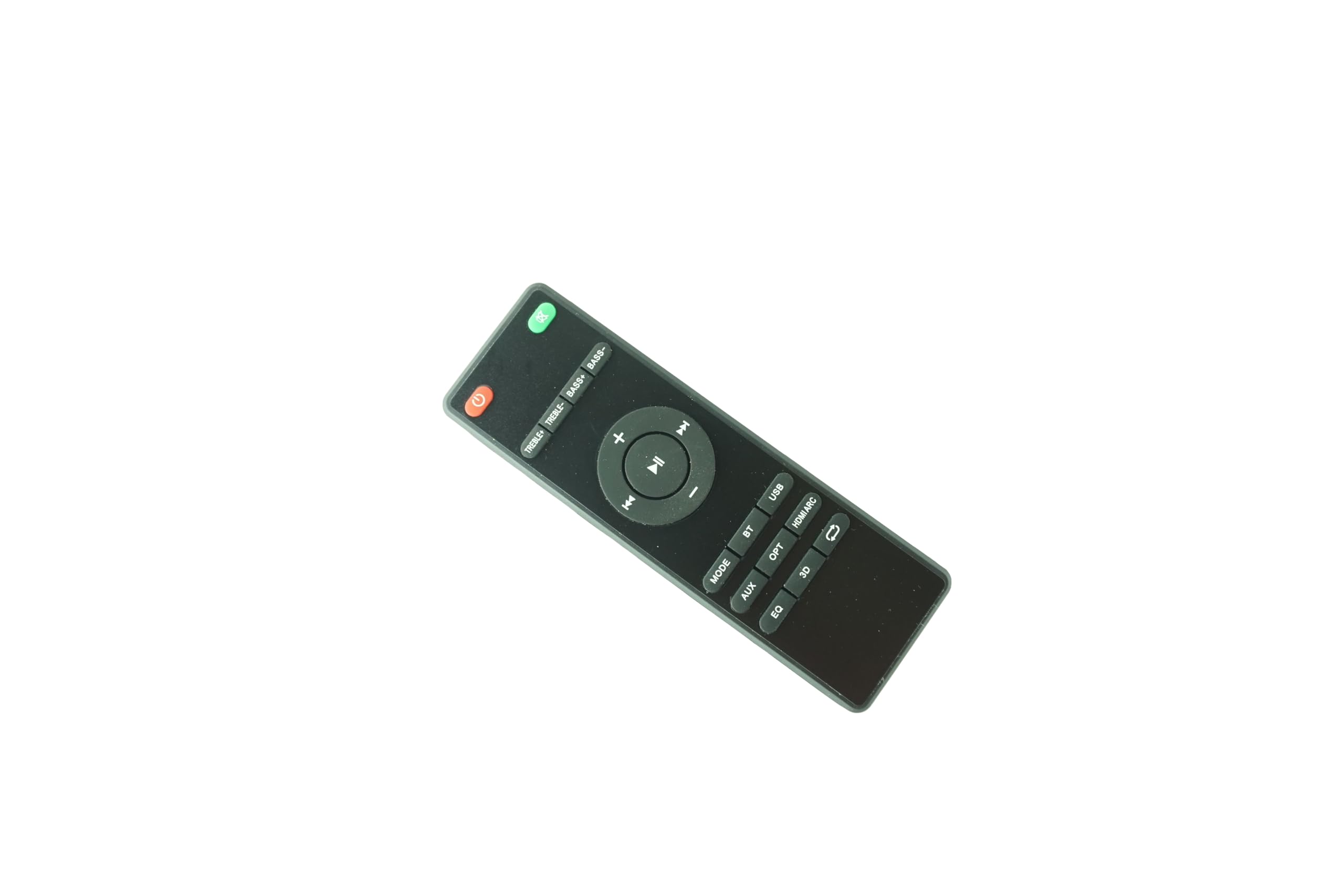
Figure 1: Generic AWSBH22 Remote Control. This image displays the full layout of the remote control, including power, volume, playback, input selection, and sound adjustment buttons.
Fungsi Butang:
- Power Button (Red, top right): Turns the soundbar system on or off.
- Mute Button (Green, top right): Membisukan atau menyahredamkan bunyi.
- Kelantangan Naik (+): Meningkatkan tahap kelantangan.
- Perlahankan suara (-): Menurunkan tahap kelantangan.
- Play/Pause (Center button): Starts or pauses media playback.
- Previous Track (Left arrow): Melangkau ke permulaan trek semasa atau trek sebelumnya.
- Next Track (Right arrow): Langkau ke trek seterusnya.
- ARAHAN: Cycles through different audio input modes.
- AUX: Selects Auxiliary input.
- OPT: Selects Optical input.
- ARC HDMI: Selects HDMI Audio Return Channel input.
- BT: Selects Bluetooth input for wireless connection.
- USB: Selects USB input for media playback.
- EQ: Cycles through Equalizer presets (e.g., Music, Movie, News).
- 3D: Activates or deactivates 3D audio mode.
- Repeat/Loop (Arrow icon): Toggles repeat or loop playback modes (functionality may vary by device).
- TREBLE+ / TREBLE-: Adjusts the treble level up or down.
- BASS+ / BASS-: Adjusts the bass level up or down.
5. Persediaan
5.1 Pemasangan Bateri
- Cari petak bateri di belakang alat kawalan jauh.
- Geser buka penutup petak bateri.
- Masukkan dua (2) bateri AAA, pastikan terminal positif (+) dan negatif (-) sejajar dengan tanda di dalam petak.
- Tutup penutup petak bateri dengan selamat.
Note: 2 AAA batteries are required and are not included with the remote control.
6. Arahan Operasi
This remote control is an infrared (IR) replacement remote. It operates by sending IR signals to your compatible soundbar system. Ensure there is a clear line of sight between the remote control and the soundbar's IR receiver.
6.1 Operasi Asas
- Hidupkan/Mati Kuasa: Tekan ke kuasa button to turn your soundbar on or off.
- Pelarasan Kelantangan: Gunakan Jilid + dan Isipadu - butang untuk melaraskan tahap bunyi.
- Redam: Tekan ke bisu button to temporarily silence the audio. Press again to restore sound.
6.2 Pemilihan Sumber Input
To switch between different audio sources, press the corresponding input button:
- ARAHAN: Cycles through available inputs.
- AUX: For devices connected via a 3.5mm auxiliary cable.
- OPT: For devices connected via an optical digital cable.
- ARC HDMI: For devices connected via HDMI ARC.
- BT (Bluetooth): Untuk penstriman audio tanpa wayar daripada peranti yang didayakan Bluetooth.
- USB: For media playback from a USB storage device.
6.3 Pelarasan Bunyi
- EQ: Press to cycle through preset equalizer modes (e.g., Standard, Movie, Music, Voice).
- 3D: Press to enable or disable 3D surround sound effects.
- TREBLE+ / TREBLE-: Melaraskan output bunyi frekuensi tinggi.
- BASS+ / BASS-: Melaraskan output bunyi frekuensi rendah.
7. Penyelenggaraan
7.1 Pembersihan
To clean the remote control, wipe it gently with a soft, dry cloth. Do not use abrasive cleaners, waxes, or solvents as they may damage the surface.
7.2 Penggantian Bateri
Replace the batteries when the remote control's response becomes sluggish or stops functioning. Follow the battery installation steps outlined in Section 5.1. Always replace both batteries at the same time with new AAA batteries.
8. Penyelesaian masalah
| Masalah | Kemungkinan Punca | Penyelesaian |
|---|---|---|
| Alat kawalan jauh tidak berfungsi. |
|
|
| Sesetengah fungsi tidak berfungsi. |
|
|
9. Spesifikasi
- model: AWSBH22
- Jenama: Generik
- Jenis: Kawalan Jauh Inframerah (IR).
- Sumber Kuasa: 2 x Bateri AAA (tidak termasuk)
- Peranti Serasi: Aiwa AWSBH22, VMA X-bar, Geepa GMS11152 Soundbar Speaker Systems
- warna: Hitam
- Bilangan Maks Peranti yang Disokong: 1
10. Waranti dan Sokongan
10.1 Maklumat Waranti
This product is sold as a replacement remote control. Specific warranty details may vary by retailer or region. Please retain your purchase receipt for any warranty claims. The manufacturer, Easytry, provides this product.
10.2 Sokongan Pelanggan
For further assistance or inquiries regarding this remote control, please contact your point of purchase or refer to the contact information provided by the seller. Ensure to mention the model number AWSBH22 when seeking support.