
pengenalan
Thank you for choosing the TELE System TS9019HEVC Satellite Decoder. This device is designed to provide stable and seamless reception of Tivùsat digital satellite channels, including over 70 free HD channels. This manual will guide you through the setup, operation, and maintenance of your new decoder to ensure an optimal viewpengalaman dalam.
Kandungan Pakej
Sila sahkan bahawa semua item yang disenaraikan di bawah disertakan dalam pakej anda:
- TELE System TS9019HEVC Satellite Decoder
- Tivùsat HD Smartcard (Merlin)
- Bekalan Kuasa Luaran
- Alat Kawalan Jauh
- 2x Bateri AAA
- Kabel HDMI

Image: The TELE System TS9019HEVC decoder, its remote control, and the included Tivùsat Smartcard.
Persediaan
1. Menyambungkan Dekoder
- Satellite Antenna Connection: Connect your satellite dish cable to the "RF IN" port on the back of the decoder.
- Sambungan HDMI: Connect one end of the supplied HDMI cable to the "HDMI" port on the decoder and the other end to an available HDMI input on your television.
- Sambungan Kuasa: Connect the external power supply to the "12V DC" port on the decoder, then plug the power adapter into a wall outlet.
- Optional AV Connection: If your TV does not have an HDMI input, you can use an AV cable (not included) to connect to the "AV" port.
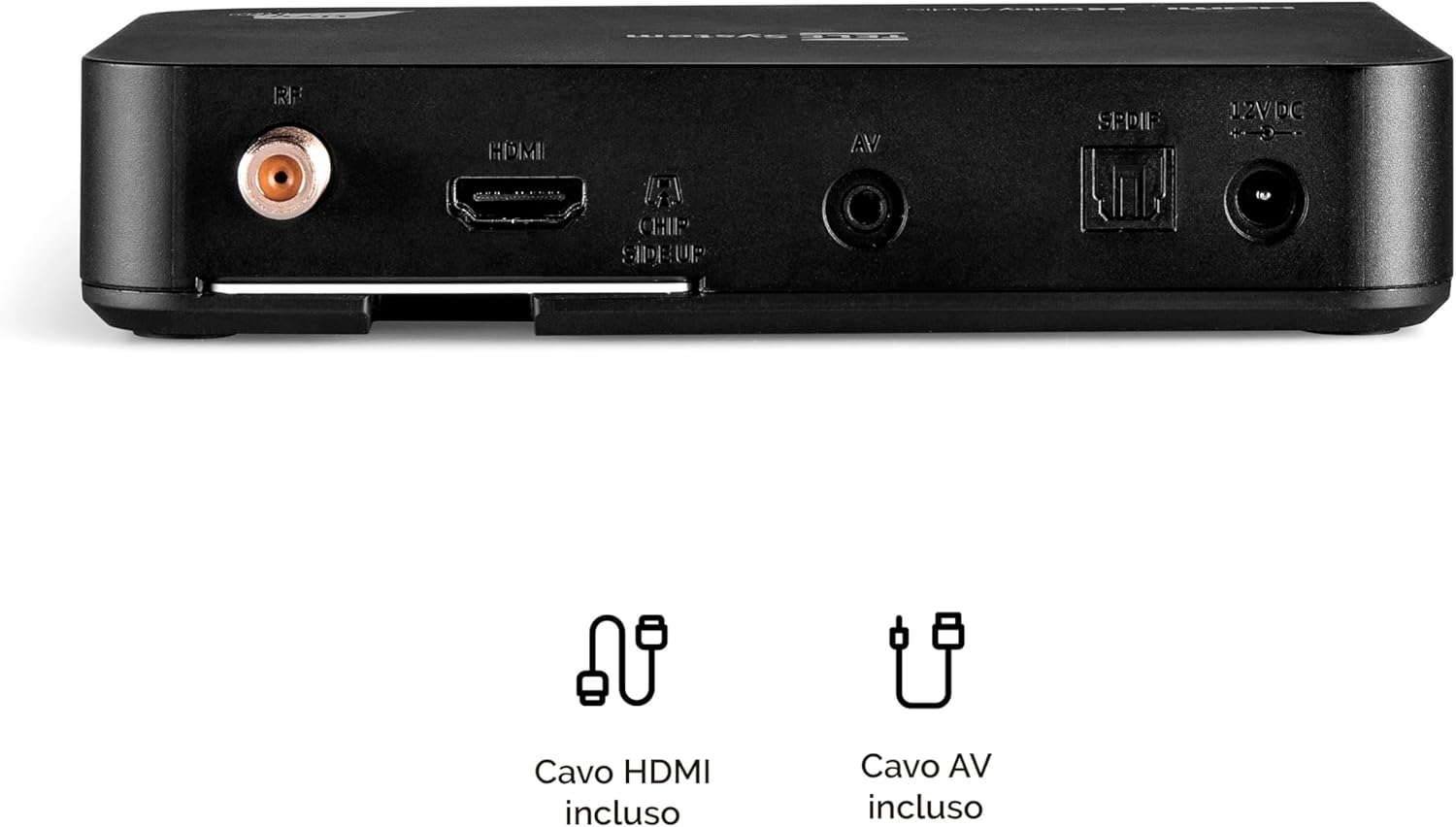
Image: Rear panel connections of the decoder, including RF IN, HDMI, AV, SPDIF, and 12V DC power input.
2. Inserting the Tivùsat Smartcard
The Tivùsat Smartcard is essential for accessing encrypted channels. Ensure it is inserted correctly:
- Locate the smartcard slot on the side of the decoder.
- Insert the Tivùsat Smartcard with the chip facing upwards and the arrow pointing into the slot. Push it gently until it clicks into place.
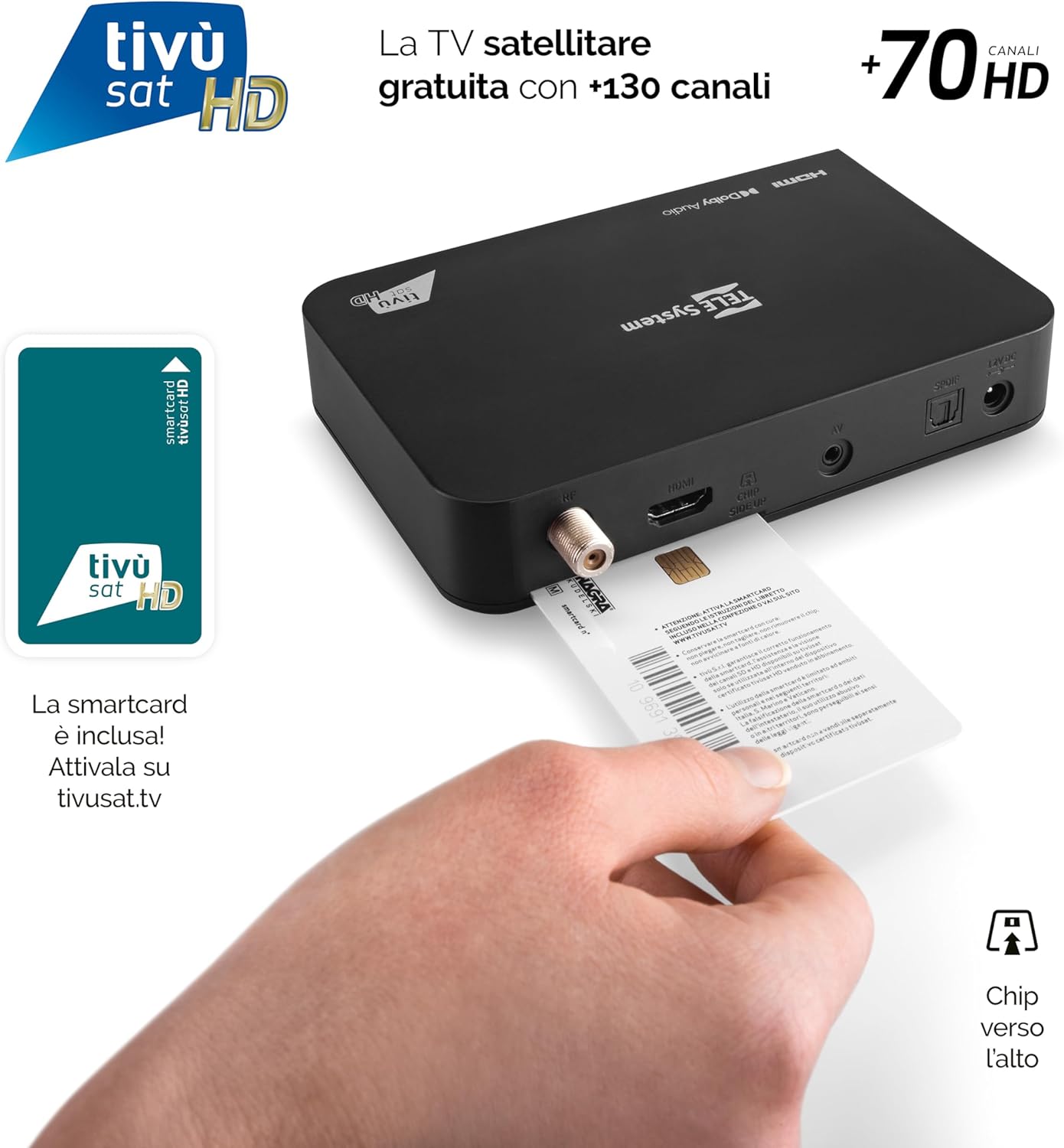
Image: Proper insertion of the Tivùsat Smartcard into the decoder's side slot.
3. Wizard Persediaan Awal
After connecting all cables and inserting the smartcard, turn on your TV and select the correct HDMI input. Power on the decoder. The initial setup wizard will guide you through:
- Pemilihan bahasa
- Satellite dish configuration
- Automatic channel scan (EASY HD)
4. Activating the Tivùsat Smartcard
To access all Tivùsat channels, your smartcard must be activated. You can activate it easily on the official Tivùsat webtapak (www.tivusat.tv). Follow the instructions provided on the website for activation. Note that older Tivùsat Tiger smartcards may be obsolete and require replacement with a Merlin card.
Arahan Operasi
Fungsi Asas
- Hidupkan/Mati Kuasa: Gunakan KUASA button on the remote control or the front panel of the decoder.
- Pemilihan Saluran: Gunakan P+ / P- butang untuk menukar saluran secara berurutan atau masukkan nombor saluran terus menggunakan pad kekunci berangka.
- Kawalan Kelantangan: Gunakan VOL + / VOL- butang untuk melaraskan kelantangan.
- Menu: Tekan ke MENU butang untuk mengakses menu utama bagi tetapan dan ciri.
- Butang OK: Confirms selections in menus or displays the channel list during live TV.
- Keluar/Kembali: Kembali ke skrin sebelumnya atau keluar dari menu.

Image: The remote control for the TELE System TS9019HEVC decoder, highlighting key function buttons.
Ciri Lanjutan
- Panduan Program Elektronik (EPG): Tekan ke EPG button on the remote to view the program schedule for upcoming broadcasts.
- Favorite Lists: Create and manage personalized lists of your preferred channels for quick access. Refer to the on-screen menu for instructions.
- TV Pause (Timeshift): Connect a USB storage device (not included) to the USB port on the decoder. This feature allows you to pause live TV and resume viewnanti.
- Automatic Channel Update: The decoder automatically updates Tivùsat channels, ensuring you always have access to the latest channel lineup.
- Fungsi Pemasa: Set timers to automatically switch to a specific channel at a scheduled time.

Imej: Cthample of the channel list interface, displaying various Tivùsat channels.
Penyelenggaraan
Kemas Kini Perisian
To ensure your decoder always has the latest features, improvements, and security updates, regularly check for software updates. Updates can be performed via:
- Melalui Udara (OTA): The decoder may receive updates automatically via satellite. You will be prompted on-screen if an update is available.
- USB: Download the latest firmware from the TELE System official website to a USB stick and follow the instructions provided with the firmware file for a manual update.
Always ensure the decoder remains powered on during a software update to prevent damage.
Penjagaan Am
- Keep the decoder in a well-ventilated area to prevent overheating.
- Bersihkan bahagian luar dengan kain lembut dan kering. Jangan gunakan pembersih cecair atau bahan kasar.
- Avoid exposing the decoder to direct sunlight, high temperatures, or humidity.
Menyelesaikan masalah
| Masalah | Kemungkinan Punca | Penyelesaian |
|---|---|---|
| Tiada Isyarat / Skrin Hitam | Incorrect HDMI input selected on TV; Satellite cable disconnected; Dish misalignment. |
|
| "Smartcard Error" Message | Smartcard incorrectly inserted; Smartcard not activated; Obsolete smartcard. |
|
| Tiada Bunyi | TV or decoder volume muted; Incorrect audio settings. |
|
| Alat Kawalan Jauh Tidak Berfungsi | Dead batteries; Obstruction between remote and decoder; Remote not paired (if applicable). |
|
Spesifikasi
| Ciri | Perincian |
|---|---|
| Jenama | Sistem TELE |
| Nombor Model | 58010100 |
| warna | Hitam |
| Teknologi Ketersambungan | USB |
| Mod Keluaran Audio | Stereo |
| Jumlah Port HDMI | 1 |
| Peranti Serasi | Televisyen |
| Format Audio yang Disokong | Dolby Digital, DTS, AAC, MP3, PCM |
| Penerangan Perkhidmatan Satelit | Tivùsat HD Classic and DAZN |
| Jumlah Port Output Video | 1 |
| Resolusi Keluaran Video | 1080p |
| Piawaian yang Disokong | DVB-S, H.264, MP2, MP3, AAC, HD |
| Format Skrin | 16:9 |
| Negara Asal | China |
Maklumat Waranti
The TELE System TS9019HEVC Satellite Decoder comes with a Waranti produk 2 tahun from the date of purchase. This warranty covers manufacturing defects and malfunctions under normal use. Please retain your proof of purchase for warranty claims. For detailed terms and conditions, please refer to the warranty card included in your package or visit the official TELE System webtapak.
Sokongan
For further assistance, technical support, or frequently asked questions, please visit:
- TELE System Official Webtapak: www.telesystem.it
- Tivùsat Support: For smartcard activation and Tivùsat specific inquiries, visit www.tivusat.tv
Before contacting support, please ensure you have reviewed the troubleshooting section of this manual.