
DAMOACAM CK400FQHD
DAMOACAM CK400FQHD Car Key Hidden Camera User Manual
Model: CK400FQHD
Produk Selesaiview
The DAMOACAM CK400FQHD is a discreet, high-definition hidden camera designed to resemble a standard car key fob. It captures QHD 2560x1440P video with a wide-angle lens and features a concealed camera lens for maximum discretion. The device is equipped with a USB Type-C port for charging and data transfer, and includes a built-in 64GB memory.

Image: The DAMOACAM CK400FQHD Car Key Hidden Camera, showcasing reka bentuknya dan aksesori yang disertakan.
Kandungan Pakej
Sila sahkan bahawa semua item terdapat dalam pakej:
- Car key hidden camera unit
- Kabel USB Jenis-C
- Pemegang kunci
- Screwdriver (for accessing USB-C port)

Image: The premium packaging and all included accessories: the car key camera, USB-C cable, key holder, and screwdriver.
Ciri-ciri Produk
- Rakaman Video QHD Ultra HD 2560x1440: Delivers sharp, detailed video for confident monitoring. Note: This device does not record audio.
- Kanta Tersembunyi di Sebalik Penutup: Designed for complete discretion, the camera lens is fully concealed.
- Realistic Look and Feel: Matches the appearance, weight, and texture of a real car key.
- Tiada Penunjuk Lampu Merah: Ensures stealth recording with no visible lights.
- Wide-Angle Shooting: Features an 80-degree wide-angle lens to capture a broader field of view.
- Memori terbina dalam 64GB: Menyediakan ample storage for video recordings.
- Kesambungan USB Jenis-C: For convenient charging and data transfer.

Image: Visual comparison highlighting the superior clarity of QHD 2560x1440p resolution over FHD 1920x1080.

Image: Illustration demonstrating the perfectly concealed camera lens, contrasting it with visibly exposed competitor lenses.

Image: A visual representation of the 80-degree wide-angle shooting capability, showing a broader capture area compared to a 40-degree lens.
Persediaan
1. Mengecas Peranti
Before first use, fully charge the device. Use the provided screwdriver to gently open the camouflage cover to reveal the USB Type-C port. Connect the included USB Type-C cable to the device and a power source (e.g., computer USB port, USB wall adapter). The operating indicator light will show charging status (refer to the indicator light section for details). A full charge typically takes approximately 2-3 hours.

Image: The car key camera showing the USB Type-C port for recharging, accessible by opening a small cover.
2. Attaching the Key Holder
The included key holder can be attached to the designated loop on the car key camera. This allows you to attach your personal keys, making the device appear more authentic as a standard car key fob.
Arahan Operasi
Familiarize yourself with the buttons and indicator light:

Imej: Terperinci view of the car key camera, labeling the Power Button, FHD Button, QHD Button, USB Type-C port, Operating Indicator Light, and Encased Lens.
1. Menghidupkan/Mematikan
- Untuk Menghidupkan: Press and hold the Power Button for approximately 2-3 seconds until the operating indicator light illuminates. The device will enter standby mode.
- Untuk Mematikan: In any mode (standby or recording), press and hold the Power Button for approximately 5 seconds until the indicator light turns off.
2. Video Recording Mode Selection (FHD 1080p / QHD 1440p)
Once the device is in standby mode:
- For FHD 1080p Recording: Tekan ke FHD Button once. The device will vibrate briefly, and the indicator light will change to indicate that 1080p recording has started.
- For QHD 1440p Recording: Tekan ke QHD Button once. The device will vibrate briefly, and the indicator light will change to indicate that 1440p recording has started.
The device supports loop recording. When the memory is full, the oldest files will be overwritten. A fully charged battery provides approximately 70-90 minutes of recording time.

Image: Graphic illustrating the smart loop recording feature and battery life for QHD recording.
3. Stopping Video Recording
To stop recording, press the same button (FHD Button or QHD Button) that was used to start recording. The device will vibrate briefly, save the current recording, and return to standby mode.
4. Connecting to a PC and Viewdalam Video
To transfer or view recorded videos, connect the device to your computer using the provided USB Type-C cable. Open the camouflage cover to access the USB-C port. Once connected, the device will appear as a removable drive (e.g., "DCIM" folder). You can then access and transfer your video files (MP4 format).
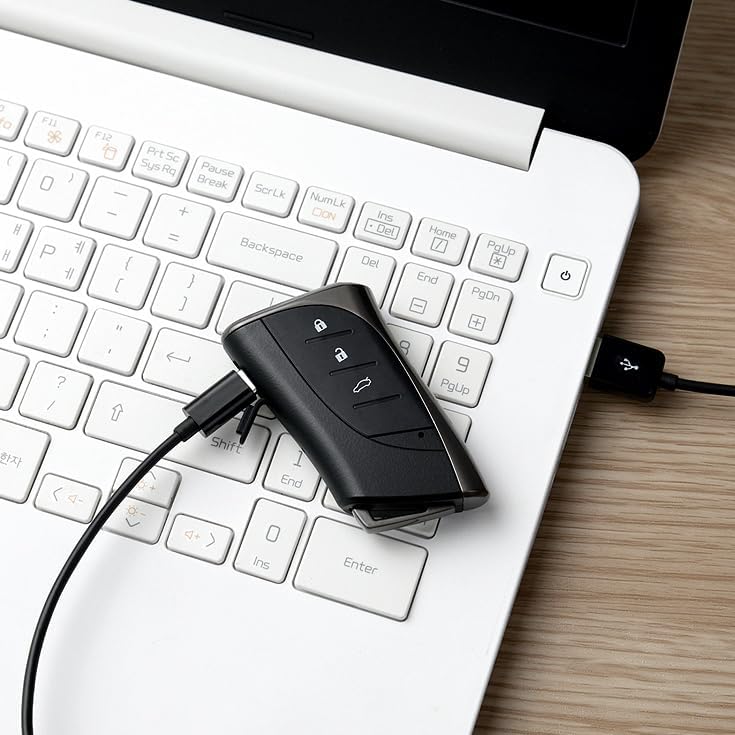
Image: The car key camera connected to a laptop via its USB Type-C cable for data transfer.

Image: A visual guide showing how to charge the device and transfer data by connecting it to a PC with the USB-C cable.
Penyelenggaraan
- Pastikan peranti bersih dan bebas daripada habuk dan serpihan. Gunakan kain lembut dan kering untuk pembersihan.
- Elakkan daripada mendedahkan peranti kepada suhu yang melampau, cahaya matahari langsung atau kelembapan yang tinggi.
- Jangan cuba membuka atau mengubah suai peranti, kerana ini akan membatalkan jaminan dan boleh menyebabkan kerosakan.
- Simpan peranti di tempat yang sejuk dan kering apabila tidak digunakan.
Menyelesaikan masalah
| Masalah | Kemungkinan Punca | Penyelesaian |
|---|---|---|
| Peranti tidak dihidupkan. | Bateri lemah. | Cas peranti sepenuhnya menggunakan kabel USB Jenis-C yang disediakan. |
| Cannot start recording. | Device not in standby mode; battery low; memory full. | Ensure device is in standby mode. Charge the battery. Connect to PC and delete old files untuk mengosongkan ruang. |
| Kualiti video kurang baik. | Insufficient lighting; lens obstruction; incorrect resolution setting. | Ensure adequate lighting. Clean the lens. Select QHD 1440p resolution for best quality. |
| Peranti tidak dikenali oleh komputer. | Loose cable connection; faulty cable; driver issue. | Ensure the USB Type-C cable is securely connected. Try a different USB port or cable. Restart your computer. |
| No audio in recordings. | This model does not support audio recording. | This is expected behavior. The device is designed for video-only surveillance. |
Spesifikasi
- Nama Model: CK400FQHD
- Resolusi Tangkapan Video: 2560x1440p (QHD)
- Viewsudut: 80 Darjah
- Memori Dalaman: 64GB
- Format Video: MP4
- Sumber Kuasa: Dikuasakan Bateri (termasuk 1 bateri Lithium Ion)
- Hayat Bateri: Approximately 70-90 minutes of continuous recording
- Ketersambungan: USB Type-C (for charging and data transfer)
- Dimensi (L x W x H): 5 x 6 x 2 inci
- Berat Barang: 8 auns
- warna: Hitam
- Penggunaan Dalaman/Luar: Dalaman, Luaran
- Ciri Khas: 2K Video, QHD Resolution, Wide angle, Concealed Lens, No Red Light
Waranti dan Sokongan
For warranty information or technical support, please contact DAMOACAM customer service directly. You can find contact details on the official DAMOACAM webtapak atau melalui platform pembelian anda.
Visit the official DAMOACAM store for more products and support: DAMOACAM Store
Ask a question about this manual
Ask about setup, troubleshooting, compatibility, parts, safety, or missing instructions. Manuals+ will review the question and use this page’s manual context to help answer it.