
1. Maklumat Keselamatan
Please read this instruction manual thoroughly before operating the JONR ED20 Pro. Keep this manual for future reference. Failure to follow these instructions may result in electric shock, fire, or serious injury.
- This appliance is for indoor household use only. Do not use outdoors or on commercial surfaces.
- Jangan rendamkan perkakas dalam air atau cecair lain.
- Gunakan hanya penyesuai pengecas yang disediakan oleh pengilang.
- Jangan ambil cecair mudah terbakar atau mudah terbakar, seperti petrol, atau gunakan di kawasan yang mungkin terdapat.
- Jangan ambil apa-apa yang terbakar atau berasap, seperti rokok, mancis, atau abu panas.
- Jauhkan rambut, pakaian longgar, jari dan semua bahagian badan daripada bukaan dan bahagian yang bergerak.
- Ensure the clean water tank and dirty water tank are correctly installed before use.
- Always unplug the appliance from the charging base before cleaning or performing maintenance.
- Jangan kendalikan perkakas dengan kord atau palam yang rosak.
- Jauhkan daripada kanak-kanak. Perkakas ini bukan mainan.
2. Produk Lebihview
The JONR ED20 Pro is a versatile 4-in-1 cordless wet dry vacuum cleaner designed to simplify your cleaning routine. It combines powerful vacuuming with effective mopping, offering multiple cleaning modes and attachments for various surfaces.
Ciri-ciri Utama:
- Fungsi 4-dalam-1: Seamlessly switches between wet dry vacuum, stick vacuum, handheld vacuum, and specialized cleaning tools.
- Penyedutan Kuat: Delivers 17000 Pa suction power for effective dirt and liquid removal.
- Self-Cleaning & Auto-Drying: One-click self-cleaning and automatic drying function for the brush roller, preventing odors and extending lifespan.
- Reka Bentuk Tanpa Kusut: Advanced dual scraper system prevents hair and pet hair from tangling on the brush roller.
- Pembersihan Tepi: Thin 0.2-inch edge design allows thorough cleaning along skirting boards and hard-to-reach corners.
- Intelligent Voice Reminder: Provides helpful voice prompts during operation and maintenance.
- Jangka Panjang: Up to 30 minutes in wet/dry vacuum mode and 60 minutes in vacuum cleaner mode.
- Bateri Boleh Ganti: Supports battery replacement for extended use.
Komponen yang Disertakan:

Figure 2.1: All components included with the JONR ED20 Pro.
- Main Unit (Handle, Brush, Dust Cup)
- Handheld Vacuum Extension Rod
- Wet Dry Vacuum Extension Rod
- Combination Tool (2-in-1 crevice and dusting brush)
- Berus Penggelek Lantai
- Pangkalan Pengecasan
- Rak Penyimpanan Aksesori
- Berus Pembersih
- Penyesuai Kuasa
3. Persediaan
3.1 Perhimpunan
Follow these steps to assemble your JONR ED20 Pro vacuum cleaner:
- Buka bungkusan semua komponen dari kotak.
- Masukkan pemegang ke dalam unit utama sehingga ia klik dengan selamat pada tempatnya.
- Attach the floor roller brush to the bottom of the main unit.
- For wet/dry vacuuming, ensure the clean water tank and dirty water tank are properly seated.
- For handheld or stick vacuuming, detach the motor unit and attach the appropriate extension rod and combination tool.
3.2 Pengecasan Awal
Before first use, fully charge the vacuum cleaner. Place the main unit onto the charging base and connect the power adapter to a wall outlet. The indicator lights on the display will show charging status. A full charge typically takes several hours.
3.3 Mengisi Tangki Air Bersih
For wet cleaning, remove the clean water tank from the main unit. Fill it with clean tap water up to the MAX line. You may add a small amount of non-foaming cleaning solution suitable for wet/dry vacuums if desired. Reattach the tank securely to the main unit.
Assembly & Operation Guide Video:
Video 3.1: A detailed guide on assembling and operating the JONR ED20 Pro Wet Dry Vacuum Mop.
4. Arahan Operasi
4.1 Menghidupkan/Mematikan
Press the power button on the handle to turn the vacuum cleaner on or off. The intelligent voice reminder will confirm the status.
4.2 Mod Pembersihan
The JONR ED20 Pro offers multiple cleaning modes and configurations:
- Wet Dry Vacuum Mode: Ideal for hard floors, simultaneously vacuuming debris and mopping with clean water.
- Mod Vakum Stick: Detach the main unit and attach the handheld vacuum extension rod and floor roller brush for dry vacuuming carpets and large areas.
- Mod Vakum Genggam: Use the main unit with the combination tool for cleaning crevices, furniture, car interiors, and other hard-to-reach spots.
4.3 Menggunakan Pembersih Vakum
For wet/dry cleaning, simply push the vacuum forward. The brush roller will rotate, and water will be dispensed to clean the floor while dirty water is simultaneously suctioned into the dirty water tank. For dry vacuuming, operate as a standard stick or handheld vacuum.

Figure 4.1: The JONR ED20 Pro offers 4-in-1 functionality for various cleaning needs, including hard floors, carpets, furniture, and car interiors.
Pembersihan 4.4 Tepi
The specialized 0.2-inch narrow edge design allows the vacuum to clean very close to walls and skirting boards, ensuring no dirt is left behind in corners.

Figure 4.2: The ED20 Pro's edge cleaning design allows it to reach tight spaces and corners effectively.
4.5 Battery Life and Runtime
The ED20 Pro provides approximately 30 minutes of runtime in wet/dry vacuum mode and up to 60 minutes in dry vacuum mode on a full charge. The display will indicate the remaining battery level.

Figure 4.3: The JONR ED20 Pro offers sufficient battery life for whole-house cleaning.
5. Penyelenggaraan
Regular maintenance ensures optimal performance and extends the lifespan of your JONR ED20 Pro.
5.1 Self-Cleaning and Automatic Drying
After each wet cleaning session, place the vacuum cleaner back on its charging base. Press the self-cleaning button (usually indicated by a water droplet icon) to activate the self-cleaning cycle. The vacuum will automatically clean the brush roller and then initiate an automatic drying process to prevent odor and bacterial growth.

Figure 5.1: The self-cleaning and automatic drying process ensures hygiene and extends the life of the brush roller.
5.2 Mengosongkan Tangki Air Kotor
The dirty water tank should be emptied after each use. Remove the tank from the main unit, open the lid, and pour out the dirty water and debris. Rinse the tank thoroughly with clean water and allow it to air dry before reattaching.
5.3 Cleaning the Brush Roller
While the self-cleaning function handles most of the brush maintenance, occasional manual cleaning may be necessary. The dual scraper system minimizes hair tangles, but if any hair or debris remains, carefully remove the brush roller and use the provided cleaning brush to clear it. Ensure the brush roller is completely dry before reinserting.
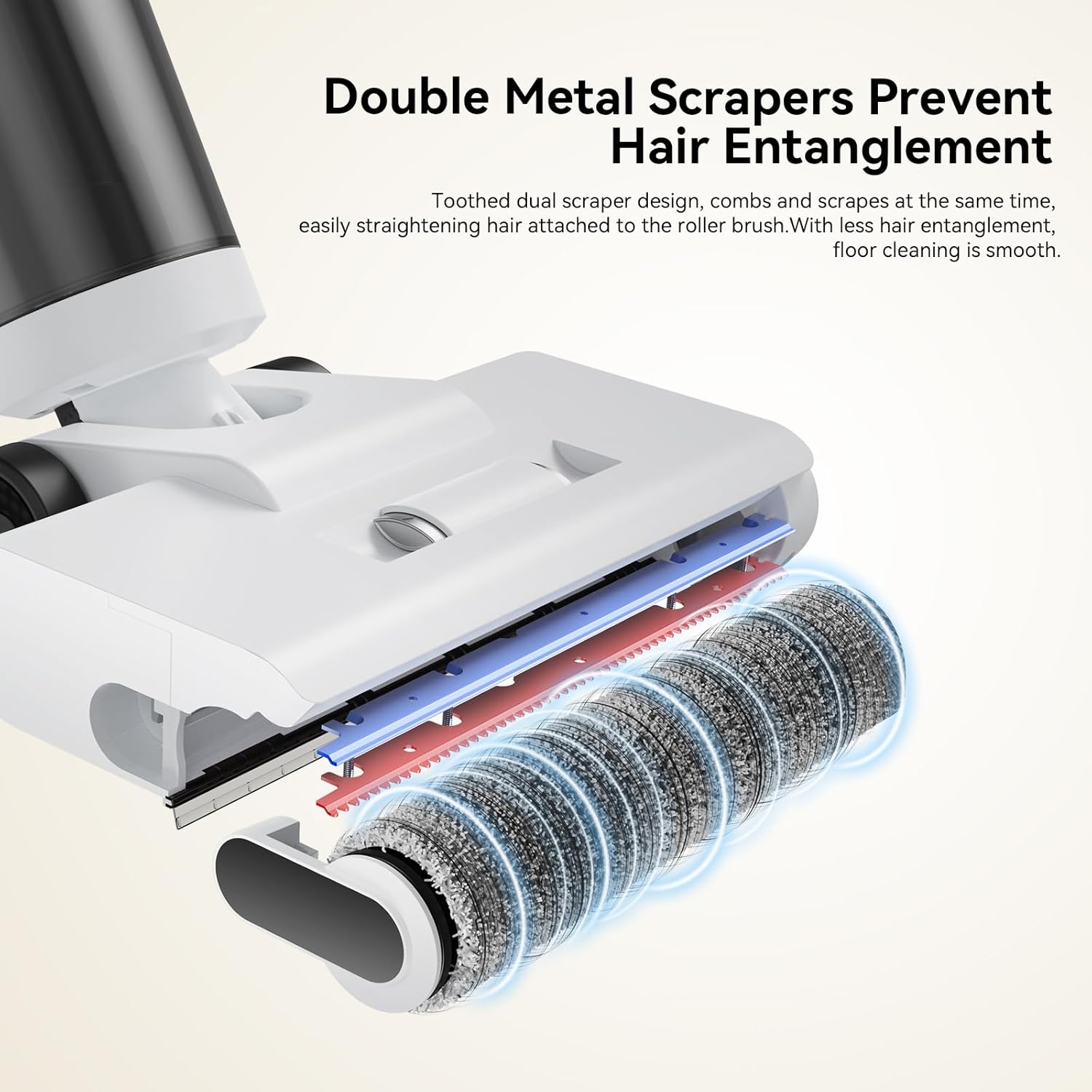
Figure 5.2: The double metal scrapers effectively prevent hair entanglement on the brush roller.
5.4 Penyelenggaraan Penapis
The HEPA filter should be cleaned regularly to maintain suction performance. Remove the filter from the dirty water tank assembly, tap off loose debris, and rinse under running water. Allow the filter to air dry completely for at least 24 hours before reinserting. Replace the filter every 3-6 months, or as needed.
6. Penyelesaian masalah
If you encounter any issues with your JONR ED20 Pro, refer to the following common problems and solutions:
| Masalah | Kemungkinan Punca | Penyelesaian |
|---|---|---|
| Vakum tidak dihidupkan | Bateri rendah; Tidak dicas dengan betul | Charge the vacuum fully. Ensure it is correctly seated on the charging base. |
| Kuasa sedutan yang lemah | Dirty filter; Clogged brush roller/hose; Full dirty water tank | Clean or replace the filter. Clear any blockages. Empty the dirty water tank. |
| Air tidak mendispens | Empty clean water tank; Tank not properly installed | Refill the clean water tank. Ensure the tank is securely in place. |
| Leaves streaks/excess water | Dirty brush roller; Dirty water tank full; Incorrect cleaning solution | Run self-cleaning cycle or manually clean brush roller. Empty dirty water tank. Use recommended cleaning solution. |
| Voice reminder not working | Volume too low; Malfunction | Check volume settings if available. Contact customer support if issue persists. |
If the problem persists after trying these solutions, please contact JONR customer support for assistance.
7. Spesifikasi
| Ciri | Spesifikasi |
|---|---|
| Jenama | JONR |
| Nama Model | ED20 Pro |
| Ciri Khas | Cordless, Self-Cleaning, Automatic Drying, Voice Reminder |
| Kuasa Sedutan | 17000 Pa |
| Jenis Penapis | Foam, HEPA Filter |
| Kapasiti Tangki Air Bersih | 530 ml (approx.) |
| Kapasiti Tangki Air Kotor | 540 ml (approx.) |
| Wet/Dry Vacuum Runtime | Sehingga 30 minit |
| Dry Vacuum Runtime | Sehingga 60 minit |
| Faktor Bentuk | tongkat |
| warna | putih |
| Dimensi Produk | 10"L x 10"W x 37"H |
| Berat Barang | 8 paun |
| UPC | 368463655749 |
8. Waranti dan Sokongan
JONR products are manufactured to the highest quality standards. For warranty information, technical support, or service inquiries, please contact JONR Direct customer service. Keep your purchase receipt as proof of purchase.
JONR Direct Customer Service:
- Refer to the contact information provided on the product packaging or the official JONR webtapak.
- Online support may be available through the JONR brand store on Amazon.