
pengenalan
Thank you for choosing the DOYO 270 Degree Wireless Gaming Steering Wheel with Pedals. This manual provides essential information for setting up, operating, and maintaining your racing wheel. Please read these instructions carefully before use to ensure optimal performance and longevity of your device.
Produk Selesaiview
The DOYO Gaming Steering Wheel is designed for a realistic racing experience across multiple platforms. It features a 270-degree rotation, dual-vibration motors, and includes a set of pedals for acceleration and braking.

Rajah 1: Depan view of the DOYO Wireless Gaming Steering Wheel with Pedals.
Kawalan dan Penunjuk

Rajah 2: Detailed diagram of the steering wheel's buttons, D-Pad, triggers, and indicators.
- Pilih Butang: Used for various in-game selections.
- D-Pad: Directional input for menu navigation and in-game controls.
- Butang A/B/X/Y: Butang tindakan standard.
- Butang Jeda/Mula: For pausing games or starting new sessions.
- Butang rumah: Returns to the system's home screen.
- ZR/ZL Triggers: Analog triggers for acceleration and braking (functionality may vary by platform, e.g., ZR = A, ZL = B on Switch).
- M Indicator: Settings indicator.
- Indicators 1/2/3/4: Display current dead zone and sensitivity settings.
Persediaan
Follow these steps to set up your DOYO Gaming Steering Wheel.
Mengkuasakan Peranti
- The steering wheel requires 3 AAA batteries (not included) for operation. Insert them into the battery compartment located on the underside of the unit, ensuring correct polarity.
Memasang Roda Stereng
The steering wheel features a stable fixture clamp design compatible with various desktop thicknesses.

Rajah 3: cl boleh larasamp mechanism for securing the steering wheel to a surface.
- Place the steering wheel on a stable, flat surface.
- Laraskan clamp screw to fit your desktop thickness (compatible with thicknesses between 3mm and 49mm).
- Ketatkan clamp securely to prevent movement during use.
Connecting the Pedals
- Connect the pedal unit cable to the designated port on the steering wheel.
Platform Connection
The steering wheel supports both wireless Bluetooth and wired connections.
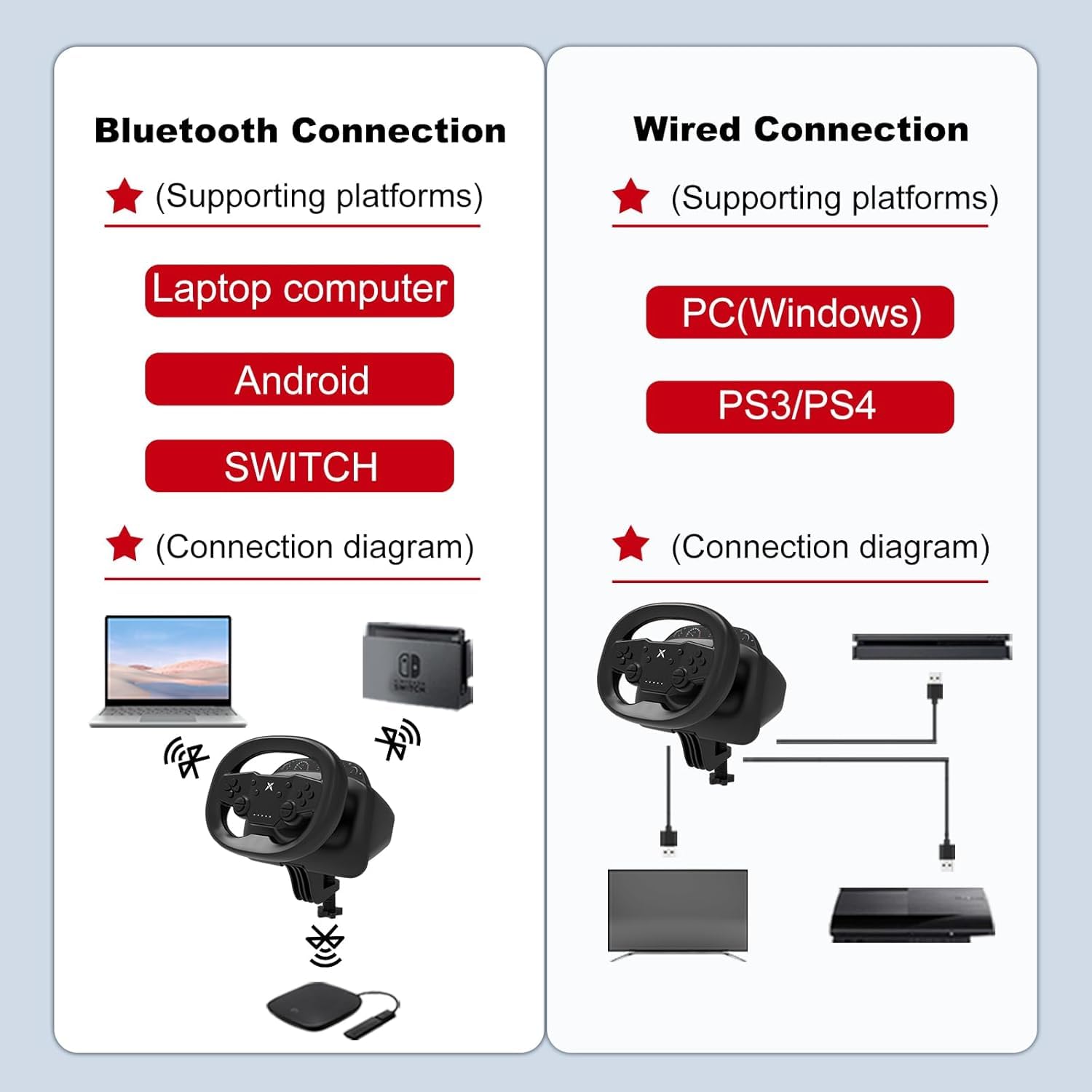
Rajah 4: Connection diagrams for wireless (Bluetooth) and wired setups.
Wireless Bluetooth Connection (Switch, PC, iOS, Android)
- Ensure the steering wheel has sufficient battery power.
- Activate Bluetooth on your device (Nintendo Switch, PC, iOS/Android mobile phone or tablet).
- Put the steering wheel into pairing mode (refer to the device's specific pairing instructions, usually by holding a specific button combination).
- Select the steering wheel from the list of available Bluetooth devices on your platform to pair.

Rajah 5: Wireless connection to a mobile device, enhancing mobile gaming.
Wired Connection (PC, PS3, PS4)
- Connect the steering wheel directly to your PC, PS3, or PS4 console using a USB cable.
- The system should automatically detect the device. Follow any on-screen prompts for driver installation if necessary (for PC).
Arahan Operasi
Once connected, you can begin using your DOYO Gaming Steering Wheel for an immersive racing experience.
Steering and Rotation
The steering wheel offers a 270-degree rotation for precise control in racing games.

Rajah 6: The steering wheel supports 135 degrees of rotation to both the left and right, totaling 270 degrees.
Maklum balas Getaran
- The dual-vibration motors provide realistic feedback during gameplay, enhancing immersion. Vibration intensity may be adjustable in game settings or through specific wheel functions.
Dead Zone and Sensitivity Adjustment
- The steering wheel allows for adjustment of dead zone and sensitivity settings. Refer to the indicators (1/2/3/4) and the 'M' indicator for current settings. Specific adjustment methods are typically detailed in the quick start guide or product packaging.
Platform-Specific Features
- Nintendo Switch: Optimized for games like Mario Kart, offering adjustable vibration feedback and easy screenshot capture.
- PC: Customizable settings for accuracy and enhanced control in PC racing titles.
Penyelenggaraan
Proper maintenance ensures the longevity and performance of your steering wheel.
- Pembersihan: Use a soft, dry cloth to wipe down the steering wheel and pedals. Avoid using harsh chemicals or abrasive cleaners.
- Storan: Simpan peranti di tempat yang sejuk dan kering jauh dari cahaya matahari langsung dan suhu yang melampau.
- Penjagaan Bateri: If the device will not be used for an extended period, remove the AAA batteries to prevent leakage.
- Pengurusan Kabel: Elakkan selekoh tajam atau lekukan pada kabel untuk mengelakkan kerosakan.
Menyelesaikan masalah
If you encounter issues with your DOYO Gaming Steering Wheel, refer to the following common solutions.
- Peranti Tidak Dihidupkan:
- Ensure fresh AAA batteries are correctly inserted with proper polarity.
- Check if the power button (if applicable) is pressed.
- Isu Sambungan (Tanpa Wayar):
- Verify Bluetooth is enabled on your gaming platform.
- Ensure the steering wheel is in pairing mode.
- Move the steering wheel closer to the gaming platform to reduce interference.
- Remove any other active Bluetooth devices that might cause interference.
- Try restarting both the steering wheel and the gaming platform.
- Connection Issues (Wired):
- Ensure the USB cable is securely connected to both the steering wheel and the gaming platform.
- Try a different USB port on your console or PC.
- Uji dengan kabel USB yang berbeza jika ada.
- Tiada Maklum Balas Getaran:
- Semak tetapan dalam permainan untuk memastikan maklum balas getaran diaktifkan.
- Verify that the game supports vibration functionality.
- Steering Input Not Responding:
- Recalibrate the steering wheel if your platform offers this option.
- Ensure the device is correctly recognized by the system.
Jika langkah ini tidak menyelesaikan isu, sila hubungi sokongan pelanggan.
Spesifikasi
| Jenama | DOYO |
| Nombor Model | B0DXPJZ396 |
| Peranti Serasi | Android, Nintendo Switch, PC, PlayStation 3, PlayStation 4, iOS Mobile Phones |
| Jenis Pengawal | Steering Wheel, Pedals |
| Teknologi Ketersambungan | Bluetooth (Bluetooth 5.0) |
| Ciri-ciri Tambahan | Ergonomic Design, Multi-use, Wireless, Dual-Vibration Motors, 270-Degree Rotation |
| Sumber Kuasa | Dikuasakan Bateri (3 bateri AAA, tidak termasuk) |
| Berat Barang | 2.04 Kilogram |
| warna | Hitam |
Waranti dan Sokongan
DOYO is committed to providing a smooth and enjoyable gaming experience. For any questions, technical assistance, or warranty inquiries, please contact our dedicated customer support team.
- Sokongan Pelanggan: Refer to the contact information provided with your product packaging or visit the official DOYO webtapak untuk pilihan sokongan.
- Maklumat Waranti: Specific warranty terms and conditions may vary by region and retailer. Please retain your proof of purchase for warranty claims. Contact customer support for detailed warranty information.