
1. Pengenalan
This manual provides essential instructions for the proper setup, operation, and maintenance of your TVS MSP 270 Star Box Dot Matrix Printer. Designed for high-speed and efficient printing of billing, reports, and invoices, this printer offers reliable performance for various business needs. Please read this manual thoroughly before using the printer to ensure optimal performance and longevity.
2. Persediaan
2.1 Membongkar Pembungkusan Pencetak
- Tanggalkan pencetak dan semua aksesori daripada pembungkusan dengan berhati-hati.
- Retain the packaging materials for future transportation or storage.
- Sahkan bahawa semua komponen yang disenaraikan dalam senarai pembungkusan ada.
2.2 Menyambung Kabel
- Connect the power cable to the printer's power input and then to a grounded electrical outlet.
- Sambungkan kabel USB ke port USB pencetak dan hujung satu lagi ke port USB yang tersedia pada komputer anda.
2.3 Installing the Ink Ribbon
The TVS MSP 270 Star Box printer uses an ink ribbon cartridge. Follow these steps to install it:
- Pastikan pencetak dimatikan.
- Open the printer cover to access the ribbon cartridge area.
- Carefully insert the new ribbon cartridge into its designated slot, ensuring it clicks into place.
- Route the ribbon correctly around the print head mechanism as indicated by the printer's internal guides.
- Tutup penutup pencetak.
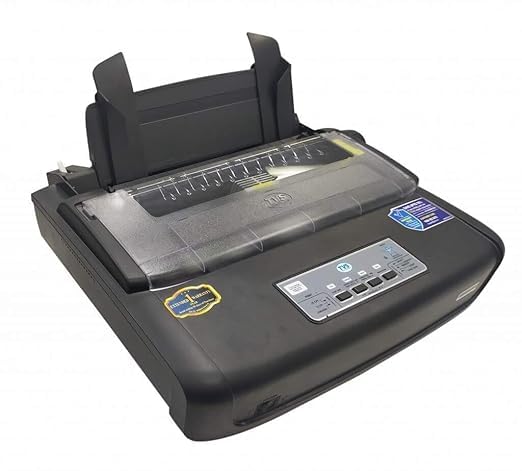
3. Arahan Operasi
3.1 Memuatkan Kertas
The MSP 270 supports continuous form paper and single cut sheets.
- For Continuous Form Paper: Ensure the paper is aligned with the tractor feed mechanism. Engage the tractors and adjust the paper guides to hold the paper securely.
- For Single Cut Sheets: Open the front paper guide and insert a single sheet of paper, ensuring it is straight and aligned with the paper sensor.
3.2 Percetakan Asas
Once the printer is connected and paper is loaded, you can send print jobs from your computer. Ensure the printer is powered on and the 'Online' indicator light is illuminated.
- From your application, select 'Print'.
- Choose 'TVS MSP 270 Star Box' from the list of available printers.
- Adjust print settings (e.g., paper size, print quality) as needed.
- Click 'Print' to start the printing process.
3.3 Fungsi Panel Kawalan
The printer's control panel typically includes buttons for basic operations:
- MAKANAN: Advances the paper by one line or page.
- Jeda: Berhenti mencetak buat sementara waktu. Tekan sekali lagi untuk menyambung semula.
- ONLINE/OFFLINE: Toggles the printer's online status. The printer must be online to receive print jobs.
4. Penyelenggaraan
4.1 Replacing the Ink Ribbon
Replace the ink ribbon cartridge when print quality begins to fade or characters become faint. Refer to section 2.3 for detailed ribbon installation steps.
4.2 Membersihkan Pencetak
Regular cleaning helps maintain printer performance and extends its lifespan.
- Luaran: Gently wipe the exterior surfaces with a soft, dry, lint-free cloth. Avoid using liquid cleaners or abrasive materials.
- Dalaman: Periodically remove any paper dust or debris from the paper path using a soft brush or compressed air. Ensure the printer is powered off before cleaning internal components.
5. Penyelesaian masalah
This section addresses common issues you might encounter with your TVS MSP 270 Star Box printer.
| Masalah | Kemungkinan Punca | Penyelesaian |
|---|---|---|
| Pencetak tidak dihidupkan. | Power cable disconnected; power outlet faulty. | Periksa sambungan kabel kuasa. Cuba salur kuasa yang lain. |
| Printer is not printing. | Printer is offline; USB cable disconnected; print job error. | Ensure printer is online. Check USB cable connection. Restart printer and computer. |
| Kualiti cetakan yang teruk (kabur, berjalur). | Ink ribbon worn out; ribbon incorrectly installed. | Replace the ink ribbon cartridge. Verify ribbon installation (Section 2.3). |
| Kertas jem. | Paper incorrectly loaded; foreign object in paper path. | Power off the printer. Carefully remove jammed paper. Reload paper correctly. |
6. Spesifikasi
Key technical specifications for the TVS MSP 270 Star Box Dot Matrix Printer:
| Ciri | Spesifikasi |
|---|---|
| Model | MSP 270 |
| Teknologi Percetakan | Matriks Titik |
| Teknologi Ketersambungan | USB |
| Output Pencetak | Monokrom |
| Resolusi Cetakan Hitam dan Putih Maksimum | 24 dpi |
| Percetakan Dupleks | Simplex (No) |
| Warna Dakwat | Hitam |
| Berat Barang | 6 kg 660 g |
7. Waranti dan Sokongan
The TVS MSP 270 Star Box Dot Matrix Printer is backed by a Waranti pengilang selama 1 tahun dari tarikh pembelian. Waranti ini melindungi kecacatan pada bahan dan mutu kerja di bawah penggunaan biasa.
For technical assistance, warranty claims, or service inquiries, please contact your authorized TVS dealer or visit the official TVS customer support website. Please have your printer's model number and purchase details ready when contacting support.