
1. Maklumat Keselamatan Penting
Please read all instructions carefully before using the DOYO 180° PC Racing Wheel. Retain this manual for future reference.
- Jangan dedahkan peranti kepada suhu yang melampau, kelembapan atau cahaya matahari langsung.
- Elakkan daripada menjatuhkan atau meletakkan peranti kepada kesan yang kuat.
- Jangan cuba membuka atau mengubah suai peranti. Ini akan membatalkan jaminan.
- Jauhkan peranti daripada air dan cecair lain.
- Gunakan hanya kabel dan aksesori yang disediakan.
- Pastikan pengudaraan yang betul semasa digunakan untuk mengelakkan terlalu panas.
2. Kandungan Pakej
Sahkan bahawa semua item terdapat dalam pakej anda:
- DOYO 180° PC Racing Wheel Unit
- Pedal Unit (Accelerator and Brake)
- Kabel Sambungan USB
- Manual Pengguna
3. Produk Lebihview
3.1 Komponen
The DOYO 180° PC Racing Wheel system consists of the main steering wheel unit and a separate pedal unit.
Gambar 3.1: Lebihview of the DOYO 180° PC Racing Wheel and Pedal Unit.
3.2 Ciri-ciri Utama
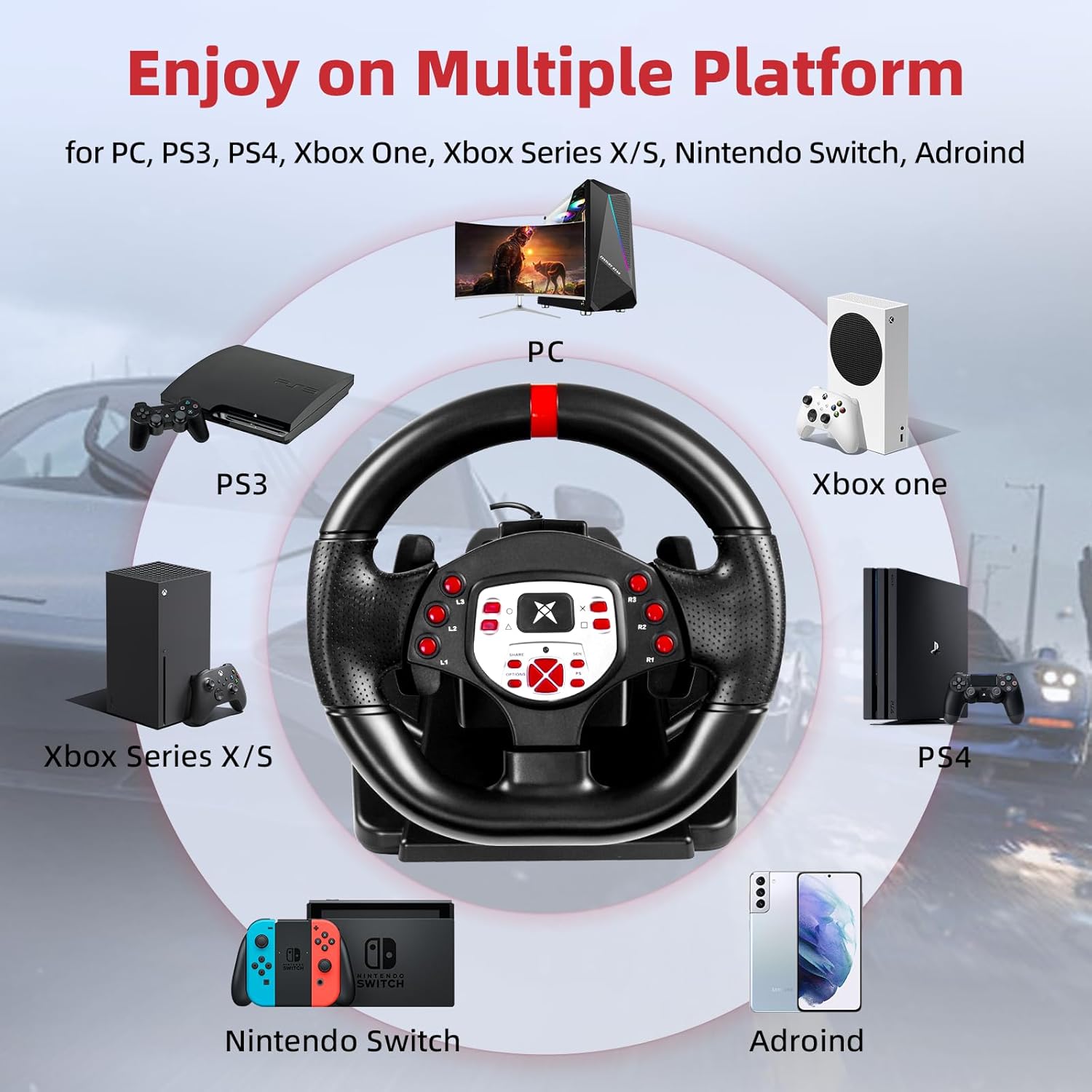
- Keserasian Luas: Supports PC, PlayStation 4 (PS4), PlayStation 3 (PS3), and Nintendo Switch.
- Putaran 180°: The steering wheel offers 180 degrees of rotation for realistic driving simulation.
- Getaran Motor Dwi: Built-in dual motors provide realistic vibration feedback based on in-game events.
- Adjustable Height & Tilt: The steering wheel's height and tilt can be adjusted to suit various user preferences and seating positions.
- Pengubah Suai Dayung: Integrated paddle shifters allow for quick and responsive gear changes.
- Linear Pedal Design: The pedal unit features a linear design for precise control over acceleration and braking.
- Strong Fixation: Equipped with four large suction cups on the base for stable mounting on flat surfaces.
- Multi-level Sensitivity Adjustment: Allows users to fine-tune steering sensitivity for different games and driving styles.

Rajah 3.2: Terperinci view of the racing wheel's controls and features.
4. Arahan Persediaan
4.1 Connecting the Steering Wheel
The DOYO Racing Wheel is designed for plug-and-play functionality across supported platforms.

Figure 4.1: Multi-platform compatibility of the racing wheel.
4.1.1 Sambungan PC
- Connect the USB cable from the steering wheel unit to an available USB port on your PC.
- The system should automatically detect and install the necessary drivers. If not, manual driver installation may be required (refer to DOYO support webtapak).
4.1.2 PS3/PS4 Connection
- Ensure your console is powered off.
- Connect the USB cable from the steering wheel unit to an available USB port on your PS3 or PS4 console.
- Power on your console. The wheel should be recognized as a controller.
4.1.3 Sambungan Nintendo Switch
- Go to System Settings > Controllers and Sensors > Pro Controller Wired Communication and set it to 'On'.
- Connect the USB cable from the steering wheel unit to the Nintendo Switch dock's USB port.
- The wheel should be recognized and ready for use.
4.2 Menyambungkan Unit Pedal
Connect the cable from the pedal unit to the designated port on the back of the steering wheel unit.

Figure 4.2: Connection point for the foot pedal unit.
4.3 Mounting the Steering Wheel
The steering wheel base is equipped with four large suction cups for secure mounting.
- Place the steering wheel unit on a clean, flat, and smooth surface (e.g., a desk or table).
- Press down firmly on the steering wheel base to engage the suction cups.
- Ensure the wheel is stable before use.
Video 4.3: Demonstration of the DOYO 180 Degree PC Racing Wheel and its features, including setup and usage.
5. Arahan Operasi
5.1 Steering Wheel Rotation
The steering wheel provides 180 degrees of rotation, allowing for 90 degrees to the left and 90 degrees to the right from the center position.

Figure 5.1: The steering wheel's 180-degree rotation range.
5.2 Height and Tilt Adjustment
To adjust the steering wheel's position for optimal comfort:
- Locate the adjustment knob or lever on the steering wheel base.
- Rotate the knob or release the lever to unlock the adjustment mechanism.
- Adjust the tilt angle and telescopic length (up to 5cm) to your desired position.
- Secure the adjustment by rotating the knob or engaging the lever.

Figure 5.2: Steering wheel height and tilt adjustment.
5.3 Pengayuh Paddle
Use the paddle shifters located behind the steering wheel for manual gear changes in compatible games. The left paddle typically shifts down, and the right paddle shifts up.

Figure 5.3: Dual paddle shifters for gear control.
5.4 Pedal Unit Operation
The linear pedal unit provides progressive control for acceleration and braking. Press the right pedal for acceleration and the left pedal for braking.
5.5 Maklum Balas Getaran
The dual motor vibration system provides immersive feedback, simulating road conditions, collisions, and other in-game effects.

Figure 5.4: Illustration of dual motor vibration feedback.
5.6 Pelarasan Sensitiviti
The steering wheel features a multi-level sensitivity adjustment. Refer to the on-screen display or indicator on the wheel to select your preferred sensitivity level (e.g., Grade 1-7).

Figure 5.5: Sensitivity adjustment dial on the steering wheel.
6. Penyelenggaraan
To ensure the longevity and optimal performance of your DOYO Racing Wheel:
- Pembersihan: Use a soft, dry cloth to wipe down the steering wheel and pedal unit. Do not use abrasive cleaners or solvents.
- Storan: Simpan peranti di tempat yang sejuk dan kering jauh dari cahaya matahari langsung dan suhu yang melampau apabila tidak digunakan.
- Penjagaan Kabel: Avoid bending or twisting cables excessively.
7. Penyelesaian masalah
If you encounter issues with your DOYO Racing Wheel, please refer to the following common solutions:
| Masalah | Penyelesaian yang Mungkin |
|---|---|
| Wheel not recognized by console/PC |
|
| No vibration feedback |
|
| Pedal tidak bertindak balas |
|
| Steering sensitivity too high/low |
|
If the problem persists, please contact DOYO customer support for further assistance.
8. Spesifikasi
- Nombor Model: R180C-PC
- ASIN: B0DXBNTWZG
- Sudut Putaran: 180 darjah
- Keserasian: PC, PS4, PS3, Nintendo Switch
- Getaran: Dual Motor Feedback
- Penetapan: 4 Cawan Penyedut
- Berat Barang: Kira-kira 7.24 paun (3.28 kg)
- Dimensi Pakej: 13 x 11.5 x 10.5 inci (33 x 29.2 x 26.7 cm)
- Pengeluar: DOYO
9. Waranti dan Sokongan
DOYO products come with a limited warranty. For detailed warranty information, product support, or to report any issues, please refer to the warranty card included with your product or visit the official DOYO website. Please have your model number (R180C-PC) and purchase information ready when contacting support.