
1. Pengenalan
This manual provides essential information for the safe and efficient operation, maintenance, and troubleshooting of your Dapper Supply DP-RAFS1205 Battery Powered Ride-On Commercial Floor Scrubber Machine. Please read this manual thoroughly before operating the machine to ensure proper usage and to prevent injury or damage.
1.1. Maklumat Keselamatan
- Always wear appropriate personal protective equipment (PPE) during operation and maintenance.
- Ensure the machine is turned off and disconnected from power before performing any maintenance or adjustments.
- Operate the machine only on surfaces designed for its use.
- Do not operate the machine in hazardous environments or near flammable materials.
- Jauhkan tangan, kaki dan pakaian longgar daripada bahagian yang bergerak.
- Familiarize yourself with all controls and emergency stop procedures.
2. Produk Lebihview
The Dapper Supply DP-RAFS1205 is a battery-powered ride-on commercial floor scrubber designed for efficient cleaning of large floor areas. It features a 22-inch brush width, a 31.5-inch squeegee width, and a dual-tank system for clean and recovery water.

Rajah 2.1: Sisi view of the Dapper Supply DP-RAFS1205 Ride-On Commercial Floor Scrubber Machine.
2.1. Komponen Utama
- Roda stereng: Untuk kawalan arah.
- Operator Seat: Provides comfortable seating for the user.
- Panel Kawalan: Contains power switch, brush controls, solution flow, and battery indicator.
- Tangki Penyelesaian: Holds clean water and cleaning solution (18.5-gallon capacity).
- Tangki Pemulihan: Collects dirty water (19.8-gallon capacity).
- Scrub Brush: 22-inch diameter brush for scrubbing floors.
- Perhimpunan Squeegee: 31.5-inch wide squeegee for water and debris collection.
- Front & Back Lights: For improved visibility in dimly lit areas.
- Penggera Sandaran: Enhances safety during reverse operation.

Rajah 2.2: Jarak dekat view of the control panel area, showing the key ignition and brush control.
3. Persediaan
3.1. Membongkar dan Memasang
- Carefully remove the machine from its packaging. Inspect for any shipping damage.
- Pastikan semua komponen yang disenaraikan dalam senarai pembungkusan ada.
- Attach any unattached components, such as the squeegee assembly, following the diagrams provided in the separate assembly guide (if applicable).
3.2. Pengecasan Bateri Awal
Before first use, fully charge the machine's battery. The battery system requires 7-8 hours for a full charge.
- Locate the charging port on the machine.
- Connect the provided charger to the machine and then to a standard 110V AC power outlet.
- Monitor the charging indicator lights. Disconnect the charger once charging is complete.
3.3. Filling the Solution Tank
- Open the lid of the clean water (solution) tank.
- Fill the tank with clean water and an appropriate, manufacturer-approved cleaning solution according to the solution manufacturer's instructions. Do not overfill.
- Securely close the tank lid.
4. Arahan Operasi
4.1. Senarai Semak Pra Operasi
- Periksa tahap pengecasan bateri.
- Ensure solution tank is filled and recovery tank is empty.
- Verify brush and squeegee are properly installed and free of obstructions.
- Clear the area to be cleaned of any large debris or obstacles.
4.2. Memulakan Mesin
- Sit comfortably in the operator's seat.
- Masukkan kunci ke dalam penyalaan dan putarkannya ke kedudukan 'HIDUP'.
- Engage the main power switch on the control panel.
4.3. Prosedur Pembersihan
- Lower the scrub brush using the brush control lever/button.
- Lower the squeegee assembly using its respective lever/button.
- Activate the solution flow.
- Begin driving the machine at a consistent, moderate speed. Overlapping passes slightly will ensure thorough cleaning.
- The machine will scrub the floor, dispense solution, and then recover the dirty water through the squeegee into the recovery tank.
- Utilize the front and back lights for enhanced visibility in low-light conditions. The backup alarm will sound when reversing.

Figure 4.1: An operator demonstrating the use of the Dapper Supply Ride-On Floor Scrubber.
4.4. Selepas Operasi
- Raise the scrub brush and squeegee.
- Turn off the solution flow.
- Turn off the main power switch and remove the key.
- Empty and rinse the recovery tank.
- Rinse the solution tank if using cleaning chemicals.
- Clean the squeegee blades and brush.
5. Penyelenggaraan
Regular maintenance ensures optimal performance and extends the lifespan of your machine.
5.1. Penyelenggaraan Harian
- Empty and rinse both solution and recovery tanks thoroughly.
- Clean the squeegee blades and check for wear. Replace if damaged.
- Inspect the scrub brush for debris and wear. Remove any tangled materials.
- Lap bahagian luar mesin.
- Check battery charge and recharge as needed.
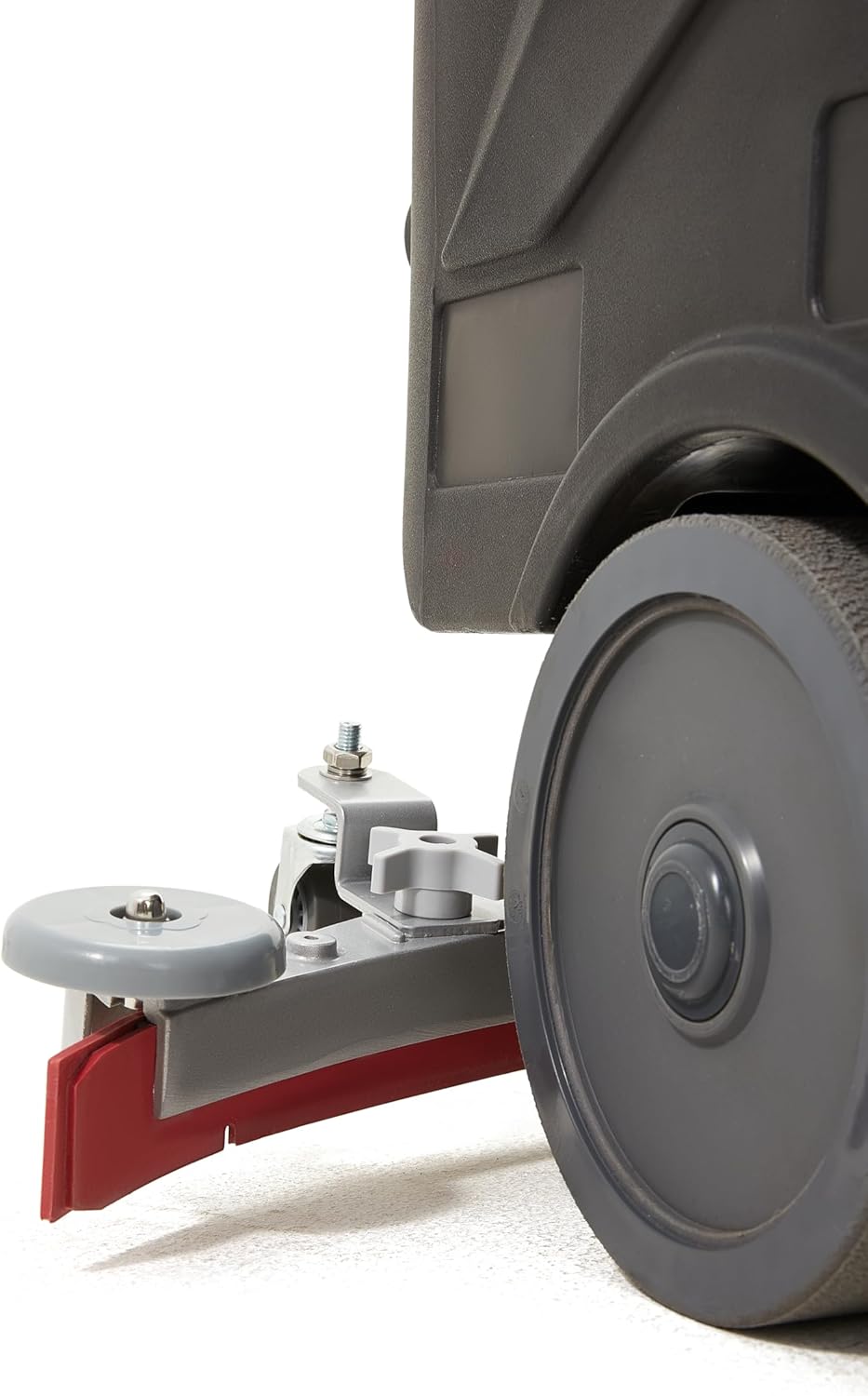
Rajah 5.1: Terperinci view of the squeegee assembly, showing the blade and adjustment knob.
5.2. Penyelenggaraan Mingguan
- Periksa semua hos dan sambungan untuk kebocoran atau kerosakan.
- Check the condition of the wheels and casters.
- Clean the vacuum filter (if applicable).

Rajah 5.2: Bahagian bawah view showing the scrub brush, which should be regularly inspected and cleaned.
5.3. Penjagaan Bateri
- Always recharge the battery after each use, even if not fully depleted.
- Elakkan menyahcas bateri sepenuhnya, kerana ini boleh mengurangkan jangka hayatnya.
- Store the machine in a cool, dry place when not in use, ensuring the battery is charged.
6. Penyelesaian masalah
Bahagian ini menyediakan penyelesaian kepada isu operasi biasa. Untuk masalah yang tidak disenaraikan di sini, hubungi khidmat pelanggan.
| Masalah | Kemungkinan Punca | Penyelesaian |
|---|---|---|
| Mesin tidak bermula | Battery discharged; Key not in 'ON' position; Main power switch off. | Charge battery; Turn key to 'ON'; Engage main power switch. |
| Prestasi menyental yang lemah | Worn brush; Incorrect brush type; Insufficient solution flow. | Replace brush; Use correct brush for floor type; Check solution tank level and flow settings. |
| Water not recovering properly | Worn or damaged squeegee blades; Recovery tank full; Clogged vacuum hose. | Replace squeegee blades; Empty recovery tank; Clear vacuum hose. |
| Machine loses power quickly | Bateri tidak dicas sepenuhnya; Bateri yang semakin usang. | Ensure full charge before use; Consider battery replacement if performance continues to degrade. |
7. Spesifikasi
Technical specifications for the Dapper Supply DP-RAFS1205.
| Ciri | Spesifikasi |
|---|---|
| Nombor Model | DP-RAFS1205 |
| Sumber Kuasa | Dikuasakan Bateri |
| Lebar Pembersihan | 22 inci |
| Lebar Squeegee | 31.5 inci |
| Kapasiti Tangki Penyelesaian | 18.5 gelen |
| Kapasiti Tangki Pemulihan | 19.8 gelen |
| Masa Penggunaan Berterusan | 3-4 jam |
| Masa Mengecas | 7-8 jam |
| Kecekapan Pembersihan | Up to 48,400 sq. ft/hour |
| Kelajuan Berus | 200 RPM |
| Tahap Kebisingan Operasi | 60 dB |
| Berat Barang | 242 paun |
| Dimensi Produk (L x W x H) | 49 x 24 x 43 inci |
| Voltage | 110 Volt (AC) |
| bahan | aluminium |
| Komponen yang Disertakan | Hard Brush for Hard Floors |
8. Waranti dan Sokongan
8.1. Waranti Pengeluar
The Dapper Supply DP-RAFS1205 Ride-On Commercial Floor Scrubber Machine is covered by a Waranti pengilang selama 1 tahun. This warranty covers defects in materials and workmanship under normal use. Please retain your proof of purchase for warranty claims. The warranty does not cover damage due to misuse, neglect, or unauthorized modifications.
8.2. Sokongan Pelanggan
For technical assistance, parts, or warranty inquiries, please contact Dapper Supply customer support. You can find contact information on the official Dapper Supply webtapak atau melalui platform pembelian anda.
For more information about Dapper Supply products and support, visit the official Dapper Supply Store.