
DOOGEE Tab E3 Pro
DOOGEE Tab E3 Pro Android Tablet User Manual
Model: Tab E3 Pro
1. Pengenalan
Welcome to the user manual for your new DOOGEE Tab E3 Pro Android Tablet. This guide provides detailed instructions on how to set up, operate, maintain, and troubleshoot your device. Please read this manual thoroughly to ensure optimal performance and longevity of your tablet.
The DOOGEE Tab E3 Pro is designed for a seamless and powerful user experience, featuring a large display, robust processor, and long-lasting battery, making it ideal for entertainment, productivity, and communication.
2. Kandungan Pakej
Please check the contents of your package. If any items are missing or damaged, contact your retailer or DOOGEE support.
- DOOGEE Tab E3 Pro Tablet
- Kabel Pengecas USB-C
- Penyesuai Kuasa
- Alat Keluarkan SIM (jika berkenaan)
- Panduan Mula Pantas
- Kad Waranti
3. Peranti Lebihview
Familiarize yourself with the physical components of your DOOGEE Tab E3 Pro.

Rajah 3.1: Depan view of the DOOGEE Tab E3 Pro tablet, showcasing its large 13-inch display with key features like Android 15, Helio G100 processor, Gemini AI, and 11000mAh battery capacity highlighted on the screen.
3.1. Butang dan Port
- Butang Kuasa: Terletak di sisi, digunakan untuk menghidupkan/mematikan tablet atau membangunkan/menidurkan skrin.
- Butang Kelantangan: Laraskan kelantangan audio.
- Port USB-C: Untuk pengecasan dan pemindahan data.
- Bicu Fon Kepala 3.5mm: Untuk menyambungkan fon kepala berwayar.
- Slot Kad SIM/MikroSD: Insert your SIM card for cellular connectivity or a MicroSD card for expandable storage.

Rajah 3.2: An illustration highlighting the Android 15 operating system, indicating its intelligent, seamless, and secure features, which is the core software of the DOOGEE Tab E3 Pro.
3.2. Kamera
- Kamera Belakang: 13MP main camera for high-quality photos and videos.
- Kamera Depan: Kamera 8MP untuk panggilan video dan swafoto.

Rajah 3.3: A visual representation of the DOOGEE Tab E3 Pro's camera capabilities, showing the 13MP main camera and 8MP front camera, along with example photos taken by the tablet.
4. Persediaan Awal
4.1. Mengecas Tablet
Before first use, fully charge your tablet. Connect the USB-C cable to the tablet's charging port and the other end to the power adapter. Plug the adapter into a wall outlet.
The DOOGEE Tab E3 Pro features an 11000mAh high-capacity battery with 18W fast charging support for extended usage.
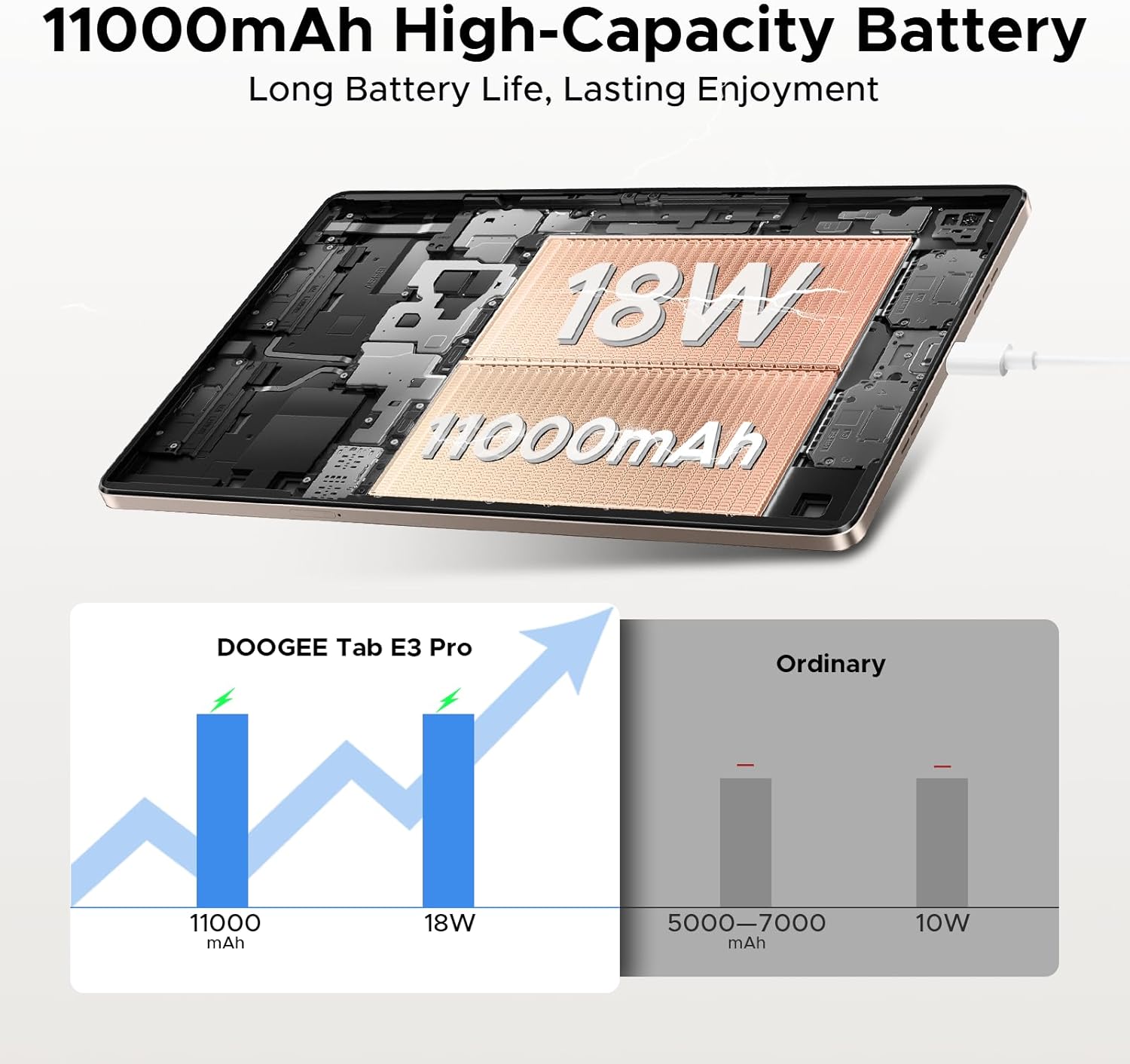
Rajah 4.1: An illustration demonstrating the 11000mAh high-capacity battery of the DOOGEE Tab E3 Pro, highlighting its long battery life and 18W charging capability compared to ordinary tablets.
4.2. Menghidupkan/Mematikan
- Untuk Menghidupkan: Tekan dan tahan butang Kuasa sehingga logo DOOGEE muncul.
- Untuk Mematikan: Press and hold the Power button until a power menu appears, then select "Power off".
- Untuk Mulakan Semula: Daripada menu kuasa, pilih "Mulakan semula".
4.3. Konfigurasi Awal
Setelah dihidupkan pertama, tablet akan membimbing anda melalui proses persediaan awal:
- Pilih bahasa pilihan anda.
- Sambung ke rangkaian Wi-Fi.
- Log masuk dengan akaun Google anda atau buat yang baharu.
- Set up screen lock (PIN, pattern, password, or facial recognition).
- Review dan menerima terma dan syarat.
5. Mengendalikan Tablet Anda
5.1. Sistem Pengendalian Android 15
Your DOOGEE Tab E3 Pro runs on the latest Android 15 system, offering an intelligent, seamless, and secure user experience with enhanced privacy features and improved performance.
5.2. Paparan dan Visual
Experience vibrant visuals on the 13-inch FHD+ 90Hz display. With a 1920x1200 resolution, 16:10 aspect ratio, and 84.6% screen-to-body ratio, content comes to life with 16.7 million screen colors.

Rajah 5.1: A graphic illustrating the 13-inch FHD+ 90Hz display of the DOOGEE Tab E3 Pro, detailing its 1920x1200 resolution, 16:10 aspect ratio, 84.6% screen-to-body ratio, and 16.7 million screen colors.
5.3. Prestasi dan Storan
Powered by the Helio G100 Octa-Core Processor, the tablet delivers boosted speed and efficiency with a 2.2GHz ultimate frequency and 6nm advanced process technology.

Rajah 5.2: A terperinci view of the MediaTek Helio G100 Octa-Core Processor, emphasizing its 2.2GHz ultimate frequency and 6nm advanced process technology, which powers the DOOGEE Tab E3 Pro.
The tablet comes with 8GB of basic RAM, expandable up to 32GB Max RAM, and 256GB of internal ROM, which can be expanded up to 2TB with a TF card (sold separately).
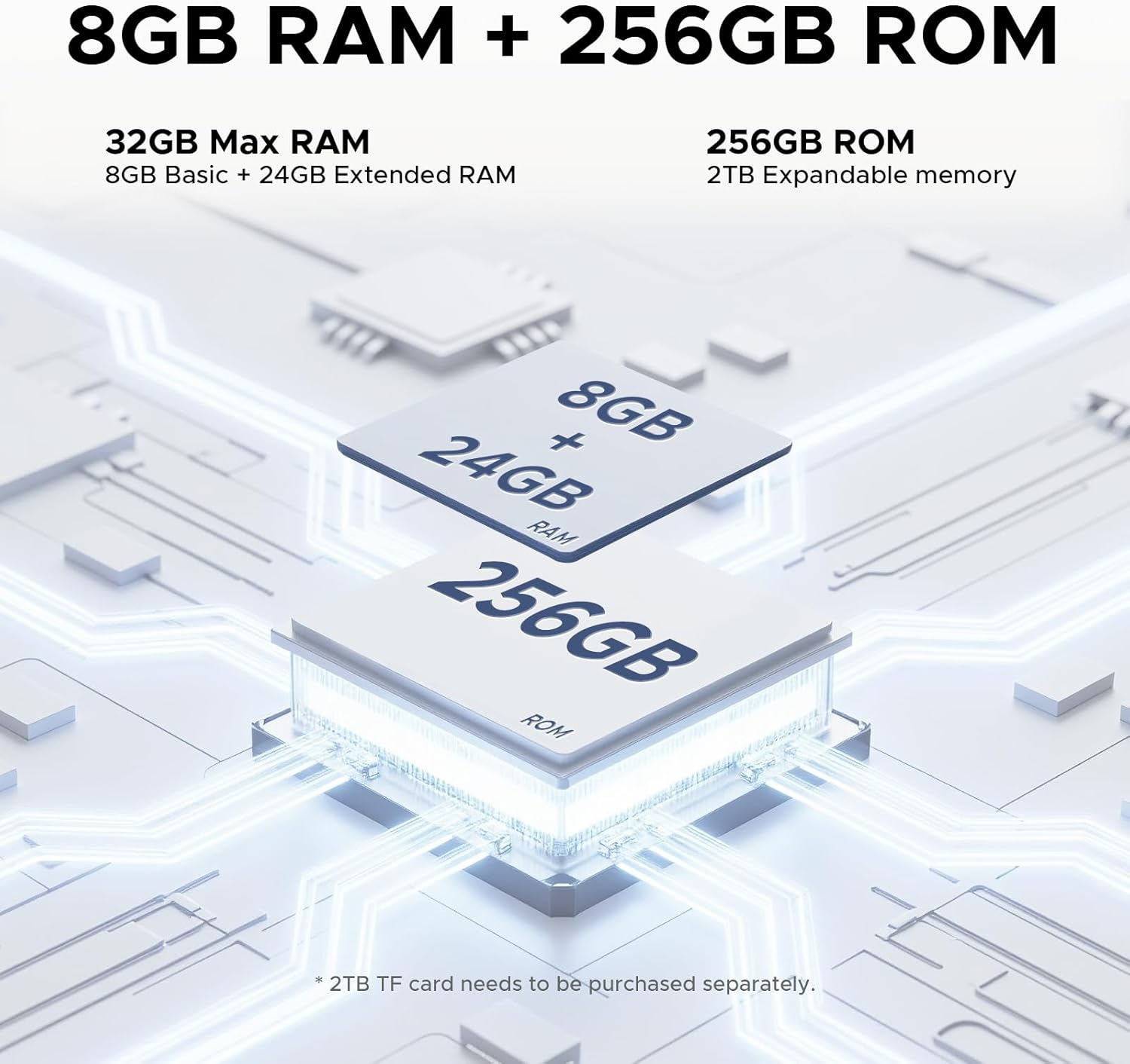
Rajah 5.3: An illustration detailing the memory configuration of the DOOGEE Tab E3 Pro, showing 8GB Basic RAM + 24GB Extended RAM for a total of 32GB Max RAM, and 256GB ROM with 2TB expandable memory support.
5.4. Built-in Gemini AI
Leverage the built-in Gemini AI for enhanced productivity and convenience. Features include content creation, information retrieval & summarization, image analysis, code development, smart assistant functions, language learning, Gemini Live, and Gemini Deep Research.

Rajah 5.4: Gambar rajah menunjukkanasing the various functionalities of the Built-in Gemini AI on the DOOGEE Tab E3 Pro, including content creation, information retrieval, image analysis, and smart assistant features.
5.5. Kualiti Audio
Enjoy premium sound quality with the 1217 BOX Quad Speakers, housed within a stylish and sleek metal case, providing an immersive audio experience.

Rajah 5.5: An image highlighting the sound quality and aesthetics of the DOOGEE Tab E3 Pro, featuring its Premium 1217 BOX Quad Speakers and stylish metal case.
6. Penyelenggaraan dan Penjagaan
- Pembersihan: Gunakan kain lembut dan tidak berbulu untuk membersihkan skrin dan badan. Elakkan pembersih atau pelarut yang kasar.
- Kemas Kini Perisian: Semak dan pasang kemas kini sistem secara berkala untuk memastikan tablet anda mempunyai ciri terkini, tampalan keselamatan dan penambahbaikan prestasi. Pergi ke Tetapan > Sistem > Kemas kini sistem.
- Penjagaan Bateri: Elakkan suhu yang melampau. Jangan biarkan bateri kehabisan sepenuhnya dengan kerap. Untuk penyimpanan jangka panjang, cas bateri sehingga kira-kira 50%.
- Storan: Keep your tablet in a cool, dry place away from direct sunlight and extreme temperatures.
- Perlindungan: Consider using a protective case and screen protector to prevent scratches and damage.
7. Penyelesaian masalah
This section addresses common issues you might encounter with your DOOGEE Tab E3 Pro.
7.1. Tablet Will Not Turn On
- Pastikan bateri dicas. Sambungkan pengecas dan tunggu beberapa minit sebelum cuba menghidupkan.
- Tekan dan tahan butang Kuasa selama sekurang-kurangnya 10-15 saat untuk memaksa mulakan semula.
7.2. Isu Ketersambungan Wi-Fi
- Pastikan Wi-Fi didayakan Tetapan > Rangkaian & Internet > Wi-Fi.
- Mulakan semula penghala Wi-Fi anda.
- Lupakan rangkaian dan sambung semula dengan memasukkan semula kata laluan.
- Periksa sama ada peranti lain boleh bersambung ke rangkaian Wi-Fi yang sama.
7.3. Prestasi Perlahan
- Tutup aplikasi yang tidak digunakan yang berjalan di latar belakang.
- Clear cache data for apps that are frequently used (Tetapan > Apl > [Nama Apl] > Storan & cache > Kosongkan cache).
- Pastikan anda mempunyai ruang simpanan kosong yang mencukupi.
- Mulakan semula tablet secara berkala.
- Jika masalah berterusan, pertimbangkan untuk menetapkan semula kilang (Tetapan > Sistem > Tetapkan semula pilihan > Padam semua data (tetapan semula kilang)). Warning: This will erase all data on your tablet. Back up important data first.
7.4. Apl Ranap atau Tidak Membalas
- Force stop the app (Settings > Apps > [App Name] > Force stop).
- Clear the app's cache and data.
- Kemas kini aplikasi daripada Gedung Google Play.
- Nyahpasang dan pasang semula apl.
8. Spesifikasi
Detailed technical specifications for the DOOGEE Tab E3 Pro.
| Ciri | Spesifikasi |
|---|---|
| Model | DOOGEE Tab E3 Pro |
| Sistem Operasi | Android 15 |
| Saiz Paparan | 13 Inci |
| Resolusi Paparan | 1920 x 1200 (FHD+) |
| Kadar Segar Semula | 90Hz |
| Pemproses | Helio G100 Octa-Core (2.2GHz) |
| RAM | 8GB (expandable up to 32GB Max RAM) |
| Storan Dalaman (ROM) | 256GB |
| Storan Boleh Dikembangkan | Up to 2TB (TF card, sold separately) |
| Kamera Belakang | 13 MP |
| Kamera Depan | 8 MP |
| Kapasiti Bateri | 11000 mAh (Lithium Polimer) |
| Mengecas | Pengecasan Pantas 18W |
| Dimensi (LxWxH) | 11.89 x 7.78 x 0.31 inci |
| Berat Barang | 14.7 auns (418 Gram) |
| Ketersambungan | Wi-Fi, Bluetooth, Cellular (if applicable) |
| Audio | 1217 BOX Quad Speakers, 3.5mm Headphone Jack |
9. Waranti dan Sokongan
Your DOOGEE Tab E3 Pro is covered by a limited warranty. Please refer to the warranty card included in your package for specific terms and conditions, including warranty period and coverage details.
Untuk sokongan teknikal, bantuan penyelesaian masalah atau tuntutan jaminan, sila hubungi khidmat pelanggan DOOGEE melalui khidmat pelanggan rasmi mereka webtapak atau maklumat hubungan yang diberikan dalam dokumentasi jaminan anda.
You can visit the official DOOGEE store on Amazon for more information and support: Kedai Amazon DOOGEE
Dokumen berkaitanTab E3 Pro


Ask a question about this manual
Ask about setup, troubleshooting, compatibility, parts, safety, or missing instructions. Manuals+ will review the question and use this page’s manual context to help answer it.