
pengenalan
Welcome to the OYIB S75 Wireless Earbuds user manual. This guide provides comprehensive instructions for setting up, operating, maintaining, and troubleshooting your new wireless earbuds. The OYIB S75 earbuds feature advanced Bluetooth 5.4 technology, deep stereo bass, an ENC microphone for clear calls, IP7 waterproofing, and a long-lasting 50-hour battery life with the charging case. Designed for comfort and stability, they are ideal for sports and daily use.
Apa yang ada dalam Kotak
Sila semak kandungan pakej untuk memastikan semua item ada:
- S75 Headphones (Left/Right) x 2
- Kabel Pengecas USB-C x 1
- Sarung Pengecas Mudah Alih x 1
- Manual Pengguna x 1
- Penjepit Telinga dengan 3 Saiz (S, M, L)

Image: OYIB S75 Wireless Earbuds in their charging case, showcasing the cream white color and earhook design.
Produk Selesaiview
Komponen
- Earbud: Left and Right earbuds with integrated earhooks and touch control areas.
- Sarung Pengecasan: Portable case for charging and storing earbuds, featuring a dual LED digital display for battery status.
- Port USB-C: Untuk mengecas kes itu.
- ENC Microphone: Built-in for clear call quality.
- Pemacu Dinamik 13mm: For immersive stereo sound.
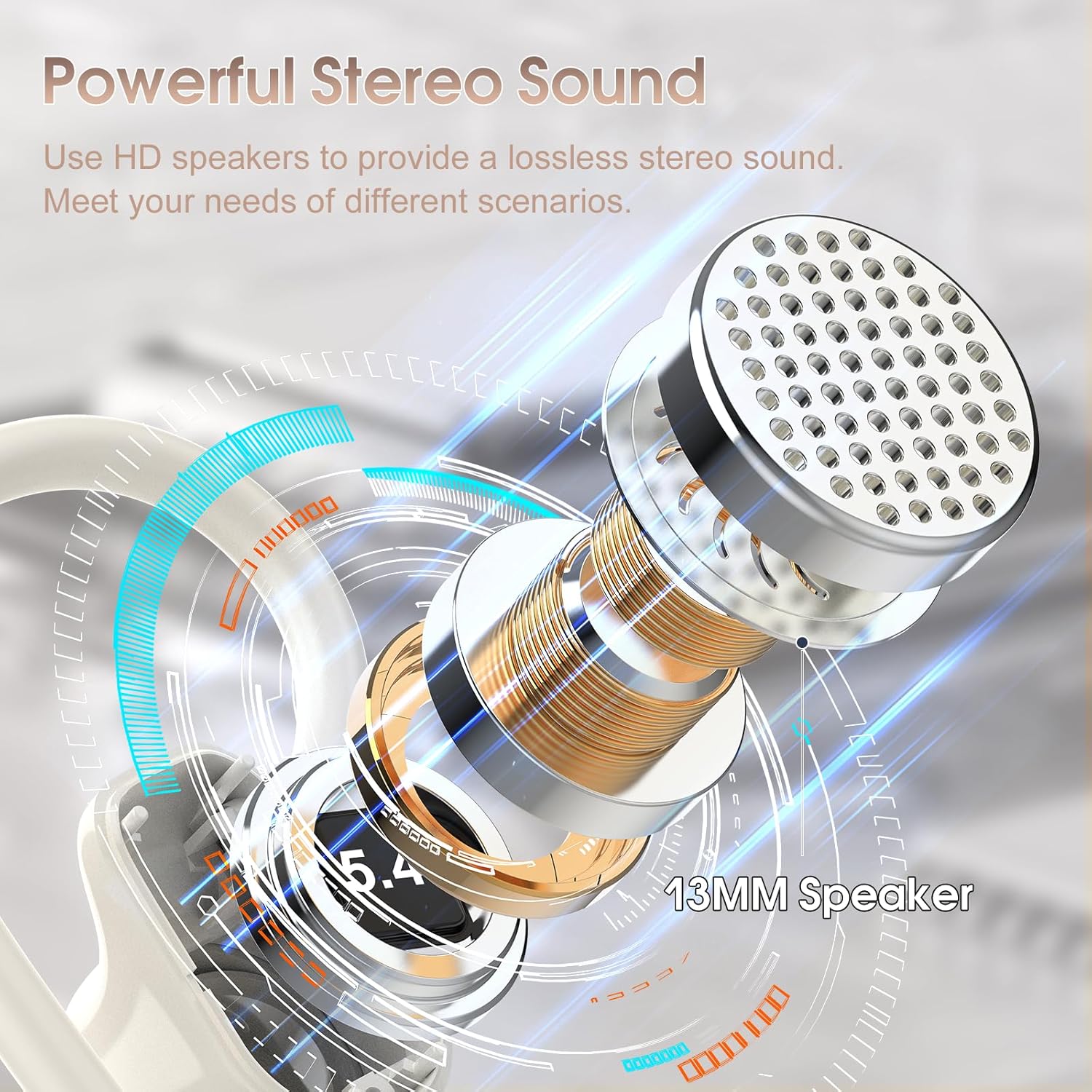
Image: Detailed diagram illustrating the 13mm speaker driver within the OYIB S75 earbud, highlighting its components for powerful stereo sound.
Kawalan Sentuh
The earbuds feature smart touch controls located on the upper part of the earbud surface. Refer to the table below for specific functions:
| Tindakan | Fungsi |
|---|---|
| One Click (R/L) | Main/Jeda Muzik |
| Short Tap (R/L) | Jawab/Tamatkan Panggilan |
| Long Tap (R/L) | Tolak Panggilan |
| One Click Tap R | Jilid + |
| One Click Tap L | Isipadu - |
| Ketik Panjang 2s L | Track Reverse |
| Long Tap 2s R | Jejak ke Hadapan |
| Triple Click (R/L) | Aktifkan Pembantu Suara |

Image: Visual representation of the smart touch control functions on the OYIB S75 earbuds, showing various tap and long-press actions.
Persediaan
1. Mengecas Fon Telinga dan Sarung
- Letakkan fon telinga ke dalam bekas pengecas. Pastikan ia diletakkan dengan betul.
- Connect the USB-C charging cable to the charging port on the case and plug the other end into a USB power source (e.g., wall adapter, computer).
- Paparan digital LED pada kes pengecasan akan menunjukkan peratusan bateritage. The earbuds will also indicate their charging status.
- Cas penuh untuk bekas dan fon telinga biasanya mengambil masa kira-kira 1 jam.
The earbuds provide approximately 10 hours of playtime on a single charge, and the charging case offers multiple additional charges, extending total playtime to about 50 hours.

Image: Diagram illustrating the 50-hour total battery life, 10 hours per earbud charge, and 1.5-hour fast charging via USB-C.
2. Berpasangan dengan Peranti Anda
- Gandingan Awal: Buka penutup bekas pengecas. Fon telinga akan dihidupkan secara automatik dan memasuki mod berpasangan.
- Pada peranti anda (telefon pintar, tablet, komputer riba), pergi ke tetapan Bluetooth dan pastikan Bluetooth diaktifkan.
- Cari untuk available devices and select "S75" from the list.
- Setelah disambungkan, anda akan mendengar nada pengesahan dan fon telinga akan sedia untuk digunakan.
- Penyambungan Semula Automatik: After the initial pairing, the earbuds will automatically connect to the last paired device when you open the charging case lid.
The earbuds maintain a stable connection within a range of up to 15 meters (49 feet) from the paired device.
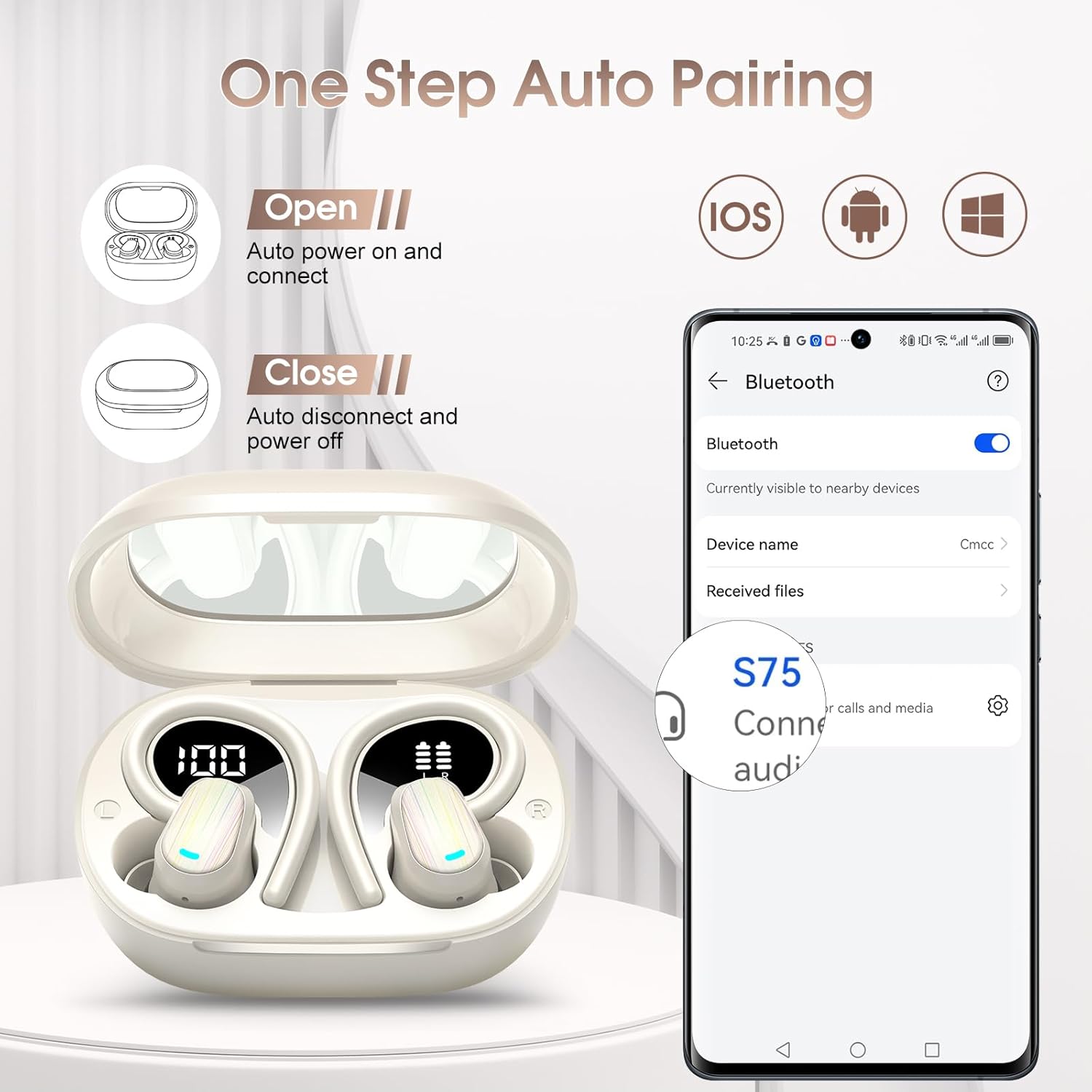
Image: Illustration of the one-step auto-pairing process for OYIB S75 earbuds, showing opening the case and selecting "S75" on a smartphone's Bluetooth menu.
3. Memakai Earbud
- Choose the best-fitting eartips (S, M, L) for optimal comfort and sound quality.
- Insert the headphones along the ear canal.
- Revolve the earhooks until they are securely inserted behind your ears.
- Adjust the headphones to a comfortable angle for a stable fit.

Image: Step-by-step guide on how to wear the OYIB S75 earbuds stably, including eartip selection and earhook adjustment, shown with a woman exercising.
Arahan Operasi
Main balik Muzik
- Main/Jeda: One click on either earbud.
- Kelantangan: One click on the Right earbud.
- Perlahankan suara: One click on the Left earbud.
- Lagu Seterusnya: Long tap for 2 seconds on the Right earbud.
- Trek Sebelumnya: Long tap for 2 seconds on the Left earbud.
Pengurusan Panggilan
- Jawab/Tamatkan Panggilan: Short tap on either earbud.
- Tolak Panggilan: Long tap on either earbud.
Pembantu Suara
- Aktifkan Pembantu Suara: Triple click on either earbud.
Penyelenggaraan
Pembersihan
- Bersihkan fon telinga dan bekas pengecas dengan kerap menggunakan kain yang lembut, kering dan tidak berbulu.
- Remove eartips and clean them with mild soap and water if necessary, ensuring they are completely dry before reattaching.
- Elakkan menggunakan pembersih yang melelas, pelarut, atau semburan aerosol.
Penyimpanan
- Apabila tidak digunakan, sentiasa simpan fon telinga dalam bekas pengecasnya untuk melindunginya dan memastikan ia dicas.
- Simpan di tempat yang sejuk dan kering, jauh daripada suhu ekstrem dan cahaya matahari langsung.
Tahan Air
The OYIB S75 earbuds have an IP7 waterproof rating, making them resistant to water splashes and sweat. They are suitable for exercise and daily use. However, they are not designed for swimming or prolonged submersion in water.

Image: A woman wiping sweat after a workout, illustrating the waterproof design of the S75 earbuds for daily and exercise use.
Menyelesaikan masalah
If you encounter any issues with your OYIB S75 Wireless Earbuds, please refer to the following common solutions:
| Masalah | Penyelesaian yang Mungkin |
|---|---|
| Fon telinga tidak berpasangan |
|
| Tiada suara atau kelantangan rendah |
|
| Fon telinga tidak dicas |
|
| Isu kualiti panggilan |
|
Spesifikasi
| Ciri | Perincian |
|---|---|
| Nama Model | S75 |
| Jenama | OYIB |
| Teknologi Ketersambungan | Wayarles (Bluetooth) |
| Versi Bluetooth | 5.4 |
| Julat Bluetooth | 15 Meter |
| Jenis Pemacu Audio | Pemacu Dinamik (13mm) |
| Hayat Bateri (Earbud) | 10 Jam |
| Jumlah Masa Main (dengan Kes) | 50 Jam |
| Masa Mengecas | 1 Hour (for full charge) |
| Port Pengecasan | USB-C |
| Tahap Ketahanan Air | IP7 Kalis Air |
| Kaedah Kawalan | Sentuh |
| Mikrofon | Built-in ENC Mic |
| Penempatan Telinga | Di Telinga |
| Faktor Bentuk | Atas Telinga (dengan cangkuk telinga) |
| Peranti Serasi | iOS, Android dan semua peranti yang didayakan Bluetooth |
| Berat Barang | 0.11 Kilogram (3.84 auns) |
| Dimensi Pakej | 3.7 x 3.46 x 1.46 inci |
Waranti dan Sokongan
OYIB products are designed for reliability and performance. For specific warranty information, please refer to the warranty card included in your product packaging or contact OYIB customer support.
If you require further assistance or have questions not covered in this manual, please contact OYIB customer support through the retailer where you purchased the product or visit the official OYIB webtapak untuk pilihan sokongan.