
1. Pengenalan
This manual provides essential instructions for the safe assembly, operation, and maintenance of your isinwheel M10 Electric Bike. Please read this manual thoroughly before your first ride to ensure proper usage and to maximize the lifespan of your e-bike. Retain this manual for future reference.
Amaran Keselamatan: Always wear a helmet and appropriate safety gear when riding. Familiarize yourself with local traffic laws and regulations. Regular maintenance is crucial for safe operation.
2. Kandungan Pakej
Upon unpacking, verify that all components listed below are present and undamaged. If any items are missing or damaged, please contact customer support.
- isinwheel M10 Electric Bike Frame (partially assembled)
- Roda Depan
- Bateri Litium-Ion Boleh Tanggal (36V 10.4AH)
- 42V 2A Fast Charger
- Pedal (Kiri dan Kanan)
- Tempat Duduk dengan Tiang Tempat Duduk
- Lampu Depan
- Reflektor Belakang
- Toolkit (including Allen wrenches and spanner)
- Pam Tayar
- Manual Pengguna

Image: All components included in the isinwheel M10 Electric Bike package.
3. Persediaan dan Pemasangan
The isinwheel M10 Electric Bike comes 85% pre-assembled. Follow these steps to complete the assembly:
- Membuka kotak: Carefully remove all components from the packaging. Keep the packaging materials until assembly is complete and you are satisfied with the product.
- Pemasangan Hendal: Attach the handlebar to the stem using the provided Allen wrenches. Ensure the handlebar is centered and tightened securely.
- Pemasangan Roda Depan: Secure the front wheel to the front fork. Ensure the brake rotor aligns correctly with the caliper and the quick-release skewer is properly tightened.
- Pemasangan Lampu: Mount the front headlight onto the designated bracket on the front fork or handlebar, and connect its cable.
- Pemasangan Pedal: Identify the left (L) and right (R) pedals. The left pedal tightens counter-clockwise, and the right pedal tightens clockwise. Use the spanner to secure them firmly.
- Pemasangan tempat duduk: Insert the seatpost into the frame's seat tube. Adjust the height for comfortable riding and secure it with the quick-release lever.
- Rear Reflector Installation: Attach the rear reflector to the seatpost or rear rack (if applicable) for increased visibility.
- Pemasangan Bateri: Slide the battery into its designated slot on the frame and lock it with the key.
- Pengurusan Kabel: Ensure all cables are neatly routed and secured, away from moving parts.

Image: Installing the handlebar.
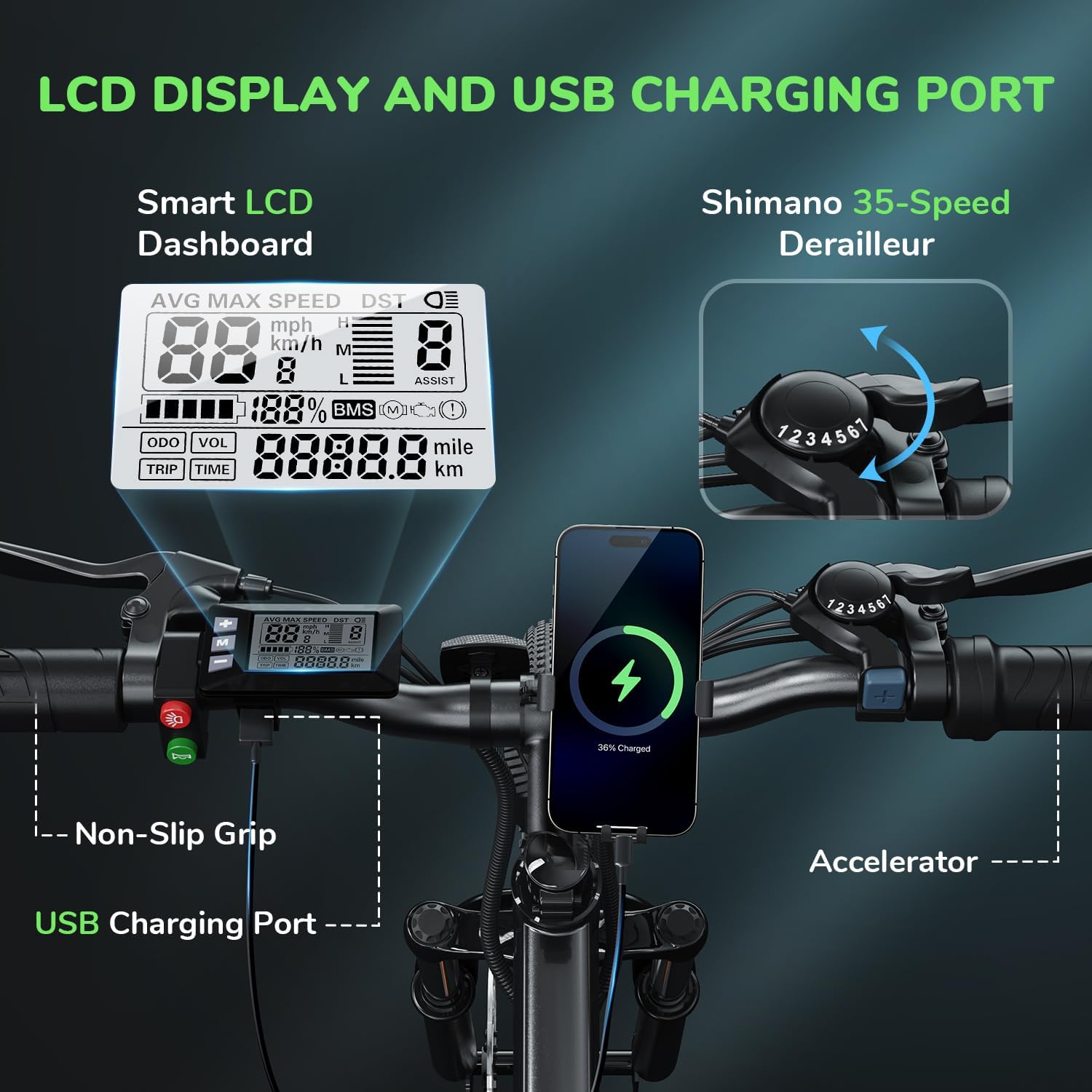
Image: Attaching the front wheel.

Image: Installing the pedals.

Image: Adjusting and securing the seat.

Image: Installing the removable battery.
Panduan Video Perhimpunan
Video: A comprehensive guide demonstrating the assembly process of the isinwheel M10 Electric Bike, including handlebar, wheel, pedal, and battery installation.
4. Arahan Operasi
4.1 Hidupkan/Mati Kuasa
- To power on the bike, press and hold the power button on the LCD display for a few seconds until the screen illuminates.
- Untuk mematikan kuasa, tekan dan tahan butang kuasa sekali lagi sehingga paparan dimatikan.
4.2 Mod Menunggang
The M10 Electric Bike offers multiple riding modes:
- Mod Bantuan Pedal (PAS): Provides motor assistance as you pedal. Adjust the assist level (1-5) using the '+' and '-' buttons on the control panel. Higher levels provide more assistance.
- Full Electric Mode (Throttle): Engage the throttle for motor power without pedaling. This mode is typically used for quick acceleration or when you need a break from pedaling.
- Mod Manual: Kayuh basikal seperti basikal tradisional tanpa sebarang bantuan motor.
4.3 Shimano 7-Speed Gear System
The bike is equipped with a Shimano 7-speed transmission system. Use the gear shifter on the handlebar to change gears according to terrain and desired speed. Lower gears are for uphill climbing, and higher gears are for flat terrain or downhill riding.
4.4 Fungsi Paparan LCD
The smart LCD display provides real-time riding data:
- Kelajuan: Current, average, and maximum speed.
- Masa Menunggang: Duration of your ride.
- Perbatuan: Trip distance and total odometer.
- Tahap Bateri: Baki cas bateri.
- Tahap Bantuan: Current pedal assist level (1-5).
Power On Operation Video
Video: Demonstrates how to power on the isinwheel M10 Electric Bike and navigate the LCD display functions.
5. Pengurusan Bateri
5.1 Penyingkiran dan Pemasangan Bateri
The 36V 10.4AH Lithium-Ion battery is removable for convenient charging or storage.
- Pembuangan: Unlock the battery with the provided key, then slide it out from the frame.
- Pemasangan: Align the battery with the frame slot and slide it in until it clicks into place. Lock it with the key to secure.
5.2 Arahan Mengecas
Use only the provided 42V 2A Fast Charger.
- Pastikan basikal dimatikan.
- Locate the charging port on the battery.
- Sambungkan pengecas ke port pengecasan.
- Palamkan pengecas ke salur keluar dinding standard.
- The charger indicator light will show red during charging and turn green when fully charged.
- Pengecasan biasanya mengambil masa 3-4 jam untuk cas penuh.
- Putuskan sambungan pengecas setelah pengecasan selesai.
Battery Removal and Charging Video
Video: Instructions for removing and installing the battery, and connecting the charger to the isinwheel M10 Electric Bike.
6. Penyelenggaraan
Penyelenggaraan berkala memastikan ketahanan dan operasi e-basikal anda yang selamat.
- Pembersihan: Lap basikal dengan iklanamp kain. Elakkan mencuci tekanan tinggi terus pada komponen elektrik.
- Tekanan Tayar: Check tire pressure before each ride. Maintain recommended pressure (usually indicated on the tire sidewall) using the included pump.
- Brek: Regularly inspect brake pads and rotors for wear. Ensure brake levers engage smoothly and provide adequate stopping power. Adjust or replace as needed.
- rantai: Pastikan rantai bersih dan dilincirkan untuk mengelakkan karat dan memastikan pertukaran gear yang lancar.
- Pengikat: Periodically check all bolts and nuts for tightness, especially on the handlebars, seatpost, and wheels.
- Penjagaan Bateri: Store the battery in a cool, dry place. If storing for extended periods, charge it to 50-70% every 2-3 months.
Air Inflation Instructions Video
Video: Demonstrates how to properly inflate the tires of the isinwheel M10 Electric Bike using the provided pump.
7. Penyelesaian masalah
If you encounter issues with your isinwheel M10 Electric Bike, refer to the following common problems and solutions:
| Masalah | Kemungkinan Punca | Penyelesaian |
|---|---|---|
| Basikal tidak dihidupkan | Battery not installed correctly or discharged; loose electrical connection. | Ensure battery is fully inserted and locked. Check battery charge level and charge if necessary. Verify all visible electrical connections are secure. |
| Motor tidak membantu | Low battery; assist level set to 0; brake lever engaged; motor cable disconnected. | Charge battery. Increase assist level on the display. Release brake levers. Check motor cable connection. |
| Bateri tidak dicas | Charger not connected properly; faulty charger/battery; power outlet issue. | Ensure charger is securely plugged into battery and outlet. Check if the outlet is working. Contact support if issues persist. |
| Brek terasa lemah | Worn brake pads; loose brake cable; air in hydraulic system (if applicable). | Inspect and replace worn brake pads. Adjust brake cable tension. For hydraulic brakes, professional service may be required. |
If you cannot resolve an issue using the troubleshooting guide, please contact isinwheel customer support for assistance.
8. Spesifikasi
Key technical specifications for the isinwheel M10 Electric Bike:
| Ciri | Spesifikasi |
|---|---|
| Model | M10 |
| Motor | Motor Tanpa Berus Puncak 500W |
| Kelajuan Teratas | Up to 32 KM/H (20 MPH) |
| Bateri | 36V 10.4AH (375WH) Removable Li-ion, IPX5 waterproof |
| Masa Mengecas | 3-4 hours (with 42V 2A Fast Charger) |
| Range (Full Electric) | 39-43 miles (63-70 KM) |
| Julat (Bantuan Pedal) | 50-60 miles (80-96 KM) |
| Penularan | Shimano 7-Kelajuan |
| Bahan Bingkai | Aloi Aluminium |
| Berat Basikal | 21.3 KG (47 paun) |
| Saiz Roda | 26 Inci |
| Penggantungan | Suspensi Fork Depan |
| Brek | Brek Cakera Mekanikal Depan dan Belakang |
| Ciri Khas | Digital LCD Display, Height Adjustable Seat, Lightweight & Portable |
| Pensijilan | UL 2271 (Li-ion battery), UL 2789 (whole e-bike) |

Image: isinwheel M10 Electric Bike dimensions and rider height guide.
9. Waranti dan Sokongan
The isinwheel M10 Electric Bike comes with a 12-month warranty from the date of purchase. This warranty covers manufacturing defects in materials and workmanship. It does not cover damage caused by misuse, accidents, unauthorized modifications, or normal wear and tear.
For warranty claims, technical support, or any questions regarding your e-bike, please contact isinwheel customer service. Provide your purchase details and a description of the issue for prompt assistance.
Maklumat Hubungan: Please refer to your purchase documentation or the official isinwheel weblaman web untuk mendapatkan butiran hubungan sokongan pelanggan yang terkini.