
1. Produk Lebihview
The Qulokar 10.26" Portable Wireless CarPlay/Android Auto Screen is designed to enhance your in-car experience by providing seamless smartphone integration, advanced navigation, and comprehensive driving recording capabilities. This device features a high-definition touch screen, dual cameras for front and rear recording, and multiple audio output options.
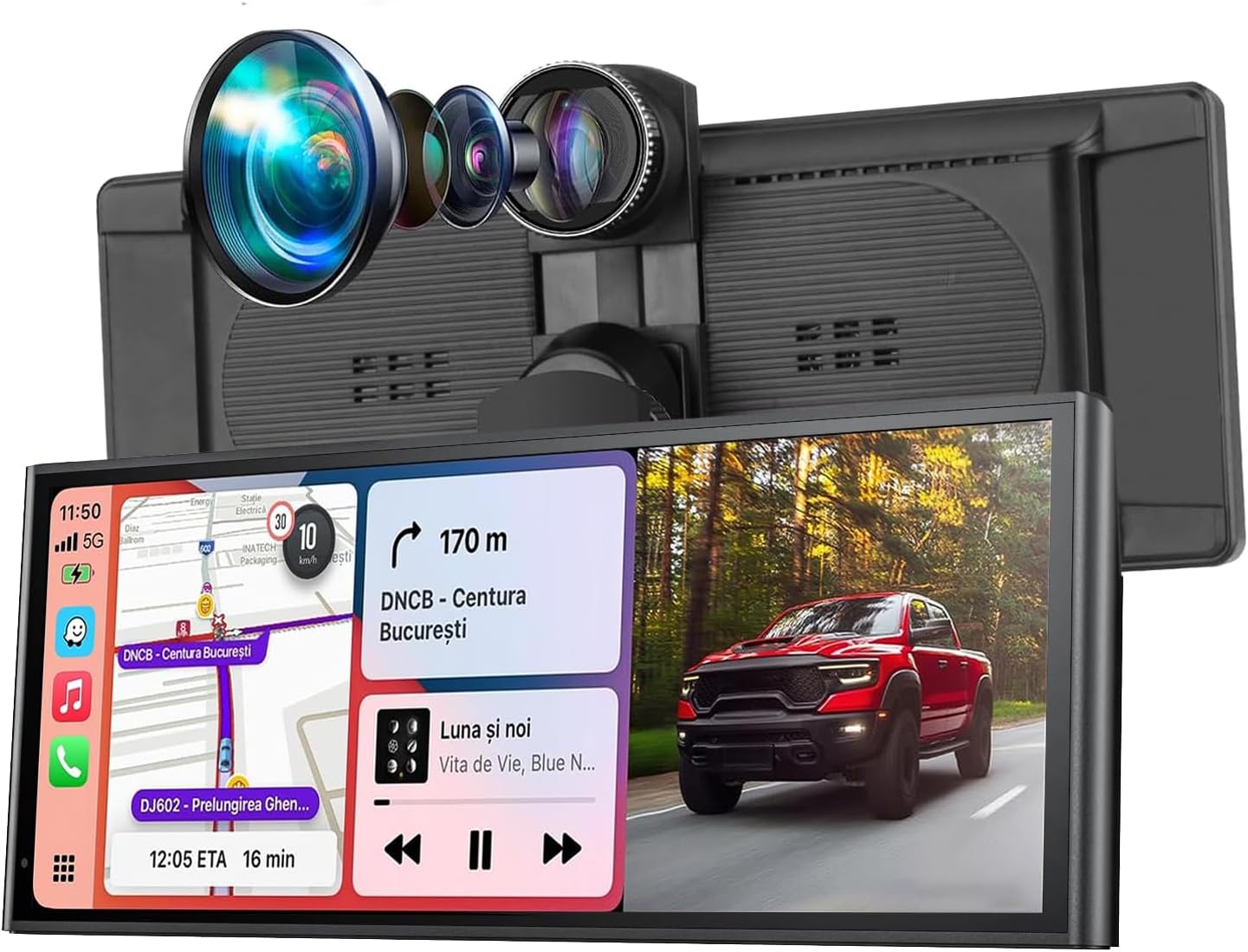
Imej 1.1: Depan view of the Qulokar 10.26" Portable Wireless CarPlay/Android Auto Screen.
2. Kandungan Pakej
Sila sahkan bahawa semua item terdapat dalam pakej:
- 10.26" Portable Car Stereo Unit
- Suction Mount Bracket
- Adhesive Sticker Bracket
- Rear Camera (1080P)
- Power Cord (for cigarette lighter)
- Kad TF 64GB
- Kabel AUX
- Stand Sticker
- Manual Pengguna

Image 2.1: All components included in the Qulokar Q10-Bk package.
3. Persediaan dan Pemasangan
3.1 Memasang Peranti
The device offers two primary mounting methods: a suction cup bracket for the dashboard or windshield, and an adhesive bracket for a more permanent fixture.
- Suction Mount Bracket: Attach the suction cup to a clean, smooth surface on your dashboard or windshield. Press the center button to secure the suction cup. Adjust the screen angle using the retractable and rotatable joints.
- Pendakap Pelekat Pelekat: Clean the desired surface thoroughly. Apply the adhesive sticker bracket firmly to the surface. Attach the screen to the bracket.

Image 3.1: Illustration of adjustable brackets for various installation methods.
3.2 Sambungan Kuasa
Connect the power cord to the device and plug the other end into your vehicle's cigarette lighter socket. The power cord also features a built-in USB socket for charging your phone.
3.3 Pemasangan Kamera
The device includes a front 4K camera and a 1080P waterproof backup camera. The large cord provided is for the backup camera.
- Kamera Depan: The main unit has an integrated front camera. Ensure its view tidak terhalang.
- Kamera Belakang: Install the 1080P waterproof backup camera at the rear of your vehicle. Connect its cable to the designated input on the main unit.
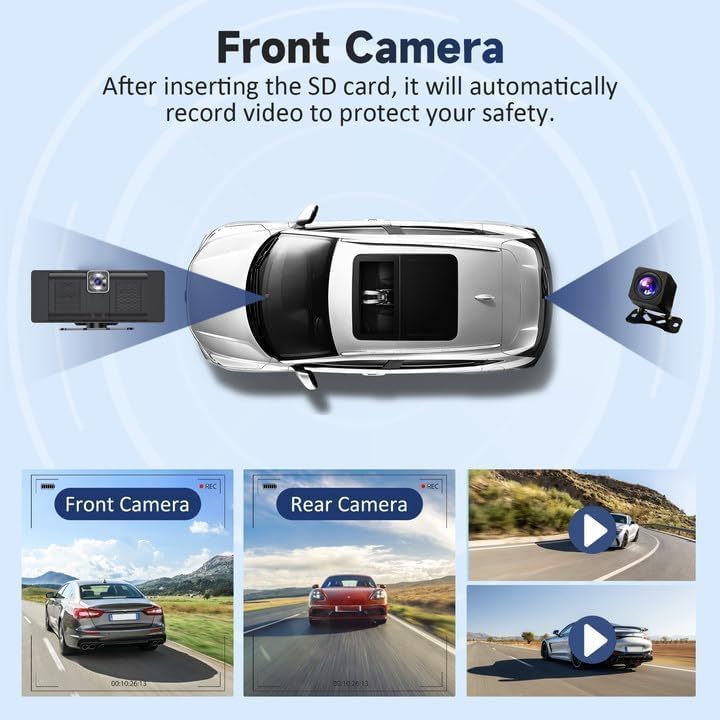
Image 3.2: The front camera records your journey, providing a clear view.

Imej 3.3: Selesaiview of the 4K dash cam and 1080P rear camera capabilities.
3.4 Sisipan Kad TF
Insert the included 64GB TF card into the designated slot on the device. This card is essential for recording dash cam footage.
4. Arahan Operasi
4.1 Menghidupkan/Mematikan
The device powers on automatically when your vehicle starts and powers off when the ignition is turned off.
4.2 Navigasi Skrin Sentuh
The 10.26-inch HD touch screen allows for intuitive control. Tap icons to access various functions and swipe to navigate menus.
4.3 CarPlay Tanpa Wayar dan Android Auto
Connect your smartphone wirelessly to access CarPlay or Android Auto features. Your smartphone will automatically sync upon entering the vehicle.
- Pastikan Bluetooth didayakan pada telefon pintar anda.
- On the device, select 'CarPlay' or 'Android Auto' from the main menu.
- Follow the on-screen prompts to pair your phone.

Image 4.1: The main interface showing CarPlay, Android Auto, and Mirror Link options.
4.4 Mirror Link (AirPlay/Android Cast)
The device supports AirPlay for iOS devices and Android Cast for Android devices, allowing you to mirror your phone's screen content.
- Select 'AirPlay' or 'Android Cast' from the main menu.
- Follow the instructions on the screen to connect your device.

Image 4.2: Demonstrating wireless mirror link to display phone content on the screen.
4.5 Pilihan Output Audio
The device offers four ways to output audio:
- Bluetooth: Connect your phone to the device via Bluetooth for audio playback through your car's speakers.
- AUX: Use the provided AUX cable to connect the device to your car's AUX input.
- Pemancar FM: Tune the device and your car radio to the same FM frequency to transmit audio wirelessly.
- Pembesar Suara Terbina dalam: The device has its own built-in speaker for audio output.

Image 4.3: Visual representation of the four audio output methods.
4.6 Dash Cam Functionality
The device records continuously using the front 4K camera and rear 1080P camera. It supports loop recording, ensuring older footage is overwritten when the TF card is full.
- Akses kamera view daripada menu utama.
- Review dirakam footage via the 'Playback' option.
- Adjust camera settings (e.g., resolution, loop recording duration) in the 'Settings' menu.
4.7 Kawalan Suara (Siri/Pembantu Google)
Utilize Siri or Google Assistant for hands-free control of navigation, music, calls, and other functions.

Image 4.4: Displaying GPS navigation and voice control integration.
4.8 Mod Skrin Terpisah
The device supports split-screen mode for CarPlay and Android Auto, allowing you to view multiple applications simultaneously. This can be enabled or disabled in the 'Settings' menu under 'Split screen mode'.
4.9 Pelarasan Kecerahan
Adjust the screen brightness via the quick settings accessible from the main screen or within the 'Settings' menu.
5. Penyelenggaraan
To ensure optimal performance and longevity of your Qulokar device, follow these maintenance guidelines:
- Pembersihan: Gunakan kain lembut dan kering untuk membersihkan skrin dan bahagian luar. Elakkan pembersih atau pelarut yang melelas.
- Pengurusan Kad TF: Periodically format the TF card (e.g., monthly) to prevent data corruption and ensure continuous recording. Back up any important footage sebelum memformat.
- Suhu: Avoid exposing the device to extreme temperatures for extended periods.
6. Penyelesaian masalah
Jika anda menghadapi masalah dengan peranti anda, rujuk penyelesaian biasa berikut:
- Peranti tidak dihidupkan: Ensure the power cord is securely connected to both the device and the cigarette lighter socket. Check if the vehicle's power outlet is functioning.
- CarPlay/Android Auto tidak bersambung: Verify Bluetooth is enabled on your phone and the device. Ensure your phone's operating system is up to date. Try restarting both the device and your phone.
- Tiada output audio: Check the selected audio output method (Bluetooth, AUX, FM Transmitter). Ensure the volume is turned up on both the device and your car stereo. If using FM, confirm the frequencies match.
- Camera not recording: Ensure the TF card is properly inserted and not full. Format the TF card if necessary (after backing up data).
- Skrin tidak bertindak balas: Try restarting the device by unplugging and re-plugging the power cord.
For further assistance, please contact our professional support team.
7. Spesifikasi
| Ciri | Spesifikasi |
|---|---|
| Saiz Skrin | 10.26 inci |
| Resolusi Skrin | 1600*600 |
| Kamera Depan | 4K |
| Kamera Belakang | 1080P (Waterproof) |
| Ketersambungan | Wireless Apple CarPlay, Wireless Android Auto, Bluetooth, AirPlay, Android Cast, WiFi |
| Mod Output Audio | Bluetooth, AUX, FM Transmitter, Built-in Speaker |
| Input Kuasa | 7-32V (via cigarette lighter) |
| Termasuk Storan | Kad TF 64GB |
| Berat Barang | 2.16 paun |
| Dimensi Pakej | 11.22 x 5.47 x 4.49 inci |
8. Video Produk Rasmi
Video 8.1: A detailed demonstration of the 10.26" Wireless CarPlay screen's features and functionality, including setup, camera views, and smartphone integration.
9. Waranti dan Sokongan
The Qulokar 10.26" Portable Wireless CarPlay/Android Auto Screen comes with a one-year warranty. Our professional tech team is available 24/7 to assist with any product-related questions or issues, ensuring a response within 24 hours.
Additionally, we offer a 365-day free return policy. If you encounter any problems that Amazon Service cannot resolve, please contact Qulokar directly for dedicated after-sales support, including replacements or full refunds if the issue cannot be resolved.

Image 9.1: Information regarding Qulokar's 365-day free return policy and customer support.