
Produk Selesaiview
The Ymiko Alarm Clock with Bed Shaker is designed to provide a reliable wake-up solution, especially for heavy sleepers. It features adjustable volume, multiple wake-up modes, and a vibrating bed shaker to ensure you wake up on time.

Imej: The Ymiko Alarm Clock, bed shaker, and USB cable. This image displays all components included in the package.
Kandungan Pakej
Sahkan bahawa semua item terdapat dalam pakej:
- 1 x Jam Penggera
- 1 x Bed Shaker
- 1 x Manual Arahan
- 1 x Kabel USB
Persediaan
Menghidupkan Jam Penggera
The alarm clock can be powered via the included USB cable or by batteries for backup.
- Connect the USB cable to the alarm clock's power input port and plug the other end into a compatible USB power adapter (not included) or a USB port.
- For battery backup, open the battery compartment on the back of the alarm clock and insert 2 x AAA batteries (not included), ensuring correct polarity.
Connecting the Bed Shaker
To utilize the vibration feature, connect the bed shaker to the alarm clock.
- Locate the dedicated port for the bed shaker on the alarm clock.
- Insert the bed shaker's plug firmly into this port.
- Place the bed shaker under your pillow or mattress for optimal vibration.
Imej: belakang view of the alarm clock, highlighting the power input and bed shaker port.
Arahan Operasi
Menetapkan Masa
- Tekan ke MASA DITETAPKAN button. The time display will begin to flash.
- Putar left bell knob (HR SETTING / DIMMER) to adjust the hour.
- Putar right bell knob (MIN SETTING / DIMMER) to adjust the minute.
- Tekan MASA DITETAPKAN sekali lagi untuk mengesahkan dan keluar dari mod tetapan masa.

Imej: sebelah view of the alarm clock showing the "TIME SET" button and other controls.
Switching 12/24 Hour Format
The default time format is 12-hour.
- Tekan ke 12/24 HR butang untuk menogol antara format paparan 12 jam dan 24 jam.
Menetapkan Penggera 1
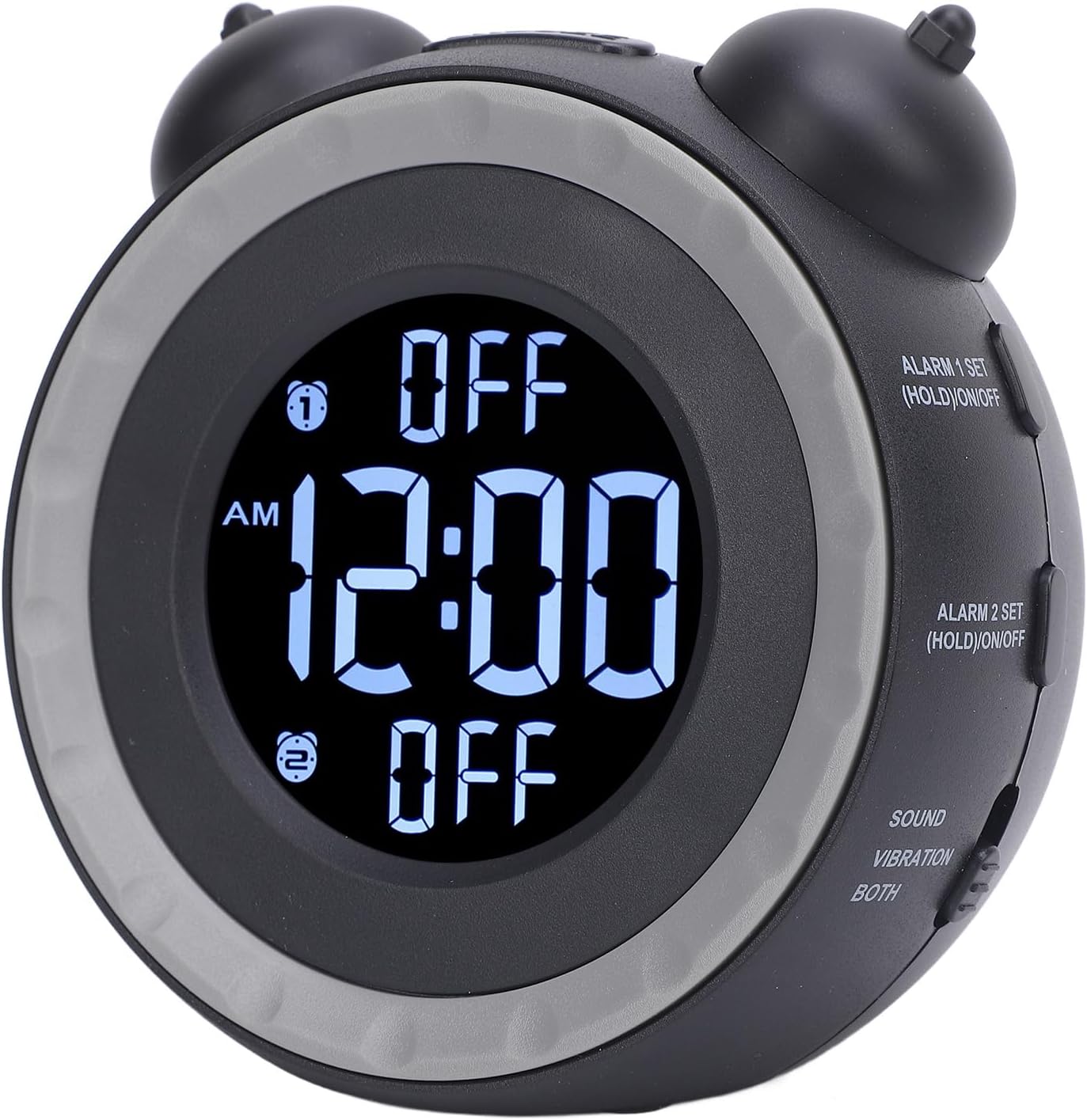
- Tekan dan tahan butang ALARM 1 SET (HOLD)/ON/OFF button for 3 seconds. The Alarm 1 time will flash.
- Putar left bell knob untuk melaraskan jam penggera.
- Putar right bell knob untuk melaraskan minit penggera.
- Tekan PENGGERA 1 SET again to confirm and exit alarm setting mode.
- To turn Alarm 1 ON or OFF, short press the ALARM 1 SET (HOLD)/ON/OFF button. An indicator will appear on the display when Alarm 1 is active.

Imej: sebelah view of the alarm clock showing the "ALARM 1 SET" and "ALARM 2 SET" buttons.
Menetapkan Penggera 2
Follow the same steps as Setting Alarm 1, but use the ALARM 2 SET (HOLD)/ON/OFF butang.
Adjusting Alarm Sound and Wake-up Mode
The alarm clock offers 3 wake-up modes and 3 music alarm tones.
- Tekan ke BUNYI PENGGERA button to cycle through the available alarm tones (e.g., beeping, bird chirping, music).
- Gunakan SOUND / VIBRATION / BOTH switch to select your preferred wake-up mode:
- BUNYI: Alarm will only use the selected sound tone.
- GETAR: Alarm will only use the bed shaker.
- KEDUA: Alarm will use both the selected sound tone and the bed shaker.
Melaraskan Kelantangan
The alarm volume can be adjusted to suit your preference.
- Tekan ke JILID button to adjust the alarm sound level.
Adjusting Screen Brightness (Dimmer)
The display brightness can be continuously adjusted.
- Putar HR SETTING / DIMMER knob (left bell knob) or MIN SETTING / DIMMER knob (right bell knob) to adjust the screen brightness.

Imej: Atas view of the alarm clock, indicating the hour and minute setting knobs which also function as dimmer controls.
Fungsi Tunda
Apabila penggera berbunyi, tekan MENGEJUTKAN button located on top of the clock to temporarily pause the alarm. The alarm will sound again after a short interval.
Penyelenggaraan
To ensure the longevity and proper functioning of your Ymiko Alarm Clock, follow these maintenance guidelines:
- Pembersihan: Wipe the alarm clock and bed shaker with a soft, dry cloth. Do not use abrasive cleaners, solvents, or harsh chemicals, as these can damage the surfaces.
- Storan: If storing the device for an extended period, remove the AAA batteries to prevent leakage. Store in a cool, dry place away from direct sunlight and extreme temperatures.
- Elakkan Air: Keep the alarm clock and bed shaker away from water and high humidity. This device is not waterproof.
- Tangani dengan Berhati-hati: Elakkan daripada menjatuhkan peranti atau terkena impak yang kuat.
Menyelesaikan masalah
If you encounter issues with your Ymiko Alarm Clock, refer to the following common problems and solutions:
| Masalah | Kemungkinan Punca | Penyelesaian |
|---|---|---|
| Clock display is blank or flickering. | Tiada kuasa atau bateri lemah. |
|
| Alarm does not sound or vibrate. | Alarm not activated, volume too low, or bed shaker not connected. |
|
| Tidak dapat menetapkan masa atau penggera. | Incorrect button sequence or mode. |
|
| Paparan terlalu terang atau terlalu malap. | Tetapan dimmer perlu dilaraskan. |
|
Spesifikasi
| Ciri | Perincian |
|---|---|
| Jenama | Ymiko |
| Nombor Model | Ymikovzge57sar2 |
| Jenis Paparan | digital |
| Dimensi Produk (W x H) | 4.72"W x 4.33"H |
| Sumber Kuasa | AC/DC (USB connectivity) |
| Keperluan Bateri | 2 x bateri AAA (tidak termasuk) |
| Bahan Bingkai | Akrilonitril Butadiena Stirena |
| Ciri Khas | Adjustable volume, 3 wake-up modes, 3 alarm tones, bed shaker, screen brightness dimmer. |
| Penggunaan Dalaman/Luar | Dalaman |
Maklumat Waranti
For detailed warranty information regarding your Ymiko Alarm Clock, please refer to the warranty card included in your product packaging or visit the official Ymiko webtapak. Terma dan syarat waranti mungkin berbeza mengikut wilayah dan peruncit.
Sokongan
If you require further assistance or have questions not covered in this manual, please contact Ymiko customer support.
- Sokongan dalam talian: Visit the official Ymiko store on Amazon for product information and support resources: Kedai Ymiko
- Maklumat Hubungan: Refer to your product packaging or the Ymiko weblaman web untuk butiran perhubungan khidmat pelanggan tertentu.