
OHOVIV N10
OHOVIV Portable Charger Power Bank N10 User Manual
Model: N10 | Brand: OHOVIV
pengenalan
Thank you for choosing the OHOVIV N10 Portable Charger Power Bank. This device is designed to provide reliable and fast charging for a wide range of electronic devices, ensuring you stay powered on the go.
With its massive 50000mAh capacity and versatile built-in cables, it's an essential companion for travel, outdoor activities, and daily use.

Figure 1: OHOVIV N10 Portable Charger Power Bank
Produk Selesaiview & Ciri-ciri
The OHOVIV N10 Power Bank is engineered with convenience and efficiency in mind. Key features include:
- Huge Capacity 50000mAh: Provides approximately 10 full charges for an iPhone 15, utilizing a new high-density polymer battery. Ideal for extended trips and multiple device charging.
- Charge 6 Devices at Once: Equipped with 4 built-in cables (Lightning, Type-C, Micro, USB-A) and 3 additional charging ports (2 USB-A, 1 Type-C), allowing simultaneous charging of up to 6 devices. The built-in cables are made from high-quality, bendable TPU material, tested to withstand over 10,000 bends.
- Pengecasan Super Cepat 22.5W: Features PD 22.5W output and QC4.0 quick charging technology, capable of charging an iPhone to 55% in just 30 minutes.
- USB-C Two-Way Charging (IN&OUT): The USB-C port supports both input and output, offering flexible recharging and device charging options.
- Paparan Digital LED: Provides real-time battery percentage, eliminating power anxiety.
- Reka bentuk padat: Measures 5.82 x 2.83 x 1.18 inches and weighs 1.07 lb, making it easy to carry in a backpack, pocket, or bag.
- Keselamatan Unggul: Built-in quality batteries and 10 multiple system protections prevent overcharge, short circuit, and other potential dangers. Features an upgraded AI smart chip and NTC temperature control technology to minimize power loss and reduce overheating risks by 97%.
- Keserasian Luas: Compatible with nearly all electronics, including iPhone 16/15/14/13/12 series, iPad series, Samsung S24/S23/S22/S21/S20, Google Pixel, other Android devices, and tablets.

Rajah 2: Terperinci view of the power bank's outputs and inputs.

Figure 3: High-quality, bendable built-in cables.
Persediaan
Before first use, it is recommended to fully charge your OHOVIV N10 Power Bank.
Mengecas Power Bank:
The power bank can be recharged in two ways:
- Using the Built-in USB-A Cable: Locate the built-in USB-A cable. Plug the USB-A end into any compatible USB wall adapter (not included), computer USB port, or power strip.
- Menggunakan Port Jenis-C: Connect a USB-C to USB-C cable (not included) to the power bank's Type-C port and plug the other end into a compatible USB-C wall adapter or device.
The LED digital display will show the charging progress, indicating the battery percentage. A full charge is indicated by 100% on the display.

Figure 4: Recharging options for the power bank.
Video 1: This video demonstrates the various charging capabilities of the OHOVIV 50000mAh Portable Charger, including its built-in cables and fast charging features. It shows how to charge the power bank itself and how to use it to charge multiple devices simultaneously.
Arahan Operasi
The OHOVIV N10 Power Bank offers multiple ways to charge your devices:
Mengecas Peranti:
- Menggunakan Kabel Terbina dalam:
- Identify the correct built-in cable for your device (Lightning for Apple, Type-C for modern Android/other devices, Micro for older Android/accessories).
- Gently pull out the desired cable from its storage slot.
- Plug the cable directly into your device's charging port.
- Menggunakan Port Luar:
- For devices requiring a different cable or faster charging, use your own USB-A or USB-C cable.
- Plug your cable into one of the available USB-A output ports (USB-A1, USB-A2) or the Type-C input/output port.
- Sambungkan hujung kabel anda yang satu lagi ke peranti anda.
- Pengecasan serentak: You can charge up to 6 devices concurrently by utilizing a combination of the built-in cables and external ports.
Memeriksa Tahap Bateri:
Press the power button on the side of the power bank. The LED digital display will illuminate, showing the remaining battery percentage.

Figure 5: Charging a device using a built-in cable.
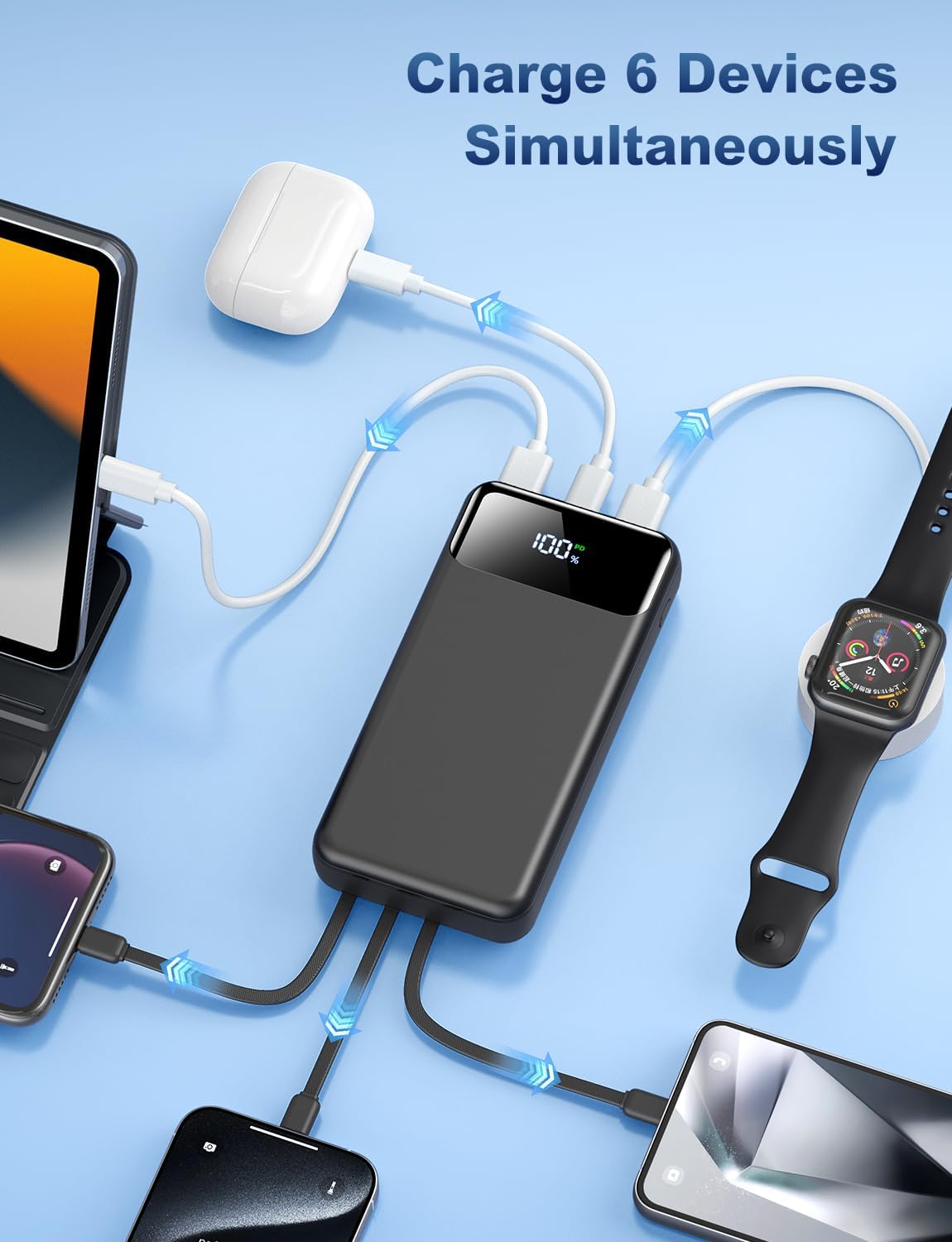
Figure 6: The power bank charging multiple devices at once.
Penyelenggaraan
To ensure the longevity and optimal performance of your OHOVIV N10 Power Bank, follow these maintenance guidelines:
- Storan: Simpan bank kuasa di tempat yang sejuk dan kering jauh dari cahaya matahari langsung dan suhu yang melampau.
- Pembersihan: Gunakan kain lembut dan kering untuk membersihkan permukaan bank kuasa. Elakkan menggunakan bahan kimia yang keras atau bahan yang melelas.
- Elakkan Kerosakan Fizikal: Do not drop, disassemble, or expose the power bank to water or excessive moisture.
- Penggunaan Biasa: For best battery health, use and recharge the power bank regularly, even if not frequently used.
- Ciri-ciri Keselamatan: The power bank includes multiple protection systems (overcharge, short circuit, temperature control). Do not attempt to bypass or modify these features.

Gambar 7: Lebihview of the power bank's superior safety protections.
Menyelesaikan masalah
If you encounter any issues with your OHOVIV N10 Power Bank, please refer to the following common solutions:
- Peranti Tidak Mengecas:
- Pastikan power bank mempunyai cas yang mencukupi (periksa paparan LED).
- Verify that the cable is securely connected to both the power bank and your device.
- Try a different built-in cable or an external cable to rule out a faulty cable.
- Ensure your device is compatible with the power bank's output specifications.
- Power Bank Not Recharging:
- Check if the charging cable (built-in USB-A or external Type-C) is properly connected to a power source.
- Try a different wall adapter or USB port.
- Pastikan sumber kuasa aktif dan membekalkan kuasa.
- Pengecasan perlahan:
- Ensure you are using a fast-charging compatible cable and wall adapter if charging the power bank.
- For device charging, ensure your device supports 22.5W fast charging and that you are using the appropriate port/cable.
- Charging multiple devices simultaneously may reduce individual charging speeds.
- Paparan LED Tidak Berfungsi:
- Tekan butang kuasa dengan kuat.
- Jika power bank kehabisan kuasa sepenuhnya, paparan mungkin tidak menyala sehingga ia dicas.
If the issue persists after trying these steps, please contact OHOVIV customer support for assistance.
Spesifikasi
| Ciri | Perincian |
|---|---|
| Nombor Model | N10 |
| Kapasiti Bateri | 50000 Miliamp jam |
| Dimensi Produk | 5.82 x 2.83 x 1.18 inci |
| Berat Barang | 1.19 paun |
| Pengecasan Output | 22.5W (PD & QC4.0) |
| Kabel Terbina dalam | Lightning, Type-C, Micro, USB-A |
| Pelabuhan Tambahan | 2 x USB-A Output, 1 x Type-C (IN&OUT) |
| Paparan | Paparan Digital LED |
| warna | Hitam |
| Pengeluar | Shenzhen Daximen Import dan Eksport Trading Co., LTD |
| Negara Asal | China |
Waranti dan Sokongan
OHOVIV is committed to providing excellent customer service and product reliability.
- Waranti: Enjoy peace of mind with a 365-day replacement guarantee.
- Sokongan Pelanggan: 24/7 professional customer support is available to assist you with any issues or questions you may encounter.
- Hubungi: For support, please refer to the contact information provided in your product packaging or visit the official OHOVIV store on Amazon. When contacting support, please provide your order number and detailed information about the issue for a faster resolution.

Figure 8: OHOVIV's commitment to customer service and support.
Ask a question about this manual
Ask about setup, troubleshooting, compatibility, parts, safety, or missing instructions. Manuals+ will review the question and use this page’s manual context to help answer it.