
1. Pengenalan
Thank you for choosing the Angrox Voice Remote Control. This remote is specifically designed as a replacement for Philips Google Smart TVs, offering enhanced functionality including voice control and dedicated shortcut buttons for popular streaming services. Please read this manual carefully to ensure proper setup and operation.

Imej: Depan dan sisi view of the Angrox Voice Remote Control, showcasing reka bentuk ergonomik dan susun atur butangnya.
2. Persediaan
2.1 Pemasangan Bateri
The remote requires two (2) AAA batteries (not included). Ensure correct polarity when inserting the batteries.
- Tanggalkan penutup bateri di bahagian belakang alat kawalan jauh dengan menggesernya ke bawah.
- Insert two AAA batteries, matching the positive (+) and negative (-) terminals as indicated inside the battery compartment.
- Gantikan penutup bateri dengan menggelongsorkannya semula ke tempatnya sehingga ia berbunyi dengan selamat.

Image: A three-step diagram illustrating how to remove the battery cover, insert two AAA batteries, and replace the cover.
2.2 Berpasangan dengan TV Anda
Before using the remote, it must be paired with your Philips Google Smart TV. This remote supports both infrared and Bluetooth technology for optimal performance.
- Ensure your Philips Google Smart TV is powered on.
- Hold down the "VOL-" button and the "Mic" (Google Assistant) button simultaneously for 5 seconds.
- The remote will initiate the pairing process. All pairing transactions occur in the background, and no further setup is typically required once the pairing is successful.

Image: A hand holding the remote, with an arrow pointing from the 'VOL-' and 'Mic' buttons to a TV screen, illustrating the pairing process.

Image: A visual guide showing the remote and a TV screen with on-screen instructions for pairing, emphasizing holding the VOL- and Mic buttons.
2.3 Model TV yang Serasi
This voice replacement remote is compatible with the following Philips Google Smart TV series:
- 7000 Siri: 75PUL7552/F7, 65PUL7552/F7, 55PUL7552/F7, 50PUL7552/F7, 43PUL7652/F7
- 7600 Siri: 65PUL7672/F7, 55PUL7672/F7, 50PUL7672/F7, 43PUL7672/F7

Image: The remote control centered between two Philips Google Smart TVs, with lists of compatible 7000 and 7600 series models.
3. Arahan Operasi
3.1 Butang Berfungsi Berakhirview
Familiarize yourself with the various buttons and their functions on your Angrox remote control:
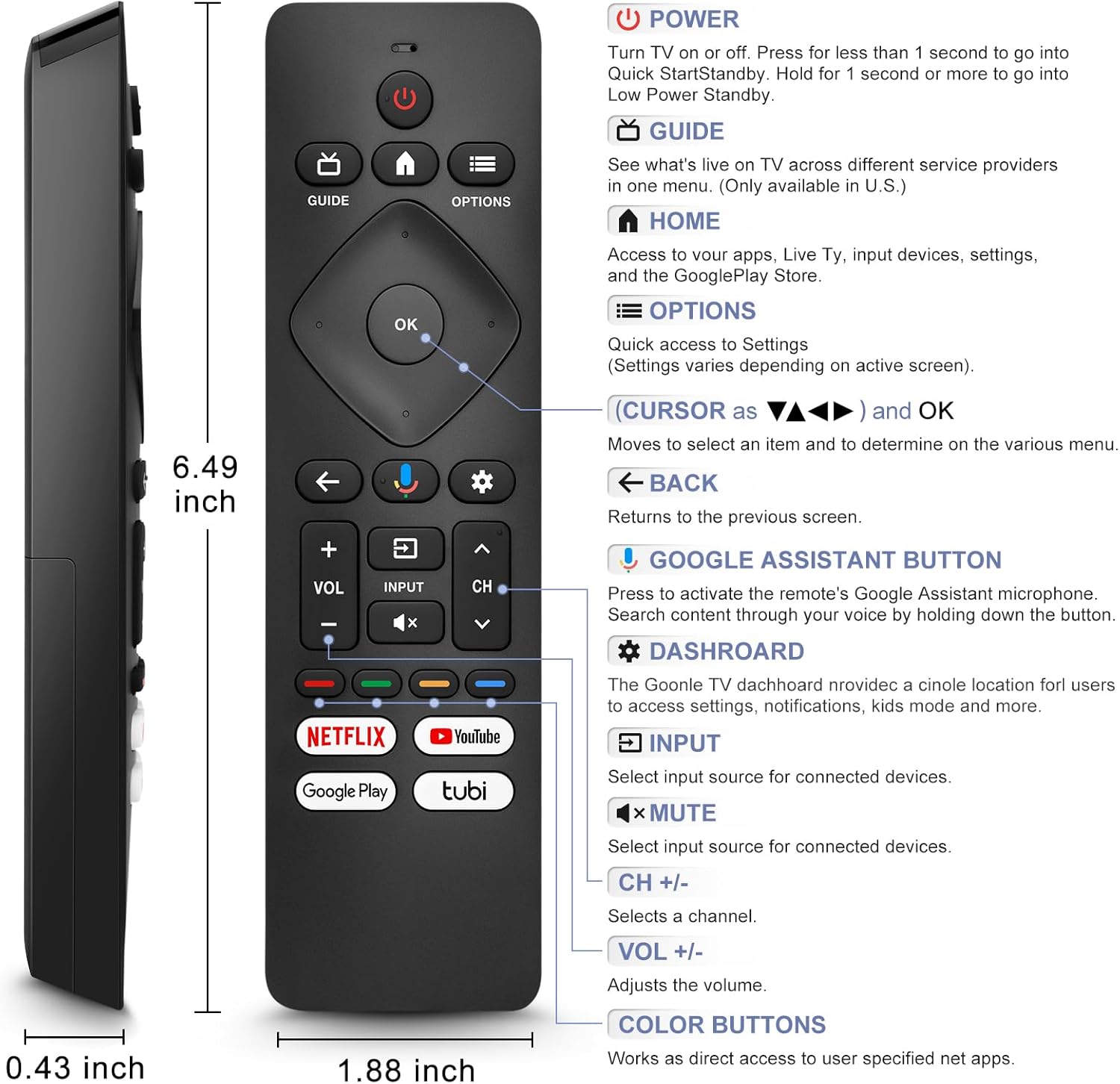
Image: A detailed diagram of the remote control with labels and descriptions for each button, including Power, Guide, Home, Options, Cursor/OK, Back, Google Assistant, Dashboard, Input, Mute, Volume, Channel, and Color Buttons.
- Kuasa: Press to turn TV on or off. Hold for 1 second for Quick Start Standby, or longer for Low Power Standby.
- Panduan: Access live TV service providers (availability may vary by region).
- Rumah: Access apps, Live TV, input devices, settings, and the Google Play Store.
- Pilihan: Quick access to settings (settings vary based on active screen).
- Cursor (Up/Down/Left/Right) & OK: Navigasi menu dan sahkan pilihan.
- Belakang: Kembali ke skrin sebelumnya.
- Butang Pembantu Google: Press and hold to activate the remote's microphone for voice search.
- Papan pemuka: Access the Google TV dashboard for settings, notifications, and kids mode.
- Input: Pilih sumber input untuk peranti yang disambungkan.
- Redam: Mute or unmute the TV audio.
- VOL +/-: Laraskan tahap kelantangan.
- CH +/-: Select the next or previous channel.
- Butang Warna: Provide direct access to user-specified net apps.
3.2 Voice Search Function
The integrated voice function allows for easier and more intuitive interaction with your smart TV. Simply press and hold the Google Assistant button and speak your command or query.
- Tekan dan tahan butang Butang Google Assistant (ikon mikrofon).
- Speak clearly into the remote's microphone.
- Lepaskan butang apabila selesai bercakap.
Examples of voice commands include: "What's the weather today?", "Turn down the volume", "Open YouTube", or searching for specific content.
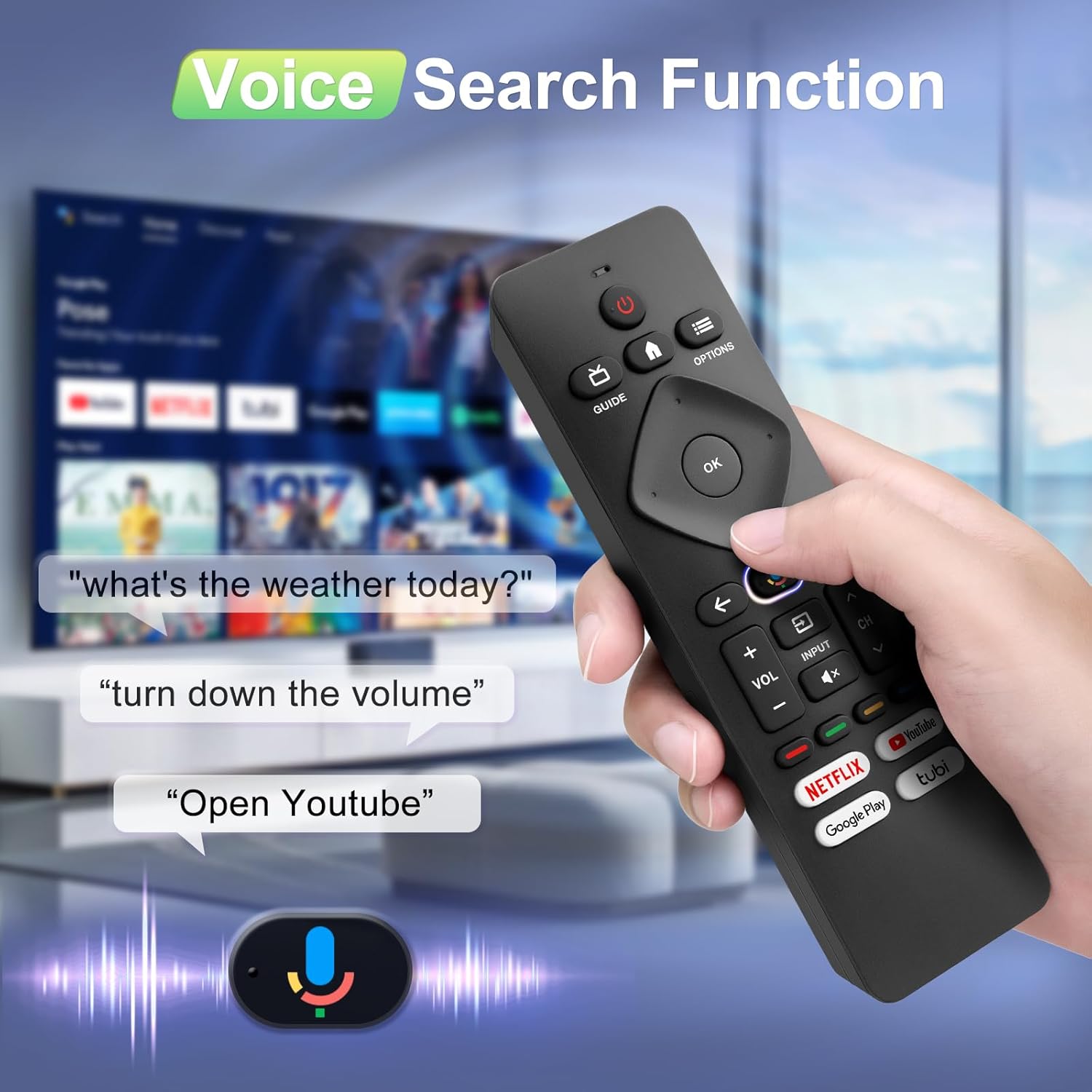
Image: A hand holding the remote, with speech bubbles showing example voice commands like "what's the weather today?" and "Open Youtube", demonstrating the voice search capability.
3.3 Butang Pintasan
The remote features four dedicated shortcut buttons for quick access to popular streaming channels:
- Netflix
- Youtube
- Google Play
- Tubi
Pressing these buttons will directly launch the respective application on your TV, provided they are installed and configured.

Image: The remote control highlighting the four dedicated shortcut buttons for Netflix, YouTube, Google Play, and Tubi, with their respective logos.
4. Penyelenggaraan
Untuk memastikan jangka hayat dan prestasi optimum alat kawalan jauh anda, ikut garis panduan penyelenggaraan ini:
- Pembersihan: Lap alat kawalan jauh dengan kain lembut dan kering. Jangan gunakan pembersih cecair atau bahan yang melelas.
- Penggantian Bateri: Replace batteries when the remote's response becomes sluggish or it stops functioning. Always replace both batteries at the same time with new ones.
- Storan: Simpan alat kawalan jauh di tempat yang sejuk dan kering jauh dari cahaya matahari langsung dan suhu yang melampau.
- Elakkan Titisan: Lindungi alat kawalan jauh daripada kesan fizikal, kerana titisan boleh merosakkan komponen dalaman.
5. Penyelesaian masalah
If you encounter issues with your remote control, please refer to the following common solutions:
- Jauh Tidak Menjawab:
- Periksa sama ada bateri dimasukkan dengan betul dengan polariti yang betul.
- Gantikan bateri lama dengan bateri AAA baharu.
- Pastikan tiada halangan antara alat kawalan jauh dan penerima IR TV.
- Fungsi Suara Tidak Berfungsi:
- Ensure the remote is properly paired with your TV via Bluetooth. Refer to Section 2.2.
- Make sure you are pressing and holding the Google Assistant button while speaking.
- Semak tetapan TV anda untuk memastikan kawalan suara diaktifkan.
- Buttons Unresponsive or Sticky:
- Clean the remote surface, especially around the buttons, to remove any dirt or debris.
- If buttons remain unresponsive after cleaning and battery replacement, the remote may require replacement.
- Short Remote Distance:
- The remote supports infrared and Bluetooth. Ensure no physical obstructions are blocking the signal.
- The remote is designed for optimal performance within 10 meters (approximately 33 feet) and is available up to 12 meters (approximately 39 feet).
6. Spesifikasi
| Jenama | Angrox |
| Nombor Model | URMT26CND002 |
| Peranti Serasi | Philips Google Smart TVs (7000 & 7600 Series) |
| Teknologi Ketersambungan | Infrared, Bluetooth |
| Ciri Khas | Ergonomic, Voice Search, Shortcut Buttons |
| Sumber Kuasa | 2 x Bateri AAA (tidak termasuk) |
| Berat Barang | 2.39 auns (lebih kurang 67.7 gram) |
| Dimensi Pakej | 6.73 x 1.93 x 1.02 inci |
| Ketahanan Butang | Tested for 5,000-8,000 clicks per button |
7. Waranti dan Sokongan
Angrox is committed to providing excellent after-sale service. We focus on the compatibility and quality of our replacement remotes. If you have any questions or concerns regarding your order or the product, please do not hesitate to contact us directly. Our professional after-sale service team is available to assist you.
For support, please refer to the contact information provided with your purchase or visit the Angrox store on Amazon.