
pengenalan
The ELK C1M1 LTEV Dual Path Alarm Communicator is an advanced device designed to provide fast and reliable emergency message transmission for your security system. It connects directly to the M1 Control panel, utilizing both IP (Internet Protocol) and cellular pathways to ensure critical alerts are sent without delay. This manual provides essential information for the proper installation, operation, maintenance, and troubleshooting of your C1M1 LTEV communicator.
Persediaan
1. Membuka Kotak dan Kandungan Pakej
Carefully unpack the ELK C1M1 LTEV Dual Path Alarm Communicator. Verify that all components are present:
- ELK C1M1 LTEV Communicator Unit
- Perkakasan Pemasangan
- Panduan Pemasangan (dokumen ini)
2. Pemasangan Fizikal
Select a suitable location for the communicator, typically near your M1 Control panel. Ensure the location allows for good cellular signal reception and access to your network infrastructure.
- Mount the communicator securely to a wall or within an enclosure using the provided mounting hardware.
- Pastikan pengudaraan yang mencukupi di sekeliling unit.
3. Sambungan Pendawaian
Connect the C1M1 LTEV to your M1 Control panel and power source.
- Sambungan Kuasa: Connect the communicator to a stable 12V DC power source, typically from the M1 Control panel's auxiliary power output. Observe polarity.
- Data Bus Connection: Connect the C1M1 LTEV to the M1 Control panel's data bus terminals (usually labeled DATA, GND).
- Network Connection (IP): If using the IP pathway, connect an Ethernet cable from your network router/switch to the Ethernet port on the C1M1 LTEV.
4. Pengaktifan
After physical installation and wiring, activate the communicator through the ELK Products portal or your security provider. This typically involves registering the device's serial number and configuring communication settings.
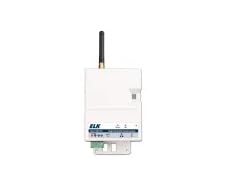
Rajah 1: The ELK C1M1 LTEV Dual Path Alarm Communicator. This image shows the compact design of the communicator, highlighting its various ports for power, data bus, and Ethernet connections, along with LED indicators for status monitoring.
Arahan Operasi
1. Operasi Asas
The C1M1 LTEV operates in conjunction with your M1 Control panel. Once properly installed and activated, it automatically monitors the M1 Control for alarm events and transmits them to the central monitoring station via the fastest available pathway (IP or cellular).
2. Remote Access via ElkLink Mobile App
The ElkLink Mobile app (available for iOS and Android) allows you to remotely access and control your M1 system. This includes arming/disarming, checking system status, and receiving notifications. No port forwarding is required for remote access.
- Download the ElkLink Mobile app from your device's app store.
- Log in using your ELK account credentials.
- Follow the in-app instructions to link your C1M1 LTEV and M1 Control system.
3. Programming with ElkRP2
The C1M1 LTEV supports remote programming of the M1 Control panel using the ElkRP2 software. This allows for convenient upload/download of system configurations over both IP and cellular pathways.
- Ensure your ElkRP2 software is up to date.
- Establish a connection to the C1M1 LTEV through the software, specifying the appropriate communication pathway.
- Perform desired programming tasks (uploading new configurations, downloading current settings).
Penyelenggaraan
1. Kemas Kini Perisian Tegar
Periodically check for firmware updates for your C1M1 LTEV communicator. Firmware updates can provide new features, performance improvements, and security enhancements. Updates are typically performed remotely through the ELK Products portal or by your security provider.
2. Pembersihan
The C1M1 LTEV requires minimal cleaning. Use a soft, dry cloth to wipe the exterior of the unit. Do not use liquid cleaners or abrasive materials, as these can damage the device.
Menyelesaikan masalah
1. Tiada Komunikasi
If the communicator is not reporting events:
- Semak Kuasa: Ensure the unit is powered on and its power indicator LED is lit.
- Sahkan Pendawaian: Confirm all power and data bus connections are secure and correctly wired.
- Kesambungan Rangkaian: For IP communication, check your Ethernet cable and router connection. For cellular, ensure adequate signal strength.
- Status Pengaktifan: Confirm the communicator is properly activated and registered with ELK Products.
2. Petunjuk LED
The C1M1 LTEV features several LED indicators to display its status. Refer to the detailed installation guide for a complete description of each LED's function and what different states (solid, flashing, color) indicate regarding power, network, and cellular status.
3. Isu Ketersambungan
If experiencing intermittent connectivity:
- IP Pathway: Restart your network router and the C1M1 LTEV. Check for network congestion or firewall settings that might block communication.
- Cellular Pathway: Relocate the communicator if possible to improve cellular signal. Contact your service provider if cellular issues persist.
Spesifikasi
| Pengeluar | ELK |
| Nombor Bahagian | ELK - C1M1 LTEV |
| Komponen yang Disertakan | Dual Path Alarm Communicator |
| Penerangan Waranti | 1 Tahun |
| ASIN | B0DW9P65TT |
| Tarikh Mula-mula Tersedia | 6 Februari 2025 |
Maklumat Waranti
The ELK C1M1 LTEV Dual Path Alarm Communicator is covered by a Waranti terhad 1 tahun from the date of purchase. This warranty guarantees the product against defects in materials and workmanship under normal use. For specific terms, conditions, and to initiate a warranty claim, please refer to the official ELK Products warranty policy available on their webtapak atau hubungi sokongan pelanggan mereka.
Sokongan
For technical assistance, troubleshooting guidance, or any inquiries regarding your ELK C1M1 LTEV Dual Path Alarm Communicator, please utilize the following resources:
- ELK Products Official Webtapak: melawat www.elkproducts.com untuk dokumentasi produk, Soalan Lazim dan maklumat hubungan sokongan.
- Sokongan Pelanggan: Contact ELK customer support directly via phone or email as provided on their webtapak.
- Professional Installer: If your system was installed by a professional, contact your installer for immediate assistance.
Note: No official product videos were provided in the source data to embed in this manual.