
pengenalan
The Zetronix Atom 4K USB DIY Hidden Camera is designed for covert surveillance, offering 4K UltraHD resolution and a customizable design. It is suitable for home security, professional monitoring, and discrete investigations, providing clear footage and versatility. This manual provides detailed instructions for setting up, operating, and maintaining your Atom 4K surveillance kit.
Apa yang ada dalam Kotak
Upon unboxing your Atom 4K DIY Surveillance Kit, verify that all components are present:
- DIY Camera Kit (main module with camera ribbon)
- Alat Kawalan Jauh
- Button Attachments (various styles)

Image: The Atom 4K DIY Camera Kit showing the main module with its flexible camera ribbon and the included remote control.
Persediaan
1. Mengecas Bateri
The Atom 4K is powered by a 2000mAh removable lithium-ion battery. For optimal performance, fully charge the battery before first use. Connect the camera module to a USB power source using a compatible Type-C cable (not included). The charging indicator light will provide status.
2. Memasukkan Kad MicroSD
The device supports MicroSD cards up to 256GB (not included). Ensure the card is formatted to FAT32 for best compatibility. Locate the MicroSD card slot on the camera module and gently insert the card until it clicks into place.

Imej: Terperinci view of the Atom 4K module, highlighting the Micro SD card slot, Type-C port, and on/off switch.
3. Attaching Button Camera Lenses
The kit includes various button attachments to help disguise the camera. Select the appropriate button for your desired concealment. Carefully attach the chosen button over the camera lens on the ribbon cable.
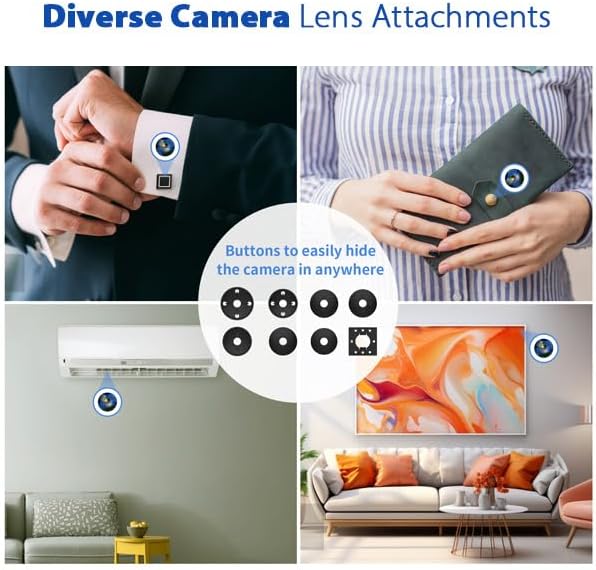
Image: Demonstrations of the Atom 4K camera's versatility with different button attachments, allowing it to blend into various environments.
Arahan Operasi
Menghidupkan/Mematikan
To power on the device, slide the 'ON/OFF' switch to the 'ON' position. To power off, slide the switch to 'OFF'.
Mod Rakaman
The Atom 4K supports both continuous recording and motion-activated recording.
- Rakaman Berterusan: Once powered on, the device can be set to record continuously. Refer to the remote control section for activation.
- Rakaman Diaktifkan Pergerakan: When motion is detected within the camera's 120° field of view, the camera automatically begins recording and saves footage to the MicroSD card. This mode conserves battery life and storage space.
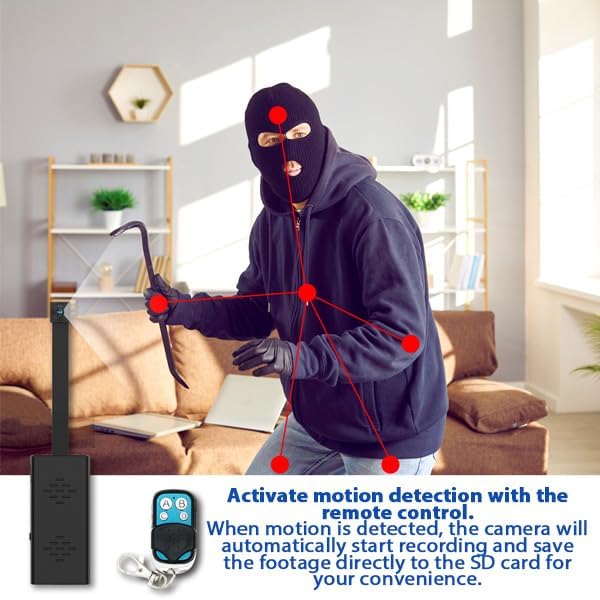
Image: Visual representation of motion detection in action, showing how the camera identifies movement and begins recording.
Menggunakan Alat Kawalan Jauh
The included remote control allows for discreet operation from up to 60 feet away. Use the buttons on the remote to start/stop recording or activate/deactivate motion detection.
Rakaman Gelung
The Atom 4K supports loop recording. When the MicroSD card is full, the camera will automatically overwrite the oldest files, ensuring continuous recording without manual intervention. Video files are saved in segments, typically every 10 minutes, with each hour of 4K footage consuming approximately 9-10GB.
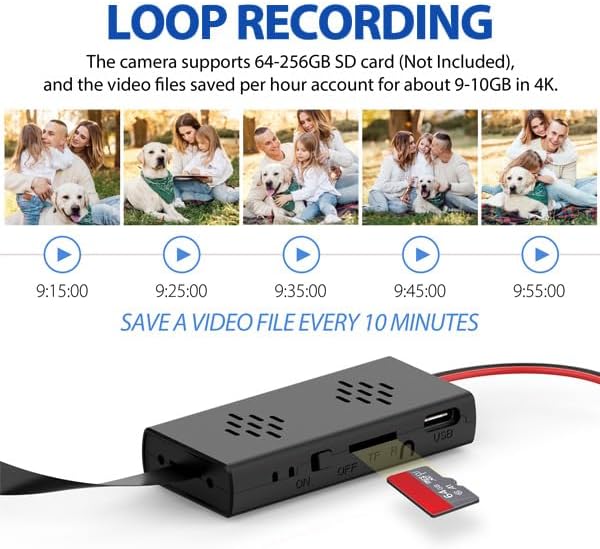
Image: Demonstration of the loop recording function, showing how the camera saves video files in 10-minute intervals, overwriting older footage apabila kad penuh.
Tarikh & Masa Stamps
Tarikh dan masa stamps can be optionally displayed in the corner of recorded videos or photos. This feature is useful for evidence collection and chronological organization of footage.
Penyelenggaraan
Penjagaan Bateri
To prolong battery life, avoid extreme temperatures and fully charge the battery before long periods of inactivity. The lithium-ion battery is rated for 500,000 cycles.
Pengurusan Storan
Kerap membuat sandaran foo pentingtage from your MicroSD card to a computer or external storage device. Periodically format the MicroSD card to maintain optimal performance and prevent data corruption.
Menyelesaikan masalah
- Peranti tidak dihidupkan: Ensure the battery is fully charged. Check that the 'ON/OFF' switch is in the 'ON' position.
- Tiada rakaman: Verify that a MicroSD card is properly inserted and has sufficient free space. Check if the card is formatted correctly (FAT32). Ensure the recording mode (continuous or motion-activated) is correctly activated via the remote control.
- Kualiti video yang lemah: Ensure the camera lens is clean and free from obstructions. Verify that the lighting conditions are adequate.
- Alat kawalan jauh tidak berfungsi: Check the remote control's battery. Ensure you are within the operational range (up to 60 feet) and there are no significant obstructions.
Spesifikasi
| Nama Model | Atom 4K |
| Nombor Model | ATOM-4K-NA |
| Resolusi Video | 4K UltraHD (4096 effective resolution) at 15FPS |
| Viewsudut | 120 Darjah |
| Penyimpanan | Supports MicroSD cards up to 256GB (not included) |
| Bateri | 2000mAh Lithium-Ion (4-5 hours recording time) |
| Ketersambungan | Wireless (RF for remote control) |
| Dimensi (L x W x H) | 2 x 1 x 1 inches (main module) |
| Komponen yang Disertakan | DIY Camera Kit, Remote, Button Attachments |
Waranti dan Sokongan
For warranty information and technical support, please refer to the official Zetronix weblaman web atau hubungi khidmat pelanggan mereka secara langsung. Butiran mengenai tempoh jaminan tertentu dan saluran sokongan biasanya diberikan bersama dokumentasi pembelian anda atau pada pengilang webtapak.
Manufacturer: Zetronix
Negara Asal: China