
1. Pengenalan
The Zwide M2 Plus+C2 is a professional dual-channel wireless lavalier microphone system designed for high-quality audio recording. This system includes two transmitters (TX), one receiver (RX), and a portable charging case. It is ideal for various applications such as filmmaking, live streaming, vlogging, online classes, video conferences, and interviews, offering reliable performance up to 140 meters (460 feet) in open environments.
2. Apa yang ada di dalam Kotak
Sila sahkan bahawa semua komponen ada semasa membuka bungkusan:
- Charging Case C2
- Pemancar (TX) x2
- Penerima (RX) x1
- Wired Microphone with Clip x2
- Cermin depan x2
- Pantau Fon Telinga
- USB-A to USB-C Digital Audio Cable
- Camera Cable (3.5mm TRS)
- 3.5mm TRRS Cable (for smartphones)
3. Produk Lebihview
The Zwide M2 Plus+C2 system consists of compact and lightweight units designed for portability and ease of use.
3.1. Komponen Sistem
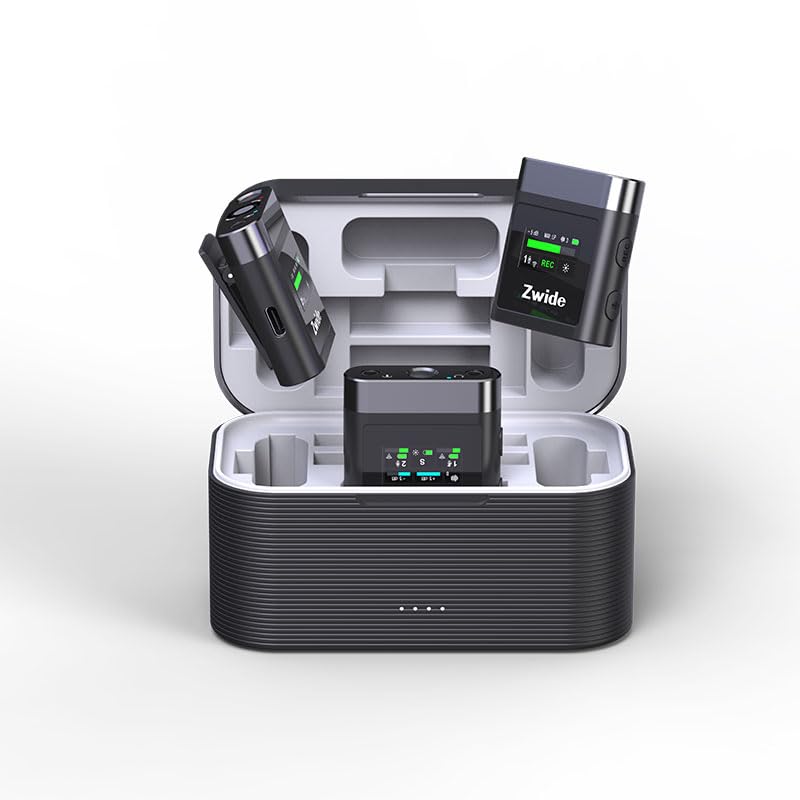
Image: The Zwide M2 Plus+C2 system, showing two transmitters, one receiver, and the charging case.
The system includes two transmitters (TX) for capturing audio from two separate sources, one receiver (RX) to connect to your recording device, and a charging case for convenient storage and power replenishment.
3.2. Pemancar (TX)
Each transmitter features a built-in microphone and a 0.96-inch LCD for real-time status display. It also includes a 3.5mm TRS input for an external lavalier microphone.
- Mikrofon terbina dalam: Untuk rakaman audio secara langsung.
- LCD 0.96 inci: Displays noise cancellation level, gain (dB), mute status, signal strength, channel, screen mode, volume, recording data rate, and battery level.
- Input MIC: 3.5mm TRS for connecting external lavalier microphones.
- Port USB-C: Untuk pengecasan dan pemindahan data.
- Butang Kuasa: Long press to power on/off. Short press for other functions.
- Butang Bisukan: To mute/unmute the microphone.
- Butang Kawalan Dapatkan: Adjust audio input level.
- Storan Dalaman: 64GB for up to 270 hours of 256kb/s audio recording.
3.3. Penerima (RX)
The receiver connects to your camera, PC, or smartphone and receives audio from both transmitters. It also features a 0.96-inch LCD for monitoring.
- LCD 0.96 inci: Displays status of both TX units, signal strength, battery levels, and audio output settings.
- Pelabuhan OUT: 3.5mm TRRS/TRS female unbalanced output for connecting to recording devices.
- Headphone Monitoring Port: 3.5mm untuk pemantauan audio masa nyata.
- Port USB-C: For charging and connecting to digital devices.
- Butang Kuasa: Tekan lama untuk menghidupkan/mematikan kuasa.
- Butang Tukar Saluran: To switch between mono, stereo, or mono with safety track modes.
- Butang Kawalan Kelantangan: Laraskan volum keluaran.
3.4. Charging Case (C2)
The charging case provides portable power for the transmitters and receiver, extending their operational time.
- Kapasiti Bateri: 3500mAh, providing up to 19 hours of additional battery life for the system.
- Penunjuk Pengecasan: Shows charging status for the case and individual units.
- Port Pengecasan USB-C: Untuk mengecas semula bekas.
4. Panduan Persediaan
4.1. Pengecasan Awal
- Place the transmitters (TX) and receiver (RX) into the charging case.
- Connect the charging case to a USB power adapter (not included) using the provided USB-A to USB-C cable.
- Ensure all units are fully charged before first use. The charging indicators on the units and case will show their status.
4.2. Menghidupkan/Mematikan
- Untuk Menghidupkan: Long press the power button on each TX and RX unit. The LCD screens will illuminate.
- Untuk Mematikan: Long press the power button on each TX and RX unit. The LCD screens will turn off.
4.3. Pairing (Automatic)
The Zwide M2 Plus+C2 units are pre-paired at the factory. Simply power on both transmitters and the receiver, and they will automatically connect. The signal strength indicator on the LCD will confirm a successful connection.
4.4. Connecting to Recording Devices
- For Cameras/DSLRs: Use the provided 3.5mm TRS camera cable. Connect one end to the RX's OUT port and the other end to your camera's microphone input.
- Untuk Telefon Pintar/Tablet: Use the provided 3.5mm TRRS cable. Connect one end to the RX's OUT port and the other end to your smartphone's headphone/microphone jack. For devices without a 3.5mm jack, an appropriate adapter (e.g., USB-C to 3.5mm or Lightning to 3.5mm) may be required (not included).
- For PCs/Laptops: Use the provided USB-A to USB-C digital audio cable. Connect the USB-C end to the RX and the USB-A end to your computer. Select the Zwide M2 Plus+C2 as the audio input device in your computer's sound settings.
4.5. Attaching Microphones
- Mikrofon terbina dalam: Clip the TX unit directly onto the speaker's clothing, ensuring the built-in microphone faces the sound source.
- External Lavalier Mic: Connect the wired lavalier microphone to the 3.5mm MIC input on the TX unit. Secure the lavalier mic to clothing, typically 6-8 inches from the mouth, and clip the TX unit to a belt or pocket. Attach the windscreen to the lavalier mic to reduce plosives and wind noise.
5. Arahan Operasi
5.1. Adjusting Audio Gain (TX)
Use the gain control buttons on the transmitter to adjust the input audio level. Monitor the audio levels on the TX's LCD or your recording device to prevent clipping (distortion) or excessively low volume.
5.2. Mute Function (TX)
Press the mute button on the transmitter to temporarily silence the microphone. The LCD will indicate when the microphone is muted.
5.3. Noise Cancellation (TX)
The transmitters feature 3 levels of Environmental Noise Cancellation (ENC). Short press the dedicated noise cancellation button on the TX to cycle through the levels (Off, Level 1, Level 2, Level 3). The LCD will display the active level. Choose the appropriate level based on your recording environment to reduce unwanted background noise.
5.4. Internal Recording (TX)
Each transmitter has 64GB of internal storage for standalone recording. To start/stop recording, short press the record button on the TX. The LCD will show the recording status and remaining time. To transfer recorded files, connect the TX to a computer using the USB-C cable; the device will appear as a removable drive.
5.5. Audio Output Modes (RX)
The receiver supports Mono, Stereo, and Mono with Safety Track output modes. Press the channel switch button on the RX to cycle through these modes:
- Mono: Combines audio from both transmitters into a single mono track.
- Stereo: Separates audio from TX1 to the left channel and TX2 to the right channel.
- Mono dengan Trek Keselamatan: Provides a primary mono track and a secondary mono track recorded at a lower volume (-6dB) as a backup against unexpected audio peaks.
5.6. Monitoring Audio (RX)
Connect the provided monitor earphone to the 3.5mm headphone monitoring port on the receiver to listen to the audio in real-time. Adjust the monitoring volume using the volume control buttons on the RX.
6. Penyelenggaraan
- Pembersihan: Gunakan kain lembut dan kering untuk membersihkan unit. Elakkan penggunaan bahan kimia yang keras atau bahan yang melelas.
- Storan: Simpan sistem di dalam bekas pengecasnya di tempat yang sejuk dan kering apabila tidak digunakan.
- Penjagaan Bateri: For optimal battery life, fully charge the units and charging case regularly, especially if storing for extended periods. Avoid extreme temperatures.
- Kemas kini Firmware: Semak pengeluar weblaman web ini secara berkala untuk kemas kini perisian tegar bagi memastikan prestasi optimum dan akses kepada ciri-ciri baharu.
7. Penyelesaian masalah
7.1. No Audio Output
- Ensure all units (TX and RX) are powered on and fully charged.
- Verify that the TX and RX are successfully paired (check signal indicator on LCD).
- Check cable connections between the RX and your recording device. Ensure the correct cable (TRS for camera, TRRS for smartphone) is used and fully inserted.
- Confirm the recording device's input settings are correctly configured to recognize the Zwide M2 Plus+C2.
- Adjust the gain on the TX and volume on the RX.
- Ensure the TX is not muted.
7.2. Poor Audio Quality/Interference
- Reduce the distance between the TX and RX.
- Avoid obstacles between the TX and RX that may block the signal.
- Ensure there are no strong 2.4GHz wireless devices operating nearby that could cause interference.
- Activate or adjust the Environmental Noise Cancellation (ENC) level on the TX.
- Check if the external lavalier microphone is securely connected and not damaged.
- Ensure the windscreen is properly attached to reduce wind noise and plosives.
7.3. Units Not Charging
- Verify the USB-C cable is properly connected to both the charging case and the power source.
- Ensure the power adapter is functional and providing sufficient power.
- Check that the TX and RX units are correctly seated in the charging case.
8. Spesifikasi
| Ciri | Spesifikasi |
|---|---|
| Nama Model | M2 Plus+C2 |
| Faktor Bentuk Mikrofon | Lavalier |
| Corak Kutub | Omnidirectional |
| Teknologi Ketersambungan | 2.4GHz Wireless Frequency Modulation Technology |
| Julat Operasi | Up to 140m (460 ft.) in open, unobstructed environments |
| Kepekaan Audio | 42 Desibel |
| Nisbah Isyarat-ke-Bunyi | 73 dB |
| Respons Kekerapan | 100 Hz |
| Impedans | 2.2 Kiloohm |
| Hayat Bateri Pemancar | lebih kurang 4.5 jam |
| Hayat Bateri Penerima | lebih kurang 5.5 jam |
| Jumlah Hayat Bateri (dengan Bekas Pengecasan) | Sehingga 24 jam |
| Kapasiti Kes Pengecasan | 3500mAh |
| Storan Dalaman (TX) | 64GB (up to 270 hours at 256kb/s) |
| Skrin LCD | 0.96-inch with full lamination technology |
| Pembatalan Bunyi | 3 Levels ENC |
| Mod Output | Mono, Stereo, Mono with Safety Track |
| Peranti Serasi | Camera/Camcorder/DSLR/SLR, PC/Laptop/Desktop, Smartphone/iPhone/iPad/Android Phone/Tablet |
| Dimensi Item (L x W x H) | 4.72 x 2.76 x 2.64 inci |
| Berat Barang | 12.5 auns (355 Gram) |
9. Waranti dan Sokongan
Zwide products are covered by a limited warranty. For detailed warranty information, technical support, or service inquiries, please refer to the warranty card included in your product packaging or visit the official Zwide webtapak. Sila simpan bukti pembelian anda untuk tuntutan waranti.