
1. Produk Lebihview
The Fanvil V60P is a professional IP phone designed for business communication. It features a color display, programmable keys, and Power over Ethernet (PoE) support for simplified installation and operation. This manual provides essential information for setting up, operating, and maintaining your device.
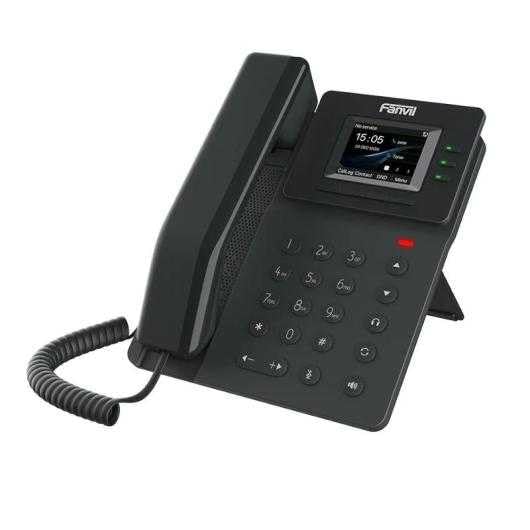
Figure 1: Fanvil V60P Professional IP Phone. This image shows the black IP phone with its handset, color display, and numeric keypad. The display shows "15:05" and menu options.
2. Persediaan dan Pemasangan
2.1 Kandungan Pakej
Sebelum pemasangan, pastikan semua barang ada di dalam bungkusan:
- Fanvil V60P IP Phone unit
- Handset and coiled cord
- Kabel Ethernet
- Berdiri
- Panduan Pemasangan Pantas (jika disertakan)
2.2 Sambungan Fizikal
- Pasang Pendirian: Securely attach the desk stand to the back of the phone unit.
- Sambungkan Handset: Palamkan satu hujung kord bergelung ke dalam telefon bimbit dan hujung satu lagi ke dalam port telefon bimbit pada pangkalan telefon.
- Connect to Network and Power (PoE):
- Sambungkan satu hujung kabel Ethernet ke LAN port pada telefon.
- Connect the other end of the Ethernet cable to a Power over Ethernet (PoE) enabled switch or injector. The phone will power on automatically.
- Sambung ke PC (Pilihan): If you need to connect a computer through the phone, connect an Ethernet cable from your PC to the PC port pada telefon.
Note: If PoE is not available, a separate power adapter (not included) may be required. Refer to the product specifications for compatible power adapter details.
3. Arahan Operasi
3.1 Fungsi Panggilan Asas
- Membuat Panggilan:
- Angkat telefon bimbit atau tekan butang Speakerphone.
- Dail nombor yang dikehendaki menggunakan papan kekunci.
- Tekan ke dail soft key or wait for the automatic dialing timeout.
- Menjawab Panggilan:
- Angkat telefon bimbit.
- Alternatively, press the Speakerphone button or the Jawab kunci lembut.
- Menamatkan Panggilan: Hang up the handset or press the Speakerphone button.
3.2 Using Programmable DSS Keys
The Fanvil V60P features 6 programmable DSS (Direct Station Select) keys. These keys can be configured for various functions such as speed dial, line keys, busy lamp field (BLF), or other custom features as defined by your system administrator.
- To use a programmed DSS key, simply press the corresponding button.
- Configuration of DSS keys is typically done via the phone's web interface or your IP PBX system.
3.3 Local Phonebook
The phone supports a local phonebook with up to 1000 entries.
- Access the phonebook via the Direktori or Kenalan soft key on the display.
- Use the navigation keys to browse entries.
- Select an entry and press the dail soft key to initiate a call.
3.4 Audio Conferencing
The V60P supports local 6-party audio conferencing.
- Establish a call with the first participant.
- Tekan ke Conf soft key. The first participant will be put on hold.
- Dial the number of the second participant and establish the call.
- Tekan ke Conf soft key again to merge all participants into a conference.
- Repeat steps 2-4 to add more participants, up to a total of 6.
4. Penyelenggaraan
4.1 Membersihkan Peranti
To maintain the appearance and functionality of your Fanvil V60P IP Phone (made of plastic material), follow these cleaning guidelines:
- Disconnect the phone from its power source (PoE) before cleaning.
- Gunakan yang lembut, sedikit damp, lint-free cloth to wipe the surfaces.
- Avoid using harsh chemicals, abrasive cleaners, or solvents, as these can damage the plastic and display.
- Jangan sembur pembersih terus ke telefon.
4.2 Kemas Kini Perisian Tegar
Firmware updates may be released periodically to improve performance, add features, or fix bugs. Consult your IT administrator or Fanvil's official website for information on available updates and instructions for installation.
5. Penyelesaian masalah
This section addresses common issues you might encounter with your Fanvil V60P IP Phone.
| Masalah | Kemungkinan Punca | Penyelesaian |
|---|---|---|
| Telefon tidak dihidupkan. | Tiada sambungan PoE atau kabel Ethernet yang rosak. | Ensure the Ethernet cable is securely connected to the LAN port and a PoE-enabled switch/injector. Verify the PoE source is active. |
| Tiada nada dail. | SIP registration failure or network issue. | Check network connectivity. Verify SIP account settings with your IT administrator. Restart the phone. |
| Tidak boleh membuat/menerima panggilan. | Network issues, incorrect SIP configuration, or firewall blocking. | Confirm network connection. Check SIP registration status on the phone's display. Contact your IT administrator for network and SIP configuration verification. |
| Kualiti audio yang lemah. | Network congestion or faulty handset/speaker. | Check network bandwidth and latency. Try using a different handset or speaker mode. If the issue persists, contact support. |
6. Spesifikasi
| Ciri | Perincian |
|---|---|
| Model | V60P |
| Sistem | Linux |
| Paparan | 2.4-inch, 320 x 240 Color Screen |
| Kunci DSS | 6 Kekunci Boleh Aturcara |
| Talian SIP | 4 |
| Local Phonebook | 1000 Penyertaan |
| Telefon bimbit | Telefon bimbit berwayar |
| Persidangan Audio | 6-party Local Conference |
| Wideband Codecs | G.722, Opus |
| Narrowband Codecs | G.711, G.723.1, G.726, G.729, G.729A, G.729B, G.729AB, iLBC |
| PoE | ya |
| Port Rangkaian | 2 x 10/100 Mbps Ethernet Ports |
| EHS Support | ya |
| Sokongan IPv6 | ya |
| bahan | plastik |
| Dimensi (LxWxH) | 15 x 200 x 15 cm |
| Berat badan | 600 Gram |
| ID pemanggil | ya |
| Operasi berbilang talian | ya |
| Conference Call Functionality | Support Multiple Conferences |
| Standby Duration (if applicable) | 10 jam |
7. Waranti dan Sokongan
7.1 Waranti Produk
The Fanvil V60P IP Phone comes with a jaminan tiga tahun terhadap kecacatan pembuatan. Waranti ini melindungi kecacatan pada bahan dan mutu kerja di bawah penggunaan biasa. Sila simpan bukti pembelian anda untuk tuntutan waranti.
7.2 Sokongan Teknikal
For technical assistance, troubleshooting beyond this manual, or warranty inquiries, please contact your reseller or Fanvil's official customer support channels. You may need to provide your product model (V60P) and serial number.