
1. Maklumat Keselamatan
- Baca semua arahan dengan teliti sebelum digunakan.
- Simpan manual ini untuk rujukan masa hadapan.
- Jangan dedahkan unit kepada hujan atau lembapan.
- Jangan letak berhampiran sumber haba seperti radiator, daftar haba, dapur atau radas lain (termasuk amppenghidup) yang menghasilkan haba.
- Bersihkan hanya dengan kain kering.
- Cabut plag radas ini semasa ribut petir atau apabila tidak digunakan untuk jangka masa yang lama.
2. Kandungan Pakej
- Escape AM/FM Alarm Clock Radio
- Penyesuai Kuasa
- Manual Arahan
3. Produk Lebihview
The Escape AM/FM Alarm Clock Radio is designed for reliable timekeeping and customizable wake-up options. It features a compact design, digital display, and intuitive controls for ease of use.
Depan View
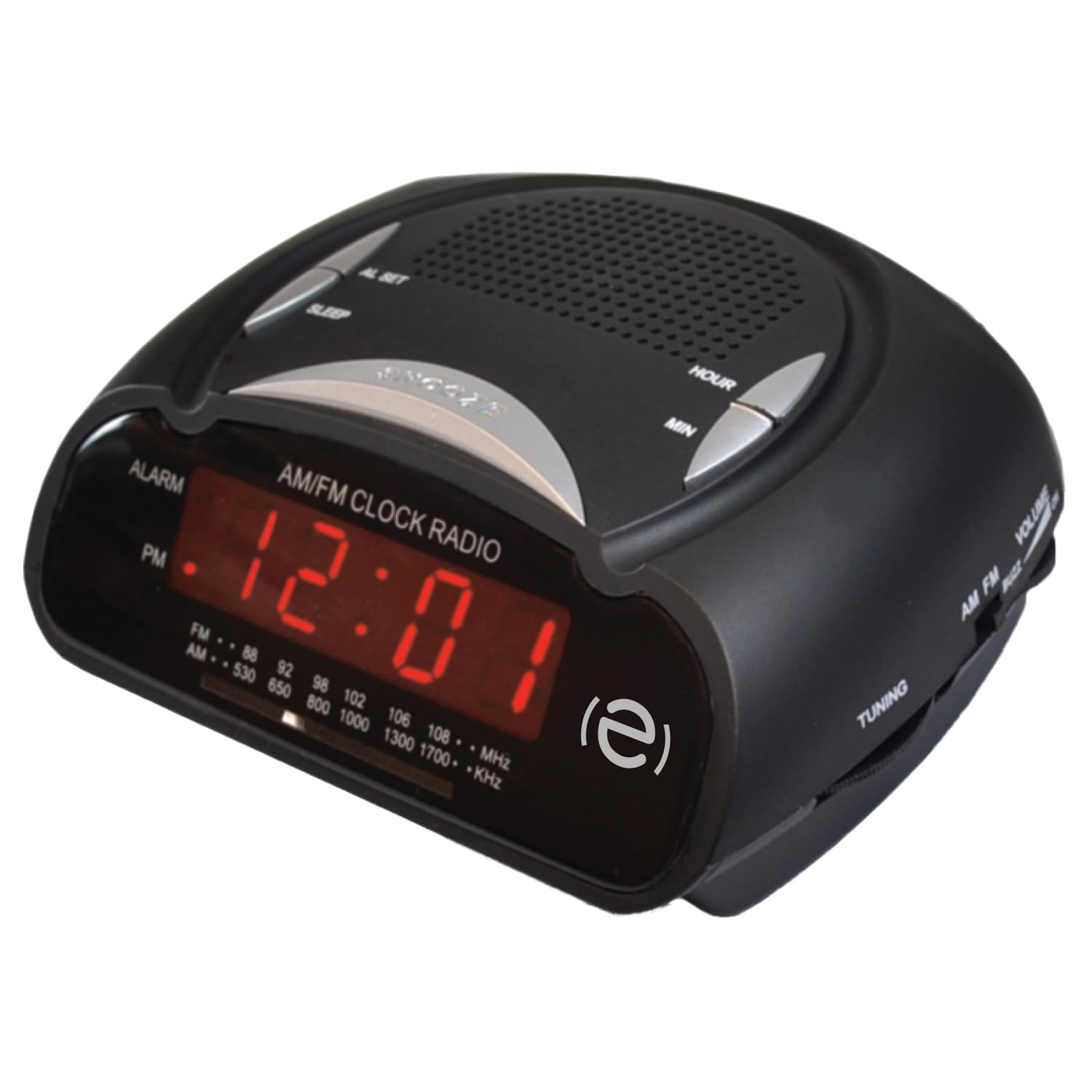
Depan view of the Escape AM/FM Alarm Clock Radio, showing the digital display and top control buttons.
Ciri-ciri Utama

Product packaging highlighting key features like snooze, sleep timer, and alarm options.
- Paparan Masa Digital
- Penala Radio AM/FM
- Dual Alarm Settings (Buzzer or Radio)
- Fungsi Tunda
- Pemasa Tidur
- Telescopic Antenna for improved radio reception
- 9V Battery Backup Option (battery not included)
4. Persediaan
4.1 Sambungan Kuasa
Plug the power adapter into a standard wall outlet and connect it to the DC input port on the back of the alarm clock. The display will illuminate, and the time will flash, indicating it is ready for time setting.
4.2 Sandaran Bateri
Untuk kuasa outage protection, insert a 9V battery (not included) into the battery compartment located on the bottom of the unit. This will maintain time and alarm settings during a power interruption.
4.3 Menetapkan Masa
When the unit is first plugged in, the time display will flash. To set the current time:
- Tekan ke TETAPKAN MASA butang. Angka jam akan mula berkelip.
- Gunakan HR (Hour) button to adjust the hour. Press and hold for faster adjustment. Observe the PM indicator for correct AM/PM setting.
- Tekan ke MIN (Minute) button to adjust the minutes. Press and hold for faster adjustment.
- Tekan TETAPKAN MASA again to confirm and save the time. The display will stop flashing.
To adjust the time after initial setup, press and hold the TETAPKAN MASA button until the display flashes, then follow steps 2-4.
Video: Instructions on how to set the time on a similar alarm clock model. Please note that button labels or exact steps may vary slightly from your Escape model.
5. Arahan Operasi
5.1 Menetapkan Penggera
The alarm clock features two independent alarms. To set an alarm:
- Ensure the radio is off. If the radio is playing, press the AM/FM butang untuk mematikannya.
- Tekan dan tahan salah satu PENGGERA 1 or PENGGERA 2 button for 2 seconds. The alarm time will start flashing.
- Gunakan HR (Jam) dan MIN (Minute) buttons to set your desired alarm time.
- Tekan ke PENGGERA 1 or PENGGERA 2 button repeatedly to cycle through alarm options: Buzzer, Radio, or Off. The corresponding icon (bell for buzzer, music note for radio) will appear on the display.
- Tekan ke TETAPKAN MASA button or wait 10 seconds for the settings to save automatically.
The alarm volume cannot be adjusted independently; it will sound at a preset level for the buzzer or the last radio volume for the radio alarm.
Video: Instructions on how to set the alarm on a similar alarm clock model. Please note that button labels or exact steps may vary slightly from your Escape model.
5.2 Using the Radio
- Tekan ke AM/FM butang untuk menghidupkan radio.
- Adjust the telescopic antenna for optimal reception.
- Gunakan MENALA knob (usually on the side) to select your desired radio station.
- Gunakan JILID knob (usually on the side) to adjust the sound level.
- Untuk mematikan radio, tekan butang AM/FM butang lagi.
5.3 Fungsi Tunda
Apabila penggera berbunyi, tekan besar MENGEJUTKAN button (often labeled SNOOZE/SLEEP/DIM) on the top of the unit. The alarm will pause for approximately 9 minutes and then sound again.
5.4 Pemasa Tidur
Pemasa tidur membolehkan anda tertidur dengan radio, yang akan dimatikan secara automatik selepas tempoh yang ditetapkan.
- Semasa radio dimainkan, tekan butang TIDUR button (often combined with SNOOZE).
- Each press will cycle through preset sleep times (e.g., 90, 60, 30, 15 minutes, or OFF). Select your desired duration.
- Radio akan dimainkan untuk tempoh yang dipilih dan kemudian dimatikan secara automatik.
6. Penyelenggaraan
- Lap unit dengan kain lembut dan kering. Jangan gunakan pembersih atau pelarut yang melelas.
- Keep the unit away from direct sunlight, extreme temperatures, and dusty environments.
- Ensure the telescopic antenna is not bent or damaged.
7. Penyelesaian masalah
| Masalah | Penyelesaian |
|---|---|
| Paparan jam kosong. | Pastikan penyesuai kuasa dipasang dengan kukuh pada kedua-dua unit dan soket dinding yang berfungsi. Periksa sama ada soket kuasa berfungsi. |
| Penggera tidak berbunyi. | Verify that the alarm time is set correctly and the alarm is activated (Buzzer or Radio icon visible). Check if the volume is not set too low for radio alarm. |
| Penerimaan radio yang lemah. | Extend and adjust the telescopic antenna. Try repositioning the unit to improve signal. |
| Masa tidak betul selepas kuasa outage. | Ensure a fresh 9V battery is installed for backup. Reset the time manually if no backup battery is present or if the battery is depleted. |
8. Spesifikasi
- Jenama: melarikan diri
- model: B0DVBJ7SJF
- warna: Hitam
- Dimensi Produk: 11 x 3.81 x 5 cm
- Sumber Kuasa: AC Power Adapter, 9V Battery Backup (not included)
- Jenis Penggera: Buzzer or AM/FM Radio
- paparan: LED digital
9. Waranti dan Sokongan
For warranty information or technical support, please refer to the contact details provided on the product packaging or visit the official Escape webtapak. Simpan resit pembelian anda sebagai bukti pembelian.