
pengenalan
This manual provides essential information for the safe and efficient use of your Qubo X-10BL mobile phone. Designed with ease of use in mind, this phone is particularly suitable for elderly users, featuring a clear 2.4-inch screen, a robust design, and essential communication functions. Please read this manual thoroughly before operating your device.
Ciri-ciri Utama:
- model: X-10BL
- Skrin: 2.4-inch display (6.1 cm diagonal)
- RAM: 32 MB
- Bateri: Kapasiti 900 mAh
- Ketersambungan: Bluetooth
- Pelabuhan: 3.5mm Jack, Micro USB
- Reka bentuk: Includes a protective cover
- warna: Biru
Produk Selesaiview
The Qubo X-10BL is a compact and user-friendly mobile phone. Below is an image illustrating the device's general appearance.
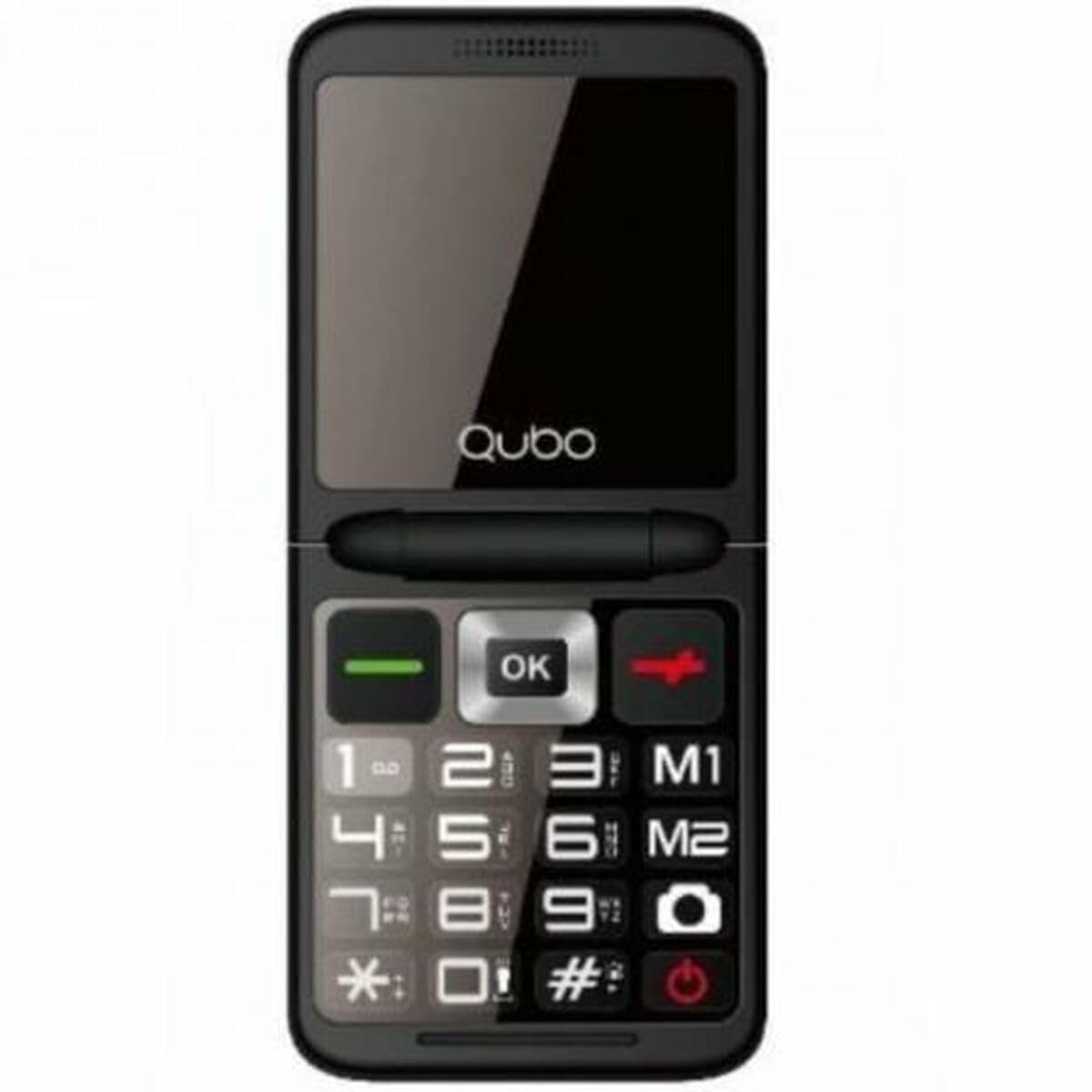
Rajah 1: Depan view of the Qubo X-10BL mobile phone. The image displays the phone in blue, featuring a clear screen, a numerical keypad, and navigation buttons. The phone is designed for straightforward operation.
Familiarize yourself with the phone's buttons and ports before proceeding with setup. Typically, these include a power button, call/end call buttons, navigation keys, a numerical keypad, and charging/headphone ports.
Persediaan
1. Install SIM Card and Battery
- Tanggalkan penutup belakang telefon dengan berhati-hati.
- Insert your SIM card into the designated slot. Ensure it is correctly oriented as indicated by the diagram near the slot.
- Letakkan bateri ke dalam petaknya, selaraskan kenalannya.
- Pasang semula penutup belakang sehingga ia terpasang dengan selamat di tempatnya.
2. Cas Peranti
- Connect the Micro USB cable to the charging port on your phone.
- Plug the other end of the cable into the provided European plug adapter, then into a wall outlet.
- Allow the phone to charge fully before first use. The charging indicator on the screen will show the battery status.
3. Hidupkan/Mati Kuasa
- Untuk Menghidupkan: Press and hold the Power/End Call button until the screen lights up.
- Untuk Mematikan: Press and hold the Power/End Call button until the power-off options appear, then select 'Power Off' or continue holding until the device shuts down.
Arahan Operasi
Membuat dan Menerima Panggilan
- Untuk Membuat Panggilan: Enter the phone number using the keypad and press the Call button (usually a green phone icon).
- Untuk Menjawab Panggilan: When the phone rings, press the Call button.
- Untuk Menamatkan Panggilan: Press the End Call button (usually a red phone icon).
Menghantar dan Menerima Mesej SMS
- Navigasi ke menu 'Mesej'.
- Select 'New Message' or 'Write Message'.
- Masukkan nombor penerima atau pilih daripada kenalan.
- Taip mesej anda menggunakan pad kekunci.
- Tekan 'Hantar'.
Kesambungan Bluetooth
The Qubo X-10BL supports Bluetooth for connecting to compatible devices such as headsets or other phones.
- Pergi ke 'Tetapan' dan kemudian 'Bluetooth'.
- Hidupkan Bluetooth dengan 'Hidup'.
- Pilih 'Cari untuk peranti' atau 'Gandingkan peranti baharu'.
- Choose the desired device from the list and follow the on-screen prompts to pair.
Using the Phone Cover
The phone comes with a protective cover. Ensure the phone is securely placed within the cover to protect it from minor impacts and scratches. The cover may also feature cutouts for easy access to buttons and ports.
Penyelenggaraan
Pembersihan
- Use a soft, dry cloth to clean the phone's screen and body.
- Elakkan menggunakan pembersih cecair, aerosol atau bahan kimia yang keras, kerana ini boleh merosakkan peranti.
Penjagaan Bateri
- To prolong battery life, avoid exposing the phone to extreme temperatures.
- Do not leave the phone charging for excessively long periods after it is fully charged.
- If the phone will not be used for an extended period, charge it to about 50% before storing.
Penyimpanan
Simpan telefon di tempat yang sejuk dan kering, jauh daripada cahaya matahari langsung dan kelembapan apabila tidak digunakan.
Menyelesaikan masalah
If you encounter issues with your Qubo X-10BL, refer to the table below for common problems and solutions.
| Masalah | Kemungkinan Punca | Penyelesaian |
|---|---|---|
| Telefon tidak dihidupkan | Bateri lemah; Bateri tidak dipasang dengan betul | Charge the battery; Reinstall the battery |
| Tiada isyarat rangkaian | SIM card issue; Out of network coverage | Check SIM card installation; Move to an area with better coverage |
| Tidak boleh membuat/menerima panggilan | No network; Incorrect number dialed; Call barring activated | Check network signal; Verify number; Check call settings |
| Bateri tidak dicas | Charger faulty; Charging port damaged | Try a different charger; Contact support if port is damaged |
Spesifikasi
Detailed technical specifications for the Qubo X-10BL mobile phone.
| Ciri | Perincian |
|---|---|
| Jenama | Qubo |
| Nama Model | X-10BL |
| Nombor Model Item | S9914467 |
| Jenis Produk | Telefon Bar |
| Faktor Bentuk | Bar |
| Saiz Skrin | 6.1 Sentimeter (2.4 inci) |
| Saiz RAM yang Dipasang | 32 MB |
| Teknologi Rangkaian Tanpa Wayar | Bluetooth |
| Pengeluar | Qubo |
| Negara Asal | Sepanyol |
| Tarikh Pertama Tersedia di Amazon.com.be | 11 Januari 2025 |
| Ketersediaan Alat Ganti | Maklumat tidak tersedia |
| Kemas Kini Perisian Dijamin Sehingga | Maklumat tidak tersedia |
Waranti dan Sokongan
Untuk maklumat jaminan dan sokongan pelanggan, sila rujuk dokumentasi yang disediakan bersama pembelian anda atau hubungi peruncit. Simpan bukti pembelian anda untuk sebarang tuntutan jaminan.