
1. Pengenalan
Terima kasih kerana membeliasing the Trevi RA 7F50 BT Portable Multiband Radio. This device offers versatile audio entertainment with FM, AM, and SW radio bands, wireless connectivity, and MP3 playback via USB and Micro SD. Its integrated solar panel and USB Type-C charging port ensure power availability wherever you go. Please read this manual carefully to ensure proper use and maintenance of your radio.
2. Maklumat Keselamatan
- Jangan dedahkan peranti kepada hujan, lembapan atau suhu yang melampau.
- Elakkan daripada menjatuhkan atau menyebabkan radio terkena impak yang kuat.
- Do not disassemble the unit. Repairs should only be performed by qualified personnel.
- Jauhkan daripada kanak-kanak.
- Pastikan pengudaraan yang betul semasa mengecas.
- Use only the provided USB Type-C cable for charging or a certified equivalent.
3. Produk Lebihview
Familiarize yourself with the components and controls of your Trevi RA 7F50 BT radio.
Depan View
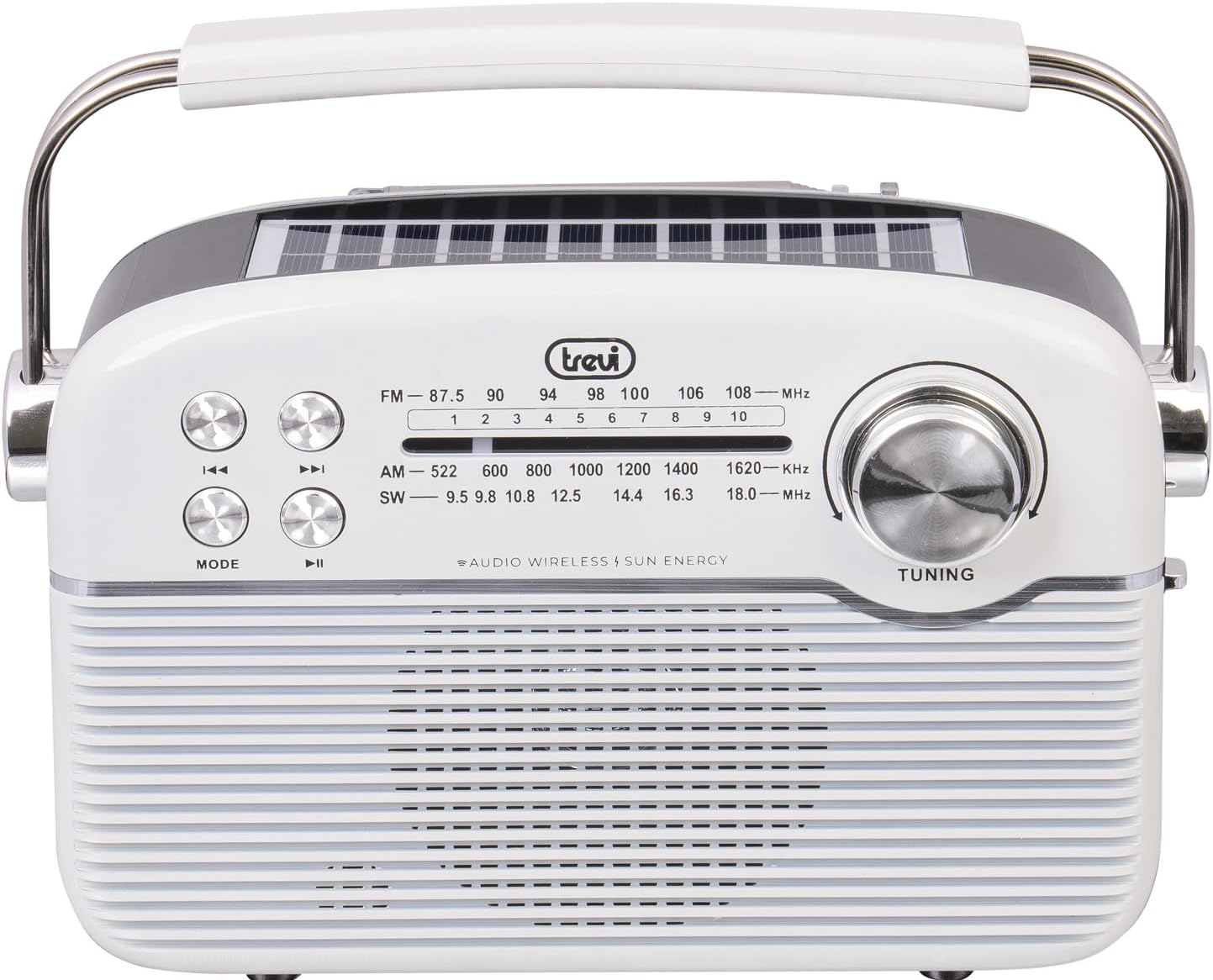
Imej: Depan view of the Trevi RA 7F50 BT radio. Visible elements include the main speaker grille, frequency display for FM, AM, and SW bands, control buttons for playback and mode selection, and a large tuning dial on the right side. The Trevi logo is centered above the frequency display.
Atas dan Sebelah View

Imej: Atas dan sisi view of the Trevi RA 7F50 BT radio. This perspective clearly shows the integrated solar panel on the top surface, designed for charging. The sturdy carrying handle is also prominent, extending across the top of the unit. The side view reveals the rounded edges and overall compact design.
belakang View

Imej: Belakang view of the Trevi RA 7F50 BT radio. The telescopic antenna is visible at the top. Below it, the various input ports are shown, including a USB port for flash drives, a Micro SD card slot for memory cards, and a USB Type-C port for charging the internal battery. The back panel also features a textured design.
Kawalan dan Pelabuhan:
- Dail Penalaan: Untuk memilih frekuensi radio.
- Butang Mod: Switches between radio (FM/AM/SW), Wireless, and MP3 (USB/Micro SD) modes.
- Butang Main/Jeda: Controls playback in MP3 and Wireless modes.
- Butang Trek Sebelumnya/Seterusnya: Navigates tracks in MP3 and Wireless modes, or fine-tunes radio frequency.
- Kawalan Kelantangan: Melaraskan tahap output audio.
- Port USB: Untuk menyambung pemacu kilat USB.
- Slot Kad Mikro SD: For inserting Micro SD memory cards.
- Port USB Jenis-C: Untuk mengecas bateri dalaman.
- Antena Teleskopik: Untuk penerimaan radio yang lebih baik.
- Panel Suria: Integrated on top for solar charging.
4. Persediaan
4.1 Mengecas Bateri
The Trevi RA 7F50 BT radio is equipped with a rechargeable lithium battery (1500 mAh) and offers two charging methods:
- Pengecasan USB Jenis-C: Connect the provided USB Type-C cable to the radio's charging port and the other end to a standard USB power adapter (not included) or a computer's USB port. The charging indicator light will illuminate.
- Pengecasan Suria: Place the radio with its solar panel facing direct sunlight. The integrated 80 mA solar panel will slowly recharge the battery. This method is ideal for maintaining charge or for emergency power in outdoor environments.
Adalah disyorkan untuk mengecas sepenuhnya bateri sebelum penggunaan pertama.
4.2 Kuasa Awal Hidup
Locate the Power On/Off switch, usually on the side or back of the unit. Slide it to the "ON" position. The radio will power on, and the display (if available) will light up.
5. Arahan Operasi
5.1 Operasi Radio (FM/AM/SW)
- Pilih Mod Radio: Tekan ke MODE button repeatedly until you reach the desired radio band (FM, AM, or SW).
- Panjangkan Antena: For optimal FM and SW reception, fully extend the telescopic antenna. For AM, the internal ferrite antenna is typically sufficient.
- Tune ke Stesen: Putar MENALA dial to scan for stations. The frequency display will show the current frequency.
- Laraskan Kelantangan: Use the volume control knob to set the desired listening level.
5.2 Wireless Connectivity (Bluetooth)
- Enter Wireless Mode: Tekan ke MODE button repeatedly until "BT" or "Wireless" appears on the display (if applicable), or you hear an audible prompt indicating Bluetooth pairing mode.
- Pasangkan dengan Peranti: On your smartphone, tablet, or other Bluetooth-enabled device, go to the Bluetooth settings and search for available devices. Select "Trevi RA 7F50 BT" from the list.
- Pengesahan: Once paired, the radio will indicate a successful connection (e.g., an audible tone or stable indicator light).
- Mainkan Audio: You can now play audio from your connected device through the radio's speaker. Use the radio's playback controls (Play/Pause, Previous/Next) or your device's controls.
5.3 MP3 Playback (USB/Micro SD)
- Sisipkan Media: Insert a USB flash drive into the USB port or a Micro SD card into the Micro SD slot. Ensure the media contains MP3 audio files.
- Enter MP3 Mode: Tekan ke MODE button repeatedly until the radio automatically switches to MP3 playback mode, or you hear an audible prompt.
- Kawalan Main Semula: Gunakan Main/Jeda button to start or pause playback. Use the Trek Sebelumnya / Seterusnya buttons to skip between tracks.
6. Penyelenggaraan
- Pembersihan: Lap radio dengan kain lembut dan kering. Jangan gunakan pembersih atau pelarut yang melelas.
- Penjagaan Bateri: To prolong battery life, avoid fully discharging the battery frequently. Recharge regularly, especially if the unit will be stored for an extended period.
- Storan: Simpan radio di tempat yang sejuk dan kering jauh dari cahaya matahari langsung dan suhu yang melampau.
7. Penyelesaian masalah
| Masalah | Kemungkinan Punca | Penyelesaian |
|---|---|---|
| Tiada kuasa | Battery discharged; Power switch off. | Charge the battery via USB-C or solar panel; Ensure power switch is ON. |
| Penerimaan radio yang lemah | Antena tidak dilanjutkan; Isyarat lemah; Gangguan. | Fully extend the telescopic antenna; Reposition the radio; Try tuning to a stronger station. |
| Cannot connect via Wireless (Bluetooth) | Radio not in Wireless mode; Device not discoverable; Already connected to another device. | Press MODE to enter Wireless mode; Ensure your device's Bluetooth is on and discoverable; Disconnect from other devices. |
| MP3 filebukan main | tak betul file format; USB/Micro SD not inserted correctly; Corrupted media. | pastikan files are MP3 format; Reinsert USB/Micro SD; Try different media. |
8. Spesifikasi
- model: RA 7F50 BT
- Pancaragam Radio: FM, AM, SW
- Ketersambungan: Wireless (Bluetooth), USB, Micro SD
- Sumber Kuasa: Rechargeable Lithium Battery (1500 mAh), Solar Panel (80 mA max), USB Type-C
- Input Voltage: 3.7V DC
- Dimensi: 25L x 11W x 20H cm (approx.)
- Berat: 0.98 kg (lebih kurang)
- Komponen yang Disertakan: USB / Type-C charging cable, User Manual
9. Apa yang ada di dalam Kotak
- Radio Pelbagai Jalur Mudah Alih Trevi RA 7F50 BT
- Kabel Pengecas USB / Jenis-C
- Manual Pengguna
10. Waranti dan Sokongan
This product is covered by a standard manufacturer's warranty. For detailed warranty information, technical support, or service inquiries, please refer to the warranty card included with your product or visit the official Trevi webtapak. Simpan bukti pembelian anda untuk tuntutan waranti.