
Aqualin YL21177
Aqualin Water Timer Garden Irrigation Hose Timer User Manual
Model: YL21177
Produk Selesaiview
The Aqualin Water Timer is an advanced irrigation system designed for efficient and automated watering of lawns, gardens, and pools. It features three independent irrigation programs, rain delay functionality, and a manual watering mode, providing flexible control over your watering schedule. Its durable and waterproof design ensures reliable performance in various outdoor conditions.

Rajah 1: Depan view of the Aqualin Water Timer, showing the large LCD display, rotary dial, and control buttons.
Ciri-ciri Utama:
- 3 Independent Irrigation Programs: Customize watering schedules with distinct start times, durations (1 to 360 minutes), and frequencies (1 hour to 15 days).
- Waterproof and Durable Design: Constructed with waterproof materials and a sealed battery cover to prevent internal leakage. Features a sturdy metal thread connection.
- Antara Muka Mudah Digunakan: Large LCD screen for clear display of watering information and intuitive controls for programming.
- Rain Delay Mode: Pause scheduled watering for 6, 12 hours, or 1-7 days to conserve water during rainfall.
- Mod Manual: Allows for on-demand watering without affecting programmed schedules.
- Intelligent Timing System: Built-in solenoid valve for precise and stable program execution.
Persediaan
1. Unboxing dan Komponen
Carefully remove the Aqualin Water Timer from its packaging. Ensure all components are present. The main unit includes the timer body, an integrated metal filter, and a connection nut.

Figure 2: The Aqualin Water Timer highlighting the built-in metal filter for durability and the easy-to-operate rotary dial.
2. Pemasangan Bateri
- Cari petak bateri di belakang pemasa.
- Open the sealed battery cover.
- Insert two (2) AA 1.5V batteries (not included) into the compartment, ensuring correct polarity (+/-).
- Securely close the battery cover to maintain its waterproof seal.
3. Installation to Faucet
- Pastikan pili paip luar anda dimatikan.
- Thread the Aqualin Water Timer onto your standard outdoor faucet. The top connection features a durable metal thread for a secure fit.
- Tighten the connection by hand until snug. Avoid over-tightening.
- Connect your garden hose to the bottom outlet of the water timer.
- Slowly turn on your outdoor faucet. Check for any leaks at the connections.
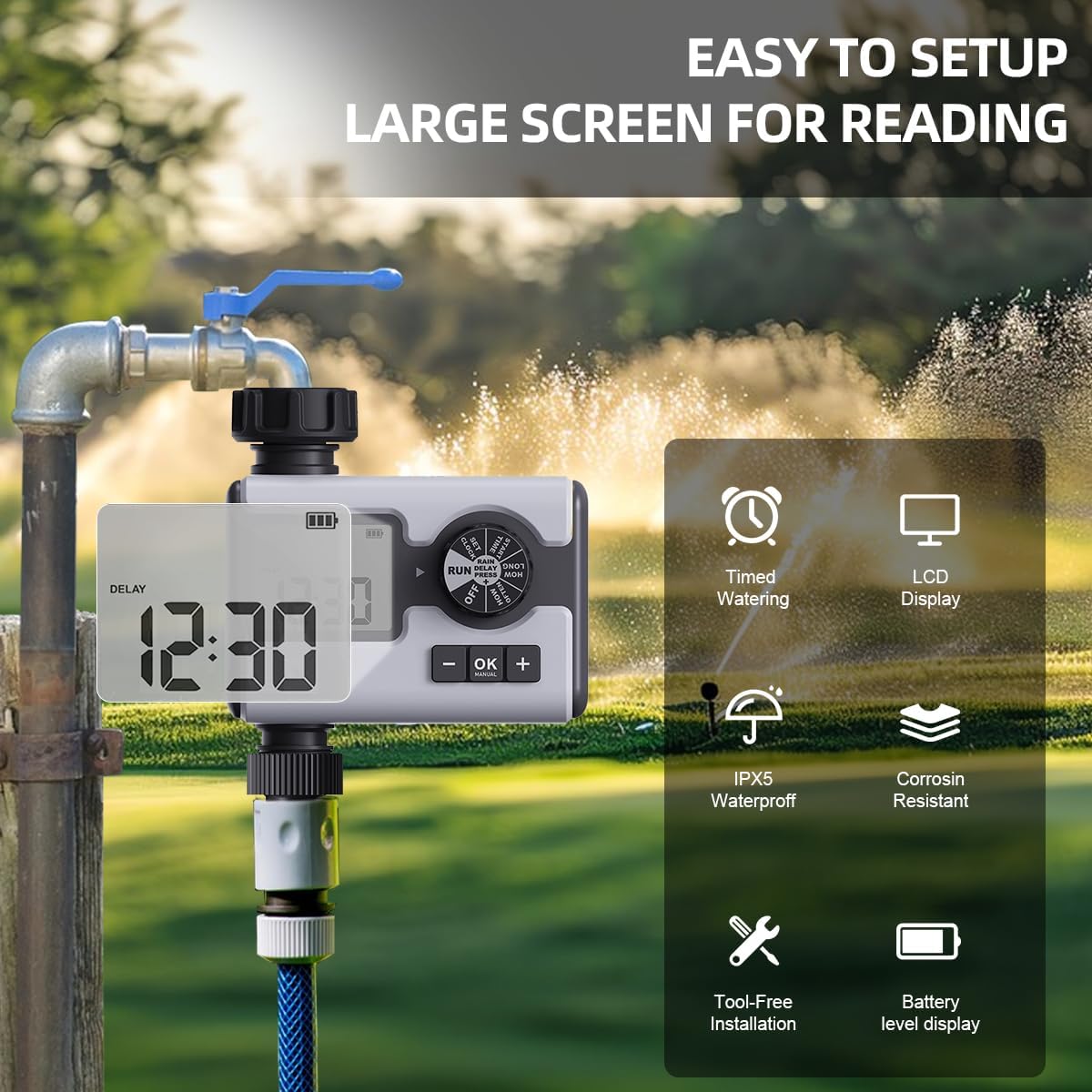
Figure 3: The Aqualin Water Timer connected to a faucet, illustrating its large LCD display for easy reading, IPX5 waterproof rating, corrosion resistance, and tool-free installation.
4. Menetapkan Jam
- Rotate the dial to the "SET CLOCK" position.
- Use the "+" and "-" buttons to adjust the current time.
- Press "OK" to confirm the setting and move to the next digit or exit the setting mode.
Arahan Operasi
1. Understanding the Control Dial
The central rotary dial allows you to navigate through different settings and modes. The available positions are:
- MATI: Turns off all watering programs.
- JALANKAN: Activates the programmed watering schedules.
- TETAPKAN JAM: Digunakan untuk menetapkan masa semasa.
- MASA MULA: Sets the beginning time for a watering program.
- BERAPA LAMA: Sets the duration of watering.
- BERAPA KERAP: Sets the frequency of watering.
- HUJAN HUJAN: Activates the rain delay function.
2. Programming Irrigation Schedules (P1, P2, P3)
The Aqualin Water Timer supports three independent programs (P1, P2, P3). Each program can be configured with its own start time, duration, and frequency.
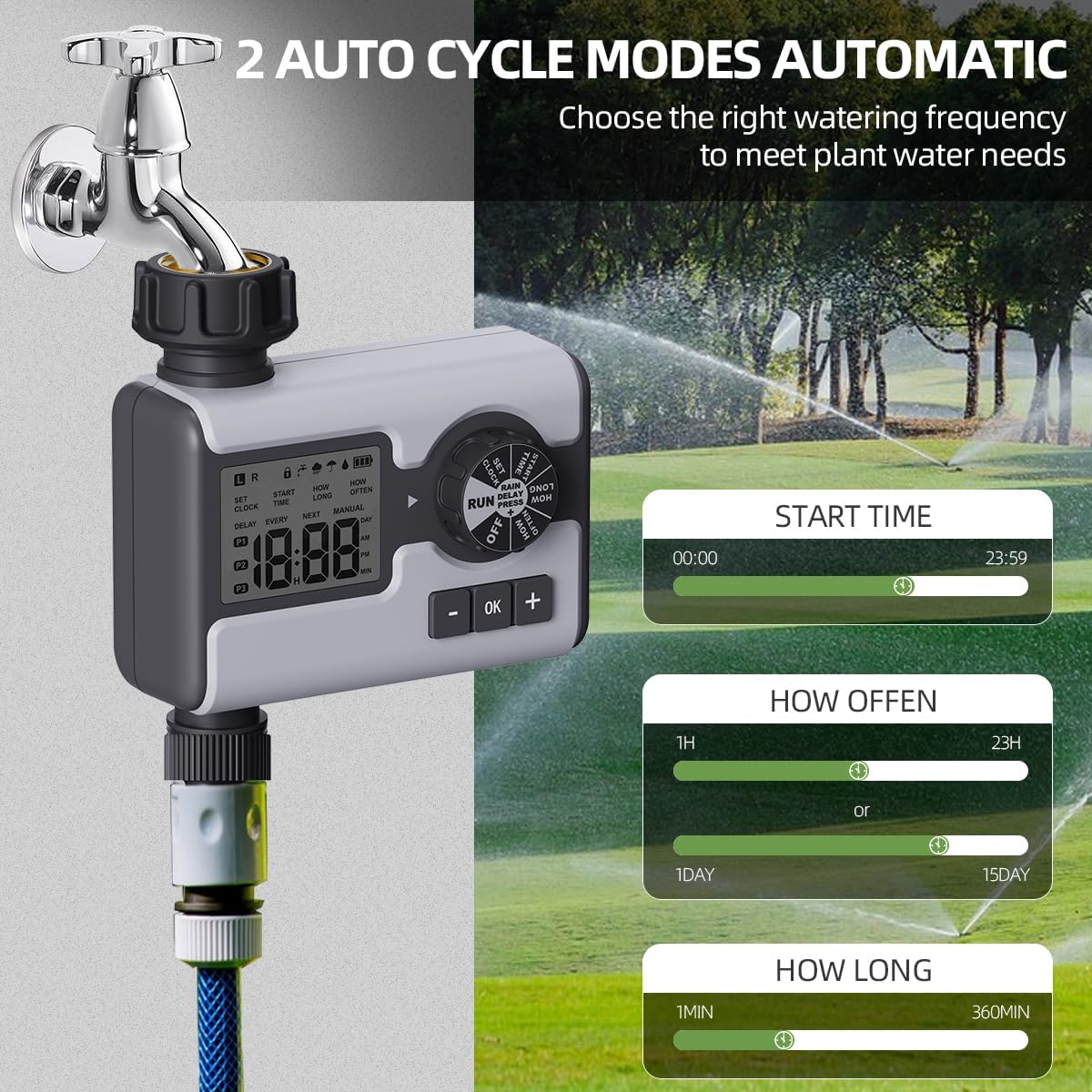
Figure 4: Display illustrating the settings for Start Time (00:00-23:59), How Often (1 hour-23 hours or 1 day-15 days), and How Long (1 minute-360 minutes) for the automatic watering cycles.
- Pilih Program: While in "RUN" mode, press the "OK" button repeatedly to cycle through P1, P2, P3. The active program will be displayed on the LCD.
- Tetapkan Masa Mula:
- Rotate the dial to "START TIME".
- Use "+" and "-" buttons to set the desired start time for the selected program.
- Press "OK" to confirm.
- Set Watering Duration ("HOW LONG"):
- Rotate the dial to "HOW LONG".
- Use "+" and "-" buttons to set the watering duration from 1 minute to 360 minutes.
- Press "OK" to confirm.
- Set Watering Frequency ("HOW OFTEN"):
- Rotate the dial to "HOW OFTEN".
- Use "+" and "-" buttons to set the frequency: from 1 hour to 23 hours, or from 1 day to 15 days.
- Press "OK" to confirm.
- After setting all parameters for a program, rotate the dial back to "RUN" to activate the schedule.
3. Rain Delay Mode
The rain delay feature allows you to temporarily pause your watering schedule to avoid overwatering during or after rainfall.

Figure 5: The Aqualin Water Timer displaying the rain delay function, which can be set for 6/12 hours or 1-7 days.
- While the timer is in "RUN" mode, press the "+" button.
- The display will show "DELAY". Use the "+" or "-" buttons to select the desired delay duration: 6 hours, 12 hours, or 1 to 7 days.
- Press "OK" to confirm the rain delay. The timer will resume its schedule automatically after the delay period ends.
4. Manual Watering Mode
The manual mode allows for immediate, on-demand watering without interrupting your pre-programmed schedules.

Figure 6: A person using the manual watering feature with the Aqualin Water Timer, indicating that temporary water use does not alter automatic watering schedules. The watering duration can be set from 1 minute to 360 minutes.
- While the timer is in "RUN" mode, press the "MANUAL" (OK) button.
- The display will show the manual watering duration. Use the "+" and "-" buttons to adjust the desired manual watering time.
- Press "OK" to start manual watering.
- To stop manual watering prematurely, press the "MANUAL" (OK) button again.
Penyelenggaraan
- Pembersihan: Periodically wipe the exterior of the timer with a damp cloth to remove dirt and debris. Do not use abrasive cleaners.
- Pembersihan Penapis: The timer has a built-in metal filter. If water flow is reduced, unscrew the timer from the faucet, remove and clean the filter screen under running water. Reinstall the filter before reattaching the timer.
- Penggantian Bateri: Replace batteries when the low battery indicator appears on the LCD screen. Always use fresh AA 1.5V alkaline batteries.
- Penyimpanan Musim Sejuk: Before freezing temperatures, disconnect the timer from the faucet and hose. Remove the batteries. Store the timer indoors in a dry, frost-free location to prevent damage.
Menyelesaikan masalah
| Masalah | Kemungkinan Punca | Penyelesaian |
|---|---|---|
| Timer not turning on/LCD blank. | Bateri mati atau tidak dipasang dengan betul. | Replace with new AA 1.5V batteries, ensuring correct polarity. |
| Tiada aliran air atau tekanan air rendah. |
|
|
| Timer not watering at scheduled times. |
|
|
| Air bocor dari sambungan. | Loose connection or missing/damaged washer. | Ensure connections are hand-tight. Check and replace rubber washers if damaged. |
Spesifikasi
| Ciri | Perincian |
|---|---|
| Jenama | Aqualin |
| Nombor Model | YL21177 |
| bahan | Plastic (with metal thread connection) |
| warna | Kelabu |
| Dimensi Produk (D x W x H) | 2.56"D x 5.24"W x 5.91"H |
| Berat Barang | 357 Gram (12.6 auns) |
| Julat Tekanan Air | 14.5 psi hingga 116 psi |
| Sumber Kuasa | 2 x Bateri AA 1.5V (tidak termasuk) |
| Tempoh Penyiraman | 1 minit hingga 360 minit |
| Kekerapan Penyiraman | 1 jam hingga 15 hari |
| Rain Delay Options | 6 hours, 12 hours, 1-7 days |
| Penilaian Kalis Air | IPX5 (implied from "IPX5 Waterproff" image) |
Waranti dan Sokongan
For warranty information and customer support, please refer to the documentation provided with your purchase or contact the retailer where the product was acquired. You may also visit the official Aqualin webtapak untuk bantuan lanjut.
Nota: Tiada video produk rasmi daripada penjual ditemui dalam data yang diberikan.
Ask a question about this manual
Ask about setup, troubleshooting, compatibility, parts, safety, or missing instructions. Manuals+ will review the question and use this page’s manual context to help answer it.