
1. Produk Lebihview
The Yunseity R1 VR Remote Controller is a versatile Bluetooth gamepad designed to enhance your virtual reality and multimedia experiences. It integrates multiple functions including gaming control, selfie activation, page flipping, mouse operation, and sound adjustment. This controller offers convenient wireless connectivity and wide compatibility with various devices.
Ciri-ciri Utama:
- Multifunctional Control: Supports gaming, selfie timer, VR video control, e-book/PPT page flipping, mouse operation (Android only), and sound adjustment.
- Sambungan Bluetooth Tanpa Wayar: Provides a stable and convenient wireless experience.
- Keserasian Luas: Compatible with VR headsets, smartphones, and tablets. Limited functionality for PC and Xbox One.
- Reka bentuk ergonomik: Lightweight and comfortable for extended use.
2. Komponen dan Susun Atur Produk
Familiarize yourself with the components of your Yunseity R1 VR Remote Controller:
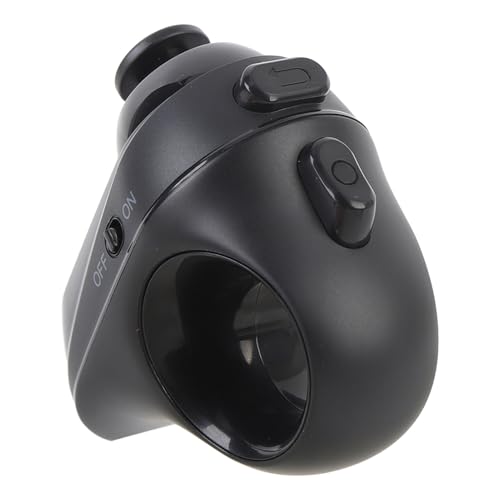
Rajah 2.1: bersudut view of the Yunseity R1 VR Remote Controller, showing its compact design.

Rajah 2.2: Depan view displaying the joystick and A, B, C, D action buttons.
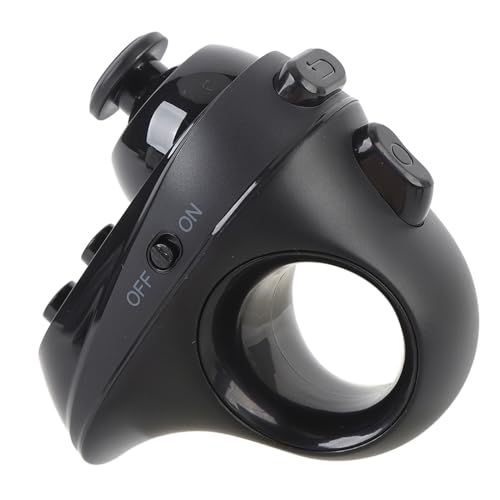
Rajah 2.3: sebelah view showing the ON/OFF power switch.
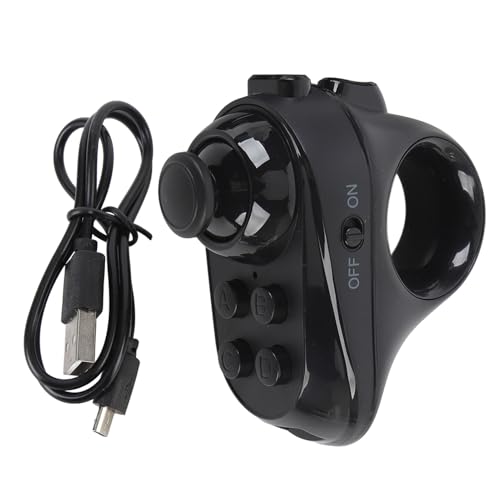
Rajah 2.4: The controller alongside its USB charging cable.
3. Arahan Persediaan
3.1 Mengecas Pengawal
Before initial use, ensure the controller is fully charged.
- Connect the small end of the provided USB charging cable to the charging port on the controller.
- Connect the standard USB end of the cable to a USB power source (e.g., computer USB port, USB wall adapter).
- Lampu penunjuk pengecasan akan menyala semasa pengecasan dan padam atau bertukar warna apabila dicas sepenuhnya.
3.2 Menghidupkan/Mematikan
- Untuk Menghidupkan: Slide the ON/OFF switch to the 'ON' position. The indicator light will flash.
- Untuk Mematikan: Slide the ON/OFF switch to the 'OFF' position. The indicator light will turn off.
3.3 Berpasangan Bluetooth
Follow these steps to pair your controller with a compatible device:
- Ensure the controller is charged and powered on. The indicator light should be flashing, indicating it is in pairing mode.
- On your smartphone, tablet, or VR headset, navigate to the Bluetooth settings.
- Dayakan Bluetooth dan cari peranti yang tersedia.
- Select "VR-BOX" or a similar device name from the list of found devices to initiate pairing.
- Once paired, the controller's indicator light will stop flashing and remain solid.
4. Arahan Operasi
The Yunseity R1 VR Remote Controller offers various functionalities depending on the connected device and operating system.
4.1 Kawalan Asas
- joystick: Used for directional navigation (up, down, left, right). Note that this functions as a D-pad (4-direction input) rather than an analog joystick.
- Butang A/B/C/D: Perform various actions such as selection, confirmation, back, or specific game commands, depending on the application.
4.2 Fungsi Khusus
- Gaming Control: Use the joystick for movement and A/B/C/D buttons for in-game actions.
- Pemasa Selfie: Can be used to trigger the camera shutter on compatible devices.
- VR Video Control: Navigate menus, play, pause, and adjust volume within VR video applications.
- E-Book/PPT Page Flipping: (Android System Only) Use the controller to turn pages in e-books or advance slides in presentations.
- Operasi tetikus: (Android System Only) The joystick can control a cursor on the screen, and buttons can act as clicks.
- Pelarasan Bunyi: Control media volume on connected devices.
5. Penyelenggaraan
Proper care will ensure the longevity and optimal performance of your controller.
- Pembersihan: Use a soft, dry cloth to clean the surface of the controller. Avoid using harsh chemicals or abrasive materials.
- Storan: Simpan pengawal di tempat yang sejuk dan kering jauh dari cahaya matahari langsung dan suhu yang melampau.
- Penjagaan Bateri: Avoid fully discharging the battery frequently. Charge the controller regularly, even if not in use for extended periods, to maintain battery health.
- Elakkan Kelembapan: Jangan dedahkan pengawal kepada air atau kelembapan berlebihan.
6. Penyelesaian masalah
If you encounter issues with your Yunseity R1 VR Remote Controller, refer to the following common problems and solutions:
- Pengawal tidak dihidupkan:
Ensure the battery is charged. Connect the controller to a power source using the USB cable and allow it to charge for at least 30 minutes before attempting to power on again. - Controller not pairing via Bluetooth:
Verify that the controller is powered on and its indicator light is flashing. Ensure Bluetooth is enabled on your device and that the device is discoverable. Try turning both the controller and your device's Bluetooth off and on again. Move the controller closer to your device. - Limited functionality on PC or Xbox One:
The mouse control and page flipping functions are primarily designed for Android systems. While the controller may connect to a PC or Xbox One, its functionality might be limited to basic inputs or specific applications, such as audio control, and may not support full mouse emulation or complex game controls. - Joystick not providing analog movement:
The joystick on this controller functions as a 4-directional D-pad (up, down, left, right) rather than a true analog joystick with variable input. This is by design. - Butang tidak responsif:
Check the battery level. If the battery is low, charge the controller. If the issue persists, try re-pairing the controller with your device.
7. Spesifikasi
| Ciri | Perincian |
|---|---|
| Jenama | Yunseity |
| Nama Model | Yunseity1vbt9ikszg |
| ASIN | B0DTLPH762 |
| Teknologi Ketersambungan | Wayarles (Bluetooth) |
| Jenis Pengawal | Kawalan Tangan |
| Peranti Serasi | VR Headsets, Smartphones, Tablets, PC, Xbox One (with functional limitations) |
| Platform Perkakasan | PC |
| warna | Hitam (# 011) |
| Kuantiti Pakej | 1 |
8. Waranti dan Sokongan
For warranty information or technical support, please refer to the product packaging or contact Yunseity customer service directly through their official website or the retailer where the product was purchased. Please have your model name (Yunseity1vbt9ikszg) and ASIN (B0DTLPH762) available when contacting support.