
GMKtec K10
Manual Pengguna PC Mini GMKtec K10
Model: K10 | Brand: GMKtec
1. Pengenalan
Thank you for choosing the GMKtec K10 Mini PC. This compact yet powerful workstation is designed for a wide range of applications, from office productivity and business tasks to multimedia consumption and light gaming. Featuring an Intel Core i9-13900HK processor, 32GB DDR5 RAM, and a 1TB SSD, the K10 delivers exceptional performance in a small form factor. This manual provides essential information for setting up, operating, maintaining, and troubleshooting your new Mini PC.
2. Kandungan Pakej
Sila sahkan bahawa semua item terdapat dalam pakej anda:
- GMKtec K10 Mini PC
- Penyesuai Kuasa
- Kabel HDMI
- VESA Mount (with screws)
- Manual Pengguna (dokumen ini)
3. Produk Lebihview
The GMKtec K10 Mini PC is engineered for high performance and versatility. Below are key features and components:

Figure 3.1: GMKtec K10 Mini PC - Front and Rear View. This image displays the compact design of the K10 Mini PC, highlighting its various connectivity options and dual Wi-Fi antennas.
3.1. Pemproses dan Grafik

Figure 3.2: Intel Core i9-13900HK Processor Details. The K10 is powered by the Intel Core i9-13900HK, featuring 14 cores, 20 threads, 24MB Intel Smart Cache, and a turbo boost frequency of up to 5.4GHz, with a Thermal Design Power (TDP) ranging from 45-70W.

Figure 3.3: Intel Iris Xe Graphics 96EU. Enjoy dedicated graphics performance for efficient video editing, work, and gaming with the integrated Intel Iris Xe Graphics, featuring 96 Execution Units (EU) and a frequency of up to 1500MHz, supporting AV1 video decoding.
3.2. Pelabuhan dan Ketersambungan

Figure 3.4: Rich Interface with 8 USB Ports. The K10 offers extensive connectivity, including multiple USB 3.2 and USB 2.0 ports, USB Type-C (DP/DATA), dual HDMI 2.0 (4K@60Hz), DisplayPort (DP), 2.5G RJ45 LAN, DC-IN, 3.5mm audio jack, COM port for industrial applications, and a Kensington Lock slot.
3.3. Expansion and Cooling

Figure 3.5: Expansion Slots. The K10 supports significant storage and memory expansion with M.2 2280 PCIe 4.0*3 slots (up to 12TB) and DDR5 SO-DIMM*2 slots (up to 96GB). The standard configuration includes 32GB DDR5 5600MHz SO-DIMM RAM and 1TB NVMe SSD.
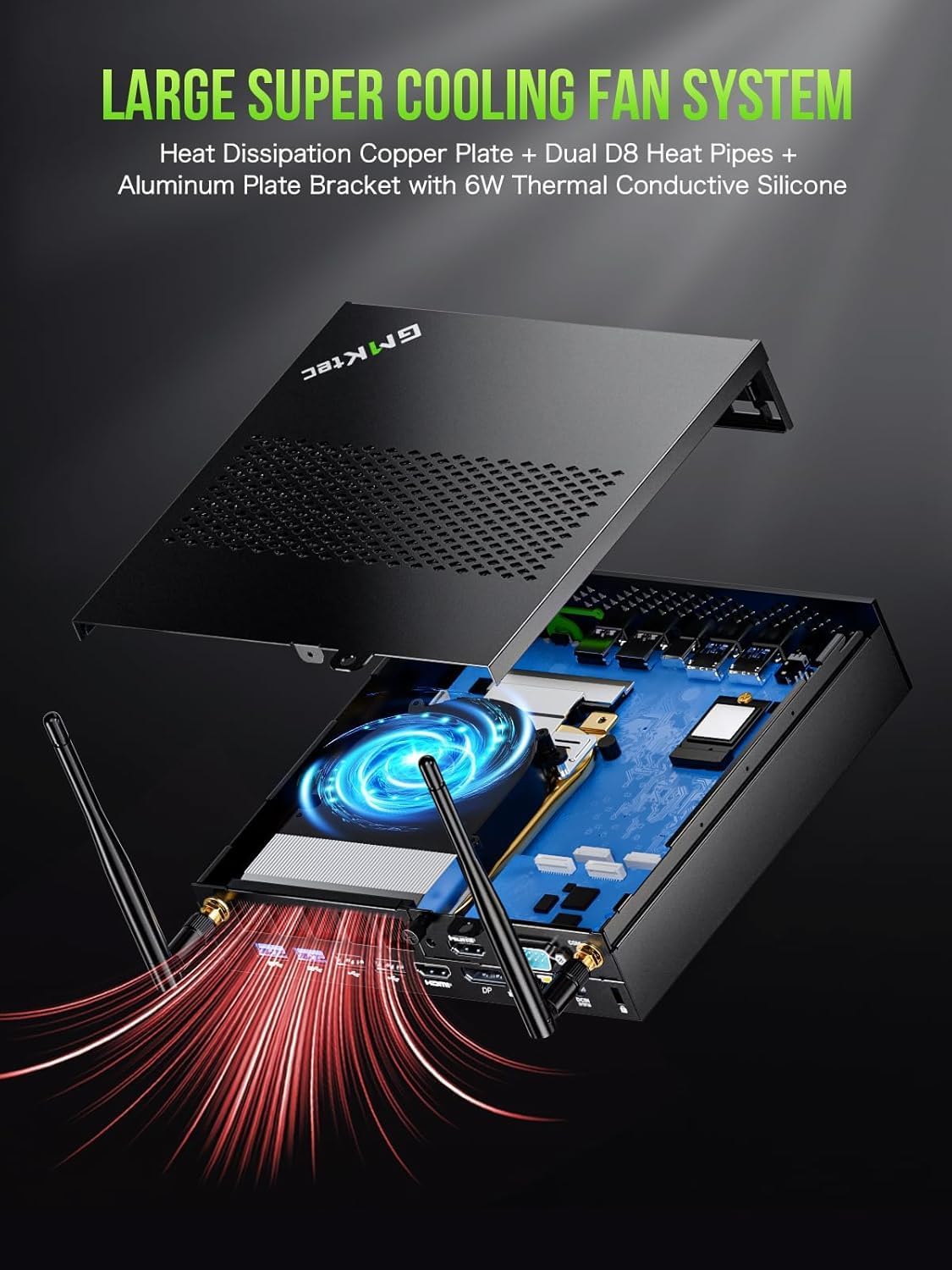
Figure 3.6: Large Super Cooling Fan System. The K10 features an advanced cooling system with a heat dissipation copper plate, dual D8 heat pipes, and an aluminum plate bracket with 6W thermal conductive silicone to ensure optimal performance and stability under load.
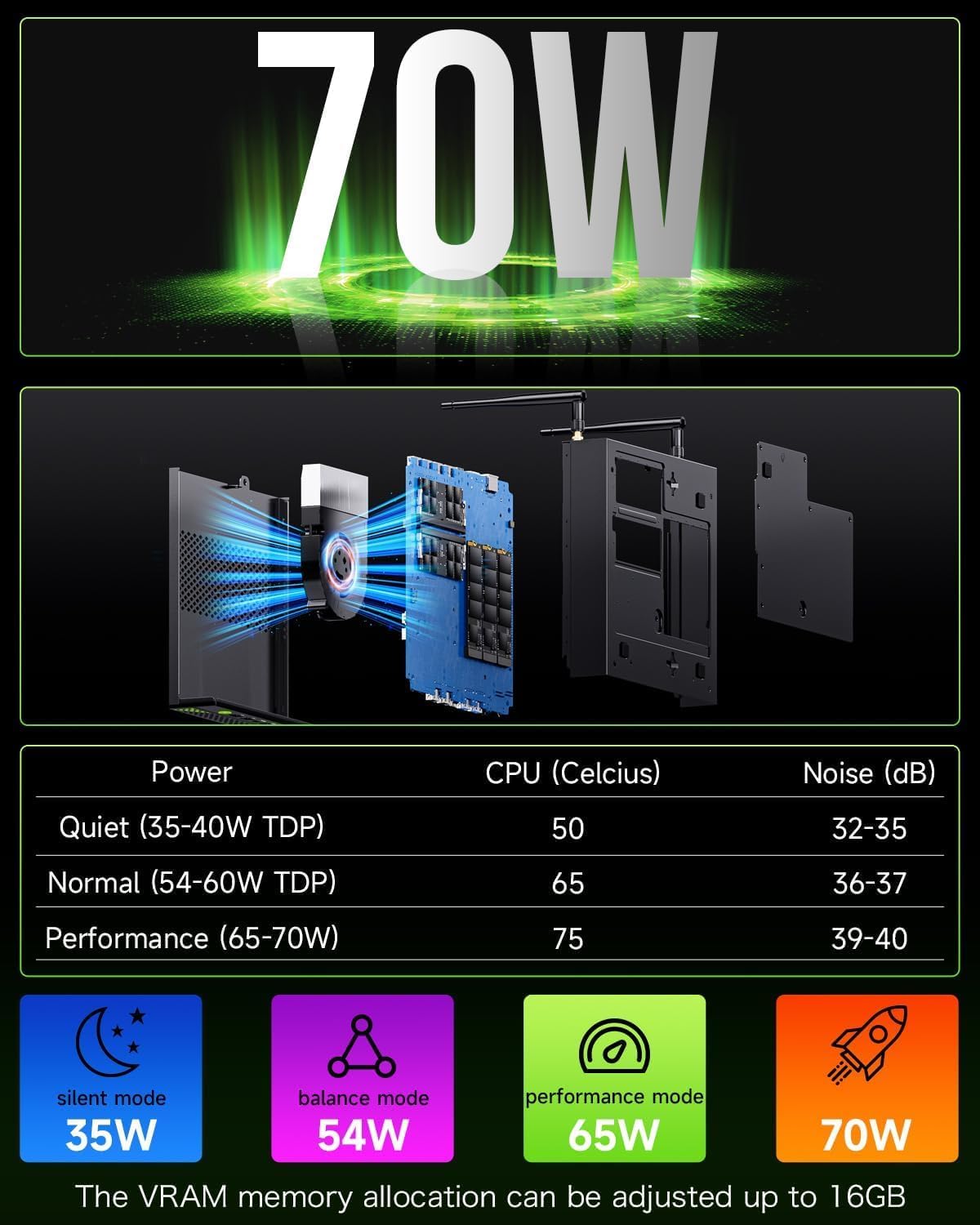
Figure 3.7: Power Consumption and Noise Levels. The K10 offers various power modes: Quiet (35-40W TDP, 50°C CPU, 32-35dB noise), Normal (54-60W TDP, 65°C CPU, 36-37dB noise), and Performance (65-70W TDP, 75°C CPU, 39-40dB noise). VRAM memory allocation can be adjusted up to 16GB.
3.4. Display Capabilities
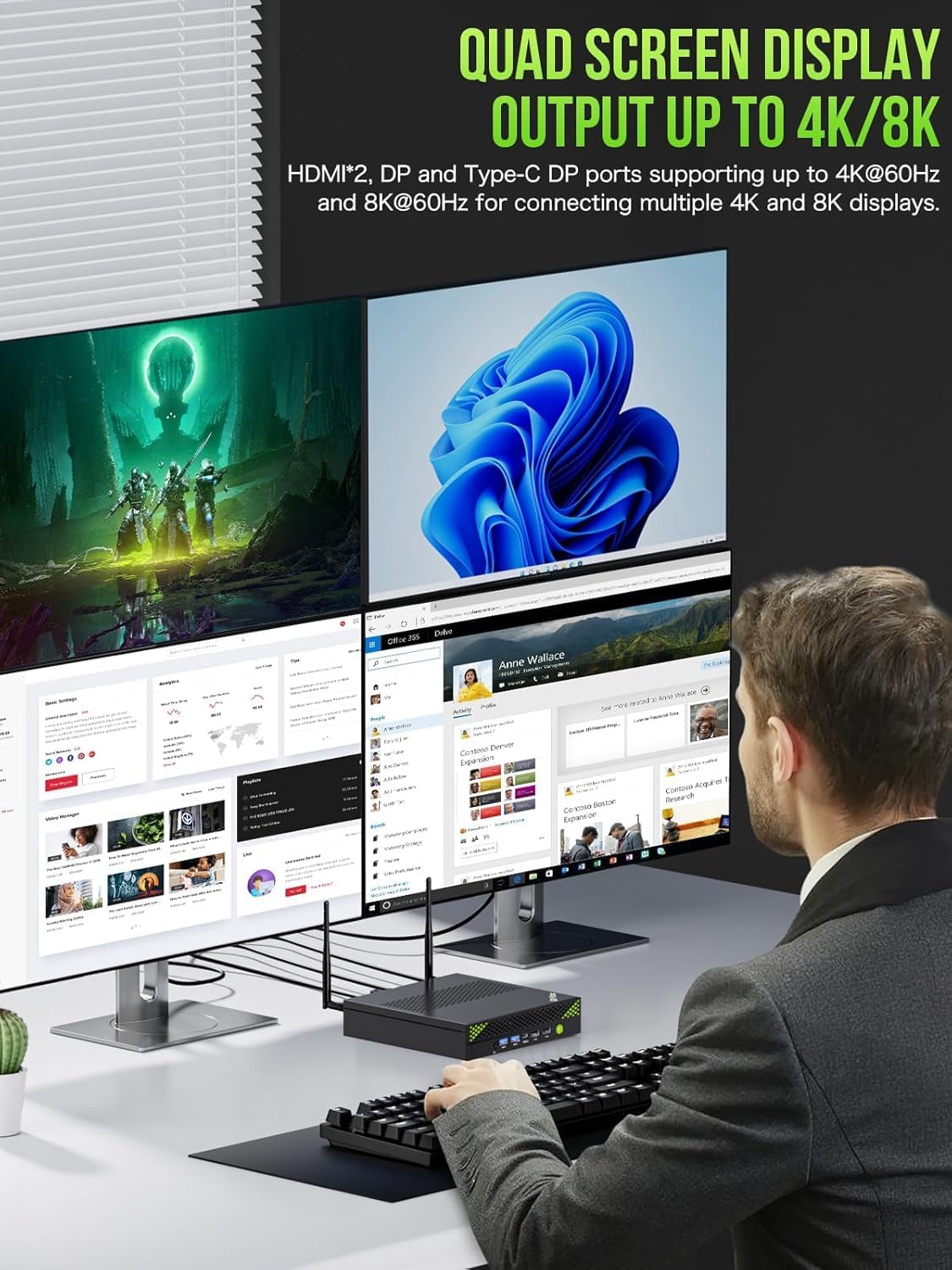
Figure 3.8: Quad Screen Display Output. The K10 supports quad-screen display output up to 4K/8K resolution. It features two HDMI 2.0 ports and one DisplayPort (DP) for connecting multiple 4K displays at 60Hz, and a Type-C DP port supporting up to 8K at 60Hz.
4. Panduan Persediaan
Follow these steps to set up your GMKtec K10 Mini PC:
- Paparan Sambungkan: Connect your monitor(s) to the Mini PC using the HDMI or DisplayPort cables. The K10 supports up to four displays simultaneously.
- Sambung Peranti: Pasangkan papan kekunci dan tetikus USB anda ke port USB yang tersedia.
- Sambungkan Kuasa: Insert the power adapter cable into the DC-IN port on the Mini PC, then plug the power adapter into a wall outlet.
- Hidupkan kuasa: Press the power button located on the front of the Mini PC. The system will boot up automatically.
- Persediaan Awal: Ikut arahan pada skrin untuk melengkapkan persediaan awal Windows 11 Pro, termasuk bahasa, rantau, sambungan rangkaian dan penciptaan akaun pengguna.
5. Arahan Operasi
5.1. Operasi Asas
- Hidupkan/Mati Kuasa: Press the power button to turn on the PC. To shut down, click the Start button in Windows, then select Power > Shut down.
- Mulakan semula: To restart the PC, click the Start button in Windows, then select Power > Restart.
- Mod tidur: To put the PC into sleep mode, click the Start button in Windows, then select Power > Sleep.
5.2. Kesambungan Rangkaian
- Wi-Fi: The K10 supports Wi-Fi 6 (802.11ax). To connect to a wireless network, click the Wi-Fi icon in the taskbar, select your desired network, enter the password, and click Connect.
- Ethernet: For a wired connection, connect an Ethernet cable from your router or modem to the 2.5G RJ45 LAN port on the Mini PC.
5.3. Persediaan Berbilang Paparan
The GMKtec K10 supports connecting up to four displays simultaneously for enhanced productivity or immersive experiences. Use a combination of the HDMI, DisplayPort, and USB Type-C (DP Alt Mode) ports. After connecting the displays, right-click on the desktop, select 'Display settings', and configure your display layout (Extend, Duplicate, or Second screen only).
6. Penyelenggaraan
Penyelenggaraan yang betul memastikan jangka hayat dan prestasi optimum Mini PC anda:
- Pembersihan: Regularly clean the exterior of the Mini PC with a soft, dry cloth. Use compressed air to clear dust from the ventilation grilles to prevent overheating. Ensure the device is powered off and unplugged before cleaning.
- Pengudaraan: Ensure the Mini PC is placed in a well-ventilated area, away from direct sunlight or heat sources. Do not block the air vents.
- Kemas Kini Perisian: Keep your Windows 11 Pro operating system and drivers updated to the latest versions. This improves security, stability, and performance.
- Sandaran Data: Sandarkan data penting anda secara kerap ke pemacu luaran atau storan awan untuk mengelakkan kehilangan data.
7. Penyelesaian masalah
If you encounter issues with your GMKtec K10 Mini PC, refer to the following common problems and solutions:
| Masalah | Kemungkinan Punca | Penyelesaian |
|---|---|---|
| PC tidak dihidupkan. | No power supply; faulty power adapter. | Ensure the power adapter is securely connected to the PC and the wall outlet. Try a different outlet. |
| Tiada paparan pada monitor. | Incorrect display cable connection; monitor input not selected. | Check display cable connections. Ensure the monitor is set to the correct input source (HDMI/DP). Try a different display cable or port. |
| Prestasi perlahan. | Too many applications running; insufficient free storage; overheating. | Close unnecessary applications. Free up disk space. Ensure proper ventilation and clean dust from vents. Check power mode settings. |
| Isu sambungan Wi-Fi/Ethernet. | Driver issues; router problems; incorrect settings. | Restart the PC and router. Check network cable (for Ethernet). Update network drivers. Verify Wi-Fi password. |
| Peranti USB tidak dikenali. | Faulty USB port; driver issues. | Try a different USB port. Update USB drivers in Device Manager. Restart the PC. |
8. Spesifikasi
Detailed technical specifications for the GMKtec K10 Mini PC:
| Ciri | Spesifikasi |
|---|---|
| Jenama | GMKtec |
| Nombor Model | K10 |
| Siri | GMKtec NUCBOX |
| Sistem Operasi | Windows 11 Pro |
| Jenama Pemproses | Intel |
| Jenis Pemproses | Core i9-13900K (13900HK) |
| Kelajuan Pemproses | Sehingga 5.4 GHz |
| Bilangan Teras | 14 |
| Saiz Cache | 24 MB |
| Memory Storage Capacity (RAM) | 32 GB DDR5 |
| Memori Maksimum Disokong | 64 GB |
| Saiz Pemacu Keras | 1 TB (SSD) |
| Teknologi Cakera Keras | SSD |
| Antara Muka Pemacu Keras | PCIE x 16 |
| Jenama Chipset Grafik | Intel |
| Penerangan Kad Grafik | Bersepadu |
| GPU | Grafik Intel Iris Xe |
| Graphics Card RAM | 16 GB (VRAM allocation) |
| Jenis RAM Grafik | DDR5 SDRAM |
| Resolusi Paparan Maks | 7680x4320 (8K) |
| Soket Pemproses | FCBGA1744 |
| Jenis Kesambungan | Bluetooth, WiFi, Ethernet |
| Jenis Teknologi Tanpa Wayar | 802.11ax (Wi-Fi 6), Bluetooth 5, 2.4 GHz/5 GHz Radio Frequency |
| Antara Muka Perkakasan | 802.11 ac/b/g/n, 3.5 mm Audio, Bluetooth 5, HDMI, Display Port, USB 3.2 Gen 2, USB Type C |
| Bilangan Port HDMI | 2 |
| Bilangan USB 2.0 Port | 4 |
| Bilangan USB 3.0 Port | 4 |
| Jenis Penyambung | Bluetooth, Ethernet, HDMI, USB, Wi-Fi |
| Keserasian Peranti | Keyboard, Printer, Monitor, Mouse, Television |
| Kegunaan Khusus untuk Produk | Penggunaan Harian |
| Jenis PC | PC mini |
| Dimensi Pakej | 22.5 x 22.4 x 9.9 cm; 2.23 kilogram |
| Pengeluar | GMKtec |
| Tarikh Pertama Tersedia di Amazon.com.be | 20 Januari 2025 |
9. Waranti dan Sokongan
GMKtec is committed to providing excellent customer service and support for your K10 Mini PC.

Figure 9.1: Warranty & Support Information. This image outlines the available support channels for GMKtec products.
9.1. Maklumat Waranti
The GMKtec K10 Mini PC comes with a Waranti 2 tahun. For specific details regarding warranty coverage and terms, please refer to the documentation included with your product or contact GMKtec customer support.
9.2. Sokongan Pelanggan
For any questions, technical assistance, or support inquiries, please use the following channels:
- Sokongan Amazon: If purchased through Amazon, you can contact support by logging into your Amazon account, navigating to 'Your Orders', and selecting 'Ask Product Question' for the GMKtec K10.
- After-Sales Support (Email): For direct assistance, you can send an email to the GMKtec After-Sales Team at support@gmktec.comGMKtec menawarkan sokongan pelanggan 24/7.
- Sokongan Teknikal Seumur Hidup: GMKtec provides lifetime technical support for its products.
Ask a question about this manual
Ask about setup, troubleshooting, compatibility, parts, safety, or missing instructions. Manuals+ will review the question and use this page’s manual context to help answer it.