
pengenalan
Terima kasih kerana membeliasing the oceanrich Automatic Coffee Mill G3. This manual provides essential information for the safe and efficient operation, maintenance, and troubleshooting of your coffee grinder. Please read this manual thoroughly before first use and keep it for future reference.
Langkah-langkah Keselamatan
- Always ensure the grinder is turned off before cleaning or disassembling.
- Jangan rendam unit utama dalam air atau cecair lain.
- Jauhkan daripada kanak-kanak.
- Use only with whole coffee beans. Do not grind other substances.
- Do not operate if the power cord or charging port is damaged.
- Charge the device using the provided USB Type-C cable.
- Avoid touching the burrs during operation.
Produk Selesaiview
The oceanrich Automatic Coffee Mill G3 is a cordless, USB-C rechargeable coffee grinder designed for convenience and precision. It features a durable stainless steel conical burr and offers multiple grind settings.
Ciri-ciri Utama:
- High-Quality Conical Stainless Steel Burr: Ensures efficient grinding, uniform particle size, and minimizes fine powder for optimal extraction.
- Fast Grinding Speed: Grinds 15g (approximately one cup) of coffee beans in about 34 seconds.
- Cordless and USB Type-C Rechargeable: Offers portability and convenience, suitable for home and outdoor use. Provides approximately 9-10 uses on a full charge.
- 5 Tetapan Pengisaran: Adjustable from fine (espresso) to coarse (French press).
- Matikan Automatik: The grinder automatically stops approximately 10 seconds after grinding is complete.
- Kapasiti Besar: Can grind up to 30g of coffee beans at once.
- Penunjuk Tahap Bateri: A 4-level LED lamp (25% increments) shows the remaining battery charge.
- Multi-purpose Glass Container: The glass container can also be used as a storage jar for ground coffee.
- Aksesori: Includes a measuring spoon and a cleaning brush.
Komponen:

This diagram illustrates the various parts of the oceanrich G3 coffee mill, including the main body, cap, battery indicator LEDs, USB Type-C charging port, hopper unit, grind adjustment ring, stainless steel burr, and glass container. The cap can be removed and used as a lid for the glass container for storage.
- Unit Utama: Contains the motor, battery, control buttons, and charging port.
- topi: Menutup corong kacang.
- Bean Hopper: Where whole coffee beans are loaded (maximum 30g).
- Cincin Pelarasan Kisar: Used to select desired grind size.
- Burr Kon Keluli Tahan Karat: The grinding mechanism.
- Glass Container: Collects ground coffee and can be used for storage.
- Port Pengecasan USB Jenis-C: Untuk mengecas semula bateri dalaman.
- Butang/Penunjuk Kuasa: Initiates grinding and displays battery status.
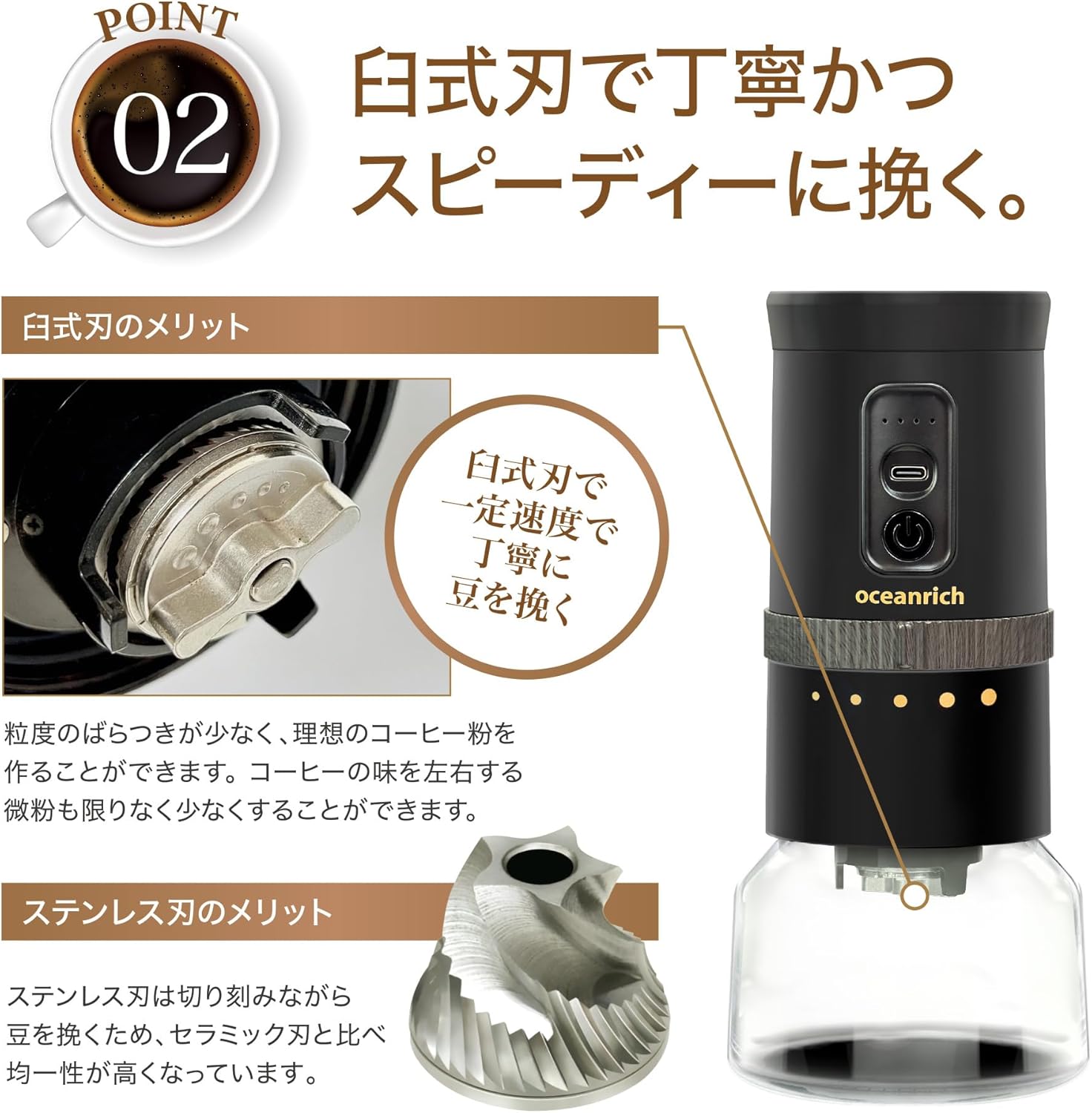
A terperinci view of the durable stainless steel conical burr, designed for precise and uniform grinding.

This image highlights the grinder's efficiency, capable of grinding 15g of coffee beans in approximately 34 seconds.
Persediaan
- Bongkar: Keluarkan semua komponen dari pembungkusan dengan berhati-hati.
- Caj Permulaan: Before first use, fully charge the coffee mill using the provided USB Type-C cable. Connect the cable to the charging port on the main unit and a compatible USB power adapter (not included). The LED indicators will show charging progress.
- Bersih: Wipe down all removable parts (glass container, cap) with a damp cloth. Ensure they are completely dry before assembly.
- Berhimpun: Attach the glass container to the main unit by aligning the marks and twisting to lock.
Arahan Operasi
Follow these steps for grinding coffee beans:
- Laraskan Saiz Kisar: Rotate the grind adjustment ring on the main unit to select your desired grind size. There are 5 settings, ranging from fine for espresso to coarse for French press.

Figure 4: Grind Size Adjustment
This image displays the range of 5 grind settings, from very fine (suitable for espresso) to coarse (ideal for French press), and how to adjust the dial. - Muatkan Biji Kopi: Remove the cap from the top of the main unit. Pour whole coffee beans into the hopper. Do not exceed the maximum capacity of 30g.
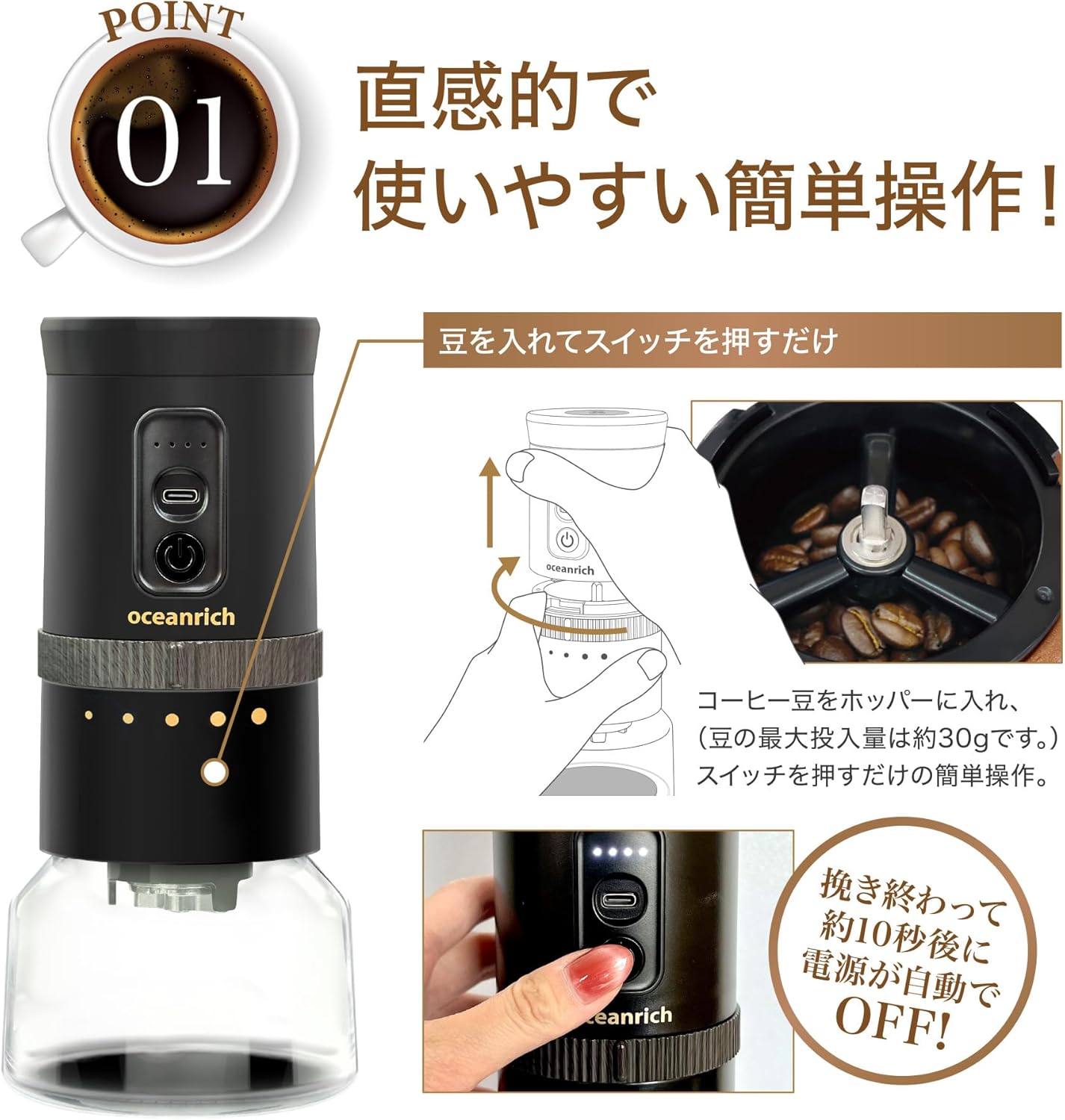
Figure 5: Loading Coffee Beans
This image demonstrates how to open the top cap and pour coffee beans into the grinder's hopper. - Selamatkan Unit: Replace the cap. Ensure the glass container is securely attached to the main unit by aligning the "Open" and "Lock" marks and twisting towards "Lock".
- Mula Mengisar: Press the power button on the main unit to begin grinding. The LED indicators will illuminate.

Figure 6: Simple Operation Steps
This multi-panel image shows the sequence of operation: 1) Adjusting grind size, 2) Loading beans, 3) Locking the hopper unit, 4) Pressing the power button, 5) Automatic stop when grinding is complete, and 6) Removing the glass container to access ground coffee. - Berhenti Automatik: The grinder will automatically stop once all beans are ground, or approximately 10 seconds after grinding is complete. The LED indicator will turn off.
- Retrieve Ground Coffee: Twist the main unit to unlock and separate it from the glass container. Pour the freshly ground coffee from the glass container.
Mengecas Bateri:
When the battery is low, the LED indicators will show fewer lights. Connect the provided USB Type-C cable to the charging port and a USB power source. The LEDs will flash during charging and remain solid when fully charged. A full charge allows for approximately 9-10 grinding cycles (for 30g fine grind).

This image highlights the USB Type-C charging port on the device, indicating its modern and convenient charging method.
Penyelenggaraan dan Pembersihan
Regular cleaning ensures optimal performance and extends the life of your coffee mill.
- Pembersihan Am: Lap bahagian luar unit utama dengan lembut, damp kain. Jangan gunakan pembersih yang melelas atau rendam unit utama dalam air.
- Glass Container and Cap: These parts can be hand-washed with mild soap and water. Ensure they are thoroughly dried before reassembly.
- Burr Cleaning: Use the provided cleaning brush to remove any residual coffee grounds from the stainless steel burrs and the bean hopper area. For a more thorough clean, you can adjust the grind setting to its coarsest to create a wider gap for brushing.

Rajah 8: Aksesori yang Disertakan
This image shows the measuring spoon and cleaning brush that come with the coffee mill, useful for precise measurement and maintenance. - Storan: When not in use, store the coffee mill in a dry place. The glass container can be used to store ground coffee by using the main unit's cap as a lid.

Figure 9: Glass Container as Storage
This image illustrates how the glass container can be detached and sealed with the main unit's cap to store ground coffee, making it convenient for transport.
Menyelesaikan masalah
| Masalah | Kemungkinan Punca | Penyelesaian |
|---|---|---|
| Pengisar tidak bermula. | Bateri hampir habis atau habis. | Charge the battery using the USB Type-C cable. |
| Grinder stops unexpectedly. | Beans are jammed or hopper is empty. | Check for obstructions in the burr area. Ensure sufficient beans are loaded. |
| Pengisaran tidak konsisten. | Burr kotor atau haus. | Clean the burrs thoroughly with the provided brush. |
| Lekapan statik yang berlebihan. | Common with dry coffee beans and plastic components. | Lightly mist beans with water before grinding (RDT method) or gently tap the container after grinding. |
Spesifikasi
| Ciri | Perincian |
|---|---|
| Jenama | oceanrich |
| Nombor Model | UQ-ORG3CBK |
| Mekanisme Pengisaran | Conical Stainless Steel Burr |
| Tetapan Kisar | 5 levels (Fine to Coarse) |
| Max Bean Capacity | 30g |
| Grinding Speed (15g) | lebih kurang 34 saat |
| Sumber Kuasa | Bateri Litium-Ion Boleh Dicas semula |
| Port Pengecasan | USB Jenis-C |
| Uses per Full Charge | Approx. 9-10 times (for 30g fine grind) |
| Pemadaman Automatik | Yes (approx. 10 seconds after grinding) |
| Bahan | EVA, PP, ABS, Glass, Stainless Steel, Ceramic |
| warna | Hitam |
| Dimensi Produk (lebih kurang) | 10 sm (L) x 10 sm (W) x 21.5 sm (H) |
| Berat Pakej (anggaran) | 0.96 kg |
| Arahan Penjagaan | Hand wash removable parts |
Waranti dan Sokongan
For warranty information and customer support, please refer to the warranty card included with your product or visit the official oceanrich webtapak. Simpan resit pembelian anda sebagai bukti pembelian.