
1. Maklumat Keselamatan Penting
Sila baca semua arahan dengan teliti sebelum pemasangan dan penggunaan. Simpan manual ini untuk rujukan masa hadapan.
- Penggunaan Dalaman Sahaja: These wall sconces are designed for indoor use. Do not expose to moisture or outdoor elements.
- Keselamatan Bateri: Use only the provided Type-C cable for charging. Do not attempt to open or modify the battery pack. Avoid extreme temperatures.
- Pemasangan: Ensure the mounting surface is clean, dry, and capable of supporting the weight of the sconce. If using screws, ensure no electrical wires or pipes are behind the wall.
- Pembersihan: Putuskan kuasa sebelum membersihkan. Gunakan kain yang lembut dan kering. Jangan gunakan pembersih atau pelarut yang kasar.
- Pelupusan: Buang bateri dan komponen elektronik mengikut peraturan tempatan.
2. Kandungan Pakej
Sahkan bahawa semua item disertakan dalam pakej anda:
- 2 x Wall Sconce Bars
- 2 x Alat Kawalan Jauh
- 2 x Kabel Pengecas Jenis-C
- 2 x Sets of Mounting Hardware (screws and anchors)
- 1 x Manual Arahan
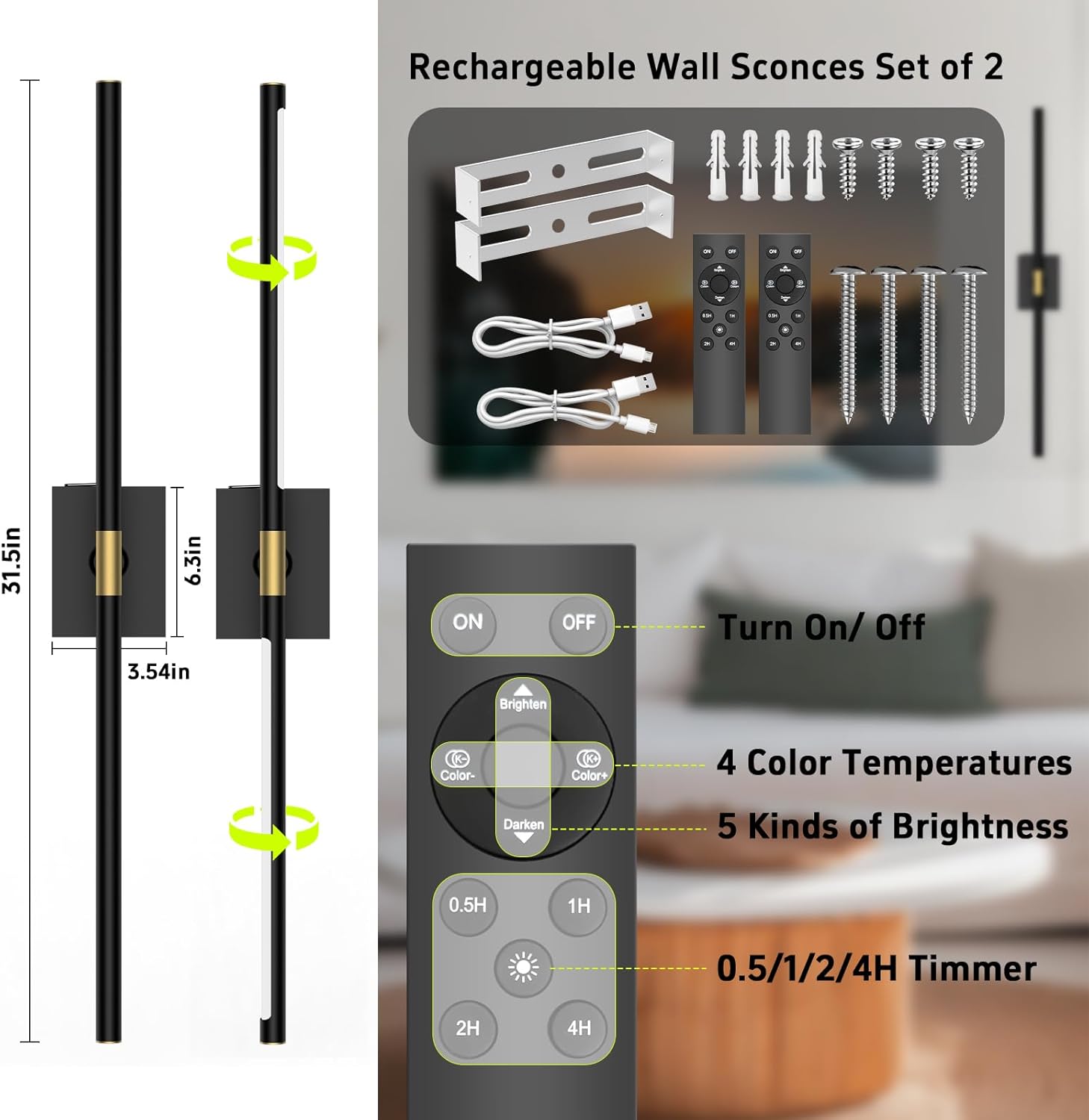
The image above illustrates the components included in your iThird DlampB2P Wall Sconces package, along with a detailed view of the remote control and its functions.
3. Ciri-ciri Produk
- Wayarles & Boleh dicas semula: No wiring required, powered by a 10000mAh rechargeable battery for 20-60 hours of continuous illumination.
- Detachable Battery Box: Conveniently remove the battery box for charging without disassembling the entire fixture.
- Kawalan Jauh: Adjust settings from a distance of 12-15 feet. One remote can control multiple sconces.
- 4 Suhu Warna: Choose from 3000K (warm), 4000K (neutral), 5000K (cool), and 6000K (daylight).
- Kecerahan boleh laras: Dimmable from 20% to 100% in 5 levels.
- Fungsi Pemasa: Set automatic shut-off for 0.5, 1, 2, or 4 hours.
- Fungsi Memori: The sconce remembers your last brightness and color temperature settings.
- 360° Rotatable Light Bar: Adjust the light direction to your preference.

The 360° rotation feature allows for versatile lighting angles, enabling you to direct light precisely where needed.
4. Pemasangan
iThird DlampB2P wall sconces offer easy, wireless installation. No electrician is required.
4.1 Mounting with Screws
- Sediakan Dinding: Choose a desired location on a clean, dry, and flat wall surface.
- Pasang Pendakap Pelekap: Use the included screws and wall anchors to securely fix the mounting bracket to the wall. Ensure the bracket is level.
- Attach Sconce Base: Align the sconce base with the installed mounting bracket and secure it with the provided screws.
- Insert Light Bar: Gently slide the light bar into the central holder on the sconce base. Ensure it is firmly seated.

This diagram illustrates the two main steps for securely mounting your wall sconce using the provided screws and bracket.
4.2 Panduan Video Pemasangan
This video demonstrates the straightforward installation process for the iThird wireless and rechargeable wall lights, highlighting their ease of setup.
5. Operasi
Your iThird wall sconces can be operated via remote control or touch control.
5.1 Fungsi Kawalan Jauh
Point the remote control at the infrared receiver on the sconce for optimal response.
- HIDUP/MATI: Press the 'ON' or 'OFF' button to turn the light on or off.
- Pelarasan Kecerahan: Use the 'Brighten' and 'Darken' buttons to cycle through 5 levels of brightness (20%, 40%, 60%, 80%, 100%).
- Suhu Warna: Use the 'Color+' and 'Color-' buttons to switch between 4 color temperatures (3000K, 4000K, 5000K, 6000K).
- Pemasa: Press '0.5H', '1H', '2H', or '4H' to set the automatic shut-off timer.

This image details the various functions available on the remote control, including power, brightness, color temperature, and timer settings, along with a visual representation of the brightness adjustment range.
5.2 Fungsi Kawalan Sentuhan
The sconce also features a touch-sensitive area for basic control.
- Sentuhan Ringkas: Tap the touch area to cycle through ON/OFF and 3 color temperatures.
- Sentuhan Panjang: Press and hold the touch area for stepless dimming.

This image highlights both the touch control functionality on the sconce itself and the comprehensive remote control options, providing flexible ways to manage your lighting.
6. Mengecas Bateri
The iThird wall sconces feature a detachable battery box for convenient charging.
- Remove Battery Box: Gently slide the battery box out from the sconce fixture.
- Sambungkan Pengecas: Plug the provided Type-C charging cable into the battery box and connect the other end to a USB power source (e.g., phone charger, computer USB port).
- Pengecasan Monitor: An indicator light on the battery box will show red during charging and turn green when fully charged.
- Reinsert Battery Box: Once fully charged, slide the battery box back into the sconce fixture until it clicks securely into place.
Charging time is approximately 8-10 hours. A full charge provides 20-60 hours of working time, depending on the brightness level used.
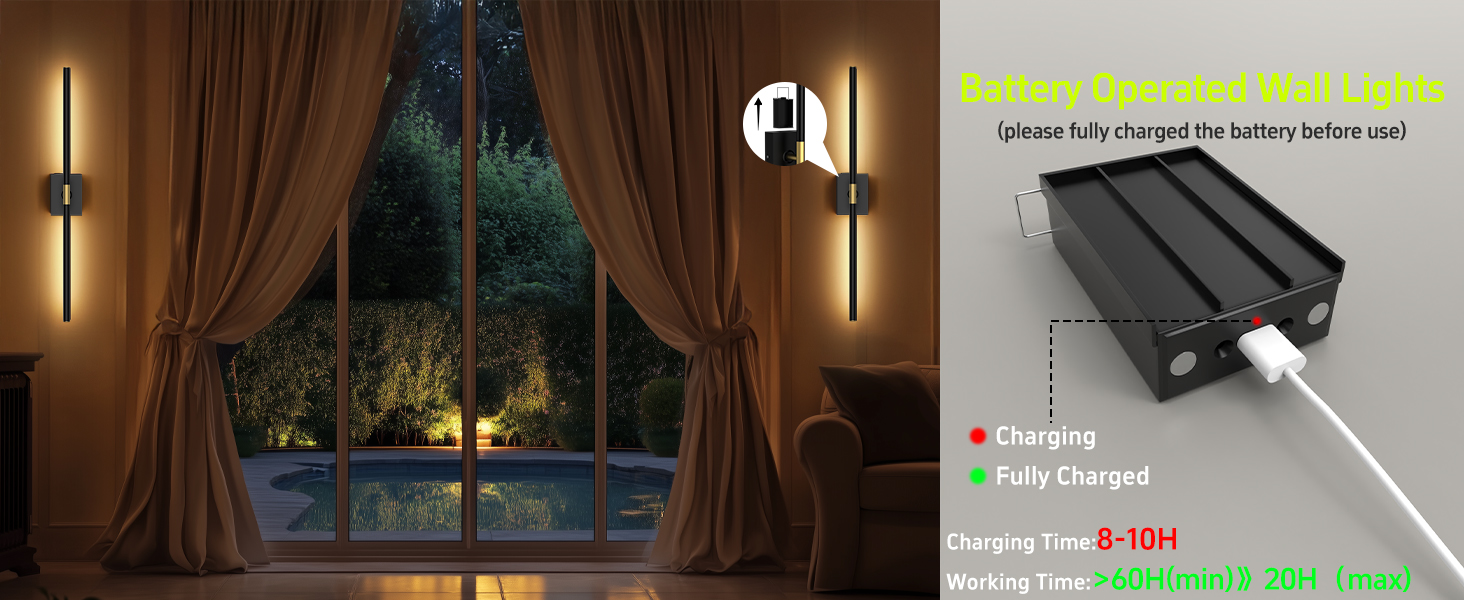
This illustration demonstrates how to charge the detachable battery box, including the charging indicator lights and estimated charging and usage times.
7. Penyelenggaraan
- Pembersihan: Wipe the sconce surface with a soft, dry cloth. Do not use liquid cleaners or sprays directly on the fixture.
- Penjagaan Bateri: For optimal battery life, avoid fully discharging the battery frequently. Charge the battery regularly, especially if the sconce will not be used for an extended period.
- Storan: Store the sconces in a cool, dry place when not in use.
8. Penyelesaian masalah
| Masalah | Kemungkinan Punca | Penyelesaian |
|---|---|---|
| Sconce does not light up. | Bateri dinyahcas. | Charge the battery fully (refer to Section 6). |
| Light bar not properly seated. | Gently rotate the lamp tube slightly to ensure proper contact. | |
| Alat kawalan jauh tidak berfungsi. | Bateri jauh hampir habis atau mati. | Gantikan bateri kawalan jauh. |
| Obstruction between remote and sconce. | Ensure a clear line of sight to the sconce's infrared receiver. | |
| Sconce falls off the wall (if using adhesive). | Improper surface preparation or insufficient adhesive. | Ensure the wall surface is clean, dry, and smooth. For a more secure installation, use the provided screws and anchors. |
9. Spesifikasi
| Ciri | Perincian |
|---|---|
| Nombor Model | DlampB2P |
| Jenama | iThird |
| warna | Hitam |
| bahan | logam |
| Sumber Kuasa | Dikuasakan Bateri |
| Kapasiti Bateri | 10000mAh |
| Voltage | 5 Volt |
| Wattage | 4 watt |
| Kecerahan | 400 Lumen (Maks) |
| Suhu Warna | 3000K, 4000K, 5000K, 6000K |
| Kaedah Kawalan | Kawalan Jauh, Kawalan Sentuh |
| Dimensi (L x W x H) | Approx. 31.5"L x 3.54"W x 6.3"H (overall) |
| Penggunaan Dalaman/Luar | Dalaman |
10. Waranti dan Sokongan
iThird menawarkan Waranti pengilang 2 tahun untuk produk ini. Waranti ini meliputi kecacatan bahan dan mutu kerja di bawah penggunaan biasa.
For any questions, technical support, or warranty claims, please contact iThird customer service through the platform where you purchased the product or refer to the contact information provided in your package.