
1. Pengenalan
This manual provides essential information for the installation, operation, maintenance, and troubleshooting of your ENERMAX Revolution III 650 Fully Modular PC Power Supply. Please read this manual thoroughly before installation and retain it for future reference. This power supply is designed to meet the latest ATX 3.1 specifications, offering high efficiency and stable power delivery for modern computing systems.
2. Maklumat Keselamatan
Sentiasa patuhi langkah keselamatan berikut untuk mengelakkan kecederaan atau kerosakan pada peralatan anda:
- Jangan buka unit bekalan kuasa. vol tinggitagterdapat di dalam, walaupun apabila diputuskan daripada bekalan elektrik.
- Ensure the power supply is disconnected from the AC outlet before installation or removal.
- Pasang bekalan kuasa di kawasan yang mempunyai pengudaraan yang baik.
- Gunakan hanya kabel modular yang disediakan bersama bekalan kuasa ini. Penggunaan kabel yang tidak serasi boleh menyebabkan kerosakan.
- This product is designed for use in desktop computers. Do not use it for other applications.
- Elakkan daripada mendedahkan bekalan kuasa kepada kelembapan atau suhu yang melampau.
3. Kandungan Pakej
Sahkan bahawa semua item terdapat dalam pakej anda:
- ENERMAX Revolution III 650 Power Supply Unit
- Modular Cable Set (including 12V-2x6 connector)
- Kord Kuasa AC
- Skru Pemasangan
- Cable Combs (16 pcs for 650W model)
- Manual Pengguna (dokumen ini)
4. Persediaan dan Pemasangan
Follow these steps to install your ENERMAX Revolution III 650 power supply:
- Sediakan Sistem Anda: Pastikan komputer anda dimatikan dan dicabut dari soket dinding. Buka bekas komputer anda untuk mengakses kawasan pelekap bekalan kuasa.
- Pasang Bekalan Kuasa: Carefully slide the ENERMAX Revolution III 650 into the designated power supply bay in your PC case. Secure it with the provided mounting screws. Ensure the fan faces the correct direction for optimal airflow (typically facing down if there's a bottom vent, or facing into the case if there's no bottom vent).

Bahagian depan view of the ENERMAX Revolution III 650 power supply, showcasing its modular cable ports and branding.
- Sambungkan Kabel Modular: Identify the necessary cables for your components. This power supply is fully modular, allowing you to connect only the cables you need. Refer to the labels on the power supply and the cables.
- Kuasa Papan Induk: Sambungkan kabel ATX 24-pin ke papan induk anda.
- Kuasa CPU: Connect the 4+4-pin EPS/CPU cable(s) to your motherboard.
- Graphics Card (GPU) Power: Connect the appropriate PCIe cables. The Revolution III 650 includes a native 12V-2x6 connector for modern GPUs, ensuring stable power delivery for high-end graphics cards.
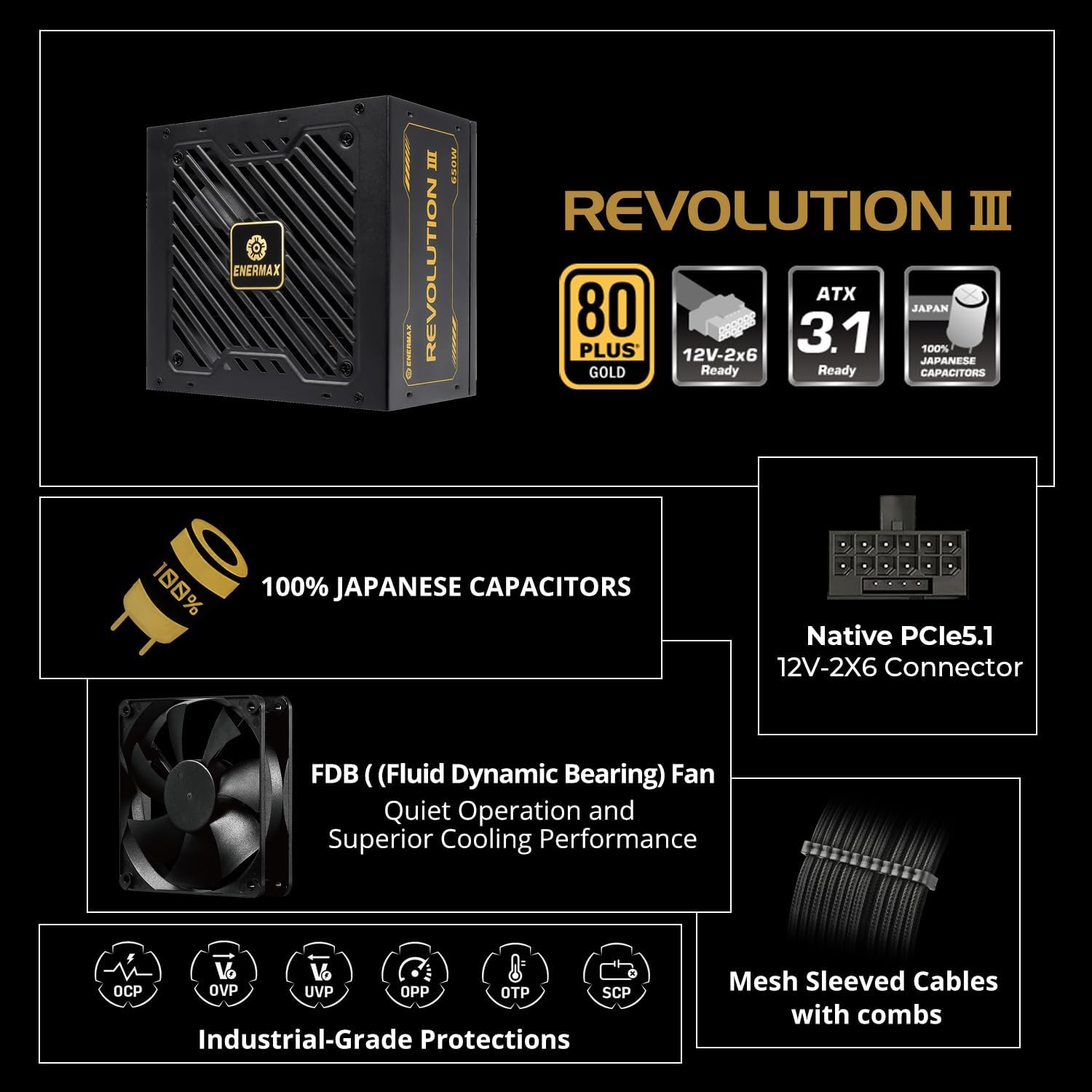
An infographic highlighting key features such as 80 PLUS Gold certification, ATX 3.1 readiness, 100% Japanese capacitors, native 12V-2x6 connector, FDB fan, industrial-grade protections, and mesh sleeved cables.

jarak dekat view of the modular cable connections on the ENERMAX Revolution III 650, showing the mesh-sleeved cables and included cable combs for organized builds.
- SATA/Molex Devices: Connect SATA power cables to your storage drives (HDDs, SSDs) and optical drives. Use Molex cables for other peripherals as needed.
- Pengurusan Kabel: Use the included cable combs to organize your cables for better airflow and a cleaner build.
- Tutup Bekas dan Sambungkan Kuasa AC: Once all internal connections are secure, close your computer case. Connect the AC power cord to the power supply and then to a wall outlet.
5. Arahan Operasi
The ENERMAX Revolution III 650 is designed for reliable and efficient operation.
- Hidupkan/Mati Kuasa: After installation, turn on your computer using the system's power button. The power supply will automatically manage power delivery.
- Kecekapan Emas 80 PLUS: This power supply is 80 PLUS Gold certified, achieving up to 93% efficiency at 50% load. This reduces energy waste and heat generation, contributing to a cooler and more stable system.

A graph illustrating the efficiency curve of 80 PLUS Gold certified power supplies compared to other ratings (Titanium, Platinum, Silver, Bronze) across different load percentages.
- Operasi senyap: The integrated 120mm Fluid Dynamic Bearing (FDB) fan provides ultra-quiet operation, even under significant system load.
- ATX 3.1 Compliance: The power supply adheres to the latest Intel ATX 3.1 specifications, ensuring compatibility and optimal performance with current and future high-performance components, including a 450W native 12V-2x6 connector.
- Superior Performance for High-End GPUs: The unit accommodates up to 200% power excursion, allowing it to handle the transient power spikes of demanding graphics cards without system instability.
- Komponen Tahan Lama: Built with 100% industrial-grade Japanese capacitors, ensuring long-term stability and reliability.

Satu dalaman view of a power supply circuit board, highlighting the 100% Japanese industrial-grade capacitors for stable performance.
6. Penyelenggaraan
Penyelenggaraan yang betul memastikan ketahanan dan prestasi optimum bekalan kuasa anda.
- Penyingkiran habuk: Periodically clean dust from the power supply's fan and vents using compressed air. Ensure the system is powered off and unplugged before cleaning.
- Aliran udara: Ensure that the power supply's intake and exhaust vents are not obstructed. Maintain good airflow within your PC case to prevent heat buildup.
- Integriti Kabel: Regularly check that all modular cables are securely connected and free from damage.
7. Penyelesaian masalah
Jika anda menghadapi masalah dengan bekalan kuasa anda, rujuk masalah dan penyelesaian biasa berikut:
- Sistem Tidak Dihidupkan:
- Periksa sama ada kord kuasa AC disambungkan dengan selamat ke kedua-dua bekalan kuasa dan alur keluar dinding.
- Ensure the power switch on the back of the power supply is in the 'ON' position.
- Verify that the 24-pin ATX and CPU power cables are correctly seated in the motherboard.
- Test the power supply with a known working system or use a PSU tester if available.
- Ketidakstabilan Sistem atau Penutupan Rawak:
- Ensure all modular cables are fully inserted into both the power supply and the components.
- Check for proper ventilation and ensure the power supply fan is spinning. Overheating can cause shutdowns.
- The ENERMAX Revolution III 650 includes multiple protection circuitries to safeguard your system:

Icons representing the multiple protection circuitries: OCP (Over Current Protection), OVP (Over Voltage Perlindungan), UVP (Di bawah Voltage Protection), OPP (Over Power Protection), OTP (Over Temperature Protection), and SCP (Short Circuit Protection).
- If these protections are triggered, the power supply may shut down to prevent damage. Address any potential overcurrent, overvoltage, undervoltage, overpower, or overheating issues.
- Bunyi Luar Biasa:
- A rattling or grinding noise may indicate a fan issue. Ensure no cables are obstructing the fan blades.
- Jika bunyi bising berterusan, hubungi khidmat pelanggan.
If troubleshooting steps do not resolve the issue, please contact ENERMAX customer support.
8. Spesifikasi
| Ciri | Spesifikasi |
|---|---|
| Jenama | Enermax |
| Nama Model | REVOLUTION III 650 |
| Nombor Model Item | EP-RV3-650G-FR |
| Output Wattage | 650 Watt |
| Pensijilan Kecekapan | 80 PLUS Gold (up to 93% at 50% load) |
| Faktor Bentuk | ATX |
| Reka Bentuk Bekalan Kuasa | Modular Penuh |
| ATX Standard | ATX 3.1 Compliant |
| Penyambung PCIe | Native 12V-2x6 (450W) |
| Kapasitor | 100% Japanese Industrial-Grade |
| Kaedah Penyejukan | Air (120mm FDB Fan) |
| Protection Circuitries | OCP, OVP, UVP, OPP, SCP, OTP |
| Dimensi Item (LxWxH) | 5.51 x 5.91 x 3.39 inci |
| Berat Barang | 4.69 paun |
| Peranti Serasi | Desktop |
9. Waranti dan Sokongan
The ENERMAX Revolution III 650 Power Supply comes with a Waranti 10 tahun, covering defects in materials and workmanship under normal use. This warranty ensures long-term reliability and peace of mind.
For technical support, warranty claims, or further assistance, please visit the official Enermax website or contact their customer service department. Please have your product model number (EP-RV3-650G-FR) and proof of purchase ready when contacting support.