
1. Pengenalan
This manual provides detailed instructions for the proper setup, operation, and maintenance of your SIRUI SQ75A Video Tripod with S5 Hydraulic Fluid Head. Please read this manual thoroughly before using the product to ensure safe and efficient operation. The SIRUI SQ75A is an aluminum alloy twin-leg tripod designed for stability and rapid deployment, paired with the S5 fluid head featuring stepless damping for smooth camera movements.
2. Maklumat Keselamatan
- Always ensure all locks and adjustments are securely tightened before mounting equipment or moving the tripod.
- Do not exceed the maximum load capacity of 8kg (17.6lb) for the fluid head and 18kg for the tripod legs to prevent damage to the equipment and potential injury.
- Be cautious when adjusting the tripod height, especially with heavy equipment mounted. Ensure a firm grip on the camera and tripod.
- Avoid exposing the tripod to extreme temperatures or harsh weather conditions for prolonged periods.
- Keep the tripod away from children and pets to prevent accidents.
3. Kandungan Pakej
Sahkan bahawa semua item terdapat dalam pakej anda:
- SIRUI SQ75A Tripod Legs
- SIRUI S5 Hydraulic Fluid Head
- Quick Release Plate (501 standard)
- Ground Spreader
- Adjustable Pan Handle
- 4mm Allen Key (magnetic)
- Portable Strap
4. Persediaan
4.1. One-Step Height Adjustment
The SQ75A tripod features a one-step flip-lock system for rapid height adjustment. To extend the legs, simply release the flip-locks on each leg and pull the leg sections to the desired height. To retract, push the legs back in and secure the flip-locks.

Image: One-step height adjustment in progress. The user releases the flip-locks to extend the tripod legs quickly and efficiently.
4.2. Ground Spreader Installation
The included ground spreader provides enhanced stability. Attach the spreader arms to the lower section of each tripod leg. Adjust the length of the spreader arms to achieve the desired leg angle and stability by rotating the twist locks on the spreader.
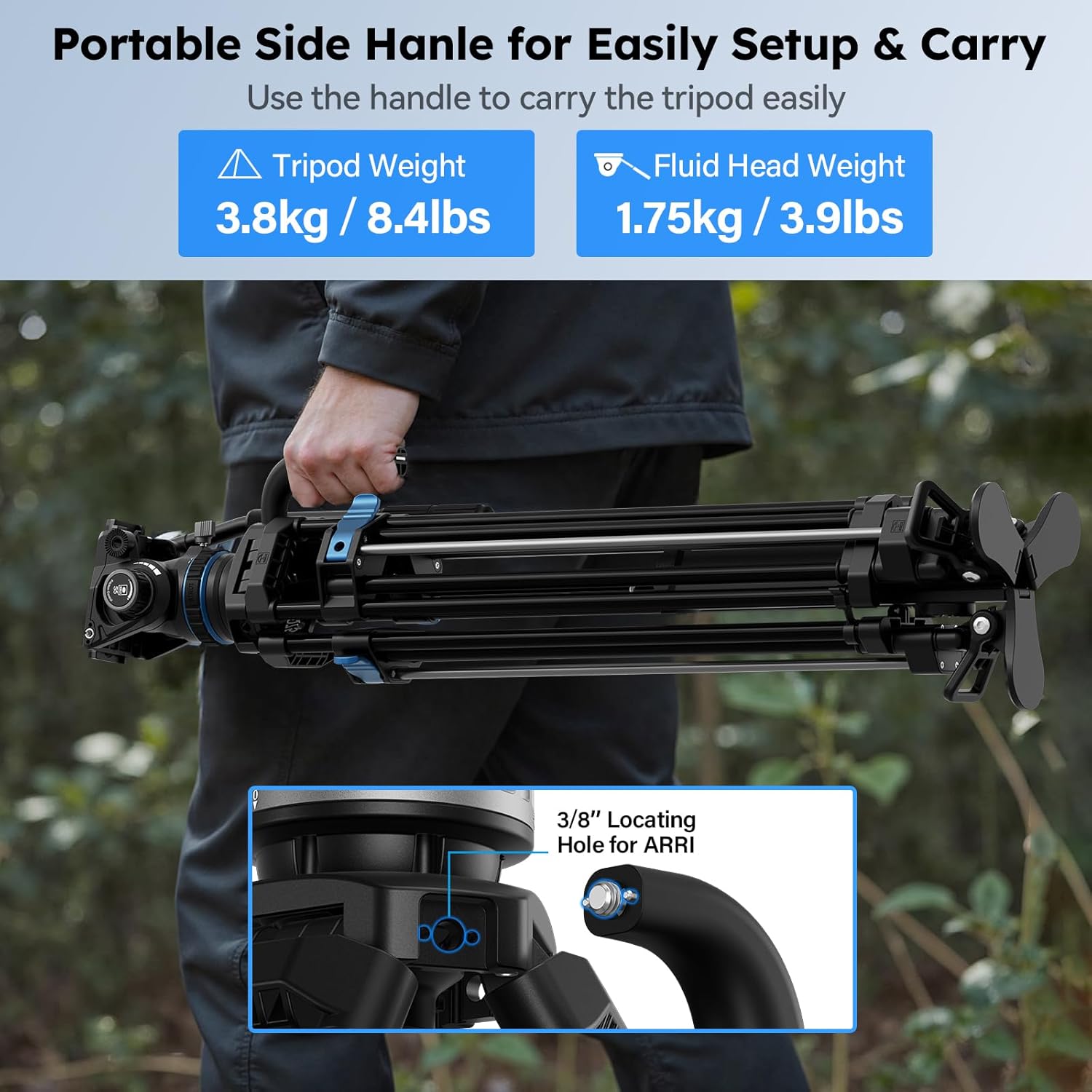
Image: The ground spreader is shown attached to the tripod legs, providing a stable base. The extendable spreader arm can be adjusted to modify the leg angle.
4.3. Fluid Head Attachment
Ensure the S5 fluid head is securely mounted to the tripod legs. The 75mm bowl allows for quick leveling of the head without adjusting the tripod legs. Rotate the handle on the bowl to adjust the shooting angle.
5. Arahan Operasi
5.1. Stepless Counterbalance System (S5 Head)
The S5 fluid head features a stepless dynamic balance system, supporting a maximum load capacity of 8kg. This system allows for precise balancing of your camera equipment, ensuring smooth and controlled movements. Adjust the counterbalance knob to match the weight of your camera setup.

Image: Visual representation of the S5 fluid head's stepless counterbalance system, highlighting the tilt and pan damping adjustments for balancing various camera weights.
5.2. Stepless Damping Adjustment (Tilt & Pan)
Both the tilt axis (+90° to -70°) and the 360° horizontal rotation are equipped with stepless damping adjustments. This allows you to fine-tune the resistance for smooth and precise camera movements, accommodating different shooting styles and equipment weights up to 10kg for dampkeperluan.
5.3. Quick Release Plate (Side-loading & Fast Switch)
The S5 video fluid head includes a 501 standard quick release plate with a side-loading design. To attach your camera, slide the plate into the head from the side until it locks. To balance your equipment, move the plate back and forth even when locked. The head also supports quick switching between 501 QR plates and DJI RS Series QR plates with a single press for seamless workflow.
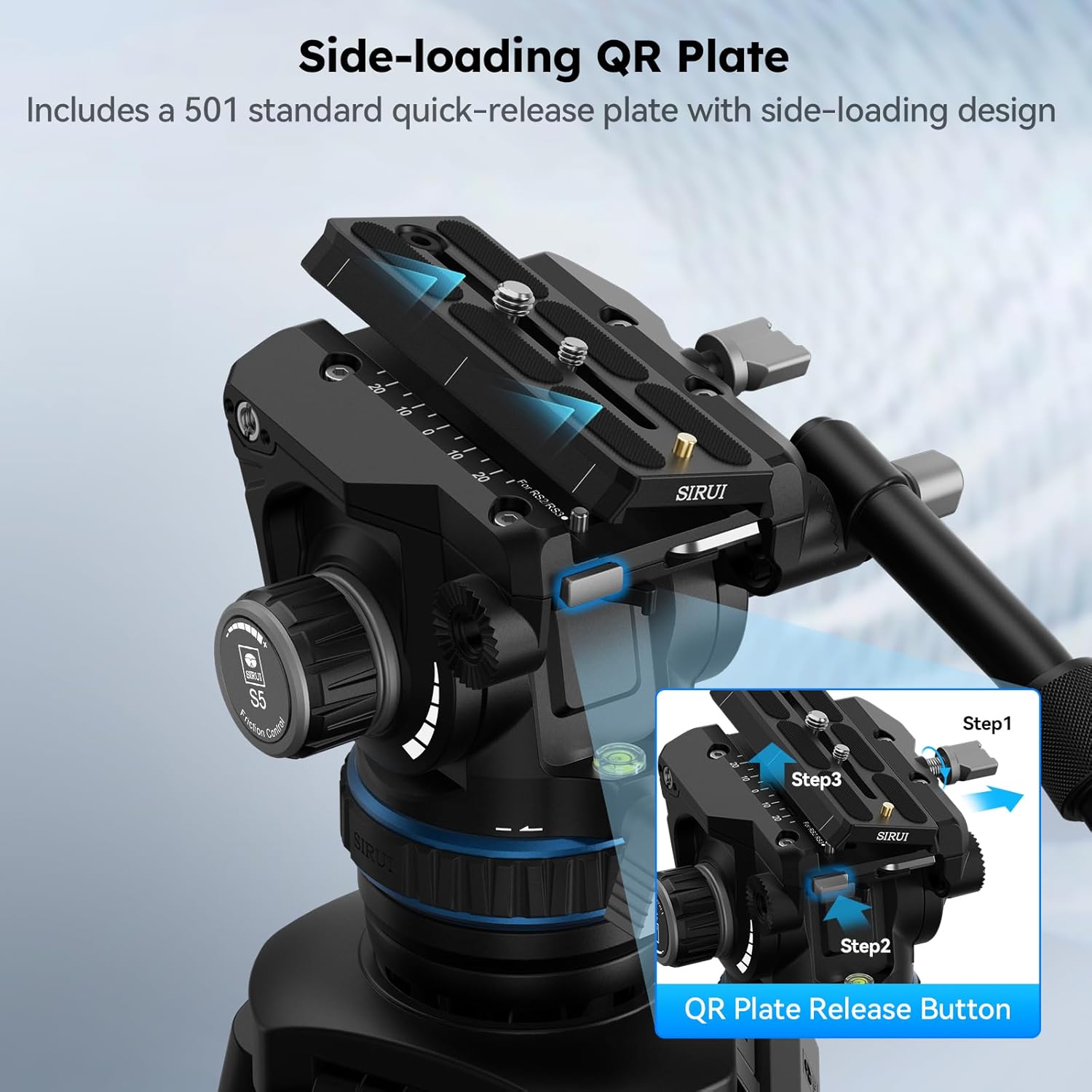
Image: Step-by-step guide for using the side-loading quick release plate, demonstrating how to install and secure the camera.

Image: The quick switch feature allows for easy interchangeability between 501 standard and DJI RS Series quick release plates.
5.4. Pelarasan Pemegang
The pan handle's angle and length are adjustable to improve operational experience for various camera moves. Loosen the adjustment knob on the handle, set it to your preferred position, and then tighten the knob to secure it.

Image: The tripod features a portable side handle for easy carrying and setup.
5.5. Demonstrasi Video
Video: This video demonstrates the one-step adjustment and various features of the SIRUI SQ75A+S5 video tripod, including setup, height adjustment, and fluid head operation.
6. Penyelenggaraan
- Regularly clean the tripod legs and fluid head with a soft, dry cloth to remove dust and debris.
- Avoid using harsh chemicals or abrasive materials that could damage the finish or moving parts.
- Inspect all screws and connections periodically and tighten them if necessary using the provided 4mm Allen key.
- Store the tripod in its carrying case in a dry, cool place when not in use.
- Do not lubricate the fluid head unless specifically instructed by SIRUI, as this can affect its dampprestasi.
7. Penyelesaian masalah
| Masalah | Kemungkinan Punca | Penyelesaian |
|---|---|---|
| Tripod legs not extending/retracting smoothly | Dirt or debris in leg sections; flip-locks not fully disengaged. | Clean leg sections. Ensure flip-locks are fully open before adjusting. |
| Fluid head movements are jerky or stiff | Damping settings too high/low; insufficient counterbalance; cold temperatures. | Laraskan damping controls. Verify camera is properly balanced. Allow head to warm up in cold conditions. |
| Camera not securely mounted to fluid head | Quick release plate not fully engaged; mounting screw loose. | Ensure QR plate is fully inserted and locked. Tighten camera mounting screw on QR plate. |
8. Spesifikasi
| Ciri | Perincian |
|---|---|
| Jenama | Sirui |
| Nama Model | SQ75A+S5 |
| bahan | Aloi Aluminium |
| Peranti Serasi | Camera, Camcorder |
| Berat Barang | 5.6 Kilogram (12.3 lbs) |
| Weight Limit (Fluid Head) | 8 Kilogram (17.6 lbs) |
| Ketinggian Maksimum | 178 Sentimeter (70.1 inci) |
| Ketinggian Minimum | 63.5 Sentimeter (25 inci) |
| Jenis Kepala Tripod | Pan Heads (S5 Hydraulic Fluid Head) |
| Diameter Kaki | 16.00 milimeter |
| Julat Kecondongan | +90° hingga -70° |
| Putaran Kuali | 360° |
| Tahap Ketahanan Air | Bukan Tahan Air |
9. Maklumat Waranti
SIRUI products are covered by a limited warranty against defects in materials and workmanship. The specific terms and duration of your warranty may vary by region and product. Please retain your proof of purchase for warranty claims. For detailed warranty information, refer to the official SIRUI webtapak atau hubungi sokongan pelanggan.
10. Sokongan Pelanggan
If you encounter any issues or have questions regarding your SIRUI SQ75A Video Tripod with S5 Hydraulic Fluid Head that are not addressed in this manual, please contact SIRUI customer support. You can find contact information on the official SIRUI webtapak (www.sirui.com) atau melalui pengedar tempatan anda.