
1. Produk Lebihview
The Mastech MS850D is a 6000-count True RMS auto-ranging digital multimeter designed for precise electrical measurements. It is suitable for professionals, technicians, and enthusiasts, offering a wide range of functions for various electrical applications.

Rajah 1: Depan view of the Mastech MS850D Digital Multimeter, displaying a measurement of 198.7 mV.
Ciri-ciri Utama:
- 6000 Counts Auto Ranging: Provides precise measurements across various ranges automatically.
- RMS Benar: Ensures accurate readings for non-sinusoidal AC waveforms.
- Comprehensive Measurement Capabilities: Mengukur Vol. AC/DCtage, AC/DC Current, Resistance, Capacitance, Frequency, and Temperature.
- Keselamatan Diperakui: CAT III 600V rating for safe use in electrical testing environments.
- Fungsi Mesra Pengguna: Includes Buzzer/Continuity, Diode Test, Transistor Test (optional), MAX/MIN, REL, Non-Contact Voltage (NCV) Detection, Live Wire Recognition, Data Hold, Flashlight, and Auto Power Off.
- Reka bentuk padat: Ergonomic dimensions (150mm x 75mm x 47mm) and lightweight (284g) for easy handling.
2. Kandungan Pakej
Sahkan bahawa semua item yang disenaraikan di bawah disertakan dalam pakej anda:
- 1 x Mastech MS850D-6000 Counts True RMS Auto Ranging Digital Multimeter
- 1 x Temperature probe
- 1 x Pair of Test leads
- 2 x Batteries (AAA type, 1.5V)
- 1 x Manual Pengguna
3. Maklumat Keselamatan
AMARAN: To avoid electric shock or personal injury, read all safety information before using this product. Use the multimeter only as specified in this manual; otherwise, the protection provided by the multimeter may be impaired.
- Always ensure the multimeter is in good working condition before use.
- Jangan gunakan lebih daripada vol yang dinilaitage, as marked on the multimeter, between the terminals or between any terminal and earth ground. The MS850D is rated for CAT III 600V.
- Berhati-hati apabila bekerja dengan voltagadalah melebihi 30V AC RMS, puncak 42V atau 60V DC. Ini voltagia menimbulkan bahaya kejutan.
- Do not use the multimeter if the test leads are damaged or if the meter appears damaged.
- Ensure the rotary switch is in the correct position for the measurement you intend to make.
- Jangan sekali-kali sambungkan petunjuk ujian kepada voltage source when the rotary switch is set to current, resistance, or continuity mode.
- Gantikan bateri dan fius hanya dengan jenis dan penarafan yang dinyatakan.
- Jangan kendalikan multimeter dalam gas letupan, wap atau persekitaran berdebu.
- Simpan jari di belakang pelindung jari pada probe ujian semasa pengukuran.
4. Persediaan
4.1 Pemasangan Bateri
The MS850D multimeter requires two 1.5V AAA batteries for operation. To install or replace batteries:
- Ensure the multimeter is powered off and disconnect all test leads.
- Cari penutup petak bateri di belakang multimeter.
- Gunakan pemutar skru untuk melonggarkan skru yang menahan penutup bateri.
- Remove the cover and insert the two AAA batteries, observing the correct polarity (+ and -).
- Pasang semula penutup bateri dan ketatkan skru.
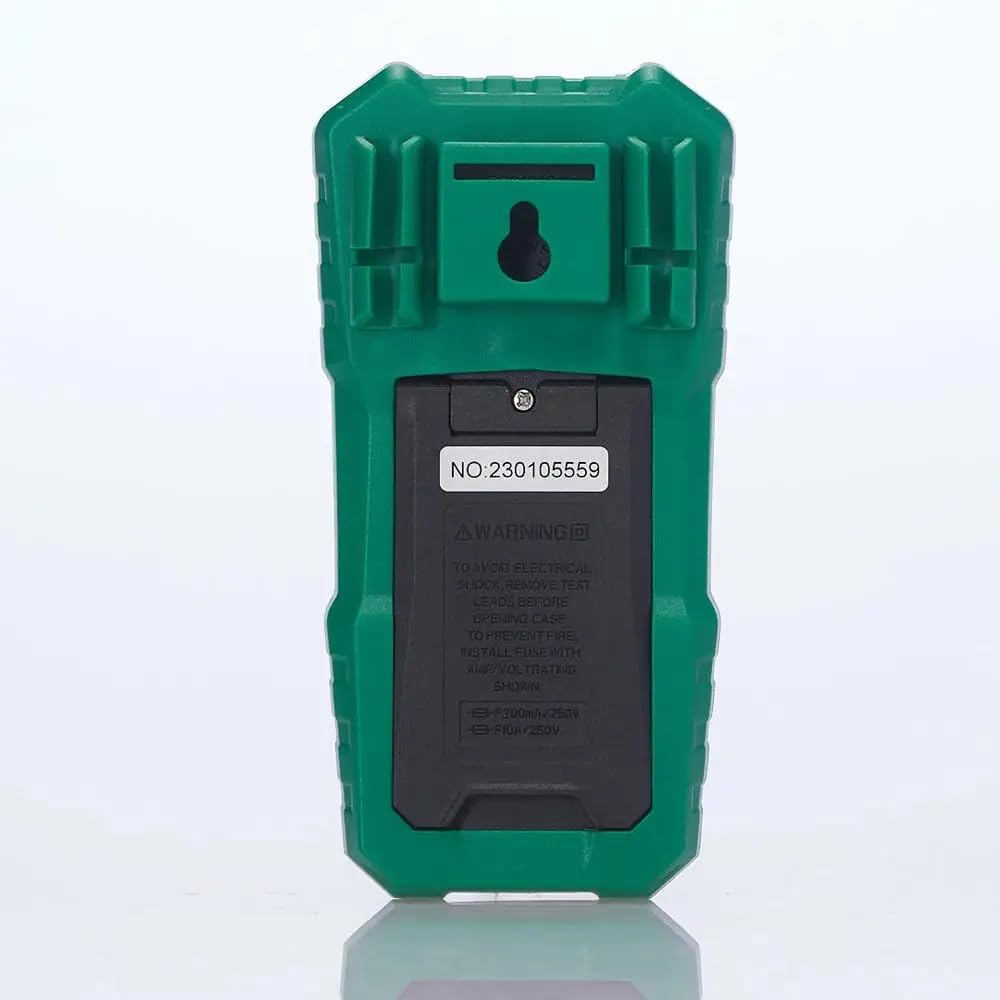
Rajah 2: Belakang view of the multimeter, illustrating the battery compartment and safety warnings.
4.2 Menghubungkan Petunjuk Ujian
Sambungan wayar ujian yang betul adalah penting untuk pengukuran yang tepat dan selamat.
- Masukkan petunjuk ujian hitam ke dalam COM (Bicu input biasa).
- Bagi kebanyakan voltage, resistance, continuity, capacitance, frequency, and temperature measurements, insert the red test lead into the VΩmA bicu input.
- For current measurements up to 600mA, insert the red test lead into the VΩmA bicu input.
- For current measurements between 600mA and 10A, insert the red test lead into the 10A MAX bicu input.

Rajah 3: Bersudut view of the multimeter, highlighting the input jacks for test leads.
5. Arahan Operasi
This section details how to use the Mastech MS850D for various measurements.
5.1 Menghidupkan/Mematikan
Rotate the central dial from the "OFF" position to any desired measurement function to power on the multimeter. To power off, rotate the dial back to the "OFF" position.
5.2 Rotary Switch Functions
The rotary switch selects the primary measurement function:
- V~ (AC Voltage): Measures alternating current voltage.
- V- (DC Voltage): Measures direct current voltage.
- Hz/% (Frequency/Duty Cycle): Measures frequency and duty cycle.
- Ω (Resistance): Mengukur rintangan elektrik.
- Continuity/Diode: Checks for circuit continuity and tests diodes.
- NCV/Live: Vol. Bukan Kenalantage detection and Live Wire recognition.
- °C/°F (Temperature): Measures temperature using the included probe.
- hFE (Ujian Transistor): Measures transistor gain (requires optional socket).
- μA~ / μA- (AC/DC Microamperes): Measures microampsebelum ini.
- mA~ / mA- (AC/DC Milliamperes): Measures milliampsebelum ini.
- A~ / A- (AC/DC Amperes): Langkah-langkah ampere current (up to 10A).
5.3 Fungsi Butang
- SEL (Pilih): Bertukar antara fungsi berbeza dalam satu kedudukan suis putar (cth., volum AC/DCtage, continuity/diode, °C/°F).
- DIBERI: Membekukan bacaan semasa pada paparan. Tekan sekali lagi untuk melepaskan.
- MIN/MAX/REL:
- Press once to enter MIN/MAX mode. The multimeter will record the minimum and maximum values. Press again to cycle between MIN, MAX, and current reading.
- Long press to activate REL (Relative) mode. This subtracts the current reading from all subsequent readings, useful for measuring changes.
- Flashlight Button (often combined with backlight): Activates the built-in flashlight for illuminating the measurement area.
5.4 Specific Measurement Procedures
5.4.1 Jldtage Pengukuran (AC/DC)
- Tetapkan suis putar ke V~ untuk AC voltage atau V- untuk DC voltage. Use the SEL button to switch between AC and DC if the position combines them.
- Sambungkan plumbum ujian hitam ke COM bicu dan ujian merah membawa kepada VΩmA jek.
- Connect the test probes in parallel across the circuit or component to be measured.
- Baca voltagnilai e pada paparan.
5.4.2 Pengukuran Arus (AC/DC)
PERHATIAN: Jangan sekali-kali menyambungkan multimeter secara selari dengan voltantage sumber semasa mengukur arus. Sentiasa sambung secara bersiri dengan beban.
- Determine if the current is AC or DC.
- Set the rotary switch to the appropriate current range (μA, mA, or A). Use the SEL button to switch between AC and DC.
- Sambungkan plumbum ujian hitam ke COM jek.
- For currents up to 600mA, connect the red test lead to the VΩmA jack. For currents up to 10A, connect the red test lead to the 10A MAX jek.
- Open the circuit where the current is to be measured and connect the multimeter in series.
- Baca nilai semasa pada paparan.
5.4.3 Pengukuran Rintangan
- Tetapkan suis putar ke Ω kedudukan.
- Sambungkan plumbum ujian hitam ke COM bicu dan ujian merah membawa kepada VΩmA jek.
- Pastikan litar atau komponen dinyahtenagakan sebelum mengukur rintangan.
- Sambungkan kuar ujian merentasi komponen.
- Baca nilai rintangan pada paparan.
5.4.4 Ujian Kesinambungan
- Tetapkan suis putar ke Kesinambungan/Diod position. Use SEL to select continuity mode (usually indicated by a speaker icon).
- Sambungkan plumbum ujian hitam ke COM bicu dan ujian merah membawa kepada VΩmA jek.
- Sambungkan kuar ujian merentasi litar atau komponen.
- Jika rintangan berada di bawah kira-kira 50Ω, buzzer akan berbunyi, menunjukkan kesinambungan.
5.4.5 Ujian Diod
- Tetapkan suis putar ke Kesinambungan/Diod position. Use SEL to select diode mode (usually indicated by a diode symbol).
- Sambungkan plumbum ujian hitam ke COM bicu dan ujian merah membawa kepada VΩmA jek.
- Sambungkan kuar merah ke anod dan kuar hitam ke katod diod. Paparan akan menunjukkan vol ke hadapantage penurunan.
- Balikkan kuar. Paparan harus menunjukkan "OL" (Gelung Terbuka) untuk diod yang baik.
5.4.6 Pengukuran Kapasitansi
- Tetapkan suis putar ke Kapasitansi position (often combined with Hz/% or other functions, use SEL to select).
- Sambungkan plumbum ujian hitam ke COM bicu dan ujian merah membawa kepada VΩmA jek.
- Ensure the capacitor is fully discharged before measurement to prevent damage to the multimeter.
- Sambungkan kuar ujian merentasi terminal kapasitor.
- Baca nilai kapasitans pada paparan.
5.4.7 Pengukuran Kekerapan
- Tetapkan suis putar ke Hz /% position. Use SEL to select frequency mode.
- Sambungkan plumbum ujian hitam ke COM bicu dan ujian merah membawa kepada VΩmA jek.
- Sambungkan prob ujian merentasi sumber isyarat.
- Baca nilai kekerapan pada paparan.
5.4.8 Pengukuran Suhu
- Tetapkan suis putar ke ° C / ° F position. Use SEL to switch between Celsius and Fahrenheit.
- Connect the temperature probe to the COM dan VΩmA jacks, observing polarity if specified by the probe.
- Letakkan hujung probe suhu pada atau berhampiran objek yang suhunya hendak diukur.
- Baca nilai suhu pada paparan.
5.4.9 Bukan Kenalan Voltage (NCV) Pengesanan
- Tetapkan suis putar ke NCV/Langsung kedudukan.
- Move the top front part of the multimeter close to the conductor or outlet.
- The multimeter will emit an audible beep and the NCV indicator light will flash if AC voltage is detected, with the frequency of beeps and flashes increasing with voltage kekuatan.
6. Penyelenggaraan
Penyelenggaraan yang betul memastikan jangka hayat dan ketepatan multimeter anda.
6.1 Pembersihan
- Lap kes dengan iklanamp kain dan bahan pencuci ringan. Jangan gunakan pelelas atau pelarut.
- Pastikan terminal input bebas daripada kotoran dan lembapan.
6.2 Penggantian Bateri
Refer to Section 4.1 for detailed instructions on battery replacement. Replace batteries when the low battery indicator appears on the display.
6.3 Penggantian Fius
If the current measurement function fails, the fuse may need replacement. The MS850D uses two fuses:
- F1: F300mA/250V (for mA/μA range)
- F2: F10A/250V (for 10A range)
To replace fuses:
- Ensure the multimeter is powered off and disconnect all test leads.
- Open the battery compartment cover (refer to Section 4.1).
- Carefully remove the old fuse(s) and replace with new fuses of the exact same type and rating.
- Pasang semula penutup bateri dan ketatkan skru.
7. Penyelesaian masalah
Jika anda menghadapi masalah dengan Mastech MS850D anda, rujuk masalah dan penyelesaian biasa berikut:
| Masalah | Kemungkinan Punca | Penyelesaian |
|---|---|---|
| Tiada paparan atau paparan malap | Bateri rendah atau mati | Replace batteries (refer to Section 4.1). |
| Bacaan yang salah | Incorrect function selected; Loose test leads; Damaged test leads; Out of range measurement | Verify rotary switch position; Ensure test leads are securely connected; Inspect test leads for damage; Check if the measurement is within the multimeter's specified range. |
| Pengukuran arus tidak berfungsi | Fius ditiup | Gantikan fius yang sesuai (rujuk Bahagian 6.3). |
| "OL" (Lebihan) dipaparkan | Measurement exceeds the selected range or multimeter's maximum capacity | Select a higher range if available, or confirm the measurement is within the multimeter's limits. |
8. Spesifikasi
Spesifikasi teknikal terperinci untuk Multimeter Digital Mastech MS850D:

Figure 4: Detailed specifications and packaging information for the Mastech MS850D.
| Pengukuran | Julat | Ketepatan |
|---|---|---|
| DC Voltage | 600mV, 6V, 60V, 600V | ±(0.8%+5) |
| Vol. ACtage | 600mV, 6V, 60V, 600V | ±(1.0%+10) |
| Arus DC | 600μA, 6000μA, 60mA, 600mA, 6A, 10A | ±(2.0%+5) (μA/mA), ±(3.0%+5) (A) |
| AC Semasa | 600mA, 6A, 10A | ±(2.5%+5) (mA), ±(3.0%+5) (A) |
| Rintangan | 600Ω, 6KΩ, 60KΩ, 600KΩ, 6MΩ, 60MΩ | ±(1.0%+5) (600Ω-6MΩ), ±(1.2%+5) (60MΩ) |
| Kapasitansi | 60nF, 600nF, 6μF, 60μF, 600μF, 6mF, 60mF, 100mF | ±(4.0%+25) (60nF-600μF), ±(5.0%+25) (6mF-100mF) |
| Kekerapan | 10Hz, 100Hz, 1KHz, 10KHz, 100KHz, 1MHz, 10MHz | ±(0.5%+4) |
| Suhu | -20°C to 0°C, 0°C to 400°C, 400°C to 1000°C | ±(4°C), ±(3.0%+3), ±(2.0%+3) |
| Paparan | 6000 Kiraan | |
| Penilaian Keselamatan | CAT III 600V | |
| Sumber Kuasa | 2 x Bateri AAA 1.5V | |
| Dimensi (L x W x H) | 150mm x 75mm x 47mm (lebih kurang) | |
| Berat badan | 284g (lebih kurang) | |
9. Waranti dan Sokongan
The Mastech MS850D Digital Multimeter is manufactured by Mastech and imported by REES52. For warranty information, technical support, or service inquiries, please refer to the warranty card included with your product or contact the seller/manufacturer directly.
Sila simpan bukti pembelian anda untuk tuntutan waranti.
- Pengeluar: mastech
- Pengimport: REES52
- Nombor Model: MS850D