
pengenalan
Thank you for choosing the LAMAX W9.2 Action Camera. This manual provides essential information for the proper setup, operation, and maintenance of your device. Please read it thoroughly before use to ensure optimal performance and longevity of your camera.
Produk Selesaiview
The LAMAX W9.2 is a versatile action camera designed to capture high-quality videos and photos in various environments. It features dual displays, advanced stabilization, and a robust waterproof design.
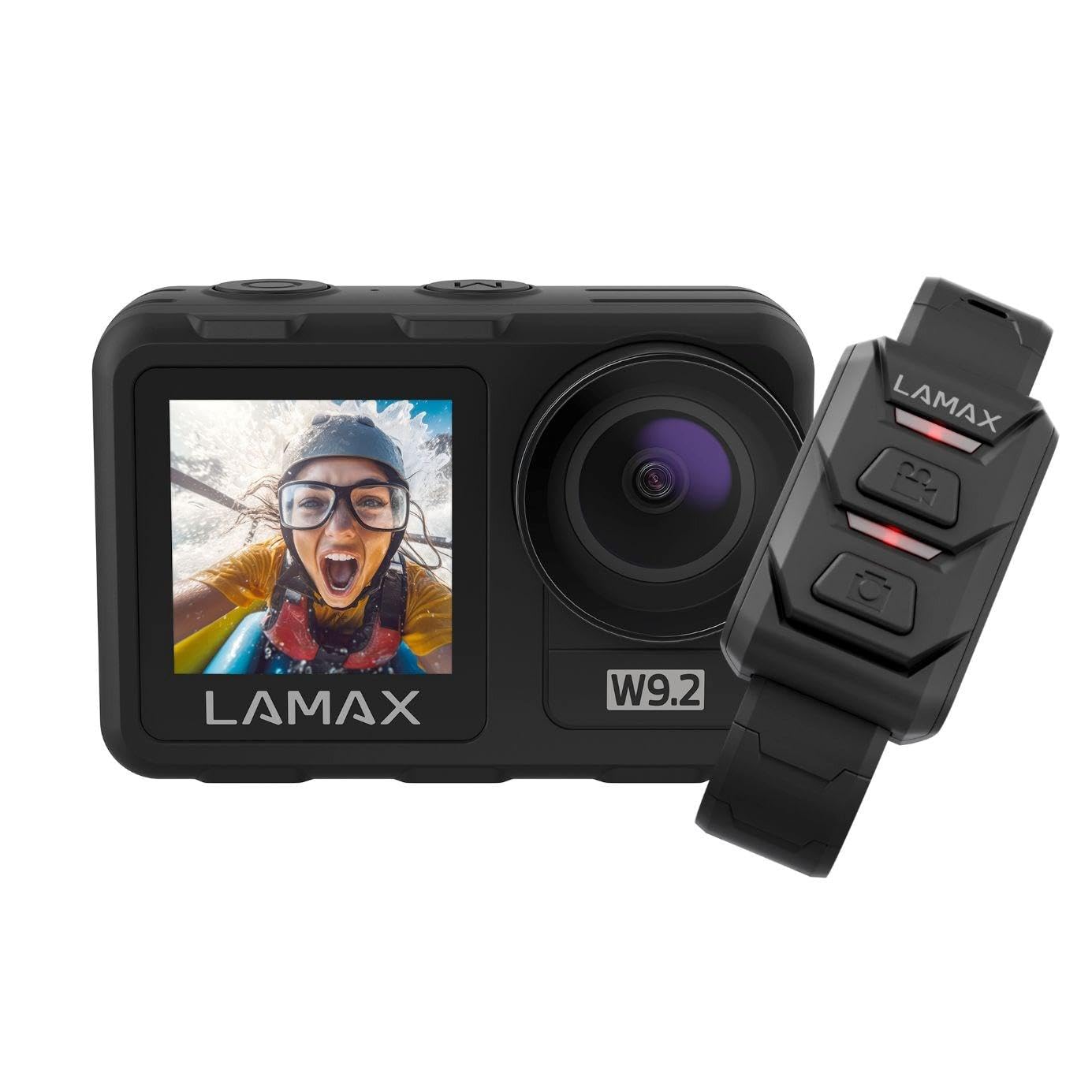
Imej: Depan view of the LAMAX W9.2 Action Camera, showcasing its compact design and dual display feature.
Ciri-ciri Utama:
- Paparan Dwi: A 2-inch rear touchscreen for settings and playback, and a 1.4-inch front screen for selfie framing.
- Video Resolusi Tinggi: Up to 5K at 60 frames per second (FPS) and 1080p at 120 FPS.
- Reka bentuk kalis air: Waterproof up to 12 meters (40 feet) without an additional case. With a waterproof case, it can be used up to 40 meters (130 feet).
- MAXSmooth Stabilization: Advanced electronic image stabilization for smooth footage.
- Foto 20 Megapiksel: Tangkap imej pegun beresolusi tinggi.
- Wi-Fi Bersepadu: For quick transfer and sharing of content to your mobile device.
- Mod Kreatif: Includes slow motion, timelapse, accelerated video, and long exposure.
- Kawalan Fleksibel: Touchscreen operation, physical buttons, and remote control compatibility.
Persediaan
1. Pemasangan Bateri
- Cari petak bateri pada kamera.
- Buka penutup petak.
- Insert the provided battery, ensuring the correct orientation of the contacts.
- Tutup penutup petak bateri dengan selamat.
- Charge the battery fully before first use using the supplied USB cable.
2. Memasukkan Kad Memori
- The camera requires a microSD card (not included) for storing photos and videos.
- Insert the microSD card into the designated slot until it clicks into place.
- Ensure the card is formatted in the camera's settings menu for optimal performance.
- Use a high-speed microSD card (Class 10 or UHS-I/UHS-3 recommended) for 4K/5K recording.
3. Kuasa Awal Hidup
- Press and hold the Power/Mode button to turn on the camera.
- Follow the on-screen prompts to set the language, date, and time.
Mengendalikan Kamera
Kawalan Asas:
- Butang Kuasa / Mod: Press and hold to power on/off. Press briefly to switch between video, photo, and playback modes.
- Butang Pengatup/Pilih: Press to start/stop recording video or take a photo. In menu, use to confirm selection.
- Butang Naik / Turun: Navigate menu options or zoom (if applicable).
- Rear Touchscreen: Swipe and tap to access settings and modes.
- Paparan Hadapan: Primarily for framing selfies or monitoring camera status.
Rakaman Video:
- Switch to video mode using the Power/Mode button or touchscreen.
- Adjust video resolution and other settings via the touchscreen menu.
- Press the Shutter/Select button to begin recording. A red indicator light will flash.
- Tekan butang Pengatup/Pilih sekali lagi untuk menghentikan rakaman.
Mengambil gambar:
- Switch to photo mode.
- Adjust photo settings (e.g., resolution, exposure) via the touchscreen menu.
- Press the Shutter/Select button to take a photo.
Kesambungan Wi-Fi:
- Enable Wi-Fi in the camera settings.
- Download the official LAMAX app on your smartphone.
- Connect your phone to the camera's Wi-Fi network (SSID and password displayed on camera screen).
- Gunakan aplikasi untuk mengawal kamera, view hidup footage, dan pemindahan files.
Mod Kreatif:
- Pergerakan Perlahan: Merakam video pada kadar bingkai yang lebih tinggi untuk main balik gerakan perlahan.
- timelapse: Captures a series of photos at set intervals and stitches them into a video.
- Accelerated Video: Records video at a lower frame rate for fast-motion playback.
- Pendedahan Panjang: Allows for longer shutter speeds to capture more light in low-light conditions.
- Access these modes through the camera's menu and adjust settings as desired.
Garis Panduan Kalis Air
The LAMAX W9.2 is designed to be waterproof up to 12 meters (40 feet) without an external housing. For deeper dives, an additional waterproof case is required, extending its capability to 40 meters (130 feet).
- Before submerging the camera, ensure all port covers (battery, USB, HDMI) are securely closed.
- Regularly inspect the seals for any dirt, debris, or damage. Clean and replace if necessary.
- After use in saltwater, rinse the camera with fresh water and dry thoroughly.
- Do not open the battery or memory card compartment while the camera is wet or submerged.
Penyelenggaraan
- Pembersihan: Use a soft, lint-free cloth to clean the camera body and lenses. For stubborn dirt, slightly dampen kain dengan air. Elakkan bahan kimia yang keras.
- Storan: Simpan kamera di tempat yang sejuk dan kering jauh dari cahaya matahari langsung dan suhu yang melampau. Tanggalkan bateri jika disimpan untuk tempoh yang lama.
- Penjagaan Bateri: Do not expose batteries to high temperatures or dispose of them in fire. Recycle used batteries responsibly.
- Kemas kini Firmware: Check the official LAMAX weblaman web ini secara berkala untuk kemas kini perisian tegar bagi memastikan prestasi optimum dan akses kepada ciri-ciri baharu.
Menyelesaikan masalah
Kamera Tidak Dihidupkan:
- Pastikan bateri dicas sepenuhnya dan dimasukkan dengan betul.
- Cuba bateri lain jika ada.
- Press and hold the Power/Mode button for at least 5 seconds.
Rakaman Berhenti Secara Tidak Dijangka:
- Periksa sama ada kad memori penuh.
- Ensure you are using a high-speed memory card (Class 10 or higher).
- Formatkan kad memori dalam kamera.
- The camera might be overheating in extreme conditions; allow it to cool down.
Isu Sambungan Wi-Fi:
- Ensure Wi-Fi is enabled on the camera and your smartphone.
- Mulakan semula kamera dan telefon pintar anda.
- Make sure you are within the Wi-Fi range.
- Verify the correct Wi-Fi password.
Kualiti Imej/Video Lemah:
- Bersihkan lensa kamera.
- Check resolution settings.
- Pastikan pencahayaan mencukupi.
- Verify MAXSmooth stabilization is enabled for video.
Spesifikasi
| Nama Model | W9.2 |
| Resolusi Video | Up to 5K/60FPS, 4K, 1080p/120FPS |
| Resolusi Foto | 20 Megapiksel |
| Kedalaman Kalis Air | 12m (without case), 40m (with waterproof case) |
| Penstabilan | MAXSmooth (Anti-shake) |
| Paparan | Rear: 2-inch Touchscreen; Front: 1.4-inch |
| Ketersambungan | Wi-Fi, HDMI |
| Teknologi Penderia Foto | CMOS |
| Format Rakaman Video | MOV |
| Ciri Khas | Slow motion, Timer, Wind noise reduction |
| Dimensi | 3.2 x 6.4 x 4.2 cm |
| Berat badan | 127 g |
| Bateri | C batteries (included) |
Waranti dan Sokongan
For warranty information and technical support, please refer to the official LAMAX webtapak atau hubungi pengedar tempatan anda. Simpan bukti pembelian anda untuk tuntutan jaminan.
Sumber Dalam Talian: For the latest information, FAQs, and firmware updates, visit the official LAMAX support page: www.lamax.eu


